FuseBase Work
FuseBase Work – AI control center for the organization
What is FuseBase Work? FuseBase Work is your AI control center for the organization. It lets you connect AI agents, give them work, let them follow routines, and allow them to use...
Guide details
- Published
- June 4, 2026
- Read time
- 7 min read
- Category
- FuseBase Work
What is FuseBase Work?
FuseBase Work is your AI control center for the organization. It lets you connect AI agents, give them work, let them follow routines, and allow them to use your FuseBase Apps to move work forward automatically.
Why do I need FuseBase Work?
FuseBase Work helps you turn AI from a chat assistant into something that can actually help run work. Instead of only asking AI questions, you can create agents that can:
- run tasks
- follow routines
- use apps
- check data
- process documents
- update workflows
- ask for approval when needed
It helps your team save time on repeated work and keep processes moving.
How is FuseBase Work different from using Claude Code or Codex directly?
Claude Code is a powerful tool for working with AI in a coding environment. FuseBase Work is different: it is designed to bring AI agents into your organization as managed, autonomous workers.
With Claude Code, you usually run AI tasks directly in a developer environment. With FuseBase Work, agents can work inside your organization, use connected apps, follow routines, and be managed by your team. The key difference is control.
FuseRun gives your organization:
- Budget control — set limits and understand how much agent work costs.
- Permissions — decide which agents can access which apps, data, and actions.
- Orchestration — connect multiple agents, apps, routines, and tasks into larger workflows.
- Visibility — track what agents are doing, what they used, and what needs approval.
- Security isolation — every FuseRun setup runs as a separate isolated instance for your organization.
Can I use my own keys for Claude/Codex?
Yes! In fact, at the moment, to use FuseBase Work you either need to enter your own keys or have a subscription to Claude/Codex.
Is FuseBase Work integrated with my FuseBase organization?
Yes, absolutely! By default, FuseBase Work is already integrated with your organization, and the default CEO agent can immediately:
- create and edit notes in your workspaces
- create new workspaces and folders within them
- create and edit portals
- invite new members and clients
- create and edit databases
- and much more
By default, only the CEO agent has access to FuseBase, but you can also connect other agents via MCP – https://thefusebase.com/guides/fusebase-work/integration-of-agents-adapters-with-other-services-via-mcp/
Can FuseBase Work work only inside FuseBase?
No. FuseBase Work is not limited to FuseBase. FuseBase Work runs autonomous AI agents that can work across different types of tasks, tools, and projects. They can use FuseBase Apps and data when needed, but they can also help with work outside of FuseBase.
For example, agents can help with:
- coding tasks in FuseBase projects
- coding tasks in your own external projects
- app generation and app maintenance
- marketing research and content creation
- sales workflows and lead follow-ups
- document review and summaries
- data processing
- reporting
- operational routines
- etc
Are you using Paperclip for Fusebase Work?
Yes, Fusebase Work is a fork of Paperclip with a number of significant changes already implemented, and more will continue to be added. How are we better than standard Paperclip? For one, you don’t have to worry about secure setup and configuration – it’s already set up for you in a secure storage, so you can start using it right away. Additionally, Fusebase Work already knows your organization’s structure, so members don’t need to create additional accounts to access Cortex.
What are agents in FuseBase Work?
Agents are your virtual assistants or team members who can perform the tasks you assign to them. Just like in any hierarchy, agents can be either simple executors or managers who can create new agents and manage existing ones (while executors can report to manager agents).
By default, we create a CEO agent with broad capabilities, who can also create other agents. You can create an unlimited number of agents, both managers and executors.
Each agent performs only the tasks you assign to them, within the permissions you specify.
Below are a few examples of agents you can create in FuseBase Work:
- CEO – The CEO Agent is created by default and has the broadest capabilities. This agent can create other agents, assign roles, connect available apps, set tasks, and oversee work progress.
- Operations Manager – This agent monitors routine operations: onboarding, requests, approvals, reminders, dashboards, and overdue tasks.
- Sales Manager – This agent can manage leads, follow-ups, CRM, email outreach, deal analysis, and report preparation.
- Marketing Manager – This agent can coordinate content, SEO, social posts, campaign research, competitor analysis, and reporting.
- Product Manager – This agent can collect feedback, analyze feature requests, create specifications, and monitor roadmap tasks.
What are adapters and why are they needed?
As mentioned above, agents perform the tasks you assign to them. However, in order to do so, they need tools, and these tools are called adapters. These can include Claude Code, Codex, or well-known orchestrators such as Hermes or OpenClaw.
For example, you may connect:
- Claude Code
- Codex
- Hermes
- OpenCode
- etc
Do I need to connect an adapter to use FuseBase Work?
Yes. FuseBase Work needs at least one adapter to run agents. You can start with one adapter and add more later. If you are not sure where to start, choose the recommended adapter in your setup screen.
You can use different adapters for different agents. For example, one agent can use Claude, another can use Hermes, and so on.
You can also vary the models. For example, if you have connected Claude, one agent can use Claude Haiku while another uses Claude Opus.
Why does FuseBase Work use tasks instead of a regular chat?
In FuseBase Work, the main workflow is built around tasks rather than a standard chat.
A regular chat is great when you want to quickly ask a question, get advice, or discuss an idea. However, if you want AI agents to actually perform work, chat quickly becomes inconvenient: context gets lost, it’s unclear who is responsible for what, it’s difficult to track status, and you constantly have to return to the conversation.
Tasks work differently. You create a task, describe the outcome you want to achieve, assign an agent or a team of agents – and then you can step away. The agents continue working independently: they initiate the necessary actions, use apps, check data, create intermediate results, request approval if needed, and update the task status.
This approach makes FuseBase Work more like a real work management system, rather than just an AI chat.
How are tasks better than chat?
- You can assign a task and step away.
- Every piece of work has a status.
- Multiple agents can work on a single task.
- There is a clear history and transparency.
- It’s better suited for teamwork.
Who will have access to FuseBase Work?
At this stage, only the owner and managers of the organization have access to Cortex.
How do I activate and set up Fusebase Work?
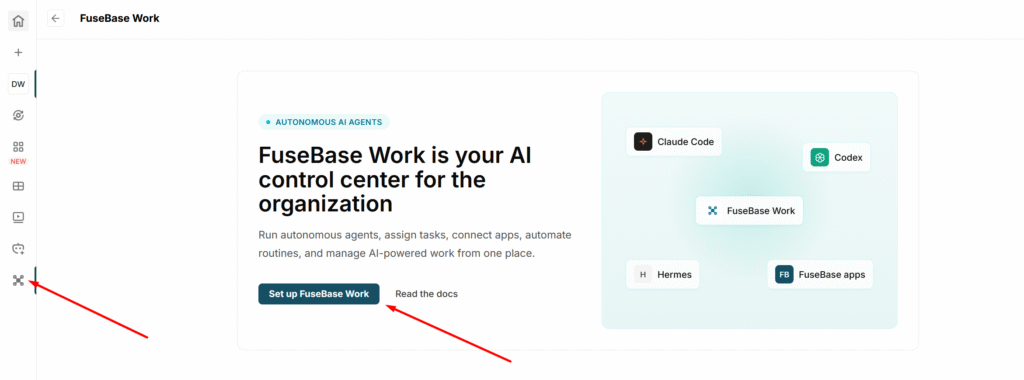
It’s very simple! Go to the FuseBase Work section and click on Set up FuseBase Work.
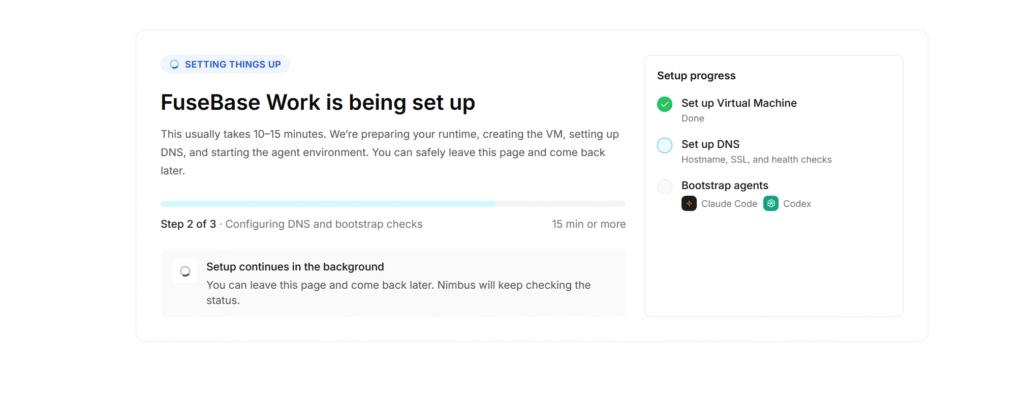
Next, you will need to wait while Fusebase Work is being installed. This usually takes 10-15 minutes. The installation runs in the background, so you can close the page during this time.
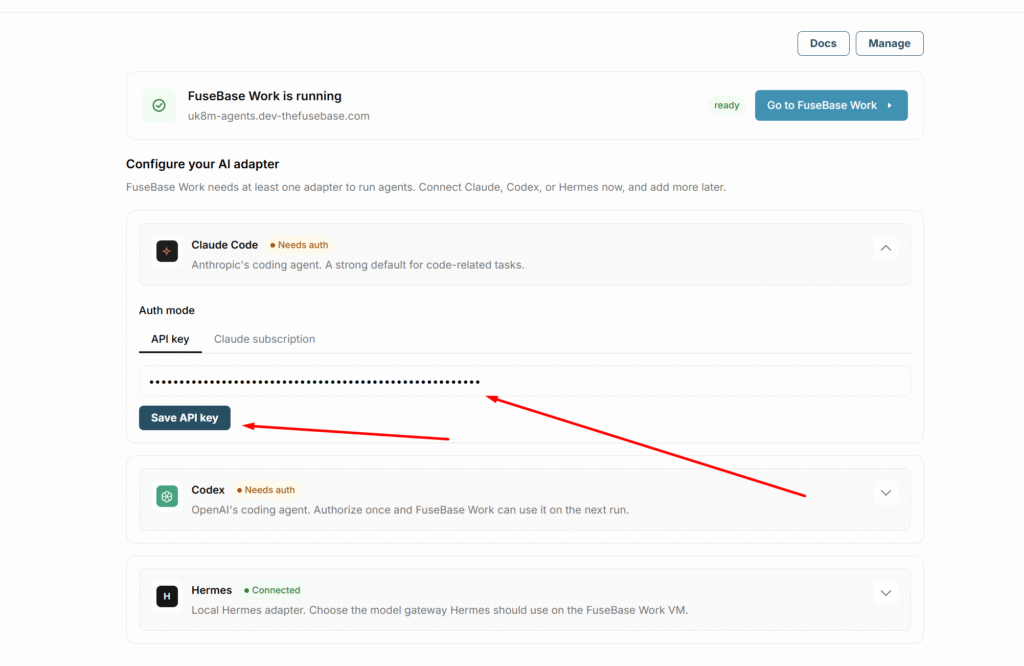
After a successful setup, we recommend first activating one (or several) of the adapters.
By default, Claude Code, Codex, and Hermes are available to you. They are already installed, and you just need to add an API key or connect a subscription.
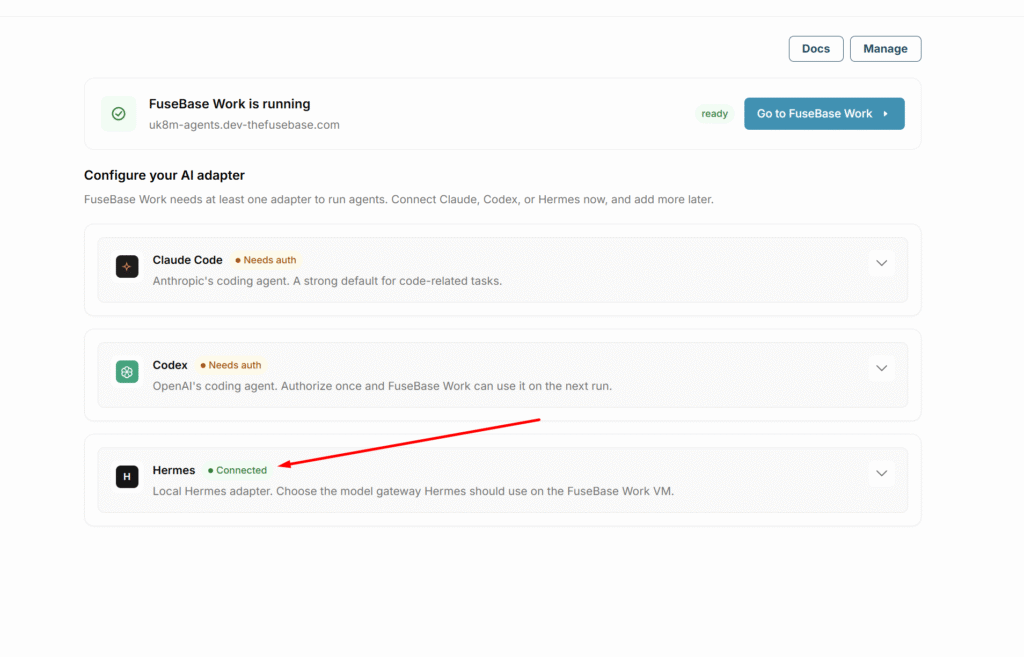
Once activated successfully, the adapter status will change to Connected.
How to get started with FuseBase Work
Once you have activated at least one adapter, you can proceed to FuseBase Work. By default, we create the first company and a CEO agent, who can start working on tasks and create new agents to delegate tasks.
Important! By default, Claude Code with the Claude Sonnet model is set as the adapter for the CEO agent. However, you can change both the adapter and the model in the agent’s settings.
Next, you need to create your first task. To do this, click on “New issue” and specify what the agent should do (for example, research, create a presentation, etc.). Indicate who should complete the task (if you haven’t created any new agents, select CEO) and then click “Create Issue.”
The new task will appear in the Issue list, where you can track its progress. The agent will leave comments on the task with updates on the current status and, if necessary, may request additional information from you or send the task for your review.
Agents work autonomously, so you can close FuseBase Work and focus on other matters while the agents handle your tasks.
Accordingly, to start working fully with Fusebase Work, only minimal effort is required:
- Complete the Fusebase Work setup (one click)
- Activate one of the adapters (just enter the key)
- Create your first task/issue