Fusebase Vibe Code
App Data Storage: Quick Guide
FuseBase Apps now include a built-in data storage layer, powered by Postgres by default. This gives your apps a reliable place to store records, form submissions, app settings,...
Guide details
- Published
- May 11, 2026
- Read time
- 3 min read
- Category
- Fusebase Vibe Code
FuseBase Apps now include a built-in data storage layer, powered by Postgres by default. This gives your apps a reliable place to store records, form submissions, app settings, workflow status, processing results, and other structured data.
This is useful when you want to build apps that are more than static pages. Your app can collect data, update records, track progress, show dashboards, and use saved information later.
What can you store?
Apps can store different types of data depending on the workflow:
- customer or client records
- form answers
- uploaded file details
- ticket information
- approval decisions
- task statuses
- extracted data from documents
- generated reports
- app configuration
- logs and processing history
This gives your app a real backend without requiring users to set up or manage a database manually.
A Postgres database is created by default whenever storage or a backend is needed in the app. You can also continue working with your existing Fusebase dashboards in the apps, both system dashboards (Clients, Meetings, Deals, etc.) and custom ones, if you specify this directly in the prompt (for example: Use my dashboard named My Table as the data source).
Common Use Cases
1. Form and request apps
Use app data storage to save form submissions, request details, file metadata, and completion status.
Example: A client fills out a request form and uploads files. The app saves the answers, tracks which files were received, and shows the request status to the team.
2. Ticket systems
Store tickets, comments, priorities, owners, statuses, and history.
Example: A support app receives tickets, assigns them to a team member, tracks progress, and stores the full ticket history.
3. AI processing apps
Save AI-generated results, summaries, classifications, extracted fields, and processing status.
Example: A user uploads a PDF. The app extracts key data with AI, saves the result, and shows it for review.
4. Parser apps
Store structured output from invoices, contracts, resumes, reports, or other uploaded files.
Example: An invoice parser extracts vendor name, invoice number, amount, and due date, then saves the result as structured data.
5. App settings and configuration
Store app-specific settings, templates, rules, and user preferences.
Example: A report generator remembers selected filters, branding settings, export options, and saved templates.
6. Workflow tracking
Track where each item is in a process.
Example: A document intake app tracks each step: requested, uploaded, parsed, reviewed, approved, completed.
7. Integration and sync apps
Store records received from external tools or APIs.
Example: An app receives customer data from another system, saves it, and then uses it to generate reports or trigger workflows.
Prompt Examples
- Create an app that stores form submissions and shows them in a dashboard.
- Create a request app that saves client responses, uploaded file details, and completion status.
- Create a ticket system that stores tickets, comments, priorities, owners, and statuses.
- Create an app that saves user settings and remembers them for future sessions.
- Create an app that uploads PDFs, extracts key data with AI, and saves the extracted fields for review.
- Create a document intake app that tracks each request step: requested, uploaded, parsed, reviewed, approved, and completed.
- Create a file transfer app that stores file details, sender, recipient, expiration date, and download status.
Is it possible to view the contents of the Postgres database?
Yes, absolutely! In the app card, you can find the Resources section, where the databases used in the app are displayed.
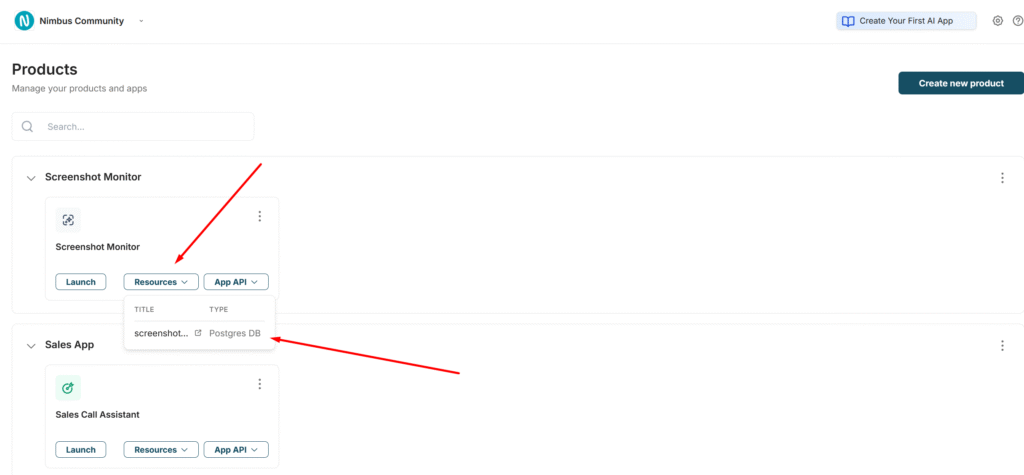
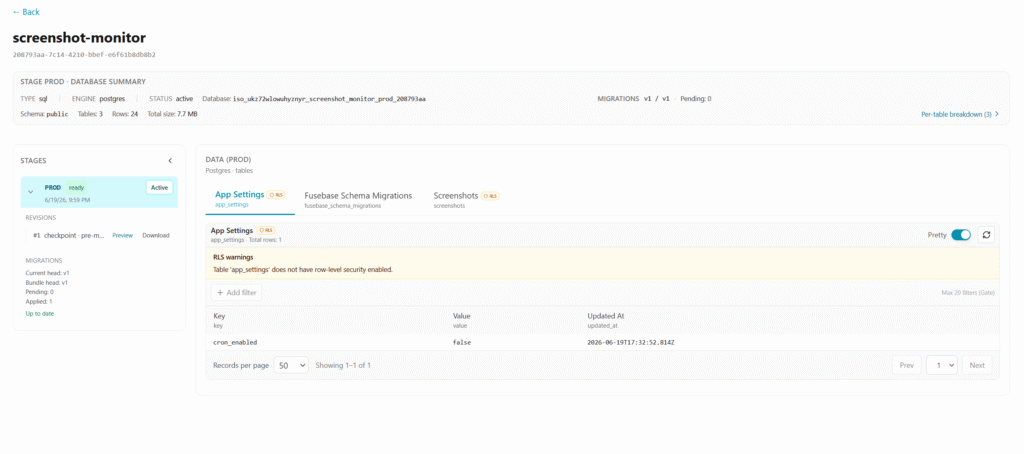
By clicking, you will be able to view the created database and its contents, but only in Read Only mode.
Is it possible to save a backup or a database dump?
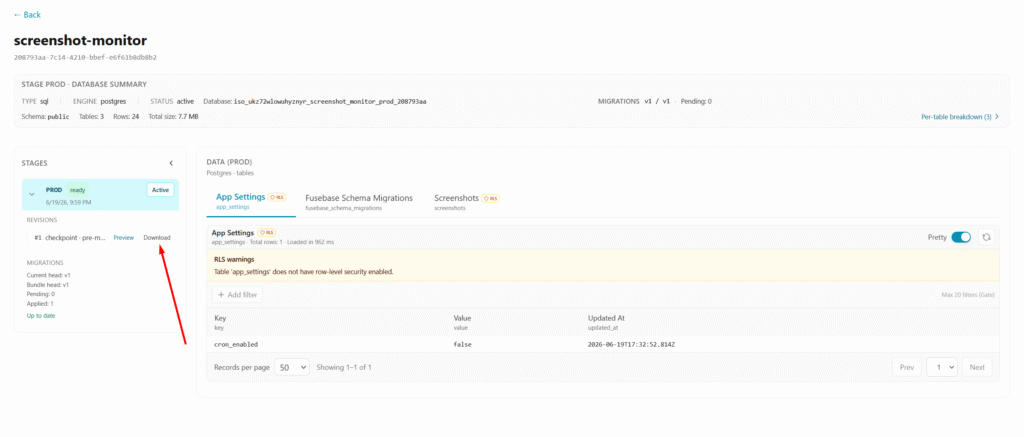
Yes, on the database view page, click on Download to download a dump of the current version of the database.