Fusebase Vibe Code
Stripe Integration in Apps: Quick Guide
The Stripe integration lets your apps accept payments, manage products, handle subscriptions, and work with invoices. Once you connect your Stripe account in Fusebase, your apps...
Guide details
- Published
- May 6, 2026
- Read time
- 2 min read
- Category
- Fusebase Vibe Code
The Stripe integration lets your apps accept payments, manage products, handle subscriptions, and work with invoices.
Once you connect your Stripe account in Fusebase, your apps can use Stripe actions without building payment logic from scratch.
This is useful when you want to build apps that can:
- sell products or services
- charge one-time payments
- manage recurring subscriptions
- generate and manage invoices
- connect payments to client workflows
- unlock access after payment
- track billing status inside Fusebase
What you can do with Stripe in FuseBase Apps
1. Add payments to your apps
You can create apps where users pay before getting access to something.
Examples:
- paid file downloads
- paid templates
- paid AI tools
- paid reports
- paid client services
- paid access to a portal or feature
2. Manage products
Your app can create, update, or manage Stripe products.
Examples:
- create a product for a digital template
- create a product for a consulting package
- create a product for a paid app
- update product names, prices, or descriptions
- organize products by category or customer type
3. Manage subscriptions
You can build apps that work with recurring payments.
Examples:
- monthly access to a client portal
- subscription-based AI tool
- paid membership app
- recurring service package
- reseller or agency subscription model
4. Manage invoices
Apps can help create and track invoices.
Examples:
- generate an invoice after a service request
- send invoices to clients
- track unpaid invoices
- update records when invoices are paid
- trigger follow-ups for overdue payments
How to add Stripe integration to your app?
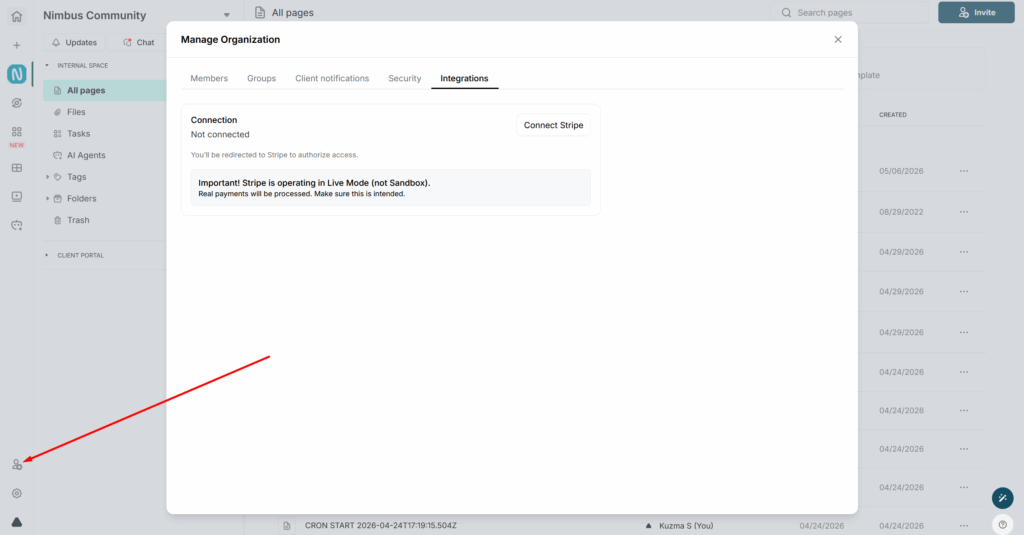
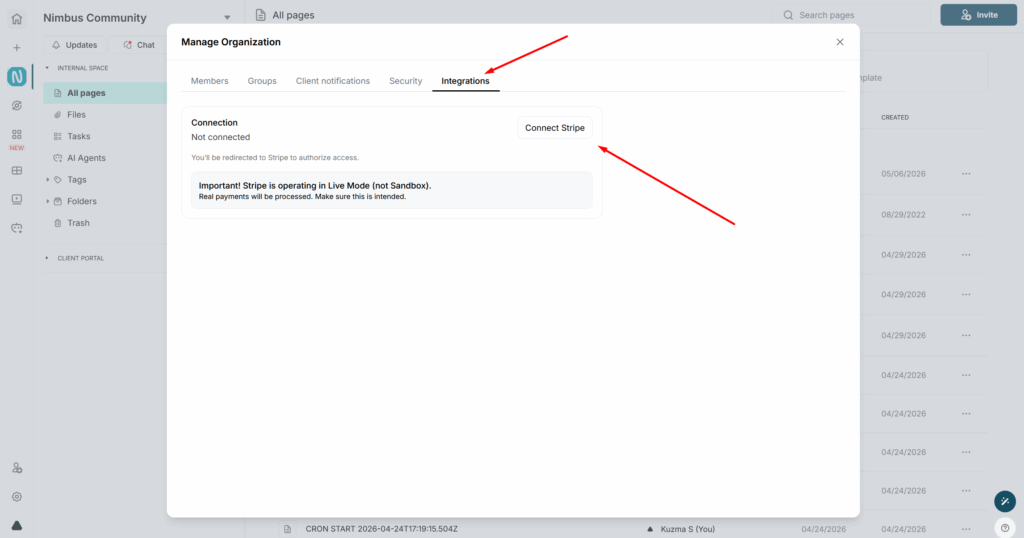
1) First, you need to activate the integration. To do this, open the organization management section in the web client and go to the Integrations tab.
2) Next, click on Connect Stripe and authorize with your account.
3) After that, you can start integrating Stripe into your app. This can be done using regular prompts.
Prompt Examples
- Create an app that lets users pay for a digital product through Stripe.
- Create an app that sells a downloadable PDF and unlocks the file after payment.
- Create an app that creates a Stripe product for each new service package.
- Create an app that tracks Stripe invoices and shows their payment status in a dashboard.
- Create an app that sends a reminder when an invoice is overdue.
- Create a payment page for a one-time service package using Stripe.
- Create an app where users select a product, pay through Stripe, and receive access after payment.
- Create an app that sells access to AI-generated reports, unlocks the report after payment, and stores the purchase in the database.
- Create a subscription-based app where users can access premium features only while their Stripe subscription is active.