Fusebase Vibe Code
Apps That Work Together: Quick Guide
Fusebase apps can now work together. This means one app can pass work to another app automatically. For example: You do not need to build one huge app that does everything. You...
Guide details
- Published
- May 27, 2026
- Read time
- 3 min read
- Category
- Fusebase Vibe Code
Fusebase apps can now work together. This means one app can pass work to another app automatically.
For example:
- a Request App collects files from a client
- a Document Parser App reads those files
- an Approval App sends the result to your team
- a Notification App updates the client
You do not need to build one huge app that does everything. You can build smaller apps for different jobs and connect them into one workflow.
Why this is powerful
Before, an app was mostly a single tool. Now, apps can become part of a bigger workflow.
That means you can start small:
- create one app for collecting files
- later add an app for parsing documents
- then add approvals
- then add notifications
- then add a dashboard
Step by step, you turn simple apps into a full working system. The best part: apps can reuse each other.
Apps as Integrations
Apps can also be used by other services. That means your Fusebase app can work not only with other Fusebase apps, but also with external tools, platforms, and custom systems.
For example, another service can send data to your app, ask it to process something, and receive a result back.
This makes your app work like an integration point.
Examples
- A website can send form data to your app.
- A CRM can send a new lead to your app.
- A payment system can send payment details to your app.
- A custom tool can ask your app to generate a report.
- Another backend service can send a file to your app for processing.
How Other Apps Should Use Your App
When you create an app, think about what other apps or services may need from it.
For example:
- What can this app do?
- What information does it need?
- What result does it return?
- When should another app call it?
- What should happen after it finishes?
You do not need to write technical API instructions in your prompt. You can describe the connection in plain language.
Example
Instead of saying:
“Expose a POST endpoint that accepts a document payload.”
You can say:
Allow other apps to send documents to this app for parsing. Return the extracted fields and processing status.
Another example:
Allow other apps to start an approval flow by sending a record, approver, and message. Return the approval status.
Technical Section: How It Works
Under the hood, app-to-app communication works through an API. When an app is generated, Fusebase creates an openapi.json file for it.
This file describes the app’s available API methods.
It explains:
- what the app can do
- which actions are available
- what data each action needs
- what the app returns
- how another app or external service can call it
This makes the app easier to use by:
- other Fusebase apps
- AI agents
- external systems
- custom integrations
- developer tools
API Section in the App List
Each generated app now includes an API section. You can open this section from the app list to see what the app exposes.
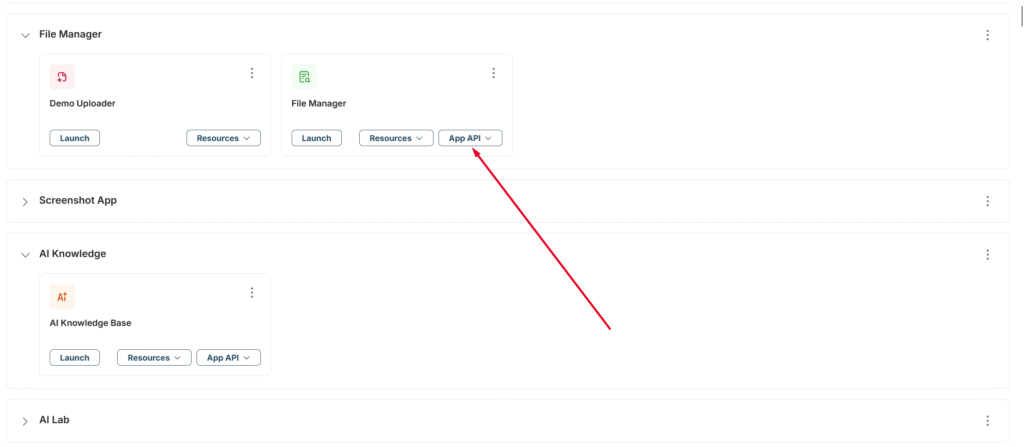
In the API section, you can:
- view available API methods
- understand what each method does
- see what data the method expects
- see what result it returns
- test API methods directly
This is useful when you want to check how other apps, agents, or external services can interact with your app.
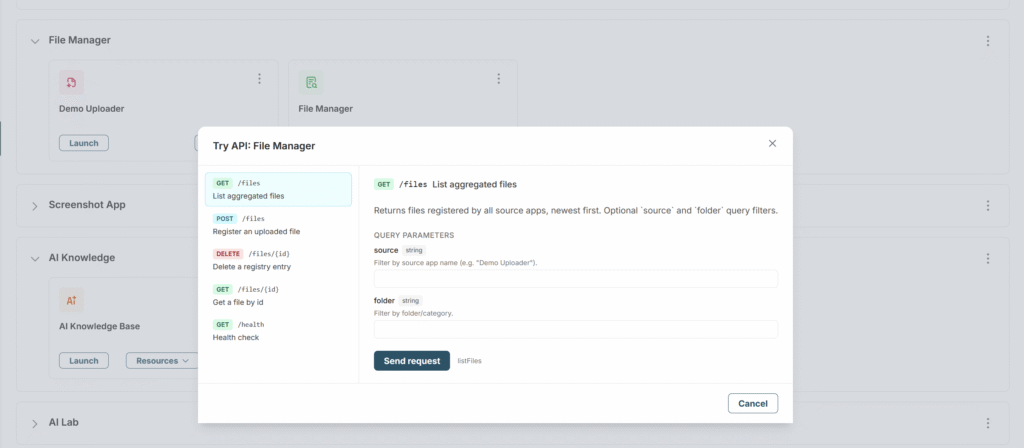
For example, you can open the API section of a Parser App and see how another app can send it a file for processing.
How does another app learn about the API?
The API information has already been added to Fusebase Gate, so you only need to mention the app’s URL or ID in your prompt. Our MCP will then automatically discover all API methods and understand which requests to send and how the API contracts work.