FuseBase Basics
Sorting of pages and folders in Internal Space
In Fusebase, you can sort pages and folders according to your requirements. In both the sidebar and the main list, you can set up different sorting options. Sorting in the Sidebar...
Guide details
- Published
- June 19, 2026
- Read time
- 1 min read
- Category
- FuseBase Basics
In Fusebase, you can sort pages and folders according to your requirements. In both the sidebar and the main list, you can set up different sorting options.
Sorting in the Sidebar
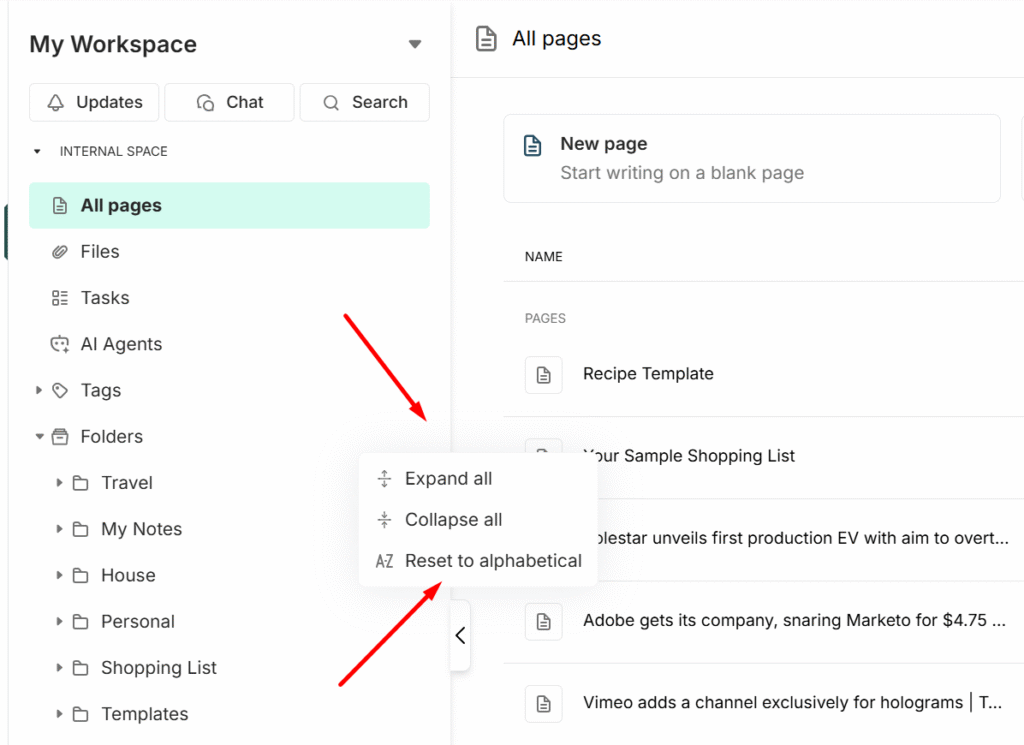
By default, the sidebar uses manual sorting. You can simply click on a page or folder and drag it to the desired position.
At any time, you can reset the sorting to alphabetical order through the Folders menu.
Sorting in the Pages/Folders List
In the pages/folders list, you can sort by various criteria:
- Name
- Date updated
- Date created
Simply click on the desired sorting type and the list will be rearranged accordingly. For example, clicking once will sort A-Z, and clicking again will reverse the order to Z-A.