Getting Started
Key Role Differences - Guest, Member, Manager and Client
When you invite a colleague, friend or client to FuseBase, you can choose from several User Roles:
Guide details
- Published
- November 23, 2023
- Read time
- 2 min read
- Category
- Getting Started
When you invite a colleague, friend or client to FuseBase, you can choose from several User Roles:
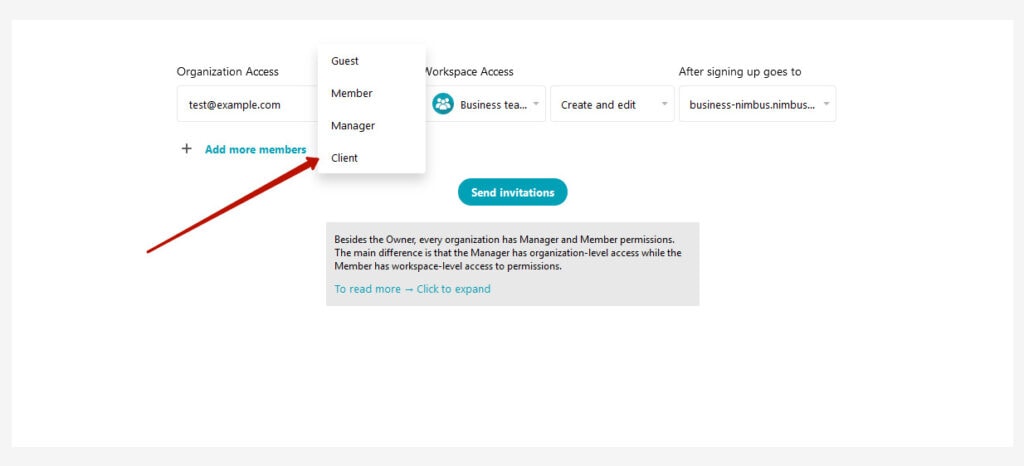
Guest
- Has access to the Internal Space.
- Can be allowed or denied access to the Customizer and Portal.
- Can only be a member of one workspace at a time.
- You can set an expiration date for a guest, after which they will lose access to the organization.
Member
- Has all features in the Internal Space: they can create and edit folders or notes.
- Can be allowed or denied access to the Customizer and Portal.
- Can be a member of more than one workspace at the same time.
- Has no access to the organization management (cannot create workspaces or invite new members).
Manager
- Has access to the Internal Space.
- Can be allowed or denied access to the Customizer and Portal.
- Can create new workspaces and delete old ones.
- Has access to all workspaces in the organization by default.
- Can invite other members to the organization and portals.
Client
- A member of the organization for collaboration.
- Has no access to the Internal Space or Customizer.
- Can be allowed or denied access to the Portal.
Clients are needed for working with portals. For example, if you are a design agency developing design solutions, you can send contracts, documents, and the designs themselves to the customer through a portal. You wouldn’t want the portal’s content to be accessible to everyone, but you also wouldn’t want to invite the customer as a full member of the organization. This is where the client role comes in handy; you can invite a client to a portal for collaboration.
In addition to User Roles, it is essential to understand the different Permissions Levels in your workspaces. Click here to learn more about permissions.