FuseBase AI
Connect external AI Agents to Fusebase with MCP
Fusebase MCP lets you connect external AI agents, such as Claude, Codex, Cursor and other MCP-compatible tools, directly to your Fusebase organization. You can create an MCP...
Guide details
- Published
- June 24, 2026
- Read time
- 4 min read
- Category
- FuseBase AI
Fusebase MCP lets you connect external AI agents, such as Claude, Codex, Cursor and other MCP-compatible tools, directly to your Fusebase organization.
You can create an MCP configuration, choose exactly what the agent is allowed to access, and generate a secure MCP URL and token. Then add those details to your preferred AI tool.
Once connected, the agent can work with Fusebase on your behalf. Depending on the permissions you give it, it can create and update notes, manage portals, work with tasks, access organizational data, and perform other actions inside Fusebase.
This gives you the flexibility to use the AI agent you prefer while keeping control over what it can see and do in Fusebase.
How to obtain the MCP configuration for connecting to FuseBase
1) Open your organization settings and go to the Fusebase MCP section (available only to the owner and organization managers).
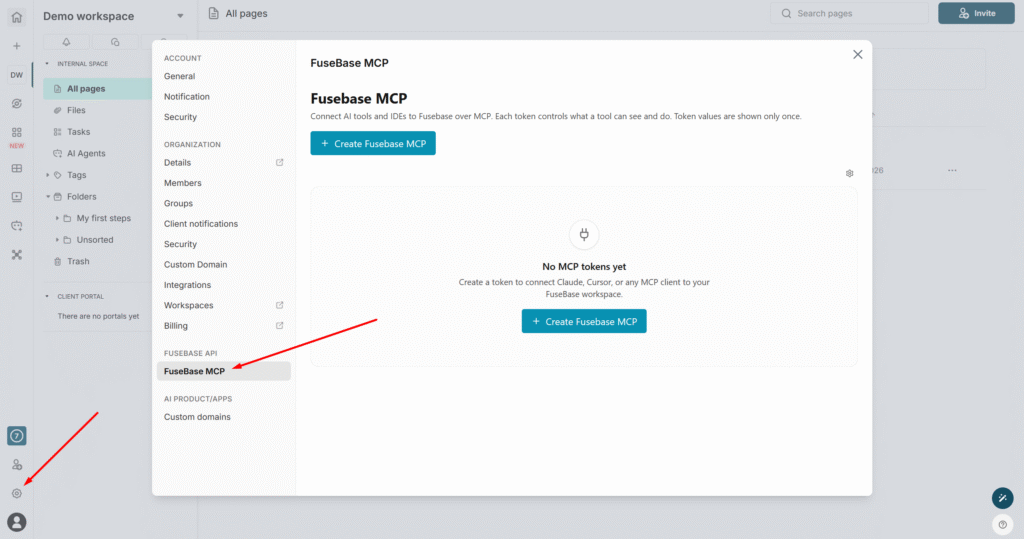
2) Click on Create Fusebase MCP.
3) Specify the name of the MCP config.
4) Next, set the access level that the agent will have with this MCP:
- Custom: you decide which areas the agent can access (a description of all areas will be provided below). Off means no access, Read is view-only, and Edit grants full access.
- Read: the agent can view but cannot make any changes in your organization.
- Full: the agent can edit. Please be cautious when granting this level of access.
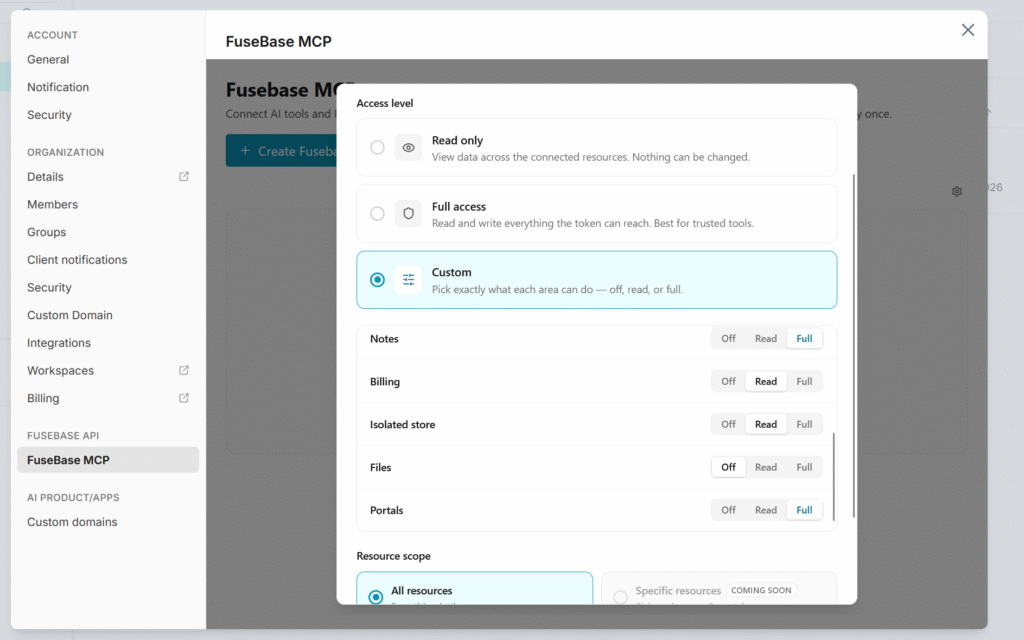
5) Next, click on Create Fusebase MCP, and you will see a page where you can copy your token as well as the configuration for adding to agents.
You can either copy the token and MCP URL, or download ready-made configurations for Claude, Codex, and others as well.
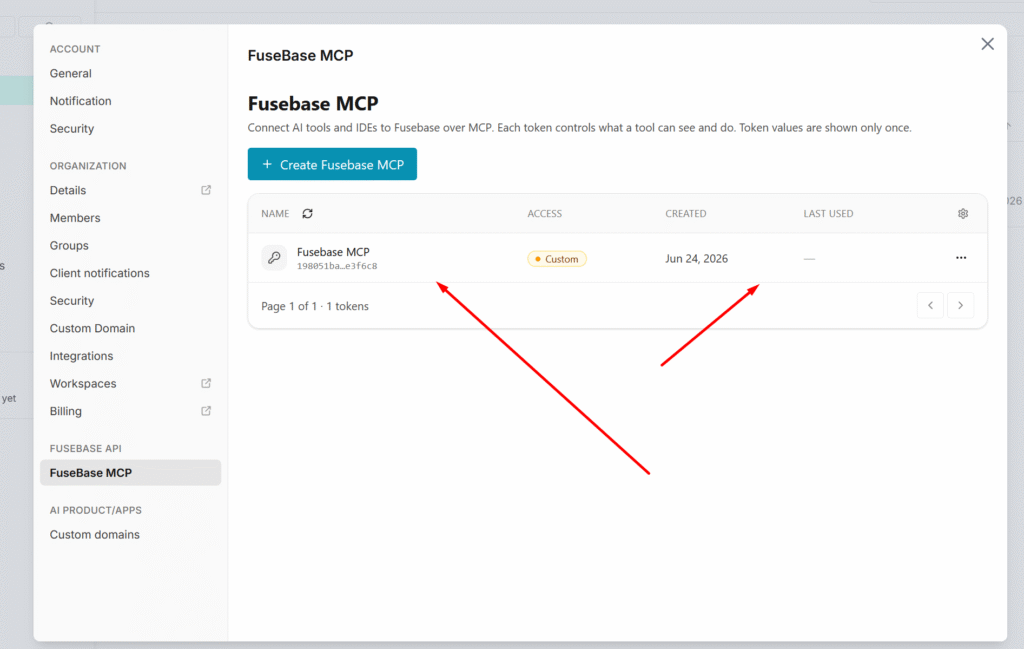
After creation, the new config will appear in the list.
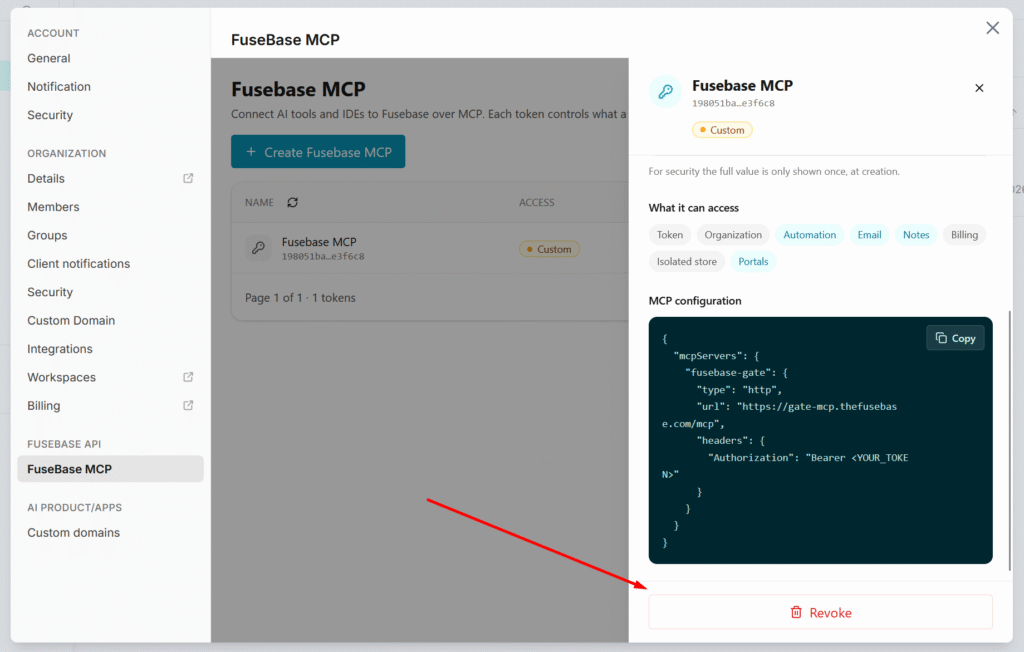
Revoke MCP Config
If desired, you can disable any MCP config. To do this, click on it and click Revoke.
FuseBase Area and available MCP operations
Below is a list of operations that your agents can perform through FuseBase MCP.
Token
Manage the API tokens that apps and integrations use to talk to Gate.
| Operation | What it does (plain language) |
|---|---|
listTokens | Show all API tokens that belong to the current user/org. |
createToken | Create a new API token with chosen scopes and permissions (the secret value is shown only once). |
getToken | Look up the details of one token by its ID. |
updateToken | Change a token’s name, permissions, or expiry (the secret value itself can’t be changed). |
revokeToken | Permanently disable a token so it can no longer be used to sign in. |
listPermissionCatalog | List every permission the platform knows about. |
resolveOperationPermissions | Tell you which permissions a given operation requires. |
Organization
Manage who belongs to the org and resolve org-level info.
| Operation | What it does |
|---|---|
listOrgUsers | List the people who are members of the organization. |
addOrgUser | Invite/add a person to the org, a workspace, or a portal (depending on the details you send). |
getMyOrgAccess | Check the signed-in user’s own access status — are they a member yet, pending, expired, or disabled. |
getOrgUrl | Get the org’s canonical web address (its subdomain or custom domain). |
Automation
These permissions are still in development and will be available soon.
Send one-off emails to existing members.
| Operation | What it does |
|---|---|
sendOrgEmail | Send a single email to one person who is already a member of the org. It is not an invite or sign-up flow. |
Notes
Work with workspace note folders and notes.
| Operation | What it does |
|---|---|
listWorkspaceNoteFolders | List the note folders in a workspace. |
listWorkspaceNotes | List the notes inside one folder. |
getWorkspaceNote | Open one note and read its content. |
createWorkspaceNoteFolder | Create a new note folder. |
createWorkspaceNote | Create a new note (optionally with starting content). |
addWorkspaceNoteAttachment | Attach an uploaded file to a note. |
Billing
Stripe setup, products, and payments for the org.
| Operation | What it does |
|---|---|
getStripeOauth | Check whether the org has connected a Stripe account. |
findStripeProduct | Look up an existing Stripe product / payment link. |
createStripeProduct | Create a one-time-payment or subscription product. |
updateStripeProduct | Replace an existing product with updated details. |
deleteStripeProduct | Remove a product. |
getStripePaymentLink | Create or fetch a checkout link for a buyer. |
cancelStripeSubscription | Cancel a buyer’s subscription (now or at period end). |
getStripePaymentState | Read the latest payment/subscription status from Stripe. |
Postgres Databases
Create and manage isolated databases (FuseBase PostgreSQL), their schema, and their data.
| Operation | What it does |
|---|---|
listIsolatedStores | List the org’s isolated stores (databases). |
getIsolatedStore | Get details of one store. |
createIsolatedStore / getOrCreateIsolatedStore | Create a store (or find-or-create it). |
deleteIsolatedStore | Delete a whole store. |
attachIsolatedStoreSourceScope | Grant an additional app access to an existing store. |
listIsolatedStoreStages / initIsolatedStoreStage / deleteIsolatedStoreStage | Manage the dev/prod copies (stages) of a store. |
listIsolatedStoreRevisions / createIsolatedStoreCheckpoint / restoreIsolatedStoreRevision | Snapshot and restore a store (backups/checkpoints). |
listIsolatedStoreSqlTables / describeIsolatedStoreSqlTable | List tables and inspect a table’s columns. |
getIsolatedStoreSqlMigrationStatus | Check which schema migrations are applied vs pending. |
applyIsolatedStoreSqlMigrations | Apply pending schema changes (the only allowed way to change schema). |
getIsolatedStoreSqlRlsStatus | Inspect row-level-security policies on tables (read-only). |
queryIsolatedStoreSql | Run a read-only SQL query. |
executeIsolatedStoreSql | Run a single write (INSERT/UPDATE/DELETE) — no schema changes. |
importIsolatedStoreSqlRows | Bulk-load data from CSV/TSV. |
Files
Upload and delete files via the file service.
| Operation | What it does |
|---|---|
startMultipartFileUpload | Begin a file upload and get a direct upload URL. |
completeMultipartFileUpload | Finish the upload and create the stored-file record (returns the file’s public URL). |
deleteFile | Delete a stored file. |
Portals
Discover client portals and invite people into them.
| Operation | What it does |
|---|---|
listPortals | List the portals in the organization. |
addOrgUser (portal invite shape) | Invite a person into a specific portal. |
activateAppMagicLink | Redeem a portal/app magic link — exchange it for a session so the invited user gets in. |