Fusebase apps can work with files in different ways depending on what you want to build.
Apps can:
- Upload files into dashboards
- Create notes/pages with images and file attachments
- Upload files into app storage
Each option is useful for a different type of workflow.
Upload Files into Dashboards #
What it means #
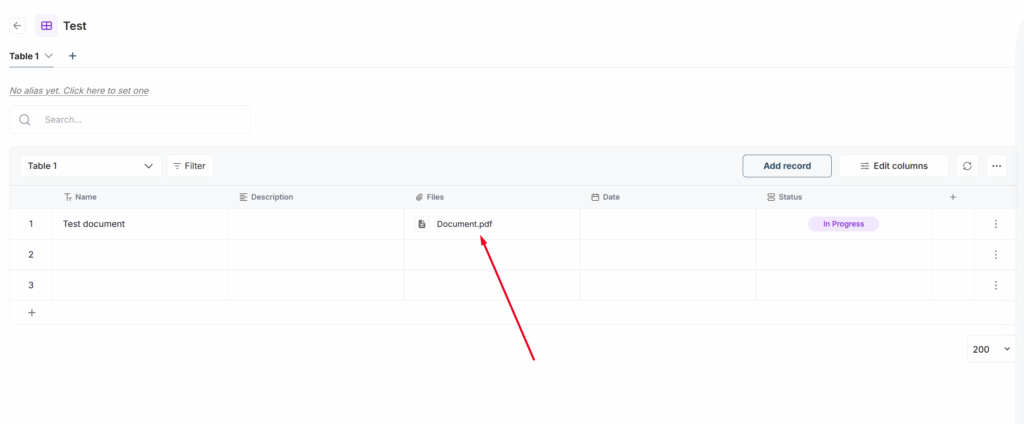
Apps can upload files directly into dashboards, tables, or records. This is useful when files should be connected to structured data. For example, a client record, request, ticket, invoice, project, or deal can have files attached to it.
When to use it #
Use dashboard uploads when files should belong to a specific record or workflow item.
This is best when you need to track files together with status, owner, deadline, client, category, or other structured fields.
Example use cases #
Client document request #
A client uploads required documents. The app saves each file into the related request record.
Ticket attachments #
A user submits a support ticket with screenshots or files. The files are attached to the ticket in the dashboard.
Invoice review #
A user uploads an invoice. The invoice file is attached to the invoice record for review.
Real estate transaction #
A client uploads disclosure documents. The files are stored in the transaction dashboard and linked to the right deal.
HR onboarding #
A new employee uploads ID, contract, and tax documents. The files are attached to the onboarding record.
Create Note/Pages with Images and Files #
What it means #
Apps can create notes and add images or file attachments to them. This is useful when the output should be readable as a page, report, summary, or review document.
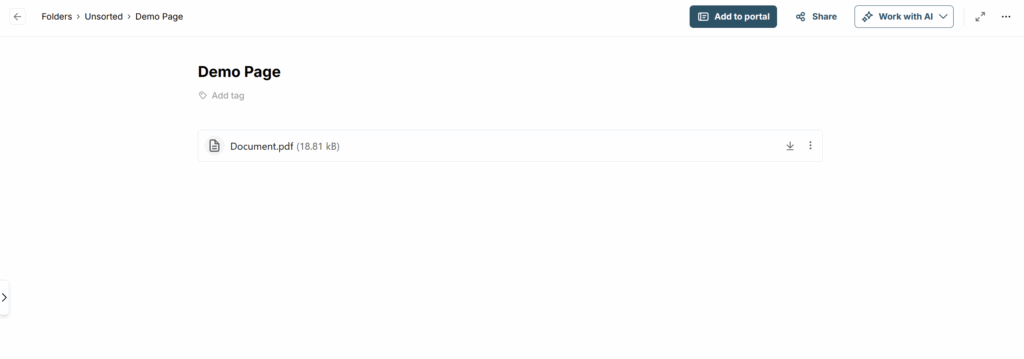
For example, an app can create a note that includes:
- uploaded images
- PDFs
- screenshots
- generated reports
- meeting recordings
- summaries
- source files
When to use it #
Use notes when you want the app to create a human-readable result. This is best when the file is part of a larger explanation, summary, review, or report. After creation, the app can provide a link to the note.
Example use cases #
Meeting summary note #
A user uploads a meeting recording.
The app creates a note with the transcript, summary, action items, and the original file attached.
Bug report note #
A user uploads screenshots.
The app creates a bug report note with images, issue details, and suggested next steps.
Client review note #
A client uploads several files.
The app creates a review note with all files attached and a short summary.
AI document review #
A user uploads a PDF.
The app creates a note with the original PDF, extracted data, summary, and review comments.
Project update #
The app creates a weekly project note with attached files, images, and status updates.
Upload Files into App Storage #
What it means #
Apps can upload and store files in their own storage space.
This storage is separate from dashboards and notes. It can be used by the app for internal files, generated files, file transfer, temporary processing, or app-specific assets.
For example, app storage can be used for:
- file transfer
- temporary files
- generated PDFs
- processing results
- configuration files
- app assets
- files that should not be shown directly in a dashboard or notes
When to use it #
Use app storage when files are part of the app’s internal workflow.
This is best when the app needs to store, process, transfer, or reuse files behind the scenes.
Example use cases #
File transfer app #
A user uploads files.
The app stores them in app storage and generates a download link for another person.
Document processing app #
A user uploads a PDF.
The app stores the original file, processes it, and saves the extracted result.
Report or proposal generator #
The app generates PDF reports/proposales and saves them in app storage for later download.
Parser app #
The app stores uploaded files temporarily while extracting data from them.
App assets and settings #
The app stores templates, images, configuration files, or other assets it needs to work.
Which Option Should You Use? #
Use dashboard uploads when: #
Use uploading to the dashboard if the information needs to belong to a specific client, deal, etc. This also applies if there is a need to upload to a particular dashboard.
Prompt example: Create an app that lets clients upload files and attaches them to the related request record in the Client dashboard.
Use notes/pages with files when: #
The app should create a readable page, report, or summary with attachments.
Examples:
- meeting summary note
- bug report note
- client review note
- AI document review
- project update note
Prompt example: Create an app that receives uploaded files, creates a review note, and attaches all files to the note.
Use app storage when: #
Files are used by the app behind the scenes.
Examples:
- file transfer
- temporary processing
- generated files
- downloadable outputs
- app configuration files
Prompt example: Create an app that stores uploaded files in app storage and generates a secure download link.