FuseBase Work
Services in Fusebase Work: Quick Guide
What are Services? Services are hosted systems that Fusebase Work can set up and run for your organization. They are not the same as Fusebase Apps, and they are not just external...
Guide details
- Published
- August 19, 2026
- Read time
- 4 min read
- Category
- FuseBase Work
What are Services?
Services are hosted systems that Fusebase Work can set up and run for your organization.
They are not the same as Fusebase Apps, and they are not just external integrations. A service is a real hosted instance, such as n8n or Firecrawl, that agents can use to complete work.
For example:
- n8n can be used to create, update, and manage automation workflows.
- Firecrawl can be used to crawl websites, extract content, and collect data for research.
- Fusebase can be used to save results into notes, dashboards, portals, and organization data.
Once a service is set up, Fusebase Work makes it available to approved agents through MCP. Agents can then use the service in tasks, routines, and workflows.
Why use Services?
Autonomous agents are powerful, but they should not do everything by themselves.
An agent can plan, reason, write, summarize, make decisions, and coordinate work. But when a task requires specialized execution – such as deep web research, large-scale crawling, content extraction, data parsing, or complex automation pipelines – it is much better to give the agent a dedicated service built for that job.
Services give agents the right working environment.
For example:
- Firecrawl helps agents crawl websites, extract clean content, and collect data for research.
- n8n helps agents build and manage complex automation workflows.
- Fusebase helps agents create notes, update dashboards, manage portals, and work with organization data.
- Connectors let agents work with external systems through MCP, such as Asana, Notion, Jira, HubSpot, Slack, Google Drive, and other tools your organization uses.
This makes agent work more reliable, scalable, and cost-efficient. Instead of forcing an AI agent to manually simulate every step, the agent can use the right service or connector for the job. The agent stays in control of the process, while specialized systems handle the heavy execution.
For example, if you need competitor research, an agent can use Firecrawl to collect website data, analyze the results, and then save the summary into Fusebase, Google Drive, or another connected system.
If you need a complex business process, an agent can use n8n to create or manage an automation workflow instead of trying to run every step manually through AI prompts.
If the workflow involves project management, the agent can use a connector to create tasks in Asana, send a Slack message, or sync data with another business tool.
How to setup services?
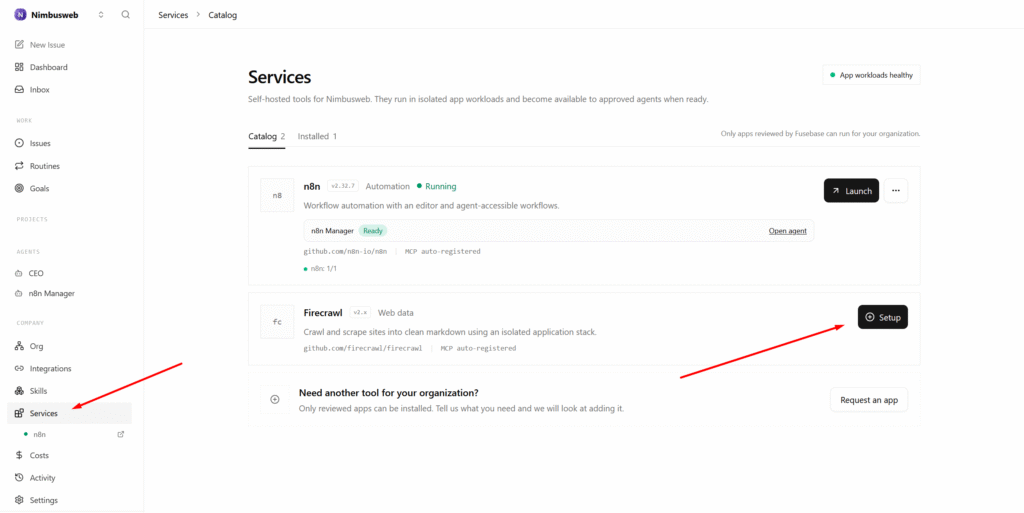
To setup services, simply go to the required section in Fusebase Work. Then click Set up on the desired service. At the moment, two services are available: n8n and Firecrawl, and the list will continue to grow.
What happens after setup?
Important! We set up services as is, without any modifications on our side. You can find documentation for the configured products on their official websites. For example, you can find n8n guides here – https://docs.n8n.io/
After the services are set up:
- MCP servers for running n8n and Firecrawl will be provisioned.
- Agents (n8n Manager and Scrape Manager) will be created automatically. They are well-versed in the respective services and come with preconfigured instructions and skills. You can assign tasks to these agents right away.
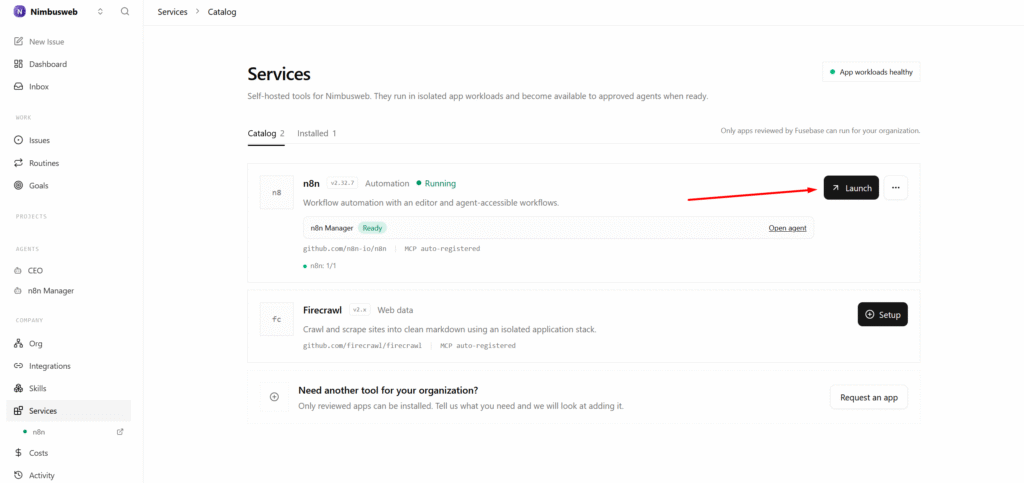
For n8n, you can open the product itself and configure your flows directly within it.
Service permissions
Not every agent should have access to every service.
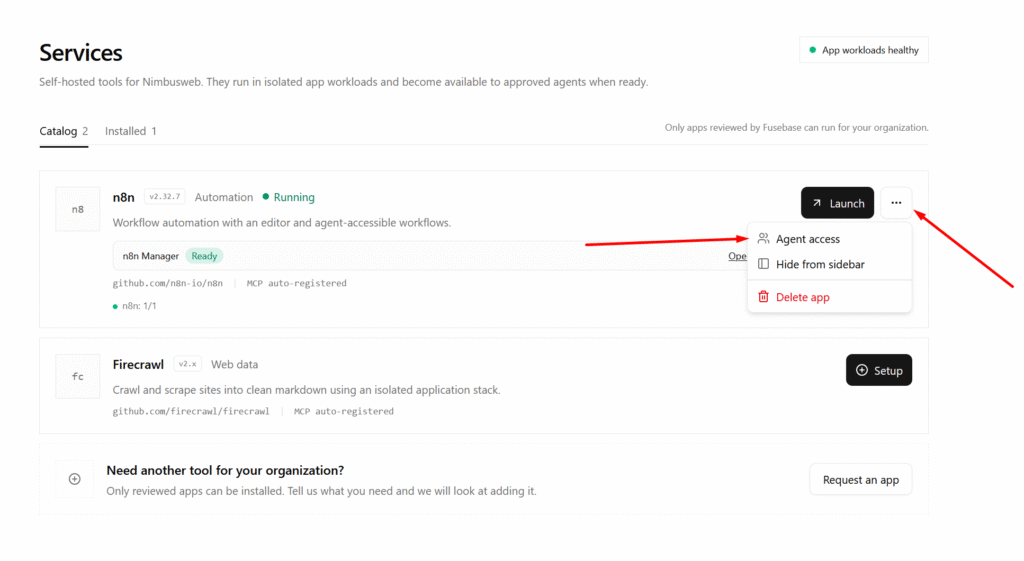
You can control which agents are allowed to use each service. This helps keep automation safe and predictable.
For example:
- a Research Agent may use Firecrawl;
- an Automation Agent may use n8n;
- a CEO Agent may manage multiple services;
- a Support Agent may only use specific workflows;
- a Finance Agent may need approval before triggering sensitive actions.
This makes services powerful while keeping your organization in control.
Example: Firecrawl research workflow
A user creates a task:
“Research these competitor websites, extract key product messaging, summarize the findings, and save the result into a Fusebase note.”
The agent can:
- Use Firecrawl to crawl the websites.
- Extract clean content.
- Analyze the information.
- Create a structured summary.
- Save the result into Fusebase.
- Report back when the task is complete.
Example: n8n automation workflow
A user creates a task:
“Create an automation that sends a reminder when a client request is overdue.”
The agent can:
- Use n8n to create the workflow.
- Connect the required trigger.
- Add the reminder logic.
- Test the workflow.
- Save or document the setup in Fusebase.
- Report what was created.