- What’s the difference between a Frontend App and a Backend App?
- Are there any specifics to creating backend apps?
- Is there support for Python and cron?
- Is it possible to integrate apps with other services? How are keys and other private data stored?
- Is it possible to send emails through the Fusebase app? For example, notifications?
What’s the difference between a Frontend App and a Backend App? #
A Frontend App is about what people see and interact with. It helps you create things like landing pages, forms, dashboards, simple generators, or new views for your tables. It sits on top of your existing FuseBase data and gives you a clean interface for a specific job. Think of a Frontend App as a smart page.
A Backend App is about what happens behind the scenes. It doesn’t just display something, it actually does work. Backend Apps can connect to other tools, run AI agents, parse files, call APIs, process data, or handle custom logic in the background. Think of a Backend App as a worker or a mini-service.
The simplest distinction: Frontend Apps show things. Backend Apps do things.
For example, a Frontend App can give you a client upload page or a custom dashboard. A Backend App can take those uploaded files, extract data from them, send it to another system, and trigger follow-up actions automatically.
Backend Apps cost more because they are significantly more powerful. Each one runs in its own container (like a small server), so it can handle real processing, integrations, AI tasks, and background jobs. Frontend Apps are lighter, faster, and cheaper to run because they focus on interface and simple interactions.
Are there any specifics to creating backend apps? #
No, the AI automatically determines whether a backend is required for your feature, and if so, it creates it for you. No additional actions are needed on your part.
Is there support for Python and cron? #
Not yet. Our backend is currently based on NodeJS. However, Python support is already in development and will definitely be available soon!
The same applies to cron. We will be adding it soon, and you will be able to create fully functional workflows through our apps.
Is it possible to integrate apps with other services? How are keys and other private data stored? #
Absolutely! Our backend allows integration with any other service. If a service requires an API key, token, etc., this data can be stored using secrets, which are currently managed at the feature level (but we plan to support secrets at the app and even organization level in the future).
When creating a feature, the AI will prompt you to add secrets. You can do this on the app page in the feature menu.
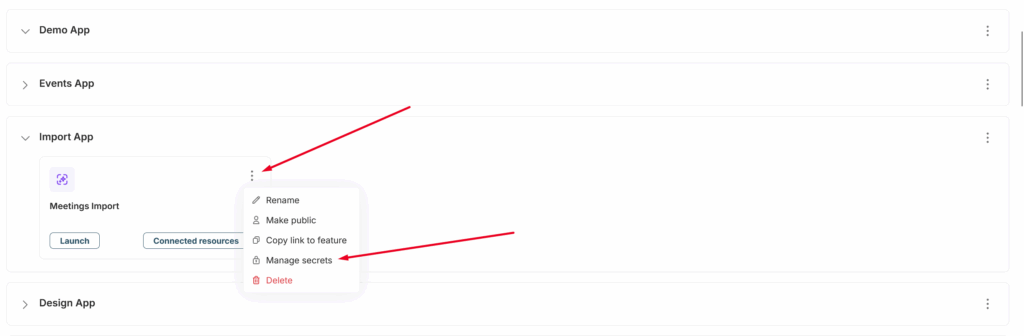
Next, click Edit next to the required secret, enter the key, token, or other necessary information, and save it.
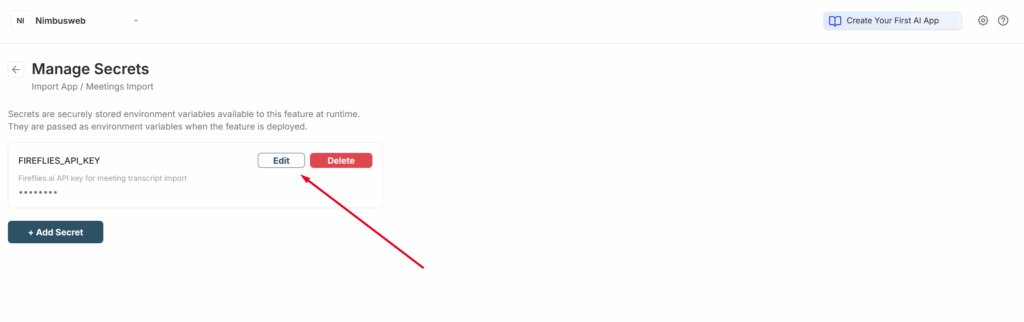
This is the most secure method, allowing you to safely integrate Fusebase features with any services.
Is it possible to send emails through the Fusebase app? For example, notifications? #
Yes, Fusebase apps have a built-in API for sending emails. This is an excellent option for:
- Custom mailings to organization members and clients (about various events)
- Various notifications (for example, when a task is reassigned, a form is submitted, a document signing link is sent, etc.)
- And more
Important! Our API allows you to send emails only to organization members and clients, and it is not intended for mass mailings (over 1,200 emails per day). For large-scale campaigns, we recommend using integrations with services such as Resend, Mailchimp, and others.
To activate a feature, you simply need to describe it in the prompt. For example: send an email notification to the organization owner after a form is submitted. Or, for instance: when clicking Send, email the document for signature to the client, and so on.