Do I need to know programming to create apps? #
No! You just need to install any popular IDE (for example, Cursor) and FuseBase CLI. It’s very simple and does not require technical skills. Then, you simply specify the type of app you need (for example, a ticketing system or file manager), and the AI agents will handle everything for you.
Is it possible to grant access to a feature to specific roles? #
Absolutely! For example, consider a ticketing system where there is a ticket management feature and a client-facing feature – creating and viewing tickets. Access to ticket management can be granted only to organization managers, while ticket creation can be available to any members and clients.
This is done using standard prompts. When creating a feature, simply instruct the agent: “Only organization managers can access this feature,” or, for example, “All members except clients can access this feature,” and so on.
You can read more about roles here: https://thefusebase.com/guides/getting-started/key-role-differences/
Do I need to install anything else besides the CLI? #
No, there is nothing else you need to install besides the CLI. All essential components, including core packages like NodeJS, are already included. If your app requires any additional libraries, the AI agent will prompt you to install them, and you will just need to confirm.
Detailed Functional Description #
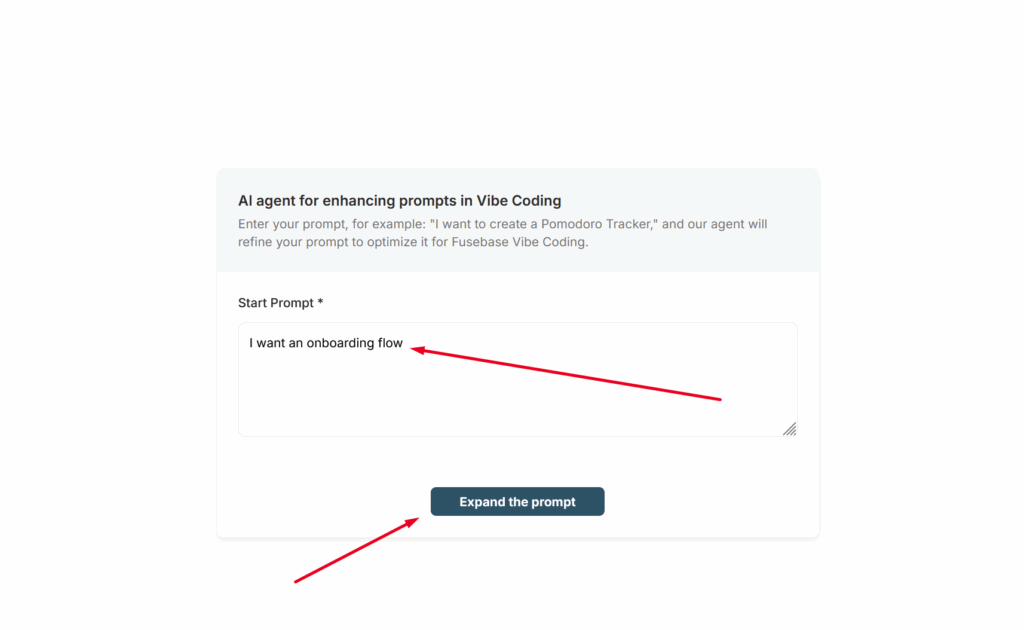
For the AI, it is important to provide as detailed a description of the functionality you want as possible. Yes, you can simply write something like “I want a CRM” or “I want an onboarding flow” and the AI will create such functionality, but the result may not fully meet your expectations the first time.
To save you from having to write everything yourself, we have created a special agent called AI agent for enhancing prompts in Vibe Coding (you can find it in your list of agents).
With this agent, you simply describe what you need, answer a few follow-up questions, and as a result, you will receive a complete technical specification that will help you effectively implement exactly what you need.
Use Plan Mode #
If you are building a complex feature, we highly recommend starting with Plan mode. Yes, it will take more time and use more tokens, but it will allow you to plan the feature more thoroughly and achieve better results. This way, you’ll spend less time on revisions—or possibly avoid them altogether.
Which models should you use? #
During feature development, you can use different models depending on the stage of development. For planning or complex features, you can use advanced models such as Claude Opus 4.6 or GPT 5.3. For simpler tasks, you can use models like Haiku or more cost-effective options like GLM/Kimi. FuseBase provides a CLI with ready-made components, so you don’t need to develop everything from scratch. This means you can build apps even with fairly standard models. However, we recommend starting with more powerful models and, over time, evaluating which model works best for your needs.