
Updates and News
Introducing FuseBase Flow: A Structured Process for AI App Development
- June 18, 2026
- 7 Min read
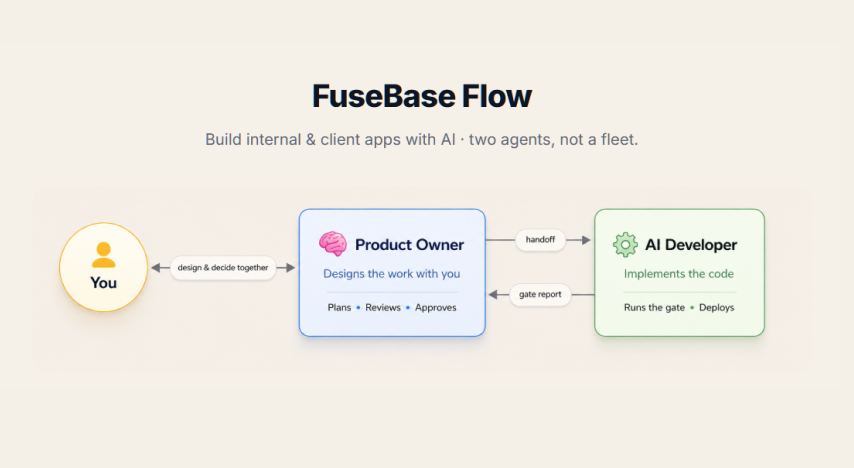
AI coding is easy to start, but hard to finish
Problem: Client-facing businesses can start building apps with AI, but projects quickly become messy, unstable, and hard to complete.
Solution: FuseBase Flow adds a structured product-development process so AI builds through phases, slices, reviews, and gates.
Real apps need a repeatable delivery system
Problem: AI can quickly produce a convincing demo, but a help-desk, client portal, analytics dashboard, training app, or marketplace needs a process that can be repeated when the app grows, a new feature is requested, or another client needs a similar solution.
Solution: FuseBase Flow is built for shipping-focused, client-facing apps rather than one-off experiments. Teams have already used the approach for help-desk ticketing, support desks with knowledge bases, customer adoption dashboards, client interview workspaces, and language-learning apps – using the same path from product direction and task slices to verification, review, and deployment.
One AI chat gets overloaded
Problem: When strategy, product thinking, coding, debugging, and QA happen in one chat, context gets polluted and the AI starts drifting.
Solution: FuseBase Flow separates planning and execution with two agents: Product Owner and AI Developer.
Slash commands make AI workflows faster
Problem: Every new AI session can start with the same overhead: explain the product context, remind the agent of the workflow, reconstruct what happened in the last chat, or work out which process step comes next.
Solution: FuseBase Flow turns those repeated setup moments into six slash commands:
| Command | What it does | Real-world use case |
| /product-owner | Starts a Product Owner session — your single point of contact who advises what to build and how, reads your North Star, and breaks work into phases/slices. | “Let’s build a booking system” → the PO scopes it, asks the right questions, and slices it into reviewable work. |
| /onboard | The PO interviews you about vision, audience, and domain, then writes the project artifacts (docs/north-star.md, audience, project values) that steer all future work. | First time using Flow on your repo — capture your product vision once so every later task is aimed at it. |
| /handoff | Writes the live session state to docs/tmp/handoff.md (16-section template) so a fresh chat resumes exactly where you left off. | A long debugging session is getting heavy → /handoff, open a new chat, continue without losing the thread. |
| /fusebase-health | Read-only health check — reports drift between the FuseBase CLI layer and the Flow layer, and offers recovery for Flow-owned drift. | After a fusebase update you’re unsure if Flow still works → confirms what (if anything) drifted and offers to fix it. |
| /token-waste-audit | Parses this project’s transcripts and lists token-waste candidates (big reads, re-reads, polling, large-output, repeat-output) mapped to FR-26. | A session felt expensive → see where the tokens actually went and what to do differently next time. |
| /find-wasted-effort | Audits Flow artifacts on disk (gate reports, handoffs, approvals, git log) for ceremony that bought no safety outcome. Read-only; findings are review candidates. | You suspect the process has overhead that isn’t earning its keep → spot ceremony to trim (nothing auto-removed). |
Reusable skills keep every stage on track
Problem: AI agents can write code quickly, but they do not automatically know when to ask clarifying questions, follow a product direction, test a fix properly, review sensitive changes, preserve context between sessions, or avoid wasting time and tokens on unnecessary work.
Solution: FuseBase Flow gives the AI reusable skills for every stage of delivery. Some are always on to keep communication, roles, and quality consistent; others activate during ticket work, reviews, debugging, product onboarding, health checks, and handoffs. This means the AI gets the right guidance when it needs it – from defining a feature and planning tasks to testing the live result, preparing deployment, and carrying context into the next session.
Client apps require more reliability than demos
Problem: Client-facing apps cannot be “vibe-coded” like experiments because they touch real client workflows, data, and service delivery.
Solution: FuseBase Flow forces clearer specs, safer implementation steps, validation, handoffs, and controlled execution.
Flow should catch drift and wasted effort
Problem: A development framework can become less useful over time: a CLI update can create configuration drift, a workflow can accumulate steps nobody needs, and expensive AI sessions can repeat context or generate output that never helps ship the product.
Solution: FuseBase Flow includes read-only health and audit checks to make those issues visible. Health checks compare the FuseBase CLI and Flow layers and can offer recovery for Flow-owned drift, while token and wasted-effort audits inspect transcripts, gate reports, handoffs, approvals, and git history to show where the team is spending effort without gaining reliability.
Service businesses need to productize, but lack software-development process
Problem: Agencies, consultants, and client-facing teams know their clients and workflows, but they often do not have a repeatable product-development system.
Solution: FuseBase Flow gives them a practical framework to turn expertise into internal tools, client apps, and micro-products.
AI agents drift without a North Star
Problem: Over time, AI loses the original product direction and starts solving local tasks in ways that break the bigger vision.
Solution: FuseBase Flow uses product documentation, North Star guidance, and structured handoffs to keep AI aligned.
Small changes need a lightweight lane
Problem: When every task gets the same level of ceremony, simple fixes move too slowly and complex work still risks not getting the structure it needs.
Solution: FuseBase Flow classifies work by risk. A small, reversible change can use the Lightweight lane: one change note, one build → verify → deploy pass, and a clear “ship it” approval. Larger, uncertain, or production-sensitive work goes through the full specification, decisions, tasks, verification-gate, review, and deploy-handoff flow – while both paths keep the same safety floor of live proof, explicit deployment approval, protected-path checks, and rollback awareness.
Big prompts create fragile results
Problem: Asking AI to build complex features in one large prompt creates poor architecture, missed requirements, and hidden bugs.
Solution: FuseBase Flow breaks work into phases and slices so each part can be built, reviewed, and improved independently.
Handoffs between planning and coding are unreliable
Problem: The person designing the app and the AI coding it often lose context between product decisions and implementation.
Solution: FuseBase Flow creates clear copy-paste handoffs between Product Owner and AI Developer workflows.
Long AI sessions create fatigue
Problem: Long-running AI chats become less accurate, forget constraints, and make inconsistent decisions.
Solution: FuseBase Flow includes restart and handoff patterns so teams can refresh context without losing project continuity.
Client-facing teams should not rebuild infrastructure from scratch
Problem: Building client portals, permissions, user accounts, client data flows, and app infrastructure from zero wastes time and increases risk.
Solution: FuseBase provides the client-facing Work OS foundation, while FuseBase Flow helps teams build apps on top of it.
💡 Read more posts on this topic:
Professional services need new recurring revenue
Problem: Traditional service work is project-based, hard to scale, and vulnerable as clients use AI to do more themselves.
Solution: FuseBase Flow helps service businesses package their expertise into branded apps and repeatable client solutions.
AI coding platforms can become expensive as projects grow
Problem: Token-based app builders are easy to start, but complex projects can become costly as the codebase grows.
Solution: FuseBase Flow works inside the team’s own development environment and AI coding tools, so teams use their existing AI subscriptions.
Apps should be modular, not one giant system
Problem: Large AI-built apps become harder to understand, debug, and safely improve.
Solution: FuseBase Flow encourages smaller app slices and modular product structure, making systems easier to maintain.
Client-facing software needs internal and external logic
Problem: Internal teams need controls, data, and operations, while clients need a simple experience. Most generic app builders do not understand this difference.
Solution: FuseBase Flow is designed around client-facing app development, where internal workflows and client-facing simplicity are both considered.
AI-built workflows need governance
Problem: Autonomous agents without structure can make changes, spend tokens, and execute work without enough visibility or control.
Solution: FuseBase Flow brings planning, review, gates, auditability, and human-in-the-loop execution into the AI development process.
Client-facing businesses need speed without chaos
Problem: Teams need to move faster with AI, but speed without structure creates fragile systems.
Solution: FuseBase Flow gives teams a controlled way to build faster while keeping product logic, implementation, and review connected.
If you’re building client-facing apps, it’s worth taking a look: https://github.com/fusebase-dev/fusebase-flow
Found it useful? Share the article with your community
Subscribe to our blog!
Get weekly tips and insights on how to grow your business