
Skip to the content
  • Portals & collaboration

    One place to collaborate internally and externally

    • AI Agents (apps)User-friendly AI agents in minutes for every team
    • AI Agents for SalesSales President’s Club AI Agents
    • AI Agents for TeamsSecure Workspace & Agent Management for Modern Teams
    • Deal RoomsClose faster with smart, sleek spaces for every deal
    • Knowledge BaseCreate one source of truth for clients & teams
    • Partner & Vendor portalsMaximize value from your external relationships
    • Project ManagementWork on clients’ projects without extra hurdles
    Explore portals →

    Browser extensions

    Boost your productivity with FuseBase browser extensions

    • FuseBase ClarityCapture Step-by-Step guides, SOP and tutorials
    • FuseBase AI AssistantAI Chat and Agents everywhere
    • FuseBase Voice AssistantVoice typing everywhere in your browser
    • FuseBase PRO AINote taking, Files Sharing & Collaboration

    Build professional apps

    Production-ready apps in days

    • App developmentCreate professional apps for the way your business works.

    Hosting

    Your tools, hosted by FuseBase.

    • FuseBase WorkAI coworkers with defined roles. Powered by Paperclip.
    • n8nSelf-hosted workflow automation.
    • FirecrawlSelf-hosted web data tools.
    Explore hosting →

    Industries

    Find the right workspace for your industry.

    • Consulting ServicesDeliver exceptional client service
    • Financial ServicesAutomate compliance, approvals & collaboration
    • HealthcareSecure, compliant portals for care and admin
    • Marketing & AdvertisingCentralize campaigns and automate client requests
    • Mid-Size companiesGrowing 50-1000+ employee companies
    • Professional ServicesGet a one-stop-shop for collaboration
    • Software & TechnologyAutomate workflows with AI-powered portals
    See all industries →
    Portals & collaboration

    One place to collaborate internally and externally

    • AI Agents (apps)User-friendly AI agents in minutes for every team
    • AI Agents for SalesSales President’s Club AI Agents
    • AI Agents for TeamsSecure Workspace & Agent Management for Modern Teams
    • Deal RoomsClose faster with smart, sleek spaces for every deal
    • Knowledge BaseCreate one source of truth for clients & teams
    • Partner & Vendor portalsMaximize value from your external relationships
    • Project ManagementWork on clients’ projects without extra hurdles
    Explore portals →
    Browser extensions

    Boost your productivity with FuseBase browser extensions

    • FuseBase ClarityCapture Step-by-Step guides, SOP and tutorials
    • FuseBase AI AssistantAI Chat and Agents everywhere
    • FuseBase Voice AssistantVoice typing everywhere in your browser
    • FuseBase PRO AINote taking, Files Sharing & Collaboration
    Build professional apps

    Production-ready apps in days

    • App developmentCreate professional apps for the way your business works.
    Hosting

    Your tools, hosted by FuseBase.

    • FuseBase WorkAI coworkers with defined roles. Powered by Paperclip.
    • n8nSelf-hosted workflow automation.
    • FirecrawlSelf-hosted web data tools.
    Explore hosting →
    Industries

    Find the right workspace for your industry.

    • Consulting ServicesDeliver exceptional client service
    • Financial ServicesAutomate compliance, approvals & collaboration
    • HealthcareSecure, compliant portals for care and admin
    • Marketing & AdvertisingCentralize campaigns and automate client requests
    • Mid-Size companiesGrowing 50-1000+ employee companies
    • Professional ServicesGet a one-stop-shop for collaboration
    • Software & TechnologyAutomate workflows with AI-powered portals
    See all industries →
    Book a demo

    with our experts to build your custom workflow

  • Templates NEW
    • FuseBase GitHub Repos One step closer to the open-source community
    • Join FuseBase Discord AI development and autonomous agents for client-facing business
    Book a demo

    with our experts to build your custom workflow

  • Pricing
    • About us Meet FuseBase!
    • Blog Read the latest collaboration tips
    • Case Studies Explore case studies and find tailored solutions
    • Contact us Get growth advice from our experts
    • Guides Answer your FuseBase questions
    • Roadmap See what waits for you in the future
    • Trust center HIPAA & SOC 2. Trusted standards, protected data
    • Affiliate Program Would you turn down free money?
    Book a demo

    with our experts to build your custom workflow

Menu
  • Solutions ›

    Portals & collaboration

    One place to collaborate internally and externally

    • AI Agents (apps)User-friendly AI agents in minutes for every team
    • AI Agents for SalesSales President’s Club AI Agents
    • AI Agents for TeamsSecure Workspace & Agent Management for Modern Teams
    • Deal RoomsClose faster with smart, sleek spaces for every deal
    • Knowledge BaseCreate one source of truth for clients & teams
    • Partner & Vendor portalsMaximize value from your external relationships
    • Project ManagementWork on clients’ projects without extra hurdles
    Explore portals →

    Browser extensions

    Boost your productivity with FuseBase browser extensions

    • FuseBase ClarityCapture Step-by-Step guides, SOP and tutorials
    • FuseBase AI AssistantAI Chat and Agents everywhere
    • FuseBase Voice AssistantVoice typing everywhere in your browser
    • FuseBase PRO AINote taking, Files Sharing & Collaboration

    Build professional apps

    Production-ready apps in days

    • App developmentCreate professional apps for the way your business works.

    Hosting

    Your tools, hosted by FuseBase.

    • FuseBase WorkAI coworkers with defined roles. Powered by Paperclip.
    • n8nSelf-hosted workflow automation.
    • FirecrawlSelf-hosted web data tools.
    Explore hosting →

    Industries

    Find the right workspace for your industry.

    • Consulting ServicesDeliver exceptional client service
    • Financial ServicesAutomate compliance, approvals & collaboration
    • HealthcareSecure, compliant portals for care and admin
    • Marketing & AdvertisingCentralize campaigns and automate client requests
    • Mid-Size companiesGrowing 50-1000+ employee companies
    • Professional ServicesGet a one-stop-shop for collaboration
    • Software & TechnologyAutomate workflows with AI-powered portals
    See all industries →
    Portals & collaboration

    One place to collaborate internally and externally

    • AI Agents (apps)User-friendly AI agents in minutes for every team
    • AI Agents for SalesSales President’s Club AI Agents
    • AI Agents for TeamsSecure Workspace & Agent Management for Modern Teams
    • Deal RoomsClose faster with smart, sleek spaces for every deal
    • Knowledge BaseCreate one source of truth for clients & teams
    • Partner & Vendor portalsMaximize value from your external relationships
    • Project ManagementWork on clients’ projects without extra hurdles
    Explore portals →
    Browser extensions

    Boost your productivity with FuseBase browser extensions

    • FuseBase ClarityCapture Step-by-Step guides, SOP and tutorials
    • FuseBase AI AssistantAI Chat and Agents everywhere
    • FuseBase Voice AssistantVoice typing everywhere in your browser
    • FuseBase PRO AINote taking, Files Sharing & Collaboration
    Build professional apps

    Production-ready apps in days

    • App developmentCreate professional apps for the way your business works.
    Hosting

    Your tools, hosted by FuseBase.

    • FuseBase WorkAI coworkers with defined roles. Powered by Paperclip.
    • n8nSelf-hosted workflow automation.
    • FirecrawlSelf-hosted web data tools.
    Explore hosting →
    Industries

    Find the right workspace for your industry.

    • Consulting ServicesDeliver exceptional client service
    • Financial ServicesAutomate compliance, approvals & collaboration
    • HealthcareSecure, compliant portals for care and admin
    • Marketing & AdvertisingCentralize campaigns and automate client requests
    • Mid-Size companiesGrowing 50-1000+ employee companies
    • Professional ServicesGet a one-stop-shop for collaboration
    • Software & TechnologyAutomate workflows with AI-powered portals
    See all industries →
  • Templates NEW
  • GitHub / Discord ›
    • FuseBase GitHub Repos One step closer to the open-source community
    • Join FuseBase Discord AI development and autonomous agents for client-facing business
  • Pricing
  • Resources ›
    • About us Meet FuseBase!
    • Blog Read the latest collaboration tips
    • Case Studies Explore case studies and find tailored solutions
    • Contact us Get growth advice from our experts
    • Guides Answer your FuseBase questions
    • Roadmap See what waits for you in the future
    • Trust center HIPAA & SOC 2. Trusted standards, protected data
    • Affiliate Program Would you turn down free money?
Sign in Book a demo Get started for free
  • Sign in
  • Book a demo
  • Get started for free
Categories
  • All articles
  • AI Agents
  • Client & Customer Portals
  • Client Collaboration & Communication
  • Comparisons
  • Customer & Self-Service
  • Knowledge Management
  • Productivity
  • Sales & Deal Management
  • Team & Project Management
  • Updates and News
TABLE OF CONTENTS

  • What is a Client Portal?
  • How To Use Notion as a Client Portal?
  • Notion Client Portal Alternatives
  • FuseBase Client Portal
  • SuperOkay Client Portal
  • Moxo Client Portal
  • Clinked Client Portal
  • Copilot Client Portal
  • Narrowing Down Your Options 
  • Home
  • Blog
  • Comparisons...
  • Top Alternatives to Notion Client Portals
Comparisons

Top Alternatives to Notion Client Portals

  • by Sabina Sher
  • December 26, 2024
  • 7 Min read

Are you using Notion as a client portal? We get it! It can be a nice solution that provides managing different project stages and a range of tools. However, is it convenient for your client, who also has to be not only a reader, but interact with the delivered result? You must look for advanced features — and several alternative platforms are worth considering, including FuseBase, SuperOkay, Moxo, Clinked, and Copilot. These client portals enhance collaboration and offer white-label customization and integrated automation, allowing for a more personalized experience. Follow along as we explore these four other Notion alternative options.

FeatureNotion PortalsFuseBaseSuperOkayMoxoClinkedCopilot
Pricing (monthly):from €11,50 per seatfrom $32 per teamfrom $12 per usernot availablefrom 119$ per portalfrom $59 per user
Has a free plan✓✓✓❌❌❌
Personal branding + custom domain name✓✓✓✓✓✓
Creating White Label Portals❌✓✓✓✓✓
Templates✓✓✓✓❌❌
Granular permissions✓✓✓✓✓✓
Task management tools✓✓✓✓✓✓
Knowledge base option✓✓✓✓✓❌
AI Copilot✓✓❌❌❌❌
Automation Module❌✓✓✓✓✓
Embedded apps✓✓✓✓✓✓

What is a Client Portal?

Before we get into the specifics of each platform, let’s define what a client portal is.

We decided to leave this block for those people, who haven’t already created a Notion Portal, and just looking around to find “Is a client portal for them?”. What are those and what solutions are there? — Marketing Team of FuseBase.

Essentially, a client portal is an online area that facilitates collaboration and improves communication between businesses and their clients. These platforms offer tools that track project stages, allow file sharing, organize task management, and much more in one localized space. Client portals are essential for strengthening professional relationships with clients and creating a smooth experience and management.

Real Benefits of Client Portal 

Internal Workspace Icon
Internal Workspace
What you get:
  • Sales Portal
  • Process Portal
  • Centralized Hub
  • Internal Knowledge Base
  • Real-Time Collaboration
  • Secure File Storage
  • Video Recording & Transcription
  • Meeting Notes with Context
  • Fast Search & Organization
  • Client-Ready Sharing
  • Tool Integrations
AI Agents Icon
AI Agents
What you get:
  • Works Where You Work
  • Internal & External Workspaces
  • Real Answers from Your Content
  • Automates Busywork
  • Screen-Aware & Prompt-Driven
  • Custom or Prebuilt Agents
  • External Agent Access
  • Synced with Your Stack
  • On-Brand, On-Point
  • No Extra Tools Needed
AI Agents Image
External Workspace Icon
External Workspace
What you get:
  • Partner or Vendor Portal
  • Client Portals
  • External Knowledge Base
  • Drag-and-Drop Page Builder
  • Mutual Action Plans & Task Lists
  • Built-in CRM
  • Built-In E-signatures
  • Forms & Surveys
  • Secure File Sharing
  • Meeting Notes & Videos
  • Live Chat with Clients
  • Client Analytics
  • White-Label & SMTP Support
Learn more

How To Use Notion as a Client Portal?

Did you use Notion as a personal workspace or for the team, you liked what it gives you and thought “How to use this tool to collaborate with my clients?”. Maybe, you even tried to create a separate workspace for them to make your communication with them easy, without emails back and forth? It definitely has its challenges. Some clients can not be as tech-savvy as you are, so the tool you are using should be very intuitive.

Mainly because Notion does not have any guide on how to create a client portal from scratch. You can only choose a template and then change something there.

Notion Client Portal Alternatives

If you’re searching for a platform with enhanced features or tailored solutions, or you have a more complicated request — here are some of the best alternatives to Notion client portals:

FuseBase Client Portal — compare

FuseBase is designed for businesses that need an intuitive design and advanced tools. One of its standout features is the ability to deliver a white-label experience with full customization options. The client portal can be your collaborative area with your clients, you can create a knowledge base there, share your files, show project progress and active tasks. The platform’s key features make it a powerful client portal alternative to Notion. 

And if you are not ready to say goodbye to the page-like area, FuseBase has a separate workspace for you or your team. You can have a familiar and understandable area, a plus client portal space.
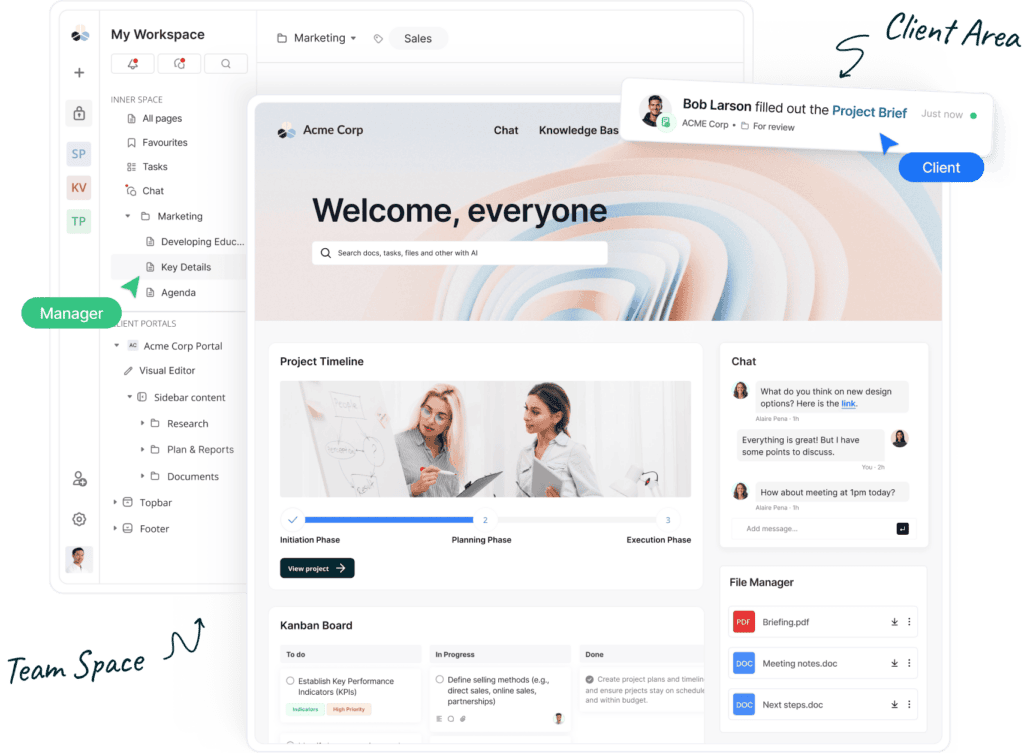
FuseBase Client Portal. Image powered by Fusebase.

Key Features:

  • Customization: branding, White-label options, custom SMTP — FuseBase team can create a custom portal special for you with your design and unique blocks.
  • AI-driven functionalities for portal users — you can train AI to be your round-the-clock teammate.
  • Built-in automation module and client/team chat.
  • Advanced collaboration tools like process views, e-signatures, and form transcriptions.

SuperOkay Client Portal

SuperOkay advertises itself as good for agile creative agencies. The portal is incredibly easy to use with the ability to exchange files, assign tasks, and sell services. Compared to Notion as a client portal, SuperOkay has a simpler setup process. Their platform offers various useful templates and client dashboards which Notion falls short on. It is also important to note that SuperOkay is primarily a client portal, whereas Notion is not. 
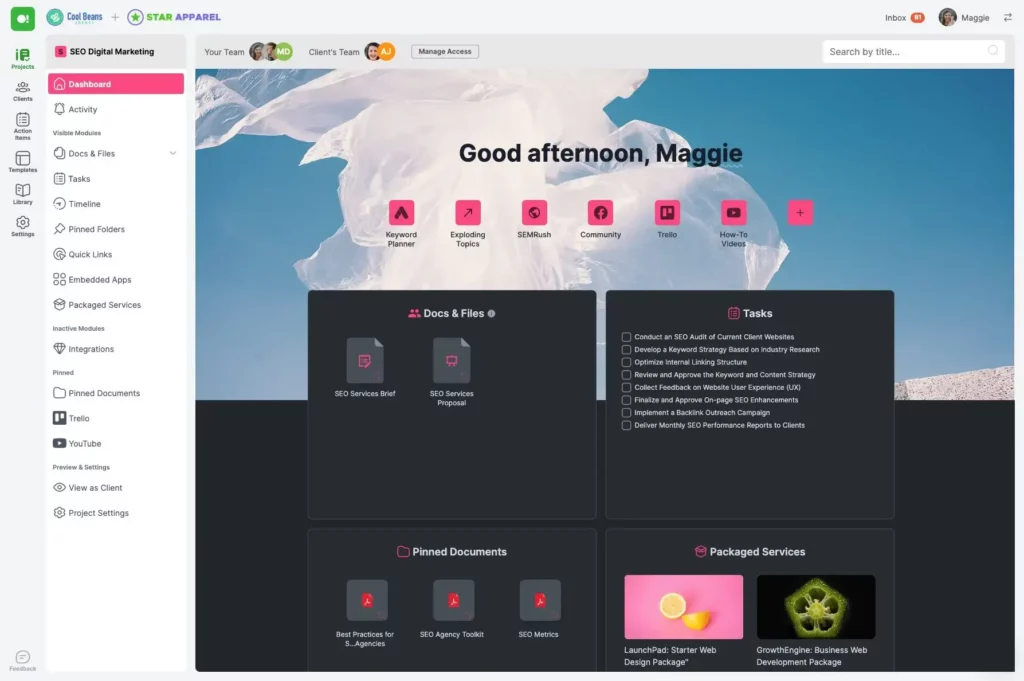
Superokay Client Portal. Image powered by Fusebase.

Key Features:

  • Pre-designed templates for faster setup.
  • Integrated task and project management tools.
  • Client dashboards for real-time updates.

Moxo Client Portal

Moxo is another Notion client portal alternative that helps streamline sales and improve interactions between clients and stakeholders. The portal offers customizable onboarding, integrated collaboration tools, and automated workflows to manage client, vendor, and partner relationships. Moxo stands out against Notion for its communication tools. In addition to its superior communication capabilities, Moxo also provides more secure and interactive document handling, enhancing user experience and ensuring that information is both protected and easily accessible.
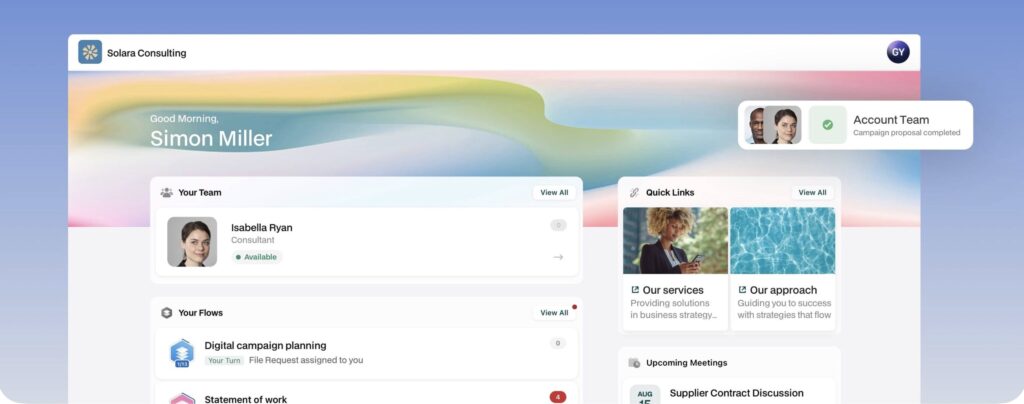
Moxo Client Portal. Image powered by Fusebase.

Key Features:

  • Secure data management
  • Unified communication via chat, video, and voice.
  • Workflow automation tailored to client needs.
  • Secure document sharing and collaboration.
💡 Read more posts on this topic:
  • Top 10 Partner Portals in 2025: Tried, Tested, and Ready for Your Team
  • 14 Top Client Collaboration Software (Tested and Reviewed in 2025)

Clinked Client Portal

The Clinked client portal is a cloud-based collaboration tool designed to streamline secure file sharing, team communication, and client interaction. It offers a centralized hub for businesses to manage projects, share documents, and engage with clients in a private and branded environment.

While Notion excels as a flexible and highly customizable workspace for organizing information, Clinked stands out as a dedicated client portal designed for secure client interactions and branded experiences. Clinked’s emphasis on white-label customization, and client-centric features make it ideal for businesses prioritizing professional-client collaboration. 
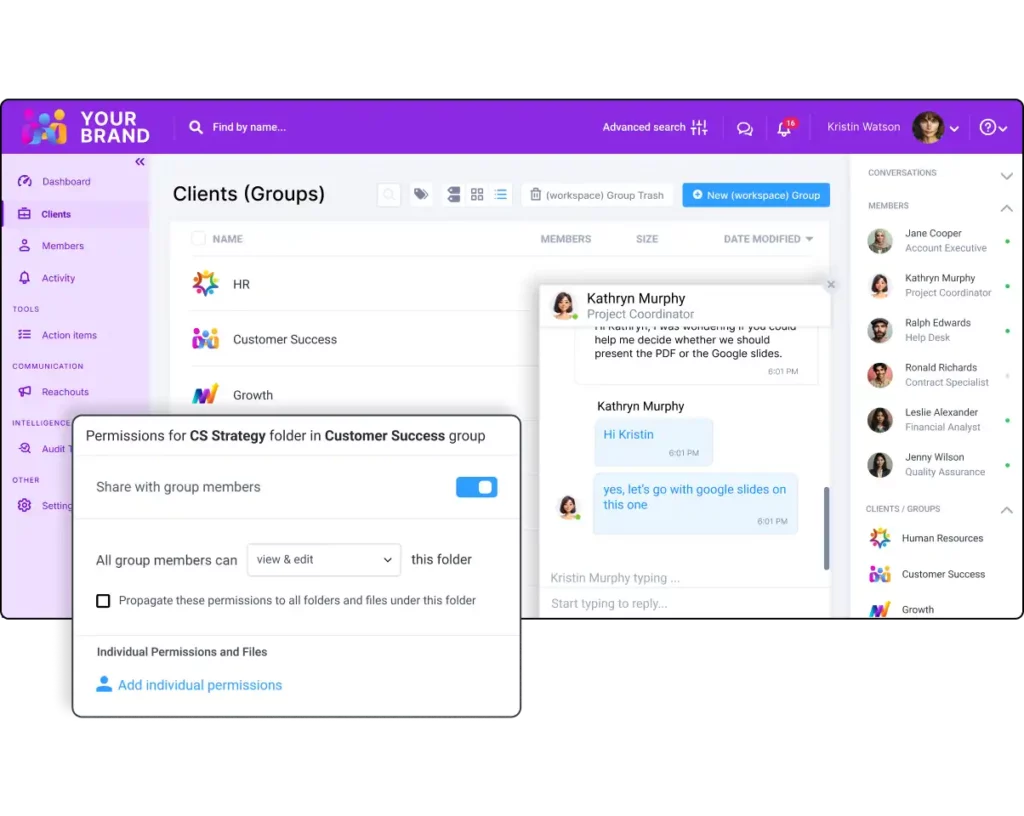
Clinked Client Portal. Image powered by Fusebase.

Key Features:

  • End-to-end encryption for secure document storage and sharing.
  • Tailor the portal with your company’s logo, colors, and domain.
  • Collaboration tools such as real-time messaging, task management, and group discussions.
  • Dedicated mobile apps for on-the-go access.

Copilot Client Portal

Client portals from Copilot help streamline onboarding and service delivery. You can think of them as your tech stack, it comes with many features — from CRM, and notification center to billing, file-sharing, and contracts. The White Label option is available as well.

Any main feature named as an App, that immediately catches the eye. From the last updates in November 2024, there were improvements with the Tasks App and homepage analytics dashboard. If you are considering automating your firm, Copilot offers triggers and actions. Are you a freelancer, a marketing agency owner, or a startup? You can find specific apps that will work for you.
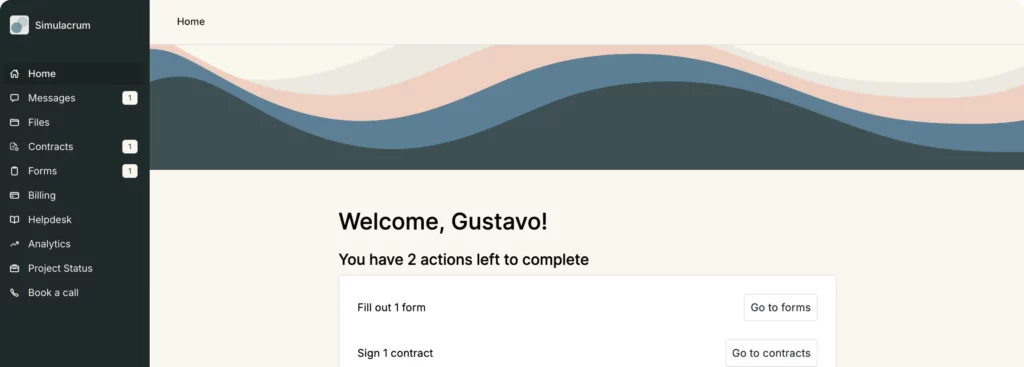
Copilot Client Portal. Image powered by Fusebase.

Key Features:

  • Billing and invoicing (even invoices with branding).
  • Messaging inside a portal — to make centralized client communication.
  • White Labeled Portal and custom domain.
  • Build-in Automation.

Narrowing Down Your Options 

While Notion is highly adaptable and can be used as a functional client portal, several specialized alternatives are better in various ways. Among these portals are FuseBase, SuperOkay, Moxo, Clinked, and Copilot. When comparing client portal solutions, FuseBase stands out as a superior choice for businesses looking to make their client interactions and project management run smoother. 

With FuseBase, businesses can make use of an all-in-one platform designed to support every phase of a project — from initiation to completion — making it the ultimate tool for professional services. FuseBase also integrates advanced AI tools to manage organizational details, allowing teams to stay focused on core tasks while automation handles the rest.

By combining project management, collaboration, and AI-driven functionalities into one intuitive platform, FuseBase provides businesses with a competitive advantage. Whether you’re in consulting, marketing, or IT, FuseBase is designed to meet the diverse needs of growing businesses and their clients. To learn more about FuseBase, visit the site.

Are you feeling a bit hesitant? Don’t worry, we get it, commitment is hard. Instead of going all in, give our demo a try first. 

Author Image

Sabina Sher

Chief Strategy Officer at FuseBase

Meet Sabina Sher, a Chief Strategy Officer at FuseBase and a storyteller turning industry challenges into engaging content packed with actionable advice. She channels rich industry experience and knowledge into our blog, making it a go-to resource for life hacks, tips, and innovative ideas.

Found it useful? Share the article with your community

  • Share on Facebook
  • Share on LinkedIn
  • Share on X

No related posts.

Subscribe to our blog!

Get weekly tips and insights on how to grow your business

Our solutions
  • Mid-size companies
  • AI Agents (apps)
  • Deal rooms
  • White label
  • Knowledge base
Plans & Pricing
  • Pricing
Enterprise Security
  • Trust Center
    (HIPAA & SOC 2)
  • Terms & Privacy
  • GDPR
Company & Contacts
  • Templates
  • Guides
  • Roadmap
  • Privacy
  • About us
  • Reviews
  • Contact us
Compare with
  • SharePoint
  • Moxo
  • Notion
  • Confluence
  • Asana
  • Airtable
  • Monday
  • See all
Fusebase Logo
  • English
FuseBase - Client collaboration platform for professional services | Product Hunt
  • g2
  • sourceforce
  • g2
  • SOC 2 Type II
  • HIPAA
2014-2026 FuseBase is a product of Nimbus Web Inc., a Delaware company