
Skip to the content
  • Portals & collaboration

    One place to collaborate internally and externally

    • AI Agents (apps)User-friendly AI agents in minutes for every team
    • AI Agents for SalesSales President’s Club AI Agents
    • AI Agents for TeamsSecure Workspace & Agent Management for Modern Teams
    • Client PortalLevel up your collaboration with unified digital hubs
    • Deal RoomsClose faster with smart, sleek spaces for every deal
    • Knowledge BaseCreate one source of truth for clients & teams
    • Partner & Vendor portalsMaximize value from your external relationships
    • Project ManagementWork on clients’ projects without extra hurdles
    Explore portals →

    Browser extensions

    Boost your productivity with FuseBase browser extensions

    • FuseBase ClarityCapture Step-by-Step guides, SOP and tutorials
    • FuseBase AI AssistantAI Chat and Agents everywhere
    • FuseBase Voice AssistantVoice typing everywhere in your browser
    • FuseBase PRO AINote taking, Files Sharing & Collaboration

    Build professional apps

    Production-ready apps in days

    • App developmentCreate professional apps for the way your business works.

    Hosting

    Your tools, hosted by FuseBase.

    • FuseBase WorkAI coworkers with defined roles. Powered by Paperclip.
    • n8nSelf-hosted workflow automation.
    • FirecrawlSelf-hosted web data tools.
    Explore hosting →
    Portals & collaboration

    One place to collaborate internally and externally

    • AI Agents (apps)User-friendly AI agents in minutes for every team
    • AI Agents for SalesSales President’s Club AI Agents
    • AI Agents for TeamsSecure Workspace & Agent Management for Modern Teams
    • Client PortalLevel up your collaboration with unified digital hubs
    • Deal RoomsClose faster with smart, sleek spaces for every deal
    • Knowledge BaseCreate one source of truth for clients & teams
    • Partner & Vendor portalsMaximize value from your external relationships
    • Project ManagementWork on clients’ projects without extra hurdles
    Explore portals →
    Browser extensions

    Boost your productivity with FuseBase browser extensions

    • FuseBase ClarityCapture Step-by-Step guides, SOP and tutorials
    • FuseBase AI AssistantAI Chat and Agents everywhere
    • FuseBase Voice AssistantVoice typing everywhere in your browser
    • FuseBase PRO AINote taking, Files Sharing & Collaboration
    Build professional apps

    Production-ready apps in days

    • App developmentCreate professional apps for the way your business works.
    Hosting

    Your tools, hosted by FuseBase.

    • FuseBase WorkAI coworkers with defined roles. Powered by Paperclip.
    • n8nSelf-hosted workflow automation.
    • FirecrawlSelf-hosted web data tools.
    Explore hosting →
    Book a demo

    with our experts to build your custom workflow

    • Consulting Services Deliver exceptional client service
    • Financial Services Automate compliance, approvals & collaboration
    • Healthcare Secure, compliant portals for care and admin
    • Marketing & Advertising Centralize campaigns and automate client requests
    • Mid-Size companies Growing 50-1000+ employee companies
    • Professional Services Get a one-stop-shop for collaboration
    • Software & Technology Automate workflows with AI-powered portals
    • See all industries
    Book a demo

    with our experts to build your custom workflow

    • FuseBase GitHub Repos One step closer to the open-source community
    • Join FuseBase Discord AI development and autonomous agents for client-facing business
    Book a demo

    with our experts to build your custom workflow

  • Pricing
    • About us Meet FuseBase!
    • Blog Read the latest collaboration tips
    • Case Studies Explore case studies and find tailored solutions
    • Contact us Get growth advice from our experts
    • Guides Answer your FuseBase questions
    • Roadmap See what waits for you in the future
    • Trust center HIPAA & SOC 2. Trusted standards, protected data
    • Affiliate Program Would you turn down free money?
    Book a demo

    with our experts to build your custom workflow

Menu
  • Solutions ›

    Portals & collaboration

    One place to collaborate internally and externally

    • AI Agents (apps)User-friendly AI agents in minutes for every team
    • AI Agents for SalesSales President’s Club AI Agents
    • AI Agents for TeamsSecure Workspace & Agent Management for Modern Teams
    • Client PortalLevel up your collaboration with unified digital hubs
    • Deal RoomsClose faster with smart, sleek spaces for every deal
    • Knowledge BaseCreate one source of truth for clients & teams
    • Partner & Vendor portalsMaximize value from your external relationships
    • Project ManagementWork on clients’ projects without extra hurdles
    Explore portals →

    Browser extensions

    Boost your productivity with FuseBase browser extensions

    • FuseBase ClarityCapture Step-by-Step guides, SOP and tutorials
    • FuseBase AI AssistantAI Chat and Agents everywhere
    • FuseBase Voice AssistantVoice typing everywhere in your browser
    • FuseBase PRO AINote taking, Files Sharing & Collaboration

    Build professional apps

    Production-ready apps in days

    • App developmentCreate professional apps for the way your business works.

    Hosting

    Your tools, hosted by FuseBase.

    • FuseBase WorkAI coworkers with defined roles. Powered by Paperclip.
    • n8nSelf-hosted workflow automation.
    • FirecrawlSelf-hosted web data tools.
    Explore hosting →
    Portals & collaboration

    One place to collaborate internally and externally

    • AI Agents (apps)User-friendly AI agents in minutes for every team
    • AI Agents for SalesSales President’s Club AI Agents
    • AI Agents for TeamsSecure Workspace & Agent Management for Modern Teams
    • Client PortalLevel up your collaboration with unified digital hubs
    • Deal RoomsClose faster with smart, sleek spaces for every deal
    • Knowledge BaseCreate one source of truth for clients & teams
    • Partner & Vendor portalsMaximize value from your external relationships
    • Project ManagementWork on clients’ projects without extra hurdles
    Explore portals →
    Browser extensions

    Boost your productivity with FuseBase browser extensions

    • FuseBase ClarityCapture Step-by-Step guides, SOP and tutorials
    • FuseBase AI AssistantAI Chat and Agents everywhere
    • FuseBase Voice AssistantVoice typing everywhere in your browser
    • FuseBase PRO AINote taking, Files Sharing & Collaboration
    Build professional apps

    Production-ready apps in days

    • App developmentCreate professional apps for the way your business works.
    Hosting

    Your tools, hosted by FuseBase.

    • FuseBase WorkAI coworkers with defined roles. Powered by Paperclip.
    • n8nSelf-hosted workflow automation.
    • FirecrawlSelf-hosted web data tools.
    Explore hosting →
  • Industries ›
    • Consulting Services Deliver exceptional client service
    • Financial Services Automate compliance, approvals & collaboration
    • Healthcare Secure, compliant portals for care and admin
    • Marketing & Advertising Centralize campaigns and automate client requests
    • Mid-Size companies Growing 50-1000+ employee companies
    • Professional Services Get a one-stop-shop for collaboration
    • Software & Technology Automate workflows with AI-powered portals
    • See all industries
  • GitHub / Discord ›
    • FuseBase GitHub Repos One step closer to the open-source community
    • Join FuseBase Discord AI development and autonomous agents for client-facing business
  • Pricing
  • Resources ›
    • About us Meet FuseBase!
    • Blog Read the latest collaboration tips
    • Case Studies Explore case studies and find tailored solutions
    • Contact us Get growth advice from our experts
    • Guides Answer your FuseBase questions
    • Roadmap See what waits for you in the future
    • Trust center HIPAA & SOC 2. Trusted standards, protected data
    • Affiliate Program Would you turn down free money?
Sign in Book a demo Get started for free
  • Sign in
  • Book a demo
  • Get started for free
Categories
  • All articles
  • AI Agents
  • Client & Customer Portals
  • Client Collaboration & Communication
  • Comparisons
  • Customer & Self-Service
  • Knowledge Management
  • Productivity
  • Sales & Deal Management
  • Team & Project Management
  • Updates and News
TABLE OF CONTENTS

  • Testing criteria
  • Client Portal vs Customer Portal
  • Why You Need a Modern Portal
  • Buyer's Guide
  • Quick Comparison Table
  • Deep Dive: Top 22 Client and Customer Portal Solutions by Categories
  • 1. FuseBase
  • 2. Taskip
  • 3. OneSuite
  • 4. Assembly (Copilot)
  • 5. SuiteDash
  • 6. Clinked
  • 7. Moxo
  • 8. ManyRequests
  • 9. Trumpet
  • 10. Zoho CRM
  • 11. Zendesk
  • 12. Freshdesk
  • 13. Planhat
  • 14. SupportBee
  • 15. SuperOkay
  • 16. Plutio
  • 17. Dubsado
  • 18. Client Portal.io (WordPress)
  • 19. Knack
  • 20. MyDocSafe
  • 21. Ideagen Collaboration Portal
  • 22. TaxDome
  • Frequently Asked Questions
  • Home
  • Blog
  • Client & Customer Portals...
  • 22 Best Client & Customer Portal Software in 2026
Client & Customer Portals

22 Best Client & Customer Portal Software in 2026

  • by Pavel Sher
  • October 8, 2026
  • 13 Min read

The client and customer portals are secure spaces where clients can quickly find answers to issues, share files, and communicate without the usual chaos. Don’t think of them as just another checkbox –they are customer retention centers that provide a lifetime value for your business. For example, client portals are most helpful for agencies, consulting businesses, and freelancers. And customer portals benefit support teams and SaaS businesses.

However, you shouldn’t rely solely on the portal’s existence – Gartner stated that while 73% of customers use self-service, only 14% of issues are fully resolved through it. So, the portal’s effectiveness really depends on the tool capabilities and the availability of the relevant content.

After testing more than 20 tools (and even building my own platform), I created this buying guide. In this article, you will find 22 software for client and customer portals with benefits and areas for improvement, plus a selection framework and a comparison table.

TL;DR – Top Client and Customer Portal Software

  • Best for marketing and agency collaboration – Clinked
  • Best for all-in-one business management – SuiteDash
  • Best for digital agencies, SMBs, and growing support teams – FuseBase
  • Best for law firms that need branded portals with HIPAA/SSO – Assembly (Copilot)
  • Best for omnichannel support teams at scale – Zendesk
  • Best for fast, omnichannel support for mid-market – Freshdesk

Testing criteria

During my research, I tested not only the admin experience but also the client experience. A great client portal tool is one that benefits both you and your clients. I tested over 20 tools personally and reviewed user feedback to understand the best options out there. Here are the main criteria I considered and questions I asked myself:

  • Ease of setup and client onboarding – How long does it take from the first step of the portal setup to inviting my client? Can a client easily navigate the portal from the beginning and quickly find the on-demand information?
  • UX/UI design of the portal – Does the client portal software have a clean, intuitive interface without unnecessary visual distractions?
  • Secure messaging and file sharing – Does the tool allow clients to upload files and store important documents? Does it have live chat and comments for quick questions/support requests? And the most important question: is everything secure and private?
  • White-labeling – Can I customize the portal’s appearance to make it look professional and like my own? Can I add logo, branding colors, and favicon?
  • Collaboration – Does it support communication channels, updates, notifications, real-time editing, shared tasks, version control? Does my collaboration with clients become simpler and smoother?
  • Support – Does a customer portal include a detailed FAQ page, a knowledge-based portal with articles and videos, and a chatbot powered by an AI agent? Does it have a billing portal or community forums as an addition?
  • Flexibility – Can I adapt the portal to different workflows like onboarding, support, deal room, or partner collaboration?
  • AI and automated workflows – Does the tool help me automate routine processes? Does the AI help with research, summaries, analytic insights, and can it take actions?
  • Integrations – Does the software connect well with my stack, or do I keep jumping back and forth between tools?

Sure, testing each tool was a pretty time-consuming process, but it was worth it, so agencies and support teams don’t have to test every platform on their own.
Client Portal vs Customer Portal

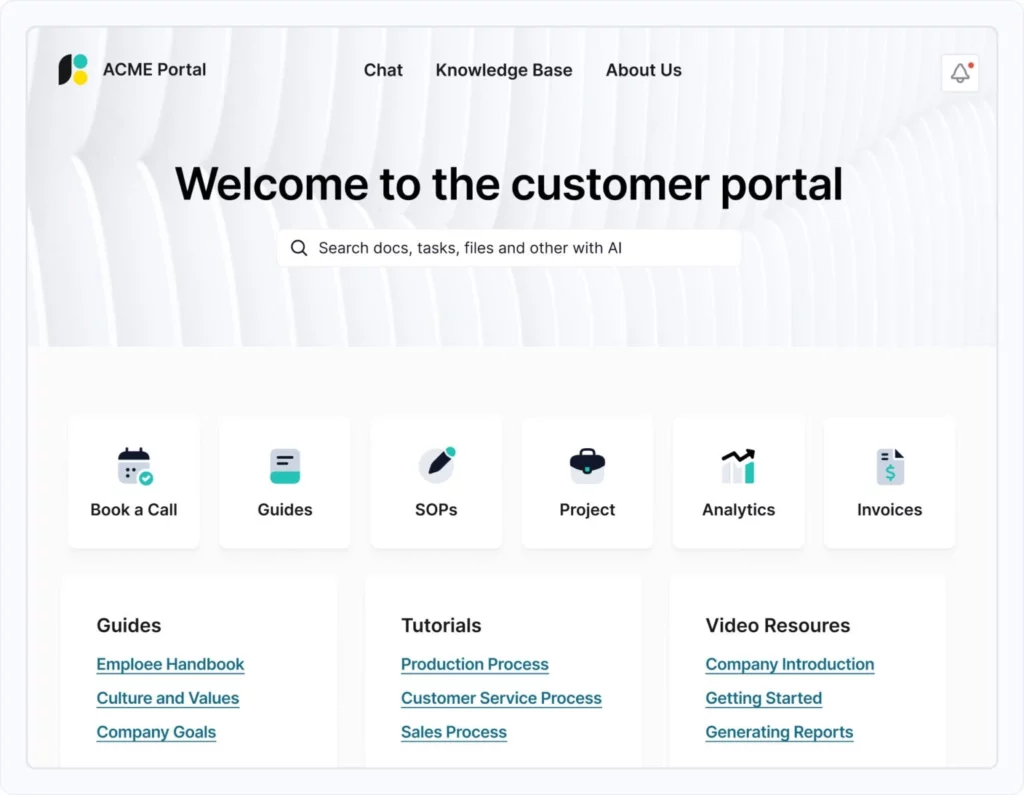
Customer portal. Image powered by FuseBase.

At first glance, the client portal and the customer portal may seem similar. However, they are not synonymous. They serve different purposes and are useful in different scenarios.

A client portal is a private, personalized workspace where you can onboard clients, interact with them one-on-one, and support them throughout their entire journey. Clients can use the portal to access information, share and exchange data, and track updates. In short, client portals make it easier to provide a professional experience, build trust, and deepen relationships with your clients.

On the other side, there’s the customer portal. Customer portal software is designed to help a large number of visiting customers quickly find answers to their issues. Instead of going to the call center, they can easily access the portal to get support, view billing, and access resources. While client portals focus on relationships, customer portals focus on self-service.

Client PortalCustomer Portal
PurposeCollaboration: projects, files, communication with clientsSelf-service: tickets, FAQs, order tracking, knowledge base
AudienceAgencies, consulting, professional services, B2BSaaS, e-commerce, support teams, B2C
Core featuresWhite-label, file sharing, task management, deal rooms, approvalsTicketing, knowledge base, AI agent, omnichannel, self-service
ExamplesFuseBase, Copilot, SuiteDash, ClinkedZendesk, Freshdesk, Planhat, SupportBee

Why You Need a Modern Portal

Have you ever lost a deal because a client couldn’t find the right file, or a project stalled due to miscommunication? I’ve seen businesses waste hours chasing down email threads, resending documents, and answering the same questions over and over.

It’s not just frustrating. It’s expensive.

Before I built FuseBase, I worked with teams that thought email and shared drives were good enough. But then deadlines slipped, clients got frustrated, and deals went cold because there was no clear way to track progress. One missing document can mean a lost contract. One miscommunication can mean months of delays. I’ve seen it happen.

A client portal and customer portal change that by giving clients a single place to access everything they need. Files, updates, messages. If your clients can manage their accounts, track orders, and find key information about their issues without having to write emails or call an agent, it’s a win for both sides. The onboarding will also be quicker, since your customers don’t have to ask for status updates, write emails, or be stuck in inefficient ticketing hell.

It’s about providing clients a seamless, professional experience that builds trust and keeps business moving. If your competitors are making it easier to work with them and you’re still stuck in email chaos, you’re already behind.

💡 My Tip: Make sure your portal has features like real-time updates and easy-to-navigate dashboards. The more intuitive and accessible the portal, the less time you’ll spend chasing down information.

Buyer’s Guide

As Gartner states, more than 80% of customer service technology buyers experienced moderate to high regret with purchase decisions. So, to avoid that fate, you must understand your business’s needs and what exactly you need from the software. I’ve prepared six steps to guide you through the decision-making process.

Step 1 – Client portal or Customer Portal?

To narrow down your options, you have to understand your primary need:

  • Do you have a high volume of support tickets? Do you need to share help articles, billing data, and FAQs answers? If so, you need a customer portal.
  • Do you want to improve client satisfaction and strengthen relationships? Do you need to share deliverables, project updates, and documents? Then, you need a client portal.

Step 2 – Security is a foundational piece 

Verizon’s research shows that most breaches (68%), whether they include a third party or not, involve a non-malicious human element (weak password, error, falling prey to a social engineering attack). Also, given that the global average cost of a data breach reached $4.88 million in 2024, even minor mistakes can become extremely expensive.

So, if you want a customer to leave sensitive data, robust security measures are a must. Ensure the platform has:

  • Data encryption, secure authentication such as multi-factor login (MFA), and access control.
  • Compliance with data protection industry standards such as HIPAA and GDPR.

Step 3 – Integration depth

According to Gartner, only 22% of customers start, stay, and resolve their issues entirely using first-party company channels. And more than half (51%) of all customer journeys now begin on third-party platforms. To meet client expectations while still keeping everything connected, the platform should support third-party integrations. Check for:

  • Open APIs
  • AI technologies
  • Integrations with billing tools, CRMs, and popular everyday tools like Slack.

Step 4 – User experience and design

In 94% of cases, users base their first impressions on website design. A well-designed portal and good user experience can dramatically increase engagement and satisfaction.

  • Look for software that allows you to tailor the look and feel of the portal’s appearance and add (or remove) features whenever you need.
  • Look for custom domain, logo, colors, and terminology per account.
  • Test UX, not just the admin panel. The platform should be intuitive, not only for you, but also for your customers.

Step 5 – Cost

It’s essential to invest in a high-quality portal. Still, it’s important to find software that fits within your budget.

  • Look for a platform with flexible pricing and consider the long-term value.
  • Check out the full cost (setup, seats, white-label, overage).

Step 6 – Test before scaling

Run a pilot on a single client and gather the feedback before scaling up.

Additional step for Customer Portals

Power up your knowledge base and ticketing with AI Agents

As was stated before, only 14% of customer service and support issues are fully resolved in self-service. To change that, you need to improve the performance of self-service continuously. AI Agents could drastically help with that.

  • A knowledge base is a single searchable source of information for customers embedded in your portal. AI Agents are one step above a typical knowledge base, as they learn from failed or unanswered questions, suggest content gaps, and summarize long documents with links to specific paragraphs and citations.
  • Tickets are the next step if customers can’t find what they need in the self-service portal. An AI Agent can optimize this process so that each ticket takes less time and is better structured. The ticketing system with the Agent can validate intake before submission, route the issue to the right team based on priority and account context, and summarize threads, setting up flags for sentiment and risk, while reminding owners before SLA can slip.

Quick Comparison Table

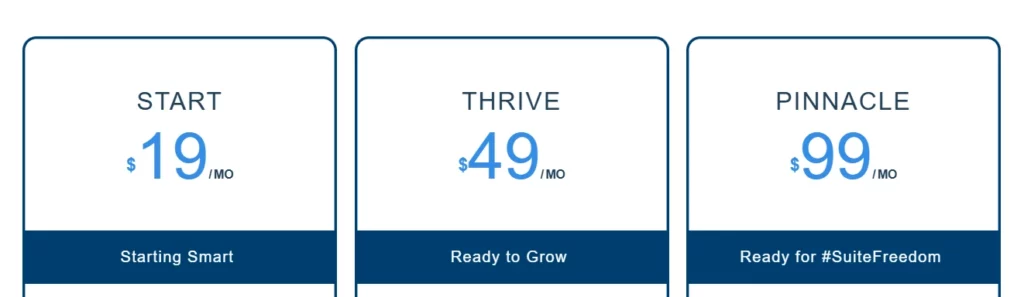
Client Portal SoftwareBest forUnique featurePricing starts fromG2 Rating
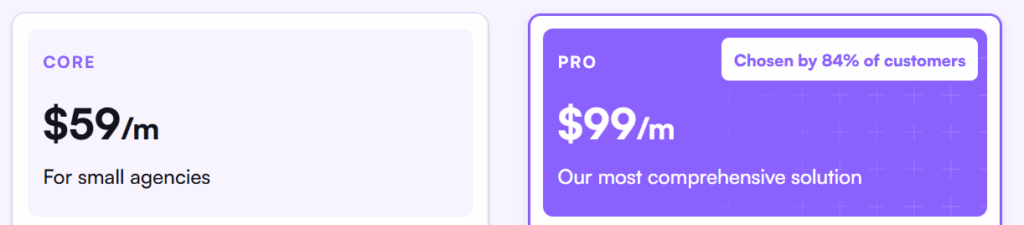
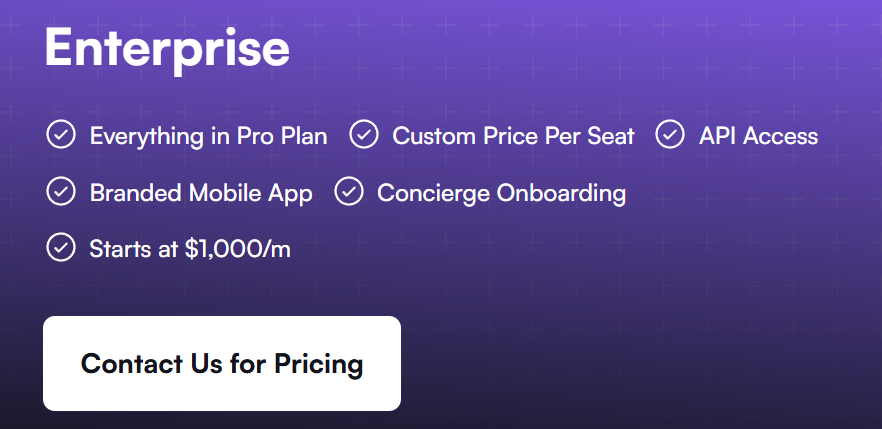
FuseBaseDigital agencies and consulting servicesAI agent system & AI apps (vibecoding) + Full white-labeling$0/per month4.7/5
TaskipFreelancers and small agencies managing multiple clientsAll-in-one client portal, task boards, invoicing, and proposals in one platform$0/per month4.8/5
OneSuiteAgencies, freelancers, and service businessesCRM and client management connected to the portal$9/per user per month4.8/5
Assembly (Copilot)Law firms and SMBsClient portal + custom CRM platform$39/per month4.8/5
SuiteDashMarketing and creative agenciesDynamic Data Dashboards$19/per month4.8/5
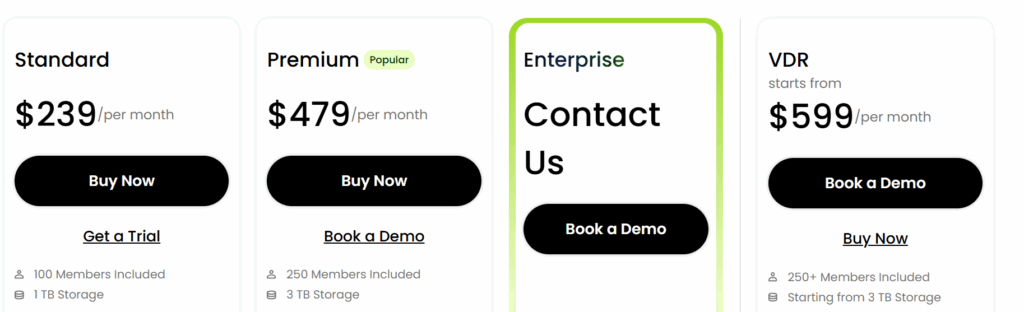
ClinkedAccounting and finance industriesDocument-centric portal with advanced security$239/per month4.8/5
MoxoProfessional servicesIntelligent workflow orchestration$200/per month4.5/5
ManyRequestsCreative agenciesSmooth client request workflow$59/per month4.5/5
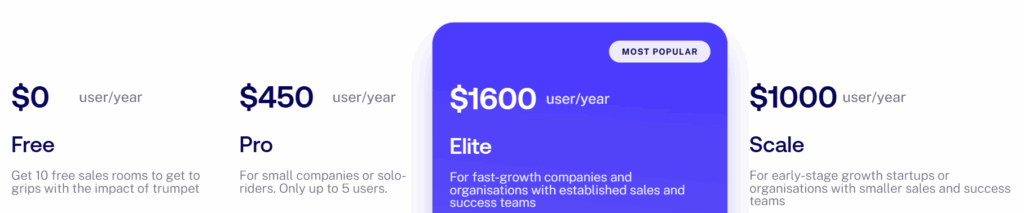
TrumpetSales and marketing teamsDigital sales rooms$0/per month4.7/5
Zoho CRMSales teamsZia AI Assistant$0/per month4.1/5
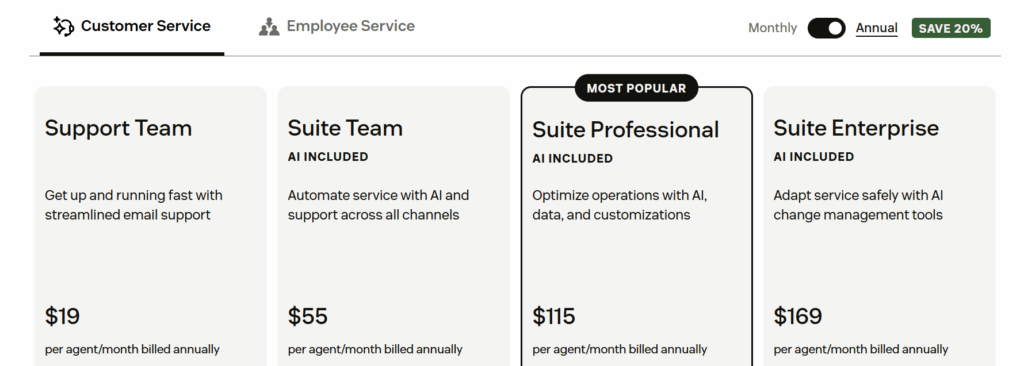
ZendeskOmnichannel support teams at scaleAI-powered ticketing system$19/per month4.3/5
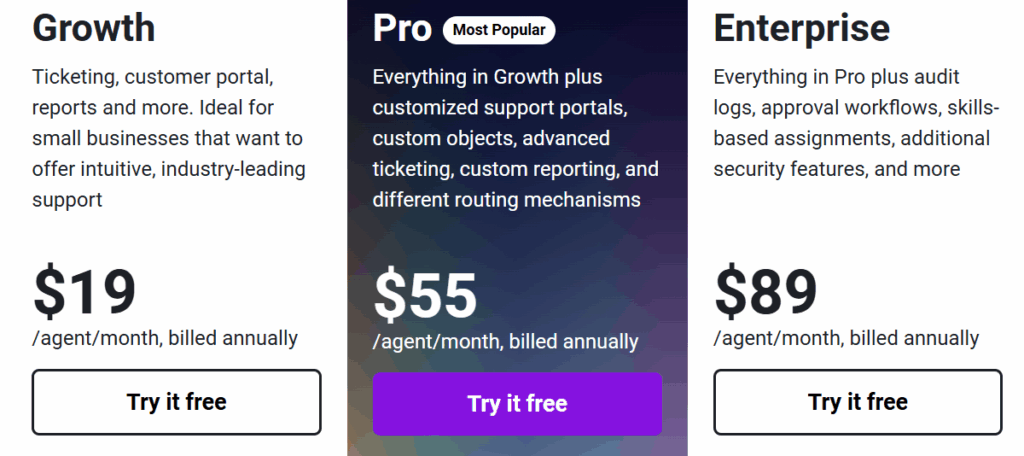
FreshdeskMid-market support teamsBranded help centers$19/per month4.4/5
PlanhatCustomer success teamsTime Series data modelcustom pricing4.5/5
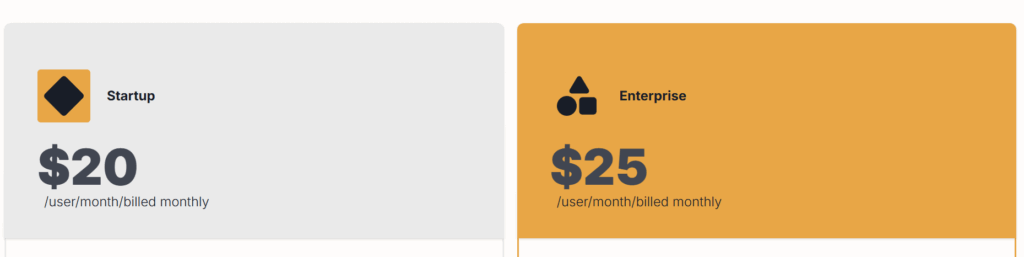
SupportBeeSmall businesses and SMB support teamsWhite-labeled emails$20/per month4.2/5
SuperOkayBranding agencies and freelancersSimple approval workflow$0/per month4.6/5
PlutioFreelancers and small businessesEnd-to-end freelancer workflow chaining$19/per month4.3/5
DubsadoPhotographers, coaches, and event plannersSmart contract builder$35/per month4.3/5
Client Portal.io (WordPress)WordPress-based organizationsLightweight portal layer for an existing WordPress site$25/per month–
KnackAdvisory firmsSelf-service payment feature$59/per month4.3/5
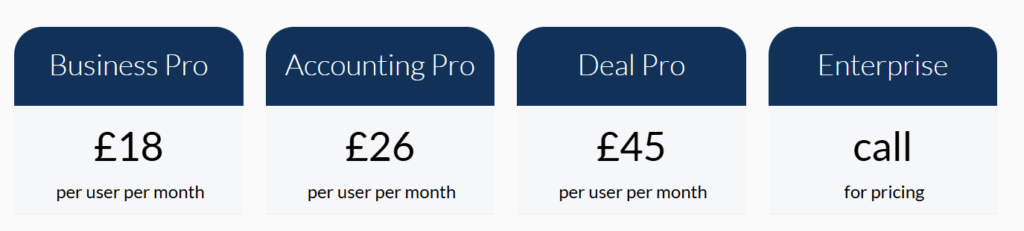
MyDocSafeAccounting and bookkeeping firmsBuilt-in compliance workflows€19/per user per month3.9/5
Ideagen Collaboration PortalRegulated industriesGovernment-grade external collaborationCustom price4.2/5
TaxDomeAccounting, tax prep, and bookkeeping companiesTax organizers system$800/per year per seat4.7/5

Deep Dive: Top 22 Client and Customer Portal Solutions by Categories

All-in-one Client Portals for agencies, consulting services, and SMBs
1. FuseBase

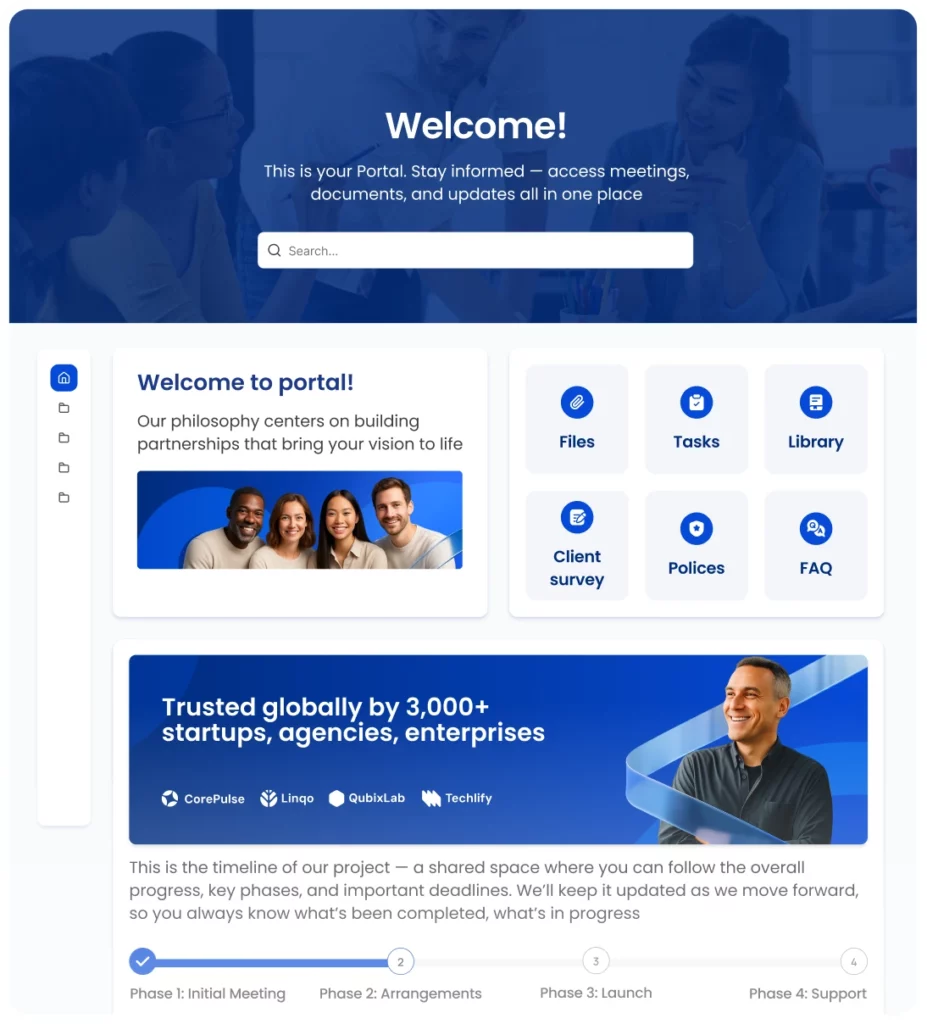
FuseBase client portal interface 2026. Image powered by FuseBase.

Best for: Digital agencies and consulting services.

Category: Client Portal & Customer Portal.

FuseBase is great for small- and medium-sized businesses that seek an affordable, flexible solution with advanced features.

Key features:

  • AI agents that help with onboarding, support, project tracking, compliance, and more
  • Built-in CRM dashboards
  • Meeting notes & transcribe feature

The “2026 Edge”: Over the past few months, the FuseBase team has launched Custom Databases, more automations, Meeting Dashboards, and, most importantly, AI Coding (Vibe-coding). The last feature helps you build your own functionality for portals, for internal use, or as standalone apps.

Pros:

  • Fully branded portals (custom domain, logo, colors, content, etc.)
  • Clients can upload invoices/other documents and sign them
  • The initial setup of external and internal knowledge bases takes up to 5 minutes
  • Enterprise-Grade Security: SSO, 2FA, and encryption keep your data protected

Cons:

  • High learning curve for advanced automation features
  • The mobile app hasn’t been updated for a while

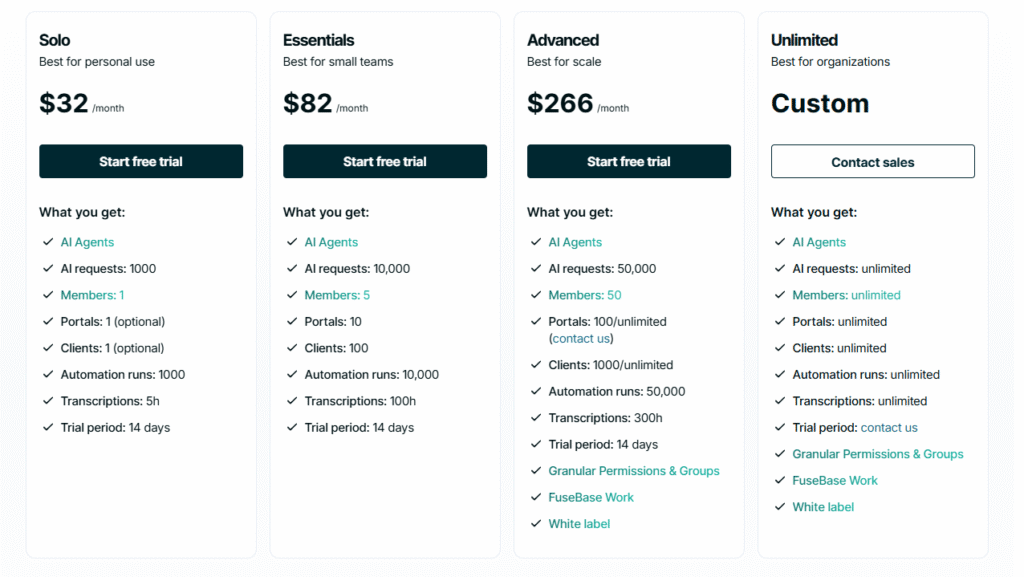
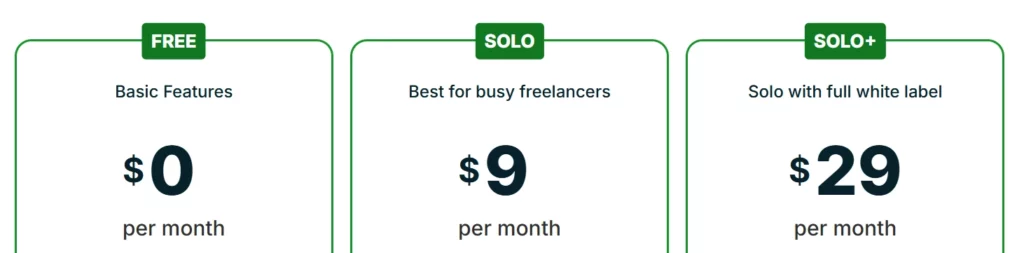
Pricing:

FuseBase pricing. Image powered by FuseBase.

What users on G2 say:

What I find most useful is the sleek style and use of the client portals. It is web based, and operates almost like a personalized website with a login. Customer support has always been responsive. I have contacted support multiple times throughout the year, and always received a quick and professional response.
Patrick J., Owner / Broker

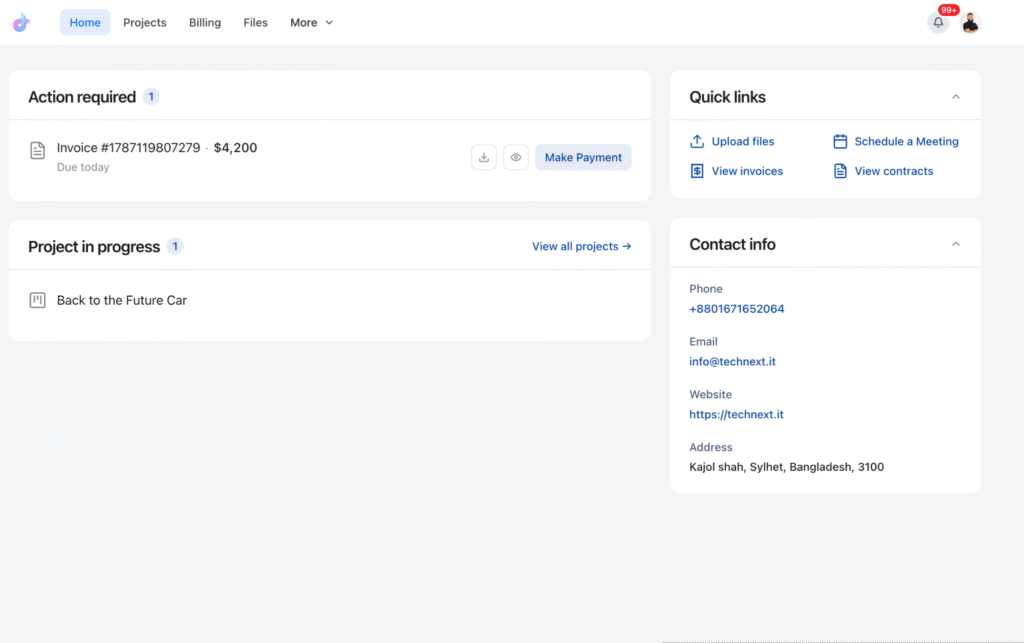
2. Taskip

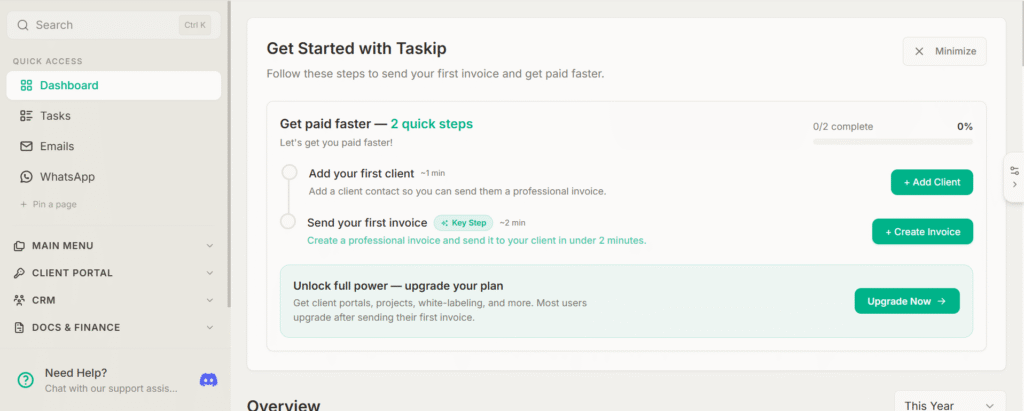
Taskip client portal 2026. Image powered by FuseBase.

Best for: Freelancers and small agencies managing multiple clients.

Category: Client Portal

Taskip is a client and project management platform built for freelancers and service-based agencies who want to run client work, invoicing, and communication from one place instead of juggling separate apps for each.

Key features:

  • Kanban-style task boards with custom workflows and team assignments
  • Built-in invoicing, proposals, and payment tracking
  • CRM and sales pipeline tracking alongside project delivery

Pros:

  • Combines client portal, task management, and invoicing in one platform
  • Reduces the number of separate tools an agency needs to run client work – I used Taskip and just 1 other tool
  • Automation for repetitive processes like onboarding
  • Branded client portal for project visibility, file sharing, and communication

Cons:

  • Couldn’t share projects and control access levels in the portal on a free plan

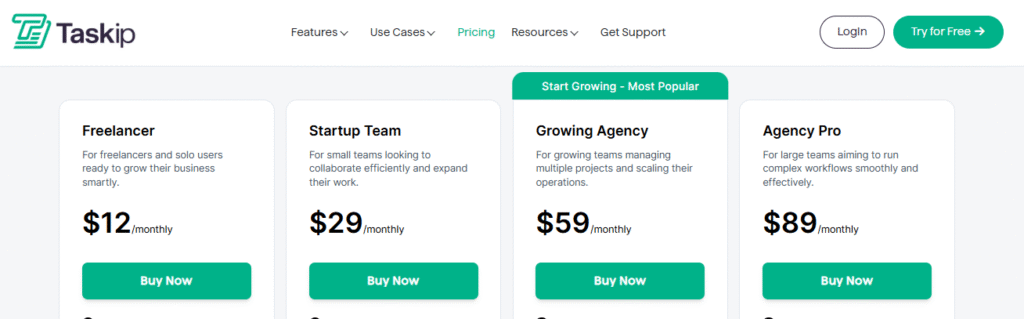
Pricing:

Taskip Pricing. Image powered by FuseBase.

What users on G2 say:

The interface is clean and intuitive, task management feels smooth and straightforward, and the collaboration features work flawlessly. The time tracking is accurate and easy to use, which makes it simple to stay on top of what’s being done. Overall, everything feels well thought out, dependable, and genuinely reliable.
Aminul I., CEO

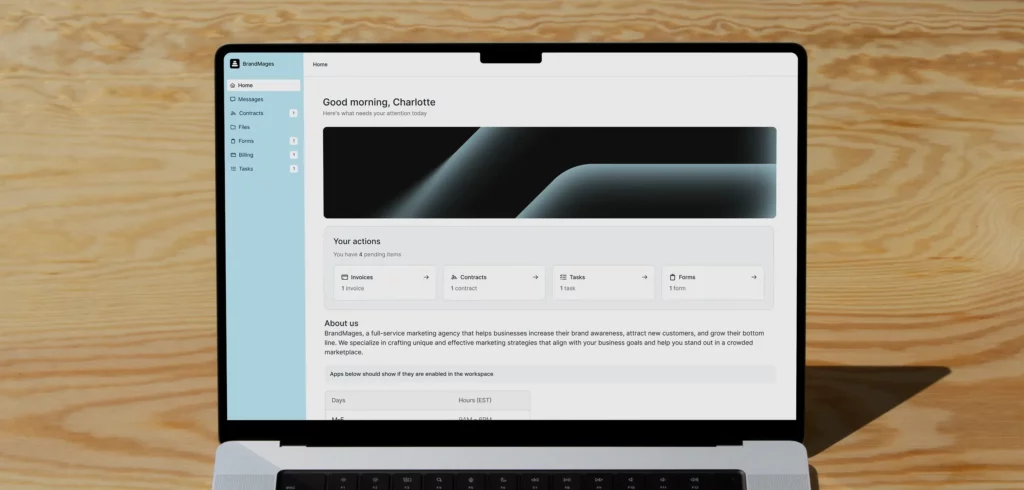
3. OneSuite

OneSuite client portal interface 2026. Image powered by FuseBase.

Best for: Agencies, freelancers, and service businesses.

Category: Client Portal.

OneSuite is a client portal and client management platform built for agencies, freelancers, and service businesses. It gives clients one branded space to track project progress, share files, review and sign documents, submit requests, communicate with the team, and pay invoices.

Key features:

  • Branded client portal with custom access controls
  • Invoices, recurring billing, and online payments
  • CRM and client management connected to the portal

The “2026 Edge”: OneSuite expanded its client portal so clients can upload files, access assigned Google Drive or OneDrive folders, and book meetings directly. It also added native time tracking, timesheet approvals, invoice generation from approved hours, and QuickBooks integration.

Pros:

  • Keeps CRM, projects, documents, billing, and the client portal connected
  • Clients can handle updates, files, signatures, requests, and payments independently
  • Didn’t run into any limitations for clients, projects, invoices, and documents
  • Flat-rate plans include multiple team members
  • Client portal access does not carry an additional per-client fee

Cons:

  • No free plan
  • No dedicated mobile app
  • Initial setup took me 20 minutes longer than usual

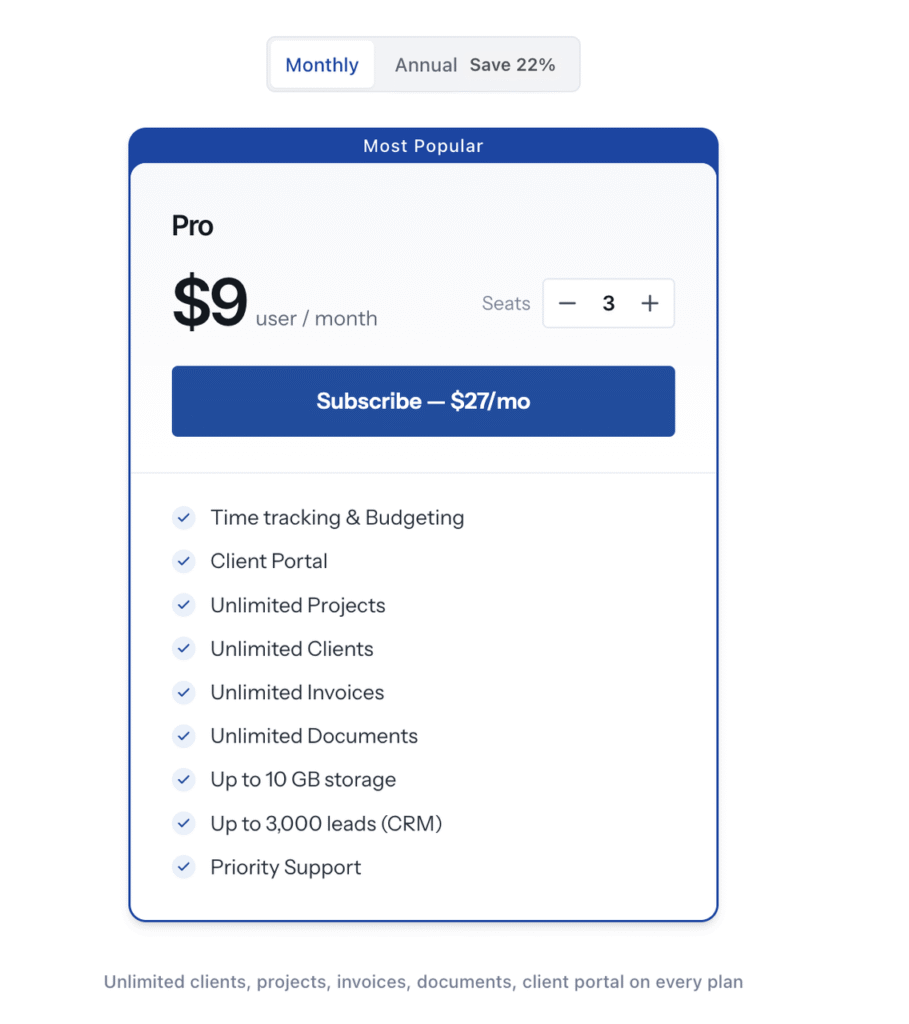
Pricing:

OneSuite Pricing. Image powered by FuseBase.

All plans include a 14-day free trial.

What users on G2 say:

I appreciate OneSuite for its excellent customer support and comprehensive features for a client portal. It helps save a lot of time by being a central place to access everything, like files, track tasks, and stay updated on project timelines.
Srikar V., Founder

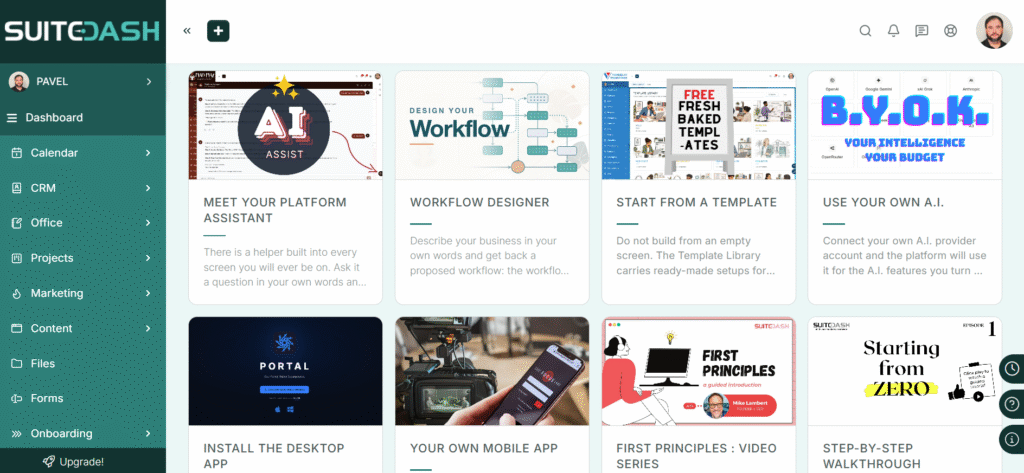
4. Assembly (Copilot)

Assembly (Copilot) client portal interface 2026. Image powered by FuseBase.

Best for: Law firms and SMBs.

Category: Client Portal.

Assembly (Copilot) is great for teams that need a unified and secure place for messaging, file sharing, billing and subscriptions, e‑signatures, and a CRM.

Key features:

  • Enterprise-grade security, including SOC 2 compliance, GDPR, CCPA, and HIPAA compliance
  • Client portal + custom CRM platform
  • Contracts API to assign contracts to clients and use contract submission data in workflows

The “2026 Edge”: In March, the Assembly team introduced Assembly 2.0 with more customizability, time-based automations, and the ability to organize your apps into folders and to associate a task with a client.

Pros:

  • With Assembly’s theme settings, I customized the brand assets, fonts, colors, and sign-in experience in under 10 minutes
  • Google SSO & Magic links, allowing clients to complete actions seamlessly without a password
  • Modular apps like messaging, billing, forms, and help desks
  • Audit trails provide proof of contract access, review, and signature

Cons:

  • Pricing can get expensive as you grow
  • Not the best option for data-heavy client reports with 100+ data points

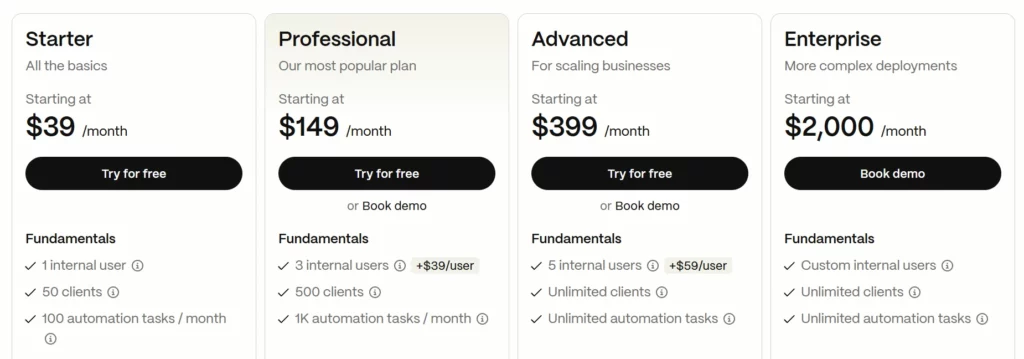
Pricing:

Assembly (Copilot) Pricing. Image powered by FuseBase.

What users on G2 say:

The onboarding experience for my clients is quick and seamless. I can set rules that save me time. Billing and invoicing is also made easy and I like that I can use it as my primary platform to communicate with clients and keep track of outstanding tasks.
Aminder M., Founder

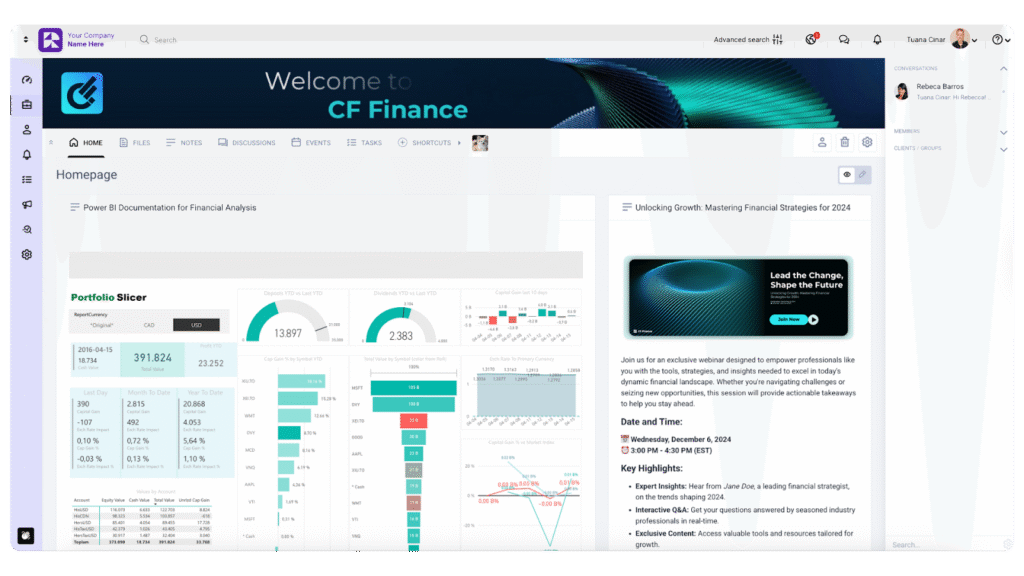
5. SuiteDash

Suitedash client portal interface 2026. Image powered by FuseBase.

Best for: Marketing and creative agencies.

Category: Client Portal & Customer Portal.

Suitedash is ideal for companies that need to manage their customer relations, client communications, project management, and invoicing.

Key features:

  • White-labeled mobile app
  • Dynamic Data Dashboards
  • Paid Portal Access

The “2026 Edge”: One of the newest features is “WORLDs” – a secure, self-contained environment that allows you to silo resources, CRM data, and important processes while maintaining unified branding and control.

Pros:

  • All-in-one customer and project management solution
  • Affordable solution, considering how much it offers
  • I applied the German language set, letting clients switch between English and German interfaces. Other available sets include French, Spanish, Italian, and more
  • The platform assistant guides through setup and suggests what to do next

Cons:

  • UI feels cluttered when managing multiple client spaces
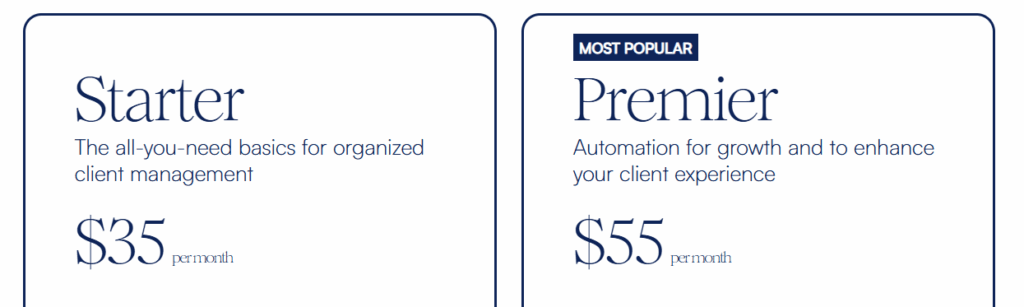
  • Setting everything up can feel overwhelming if you’re not familiar with CRMs or automation tools

Pricing:

Suitedash pricing. Image powered by FuseBase.

What users on G2 say:

What I like best about SuiteDash is having so many parts of my client management in one system. I can manage my CRM, client onboarding, client portal, invoicing and automations without having to rely on several separate platforms.

Verified User in Marketing and Advertising

Project & Collaboration for B2B projects and professional services
6. Clinked

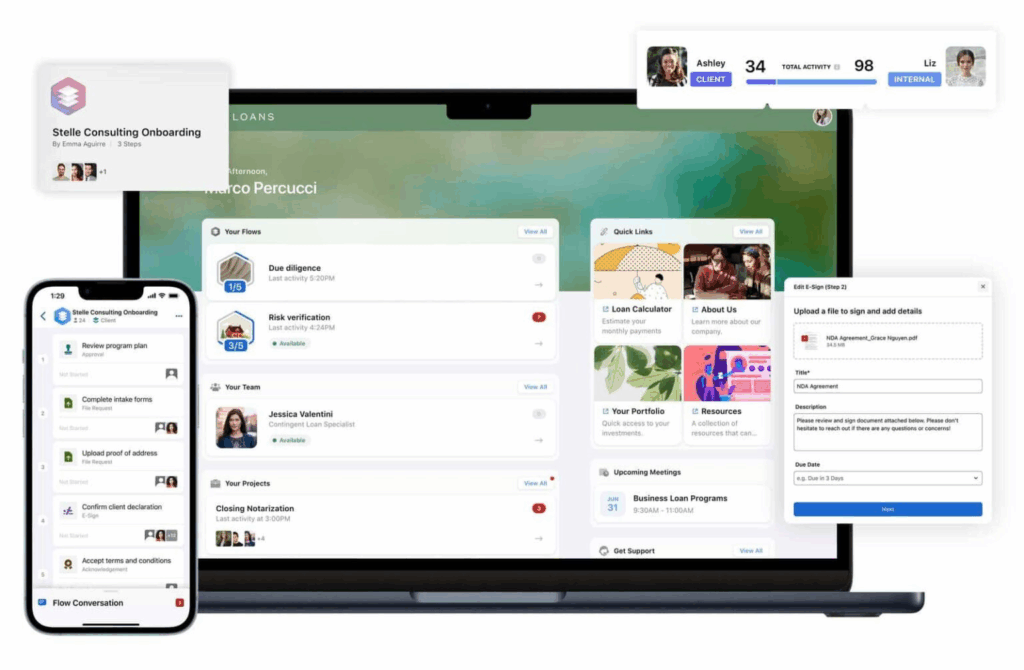
Clinked client portal interface 2026. Image powered by FuseBase.

Best for: Accounting and finance industries.

Category: Client Portal.

Clinked usually works best for teams and businesses that need advanced document management and collaboration under one roof.

Key features:

  • Version control for documents
  • ES-256 encryption and GDPR/HIPAA compliance
  • Document Watermarking

Pros:

  • Pretty intuitive interface, so it’s easy to use
  • Simple file management
  • Self-service options help teams resolve customer queries
  • Mobile client portal access; however, not all admin tools are available on mobile

Cons:

  • Pricey starting point if you have a small team
  • Reporting could be expanded for more detailed operational insights

Pricing:

Clinked pricing. Image powered by FuseBase.

What users on G2 say:

Clinked provides a secure and professional client portal that makes it easy to collaborate with record labels, managers, and business partners in one centralized place. We use it to store and share documents, manage tasks, track events, and maintain structured communication without relying on scattered emails or file-sharing tools.
Christian K., Company Owner

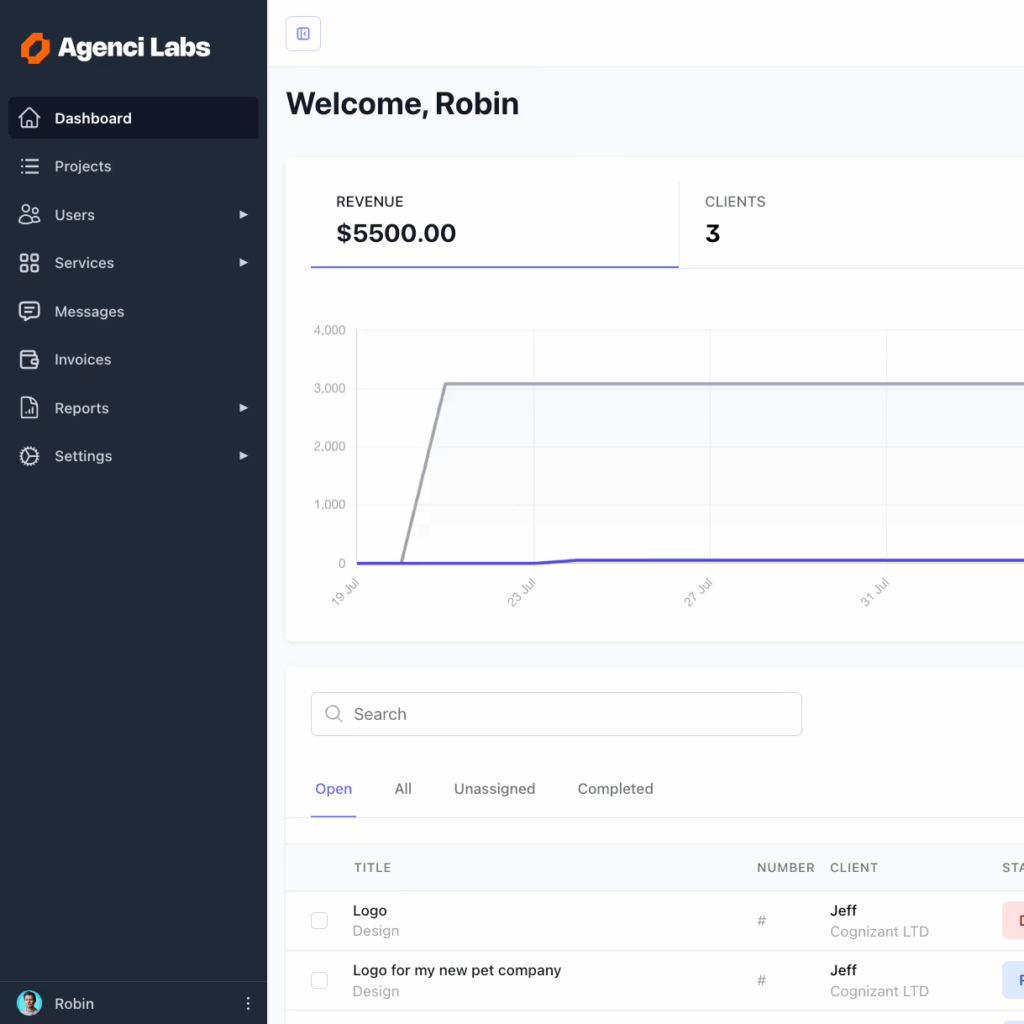
7. Moxo

Moxo client portal interface 2026. Image powered by FuseBase.

Best for: Professional services.

Category: Client Portal.

Moxo is an excellent solution for businesses seeking to improve collaboration and customer success on external projects involving customers, vendors, and partners.

Key features:

  • Intelligent workflow orchestration
  • Personal productivity dashboard
  • Advanced email template customization

The “2026 Edge”: At the beginning of the year, Moxo introduced “Start Link” as a more flexible approach to launching client-initiated workflows. They also extended voice message recordings to a maximum of 10 minutes.

Pros:

  • AI checks for completeness, accuracy, formatting, and compliance the moment a submission comes in
  • APIs, SDKs, and embedding capabilities
  • Templates for revenue operations (RevOps), onboarding, clinical ops, vendor management, audit, and more
  • I set up a service workflow clients could start through a link or QR code, with participants and roles already assigned

Cons:

  • Hard to integrate the tool with multiple third-party tools
  • Pricey for growing teams

Pricing:

Moxo pricing. Image powered by FuseBase.

What users on G2 say:

Moxo has been a game-changer for our team’s onboarding process. Before we implemented it, we had to rely on a number of manual steps and scattered tools to get new partners onboarded, which was both time-consuming and prone to bottlenecks. With Moxo, we now have a streamlined, centralized platform where all of our onboarding documents and workflows live.

Matt H., Sales Support Specialist
8. ManyRequests

ManyRequests client portal interface 2026. Image powered by FuseBase.

Best for: Creative agencies.

Category: Client Portal.

ManyRequests is a reliable option for video, marketing, or design agencies that need a one-stop place for communication, requests, and orders. 

Key features:

  • Smooth Client Request workflow
  • Flexible billing and invoicing
  • Service catalogs (packages)

The “2026 Edge”: As for the new capabilities, ManyRequests added “Control Service Quantities”, better Zapier attachments, “Unified balance calculations”, and more.

Pros:

  • Built-in proofing with versioning
  • I used client impersonation to check which requests, files, and invoices were visible in the client’s portal
  • Conversion tracking to measure performance
  • Client CRM built for service businesses

Cons:

  • Limited when managing 50+ active tasks across multiple projects
  • Aimed only at a creative agency niche

Pricing:

ManyRequests pricing. Image powered by FuseBase.

What users on G2 say:

It has almost all the customization options we require, time tracking, checklists, ticketing, and feedback from our clients, which helps us to combine everything in one place.

Sharon J., CEO

CRM & Deal Rooms for sales teams and account managers

💡 My Tip: When it comes to sales rooms, it’s much more efficient if you can tailor them to each sales stage. Organized deal rooms speed up decision-making and improve overall client experience (especially when you’re working with SMBs, Mid-Market, or Enterprise clients).
9. Trumpet

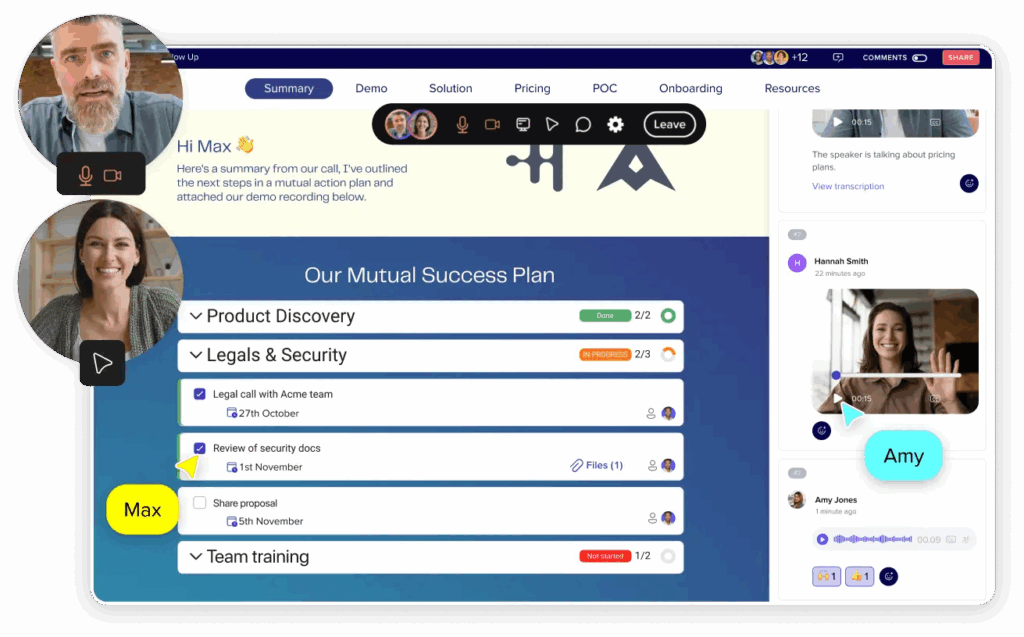
Trumpet client portal interface 2026. Image powered by FuseBase.

Best for: Sales and marketing teams.

Category: Client Portal.

Trumpet is best for sales funnel, including cold outreach, proposals, deal rooms, and demos.

Key features:

  • Digital sales rooms
  • CRM-powered personalization
  • Mutual Action Plans

The “2026 Edge”: This year, Trumpet rolled out some improvements for MAPs: a new snapshot progress tracker, Mutual Action Plan dashboard, bulk editing, advanced filters and searches, and more.

Pros:

  • AI CMS recommends the right content for every stage and persona
  • Trumpet interprets engagement, predicts deal health, and guides next steps
  • Easily integrated it with my CRM, call tools, and media vaults
  • In-depth permissions and team management

Cons:

  • It is not a complete client portal and lacks ticketing and a KB with citations
  • While it offers a free plan, the first viable paid option is rather costly

Pricing:

Trumpet pricing. Image powered by FuseBase.

What users on G2 say:

Trumpet is intuitive, highly customizable, and genuinely great to look at. It takes a scattered pile of resources and information and turns it into a “north star” for the client that is clear, easy to digest, and fully on-brand. One of my favourite features is the visitor insights and analytics you get from every pod because it’s useful to see how prospects are actually engaging with the content.

Mika S., Sales Enablement Manager
10. Zoho CRM

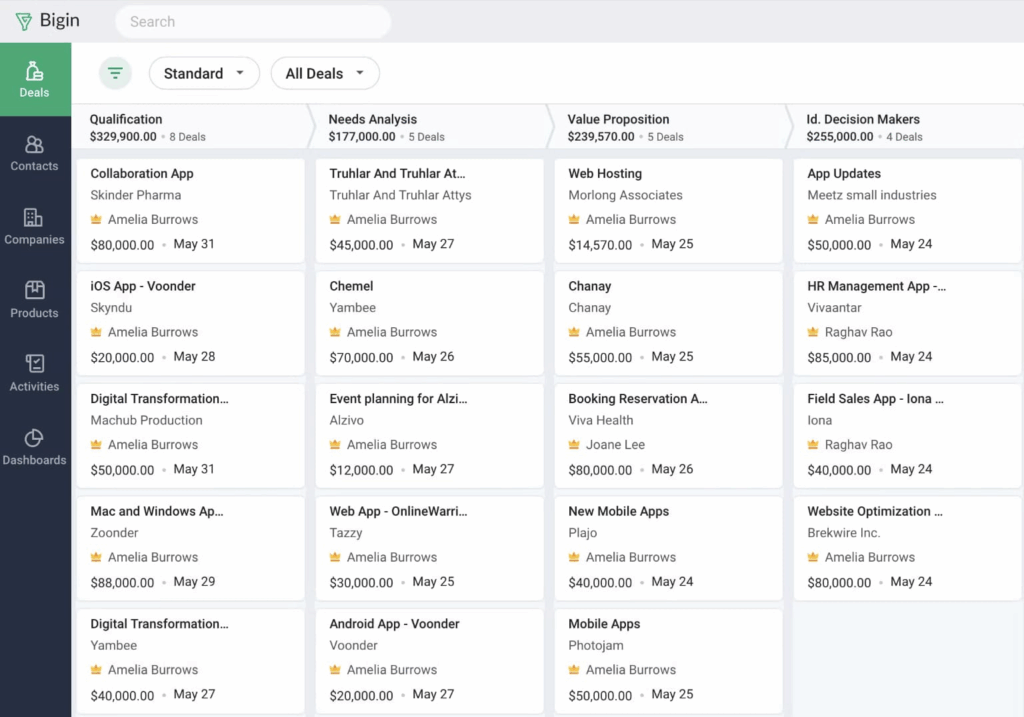
Zoho CRM client portal interface 2026. Image powered by FuseBase.

Best for: Sales teams.

Category: Client Portal.

Zoho CRM is ideal for businesses looking for CRM software that also serves as a client portal, primarily focused on sales and customer management.

Key features:

  • Zia AI Assistant that helps to create modules, reports, and workflows
  • Charts to understand customers’ needs and preferences
  • Business intelligence

The “2026 Edge”: In Q1, Zoho announced several new features, including Workqueue (a centralized view into everything important that requires sales reps’ attention), Smart suggestions from Zia (personalization), and SmartPrompts (optimize various parts of daily tasks).

Pros:

  • Helps you manage sales, marketing, and support in one single repository
  • Integrates well with other Zoho products
  • AI revenue predictions provided useful sales insights during testing
  • Transform CRM data into e-catalogs

Cons:

  • Limited integrations with external, non-Zoho services
  • A large set of features made setup more time-consuming

Pricing:

Zoho CRM pricing. Image powered by FuseBase.

What users on G2 say:

The phone API with 3cx integration has been a game changer for us. It automatically syncs our calls, logs customer data and keeps our operations running in one central dashboard. We also really like the workflows and automation features, which help us take care of our clients after the sale.

Tyler Q., Director of Business Development

Customer Self-Service for support teams, SaaS, and B2C
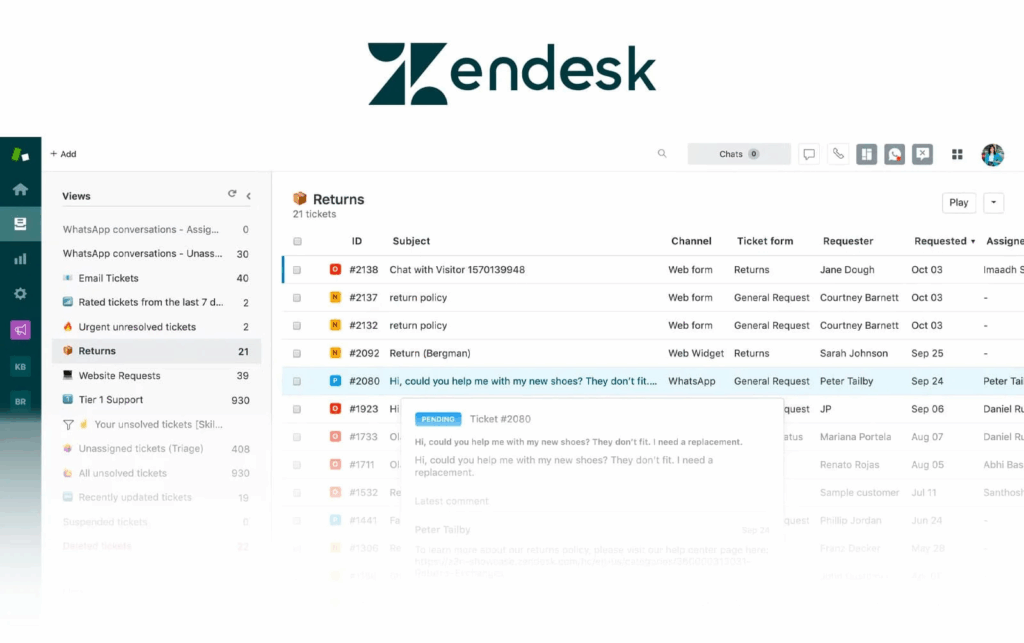
11. Zendesk

Zendesk customer portal interface 2026. Image powered by FuseBase.

Best for: Omnichannel support teams at scale.

Category: Customer Portal.

Zendesk is a customer portal tool that offers an enterprise-grade support platform for high-volume, omnichannel ticketing.

The “2026 Edge”: In 2026, Zendesk team released some powerful updates, including AI translation support for outgoing messages on all async ticket channels, Conversation Journey Tab in the reporting dashboard (visualizes the conversation flows between customers and your advanced AI agents), and automatic integration between advanced AI agents and Zendesk messaging.

Key features:

  • Zendesk’s network of AI agents that are purpose-built for service
  • AI-powered ticketing system
  • Inbound and live calls assistants

Pros: 

  • Omnichannel solution with unified ticketing for emails, chats, social, and voice
  • Help center with article management, labels, and versioning
  • AI Answer Bot helped to identify customer intent and suggested relevant answers
  • AI-powered tools for generating articles, editing, and translating

Cons:

  • Tiered, per-agent pricing with advanced AI and analytics priced separately
  • Multiple menus and settings make navigation feel complex compared with simpler helpdesk platforms

Pricing:

Zendesk CRM pricing. Image powered by FuseBase.

What users on G2 say:

Instagram, WhatsApp, and Facebook messages all land in the same Agent Workspace as regular tickets, any available agent can pick it up instead of one specific person being the bottleneck. The unified customer profile thing has helped too, someone DMs on Instagram then later emails about the same issue, and it’s linked as the same person instead of looking like two separate customers.

Alex M., Senior Property Inspector
💡 Read more posts on this topic:
  • Top 10 Partner Portals in 2025: Tried, Tested, and Ready for Your Team
  • Top 10 Vendor Portals in 2025: My Expert Picks

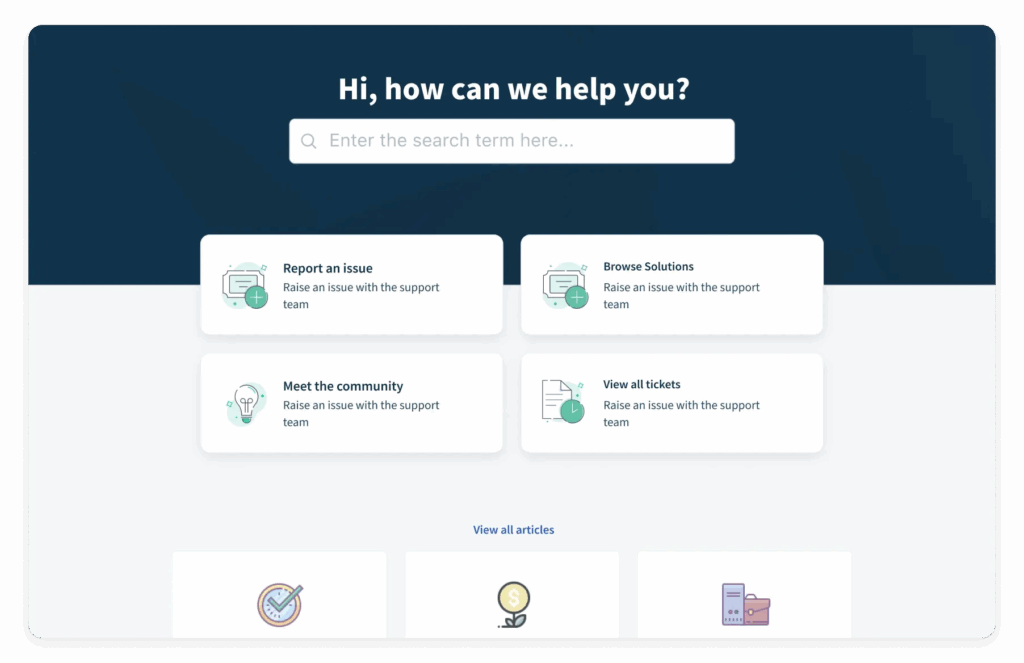
12. Freshdesk

Freshdesk customer portal interface 2026. Image powered by FuseBase.

Best for: Mid-market support teams.

Category: Customer Portal.

Along with the no-code setup, powerful ticketing, and a branded knowledge base, Freshdesk offers an intuitive customer portal for customers to submit and track requests.

The “2026 Edge”: In the last few months, Freshdesk launched New IT Asset Management, integration with Adobe Acrobat Sign, and a centralized Documents List View.

Key features:

  • Freddy AI that deflects repeated questions, suggests responses, and surfaces insights
  • Branded help centers where customers can find answers fast
  • Smart routing, automatically

Pros:

  • I set up a no-code portal in 7 minutes with minimal admin work
  • Intuitive omnichannel ticketing with SLAs, automations, and collision detection
  • Strong marketplace with integrations
  • Vertical AI Agents and 50+ prebuilt agentic workflows

Cons:

  • I noticed slower loading when working with large ticket queues
  • Although it has strong reporting, it’s less flexible than enterprise tools

Pricing:

Freshdesk pricing. Image powered by FuseBase.

What users on G2 say:

I appreciate its automation feature, knowledge base integration, and multi-channel support, which improve productivity and enhance the overall customer experience. I also like Freshdesk because it is easy to use, helps me manage customer tickets, and offers automation features that make customer support faster and more organised.

Aditya S., Technical support Engineer
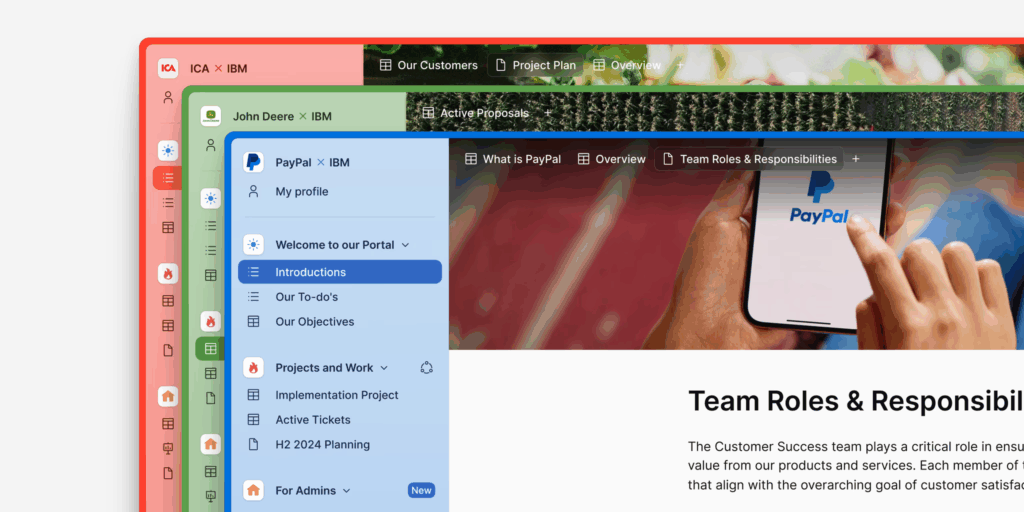
13. Planhat

Planhat customer portal interface 2026. Image powered by FuseBase.

Best for: Customer success teams.

Category: Customer Portal.

Planhat is a customer success platform created for teams that want to share success plans, renewal timelines, and QBR materials with customers.

The “2026 Edge”: Planhat introduced some new features like Planhat Labs, Ratio Widgets for Time Series, and the ability to create and customize Portals through Automations.

Key features:

  • Data Semantics to make automation smarter
  • Time Series data model that captures every customer signal as a timestamped event to create a complete chronological picture of the customer journey
  • Health Lab to analyse the trajectory of customer behaviour across time-series data

Pros:

  • Strong CS-native portal for sharing success plans, usage dashboards, and renewals
  • Integrates with CRM, product analytics, billing, and other BI systems
  • Strong reporting and analytics capabilities
  • I adapted the workspace to our process without changing the underlying workflow

Cons:

  • Not a help center, and it lacks a robust knowledge base
  • I couldn’t create or manage support tickets directly in Planhat, so an external helpdesk integration is required

Pricing: custom pricing.

What users on G2 say:

Planhat has proven to be an intuitive and highly effective Customer Success platform for our organization. Its user-friendly design, combined with functionality tailored specifically for our Customer Success Managers, has enabled rapid adoption and streamlined day-to-day operations.

Ibrahim C., Senior Director Client Success Operations
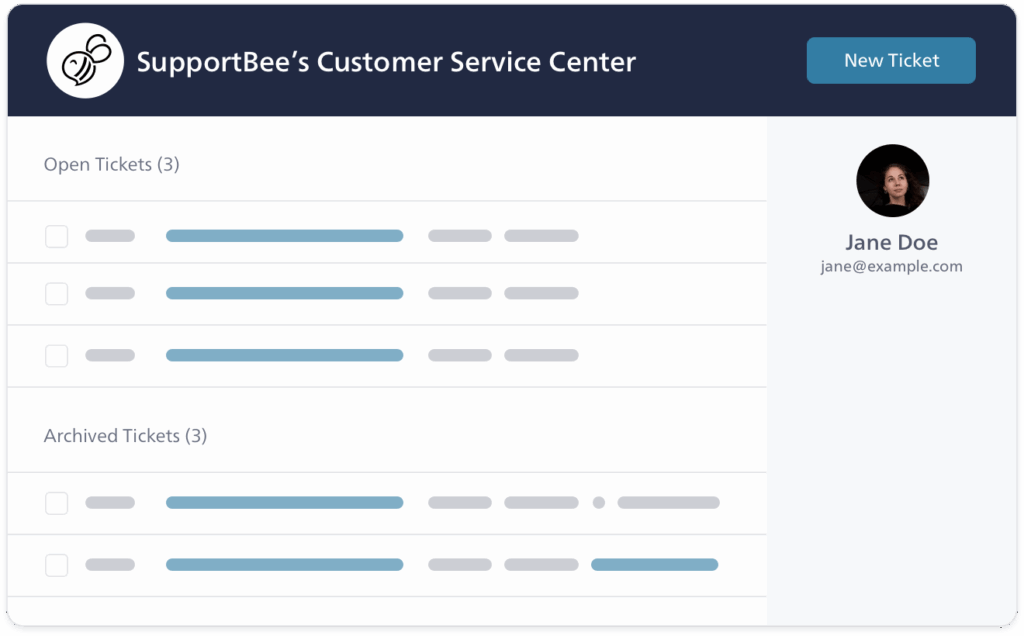
14. SupportBee

SupportBee customer portal interface 2026. Image powered by FuseBase.

Best for: Small businesses and SMB support teams.

Category: Customer Portal.

SupportBee is great for small support teams that need a branded knowledge base and a minimal portal for customers to submit and track requests.

Key features:

  • White-labeled Emails
  • Knowledge Base integrated with the ticketing system
  • Ability to embed your Knowledge base in your website

Pros:

  • The core ticketing workflow took about 15 minutes to learn
  • Comments, assignments, and drafts happen inside the ticket, not in separate chat threads
  • Email-first workflows aimed at SMB teams
  • The customer portal shows every support request in one place

Cons:

  • Analytics, SLA, and routing are not as sophisticated as in more robust solutions
  • AI doesn’t cover as much of the intake process as expected

Pricing:

SupportBee pricing. Image powered by FuseBase.

What users on G2 say:

Does a few things very well. Lightweight support solution, lightweight knowledge base that can be deployed to a custom URL. Ability to set organizational access (everyone in a group can access each other’s tickets, etc), and assign tickets to various members of our support staff.

Andrew J., Operations Lead

Billing & Freelancer for creative agencies and freelancers
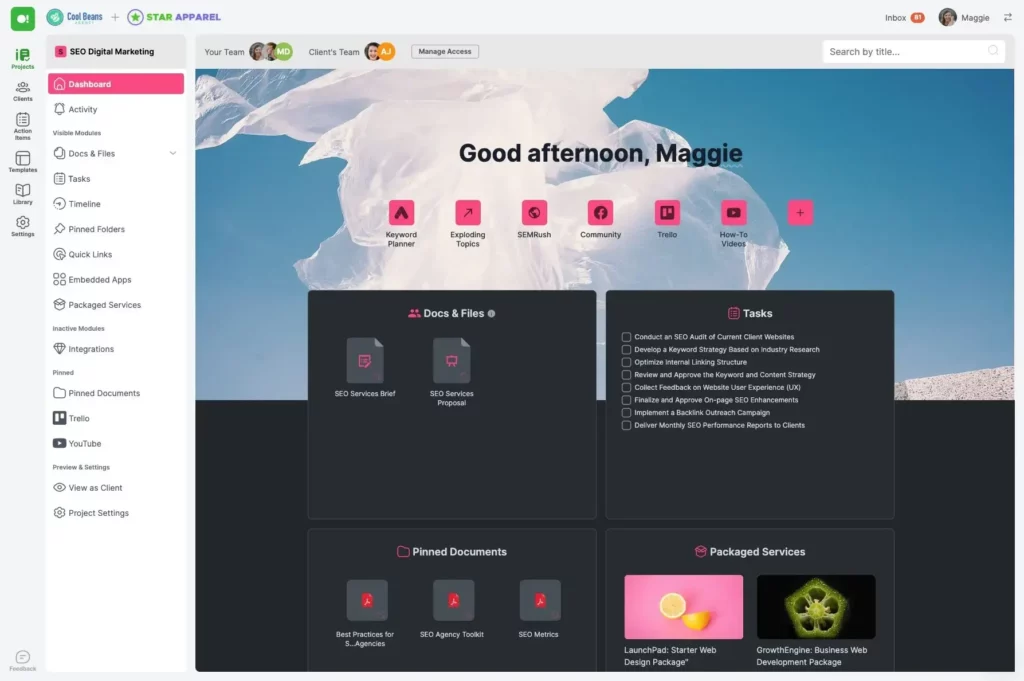
15. SuperOkay

SuperOkay client portal interface 2026. Image powered by FuseBase.

Best for: Branding agencies and freelancers.

Category: Client Portal.

Superokay is a client portal tool that’s perfect for digital agencies, software studios, and freelancers who want to manage client interactions better.

Key features:

  • Packaged services
  • Approval workflow
  • Team bios for your key people that you can easily include in Proposals

Pros:

  • Affordable pricing
  • Ready-made templates gave me a starting point for project portal, brand and identity design brief, scope change approval, and project discovery proposal
  • Create case studies of your past work, add client testimonials, and reuse them
  • Integrations with major apps like Airtable, Miro, or Figma

Cons:

  • Limited functionalities and customization
  • I couldn’t find a built-in 2FA option for account login

Pricing:

Superokay pricing. Image powered by FuseBase.

What users on G2 say:

The interface is intuitive, the design is sleek, and the features offered allow you to structure projects well, centralize documents, and facilitate communication. I particularly appreciate the ability to create personalized briefings and have a shared space with the client, which makes exchanges more fluid and transparent.

Philippe P., Local Leader UX – Interaction Design Foundation
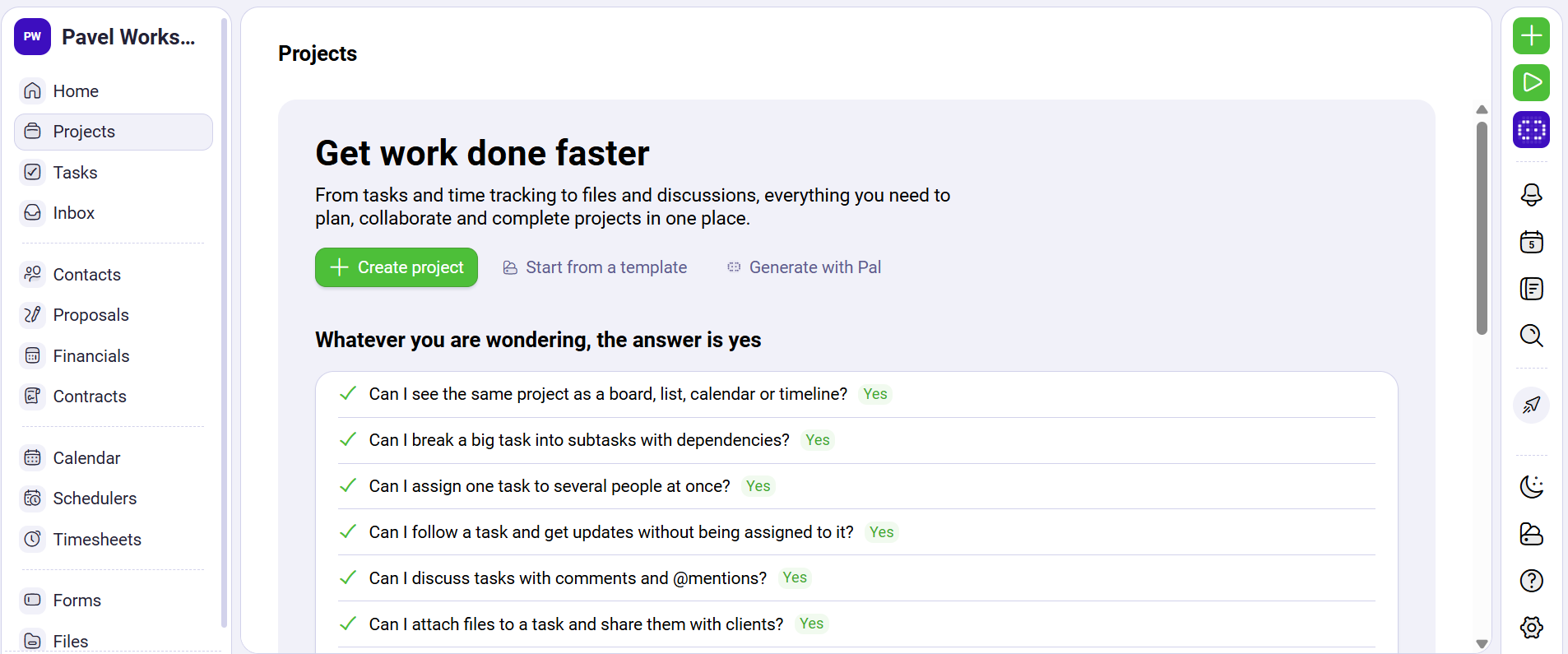
16. Plutio

Plutio client portal interface 2026. Image powered by FuseBase.

Best for: Freelancers and small businesses.

Category: Client Portal.

Plutio is a perfect fit for teams and freelancers who need a flexible, customizable solution to manage projects, clients, and payments without technical expertise.

Key features:

  • End-to-end freelancer workflow chaining
  • Unlimited projects, proposals, and contracts
  • Plutio Timesheets to make time-tracking easy

Pros:

  • Different views, such as kanban, cards, list, table, timeline, and calendar
  • Custom project stages and task fields let me organize client work around my existing process
  • Templates for projects, tasks, forms, invoices, proposals, and more
  • Automatically create or renew project tasks

Cons:

  • Customization options are somewhat limited compared to larger platforms
  • I had to invite a test client and log in separately to check the portal experience, since there’s no built-in “preview as client” mode

Pricing:

Plutio Pricing. Image powered by FuseBase.

What users on G2 say:

From project management and client communication to invoicing, proposals, scheduling, and time tracking — it really simplifies the chaos of juggling multiple apps. I’ve used the platform for years to manage projects, send proposals and invoices, and manage client subscriptions.
Mark D., Business Consultant

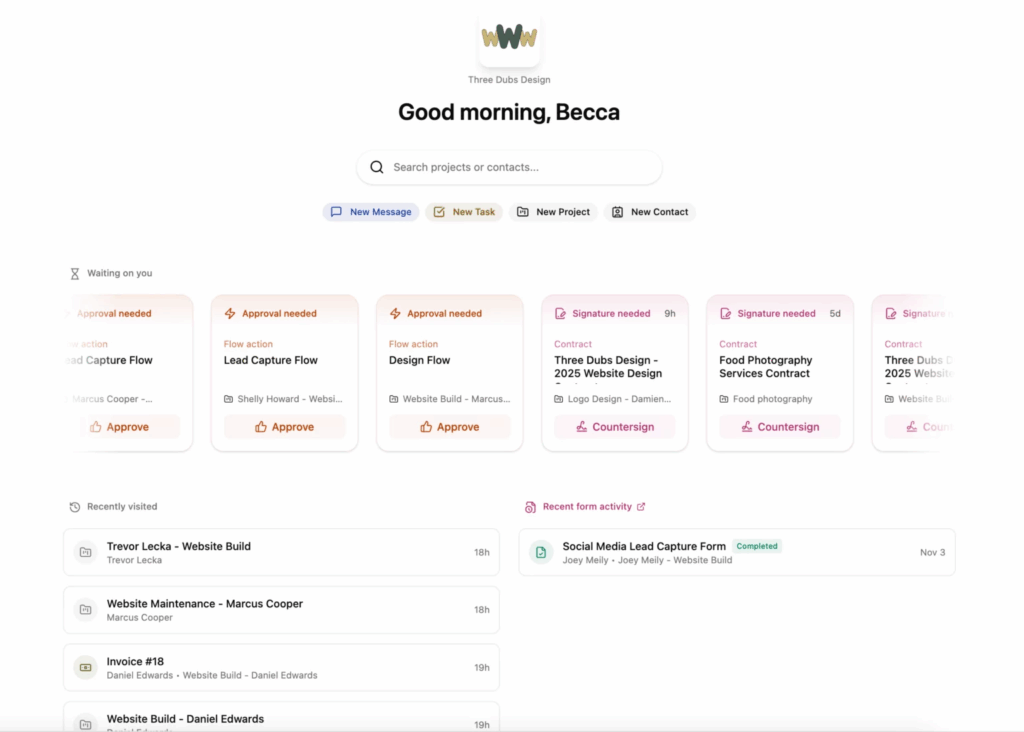
17. Dubsado

Dubsado client portal interface 2026. Image powered by FuseBase.

Best for: Photographers, coaches, and event planners.

Category: Client Portals.

Dubsado is best for creative service businesses that need an all-in-one client management solution. 

Key features:

  • Smart contract builder
  • Easy scheduling
  • Professional welcome packets for smooth onboarding

The “2026 Edge”: The last Dubsado updates include “Xero tax and income category mapping”, “Smart fields in invoice terms”, and “Form response summary”.

Pros:

  • Custom lead capture forms, questionnaires, and surveys
  • Smart field auto-population for a smoother client experience
  • Goal setting and business metrics, including projected income
  • I applied the same flow to several projects at once and Dubsado skipped projects that already had it

Cons:

  • Sharing a task board to the portal exposes every task on it to the client. I couldn’t hide individual tasks within a shared board
  • I had to compress PDFs larger than 8 MB before uploading them

Pricing:

Dubsado pricing. Image powered by FuseBase.

What users on G2 say:

It’s brilliant for keeping contracts, invoices, scheduling and time tracking all in one place. The first time I sent a proposal to a client, it was accepted, contact signed and invoice paid within 5 minutes of me sending it.

Verified User in Graphic Design
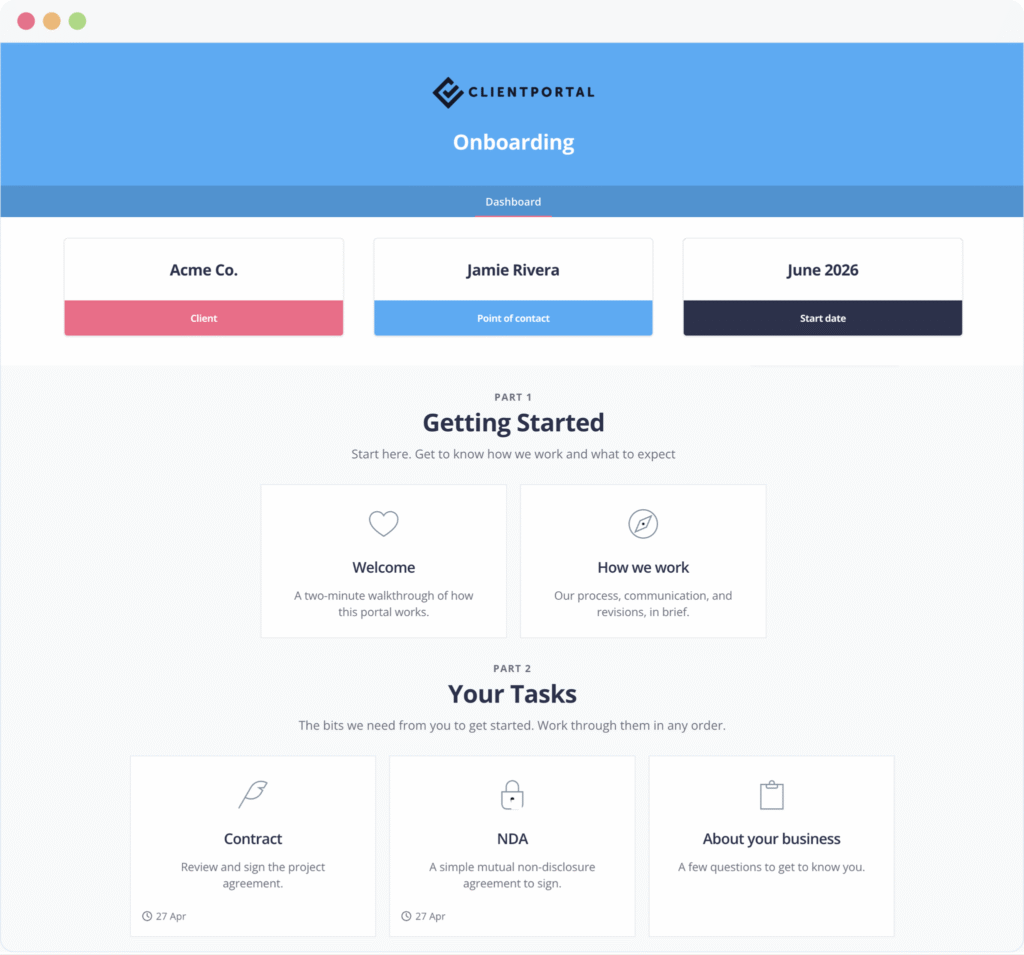
18. Client Portal.io (WordPress)

Client Portal.io (WordPress) client portal interface 2026. Image powered by FuseBase.

Best for: WordPress-based organizations.

Category: Client Portals.

Client Portal.io is a WordPress plugin, so it’s a good option for teams that use WordPress and need a lightweight portal.

Key features:

  • Unlimited portals and clients
  • Client Portal works with any WordPress theme
  • Self-registration for a portal and auto-creation

The “2026 Edge”: In 2026, Client Portal.io launched a template gallery with ready-made portals for onboarding, coaching, consulting, web design, and more.

Pros:

  • Flexibility in terms of modules you can add
  • Clean and simple UI
  • Onboarding took 12 minutes from signup to inviting my first client
  • Daily or weekly digest notifications

Cons:

  • I ran into login loops and failed uploads until I excluded portal pages from caching
  • Limited to client portal features, nothing else

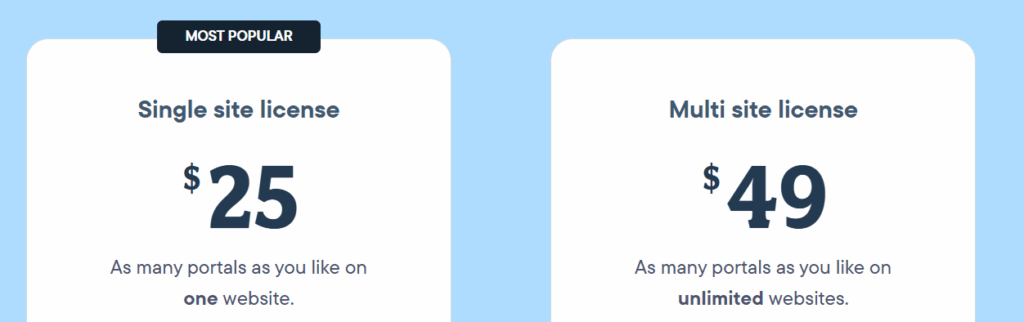
Pricing:

Client Portal.io (WordPress) pricing. Image powered by FuseBase.

DIY/No-code for teams with custom needs
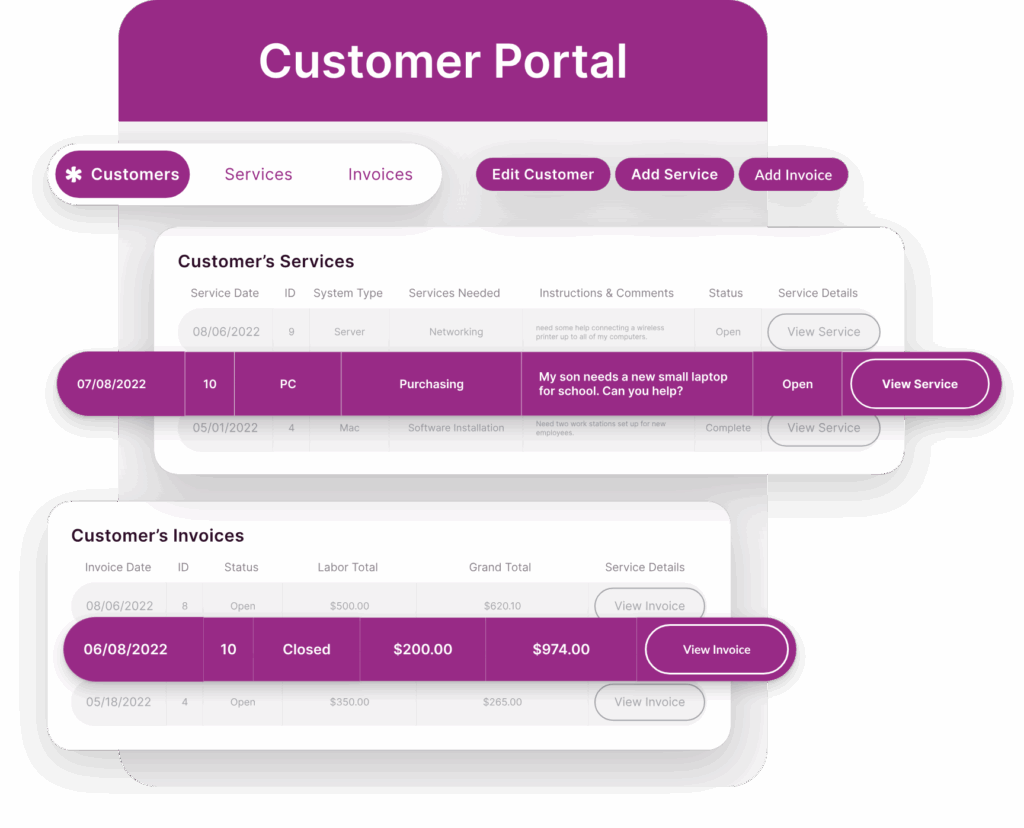
19. Knack

Knack client portal tool 2026. Image powered by FuseBase.

Best for: Advisory firms.

Category: Client Portal and Customer Portal.

Knack is a strong choice for businesses that keep a lot of data and need to build portals, databases, or customized apps.

Key features:

  • Self-service payment feature
  • Use Case-specific reporting
  • Enterprise-grade database with relationships, validation rules, and automatic scaling

The “2026 Edge”: Knack launched several new features, such as “Test as User” to improve understanding of the user experience, Shopify Integration to support scalable e-commerce, and Knack Health to support healthcare teams.

Pros:

  • Build a custom app in 70 minutes with Knack’s AI Builder
  • Flexible user roles & permissions
  • 500+ SaaS integrations
  • Business Logic Engine (conditional logic, automated calculations, multi-step approval processes)

Cons:

  • My Excel import kept the calculated values but dropped the formulas, so I had to rebuild the calculations in Knack
  • Certain standard features (like duplicate removal) are not native, which can be challenging

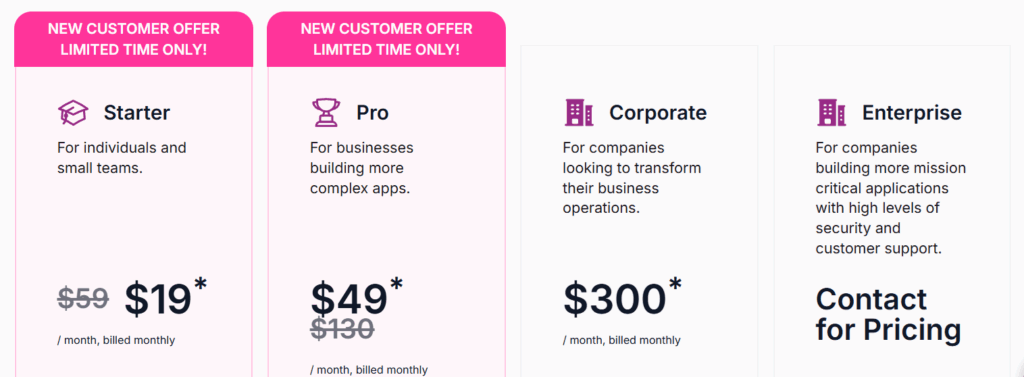
Pricing:

Knack pricing. Image powered by FuseBase.

*Valid for the first 3 months and new customers only.

What users on G2 say:

Knack has streamlined our workflows by letting us build custom apps without heavy dev work. The integrations with other tools make connecting our systems straightforward, and performance stays reliable even as our data grows. Overall it’s been a solid ROI given the pricing for the features we get.

Vineet S., Data Analysts

Document & Compliance for regulated industries, accounting, and legal teams
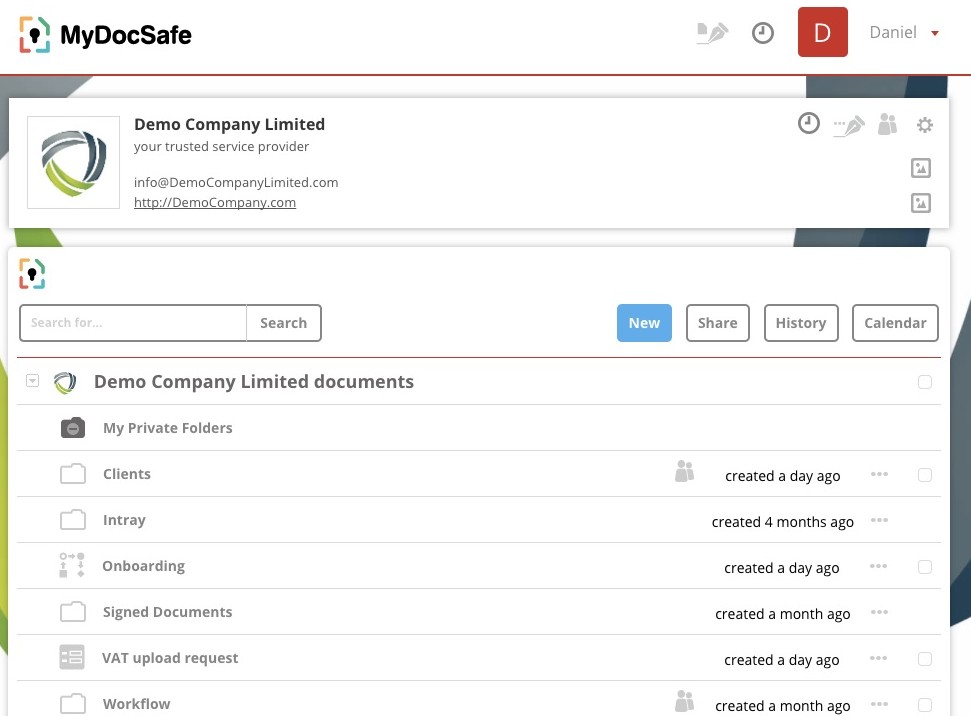
20. MyDocSafe

MyDocSafe client portal interface 2026. Image powered by FuseBase.

Best for: Accounting and bookkeeping firms.

Category: Client Portals.

MyDocSafe is an optimal choice for companies that need to design and deploy their own client onboarding processes, virtual data rooms, automated forms, and file requests.

Key features:

  • Built-in compliance workflows
  • GDPR permissions
  • ID verification tests

The “2026 Edge”: In 2026, MyDocSafe released a powerful Practice Management designed to be simple, flexible, and deeply integrated with client portals. It includes task management, time tracker & timesheets, and task notifications.

Pros:

  • Secure cloud for storing files
  • Privacy-focused with a range of security features
  • Contract signing
  • API integration – request API keys via a self-signup portal

Cons:

  • My workflow template edits didn’t carry over to copies already sent to clients
  • Deleting a workflow template also removed its history from every client portal with a copy

Pricing:

MyDocSafe pricing. Image powered by FuseBase.

What users on G2 say:

Easy to sign multiple documents. I can do numerous documents in one shot. Speeds up the process compared to other softwares.

Tayzin M., Application Technologist
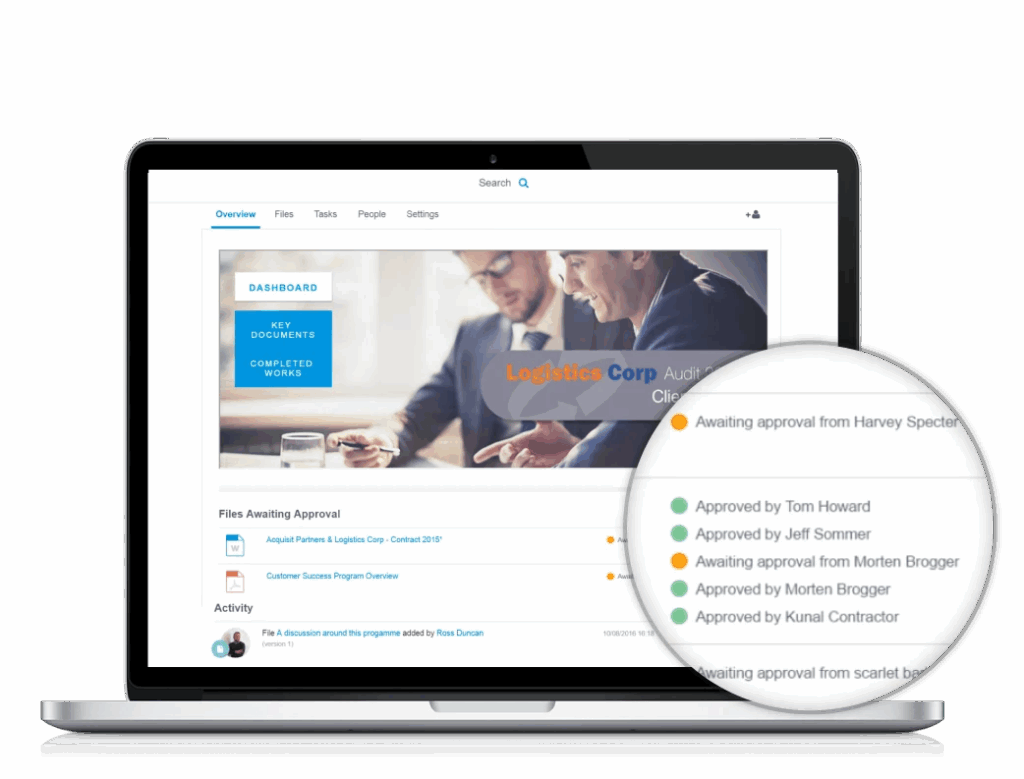
21. Ideagen Collaboration Portal

Ideagen Collaboration Portal client portal interface 2026. Image powered by FuseBase.

Best for: Regulated industries.

Category: Client Portals.

Ideagen Collaboration Portal is excellent for enterprises in regulated industries that need to collaborate securely, maintain project transparency, and manage complex documentation.

Key features:

  • Government-grade security standards
  • Compliance management tools
  • Intelligent file request and collection

The “2026 Edge”: In 2026, Ideagen enhanced search and improved reporting.

Pros:

  • Strong security features
  • Version control and audit trails for document management
  • Supports regulatory compliance for industries like healthcare, finance, and government
  • I could work on bookmarked files offline in the desktop app

Cons:

  • Limited integration options compared to other tools.
  • After updating a document, it didn’t update in all my workspaces where it was located

Pricing: Custom pricing.

What users on G2 say:

I really like the ability to task, request files, and request approval from my clients. This is a great way to keep everyone on track and ensure I have the information I need to do my job as well as possible.

Verified User in Defense & Space
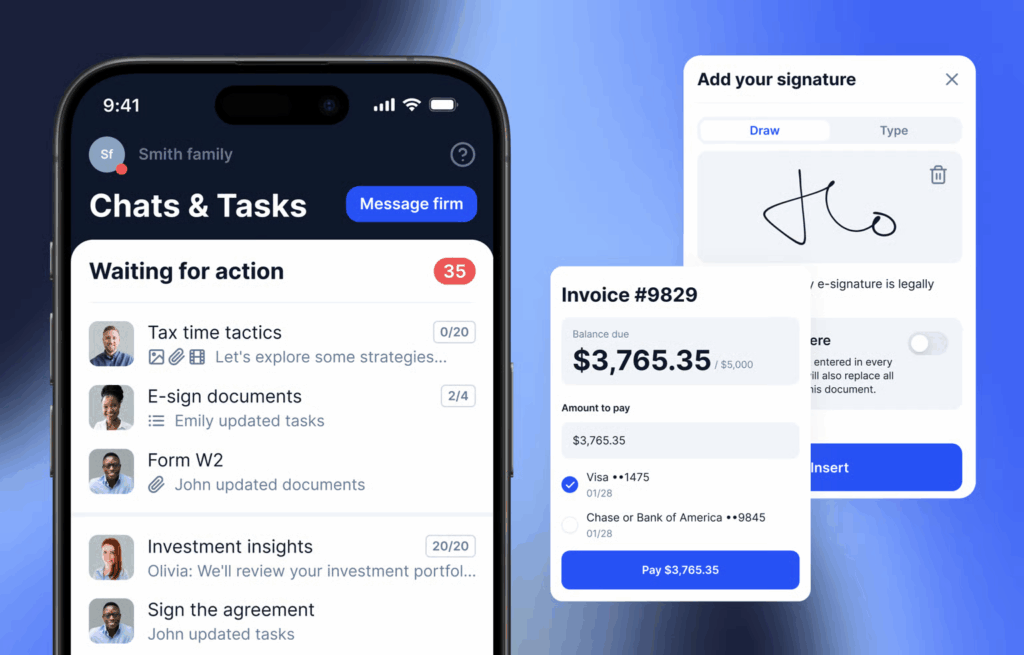
22. TaxDome

TaxDome client portal tool 2026. Image powered by FuseBase.

Best for: Accounting, tax prep, and bookkeeping companies.

Category: Client Portals.

TaxDome is a popular solution for accounting and bookkeeping companies that need a branded portal with document management, secure messaging, client management, and billing.

Key features:

  • Tax organizers system
  • E-sign
  • Built-in scanner in the mobile app

Pros:

  • Combines client portal features with accounting features
  • Powerful automations
  • Process payments with industry-leading security
  • I could let returning clients reuse previous questionnaire answers while requiring fresh responses for details that change each year

Cons:

  • Not ideal for ongoing project updates
  • It took me about 9 hours to set up the platform

Pricing:

TaxDome pricing. Image powered by FuseBase.

What users on G2 say:

TaxDome does an incredible job at making an incredibly powerful, complex software into an intuitive tool for both the firm and the clients. I recommend dedicating a significant amount of time to training or learning the automations. However, the performance has been great – and I have had no issues at all.

Sean M. G., Principal Advisor

Frequently Asked Questions

What is the difference between a client portal and a customer portal?

A client portal is a private, secure website where you can interact with each of your customers individually, share and exchange data, and track updates. It’s built to deepen the relationship and to create a personalized client experience.

A customer portal is designed to provide quick and easy access to support resources, guides, FAQs, and billing. It empowers customers to solve their own problems using a self-service portal, instead of relying on a customer service agent.

What is the best free client portal software?

Several powerful client portal tools offer a free plan, including FuseBase, SuperOkay, Zoho CRM, and Trumpet.

What features should a client portal have?

An effective client portal needs to have:

  • secure file management, delivery, and communication
  • custom branding
  • intuitive interface
  • customization options
  • reporting and analytics capabilities
  • task and project tracking
  • real‑time notifications

How much does client portal software cost?

Several tools from our list offer a free plan (FuseBase, Taskip, Trumpet, Zoho CRM, SuperOkay). Paid entry-level plans on other platforms typically start around $19-30 per month for entry-level plans.

Can I build a client portal without coding?

Sure, most of the client portal software offers a drag-and-drop builder and a no-code interface.

What is the difference between a client portal and a CRM?

CRM helps you manage and analyze client data internally, while client portals help you collaborate with clients and provide a personalized client experience.

Is a client portal secure?

Most client portal software offer security measures such as data encryption, access controls, data backup, and MFA.

Author Image

Pavel Sher

Founder and CEO of FuseBase

Pavel Sher is on a mission to give teams their time back by replacing busywork with AI agents that handle the repetitive tasks no one has time for. As the CEO of FuseBase, he has turned years of customer insights and productive teams experience into a cutting-edge collaborative portal platform. By introducing deal rooms, onboarding solutions, and knowledge-sharing features, Pavel is helping agencies and sales teams work smarter, close deals faster, and deliver exceptional client experiences. FuseBase AI Agents act as Dream Team of executive assistants that work 24/7.

Found it useful? Share the article with your community

  • Share on Facebook
  • Share on LinkedIn
  • Share on X

Related Articles

Why a Client Portal is Essential for Your Business Success
Client & Customer Portals

Why a Client Portal is Essential for Your Business Success

  • by Neel Raman
  • 1 Min read
Building a Client Portal: 8 Steps to Achieve Success
Client & Customer Portals

Building a Client Portal: 8 Steps to Achieve Success

  • by Luis P. Wadley
  • 9 Min read
Subscribe to our blog!

Get weekly tips and insights on how to grow your business

Our solutions
  • Mid-size companies
  • AI Agents (apps)
  • Deal rooms
  • White label
  • Knowledge base
Plans & Pricing
  • Pricing
Enterprise Security
  • Trust Center
    (HIPAA & SOC 2)
  • Terms & Privacy
  • GDPR
Company & Contacts
  • Templates
  • Guides
  • Roadmap
  • Privacy
  • About us
  • Reviews
  • Contact us
Compare with
  • SharePoint
  • Moxo
  • Notion
  • Confluence
  • Asana
  • Airtable
  • Monday
  • See all
Fusebase Logo
  • English
FuseBase - Client collaboration platform for professional services | Product Hunt
  • g2
  • sourceforce
  • g2
  • SOC 2 Type II
  • HIPAA
2014-2026 FuseBase is a product of Nimbus Web Inc., a Delaware company