
Skip to the content
  • Portals & collaboration

    One place to collaborate internally and externally

    • AI Agents (apps)User-friendly AI agents in minutes for every team
    • AI Agents for SalesSales President’s Club AI Agents
    • AI Agents for TeamsSecure Workspace & Agent Management for Modern Teams
    • Client PortalLevel up your collaboration with unified digital hubs
    • Deal RoomsClose faster with smart, sleek spaces for every deal
    • Knowledge BaseCreate one source of truth for clients & teams
    • Partner & Vendor portalsMaximize value from your external relationships
    • Project ManagementWork on clients’ projects without extra hurdles
    Explore portals →

    Browser extensions

    Boost your productivity with FuseBase browser extensions

    • FuseBase ClarityCapture Step-by-Step guides, SOP and tutorials
    • FuseBase AI AssistantAI Chat and Agents everywhere
    • FuseBase Voice AssistantVoice typing everywhere in your browser
    • FuseBase PRO AINote taking, Files Sharing & Collaboration

    Build professional apps

    Production-ready apps in days

    • App developmentCreate professional apps for the way your business works.

    Hosting

    Your tools, hosted by FuseBase.

    • FuseBase WorkAI coworkers with defined roles. Powered by Paperclip.
    • n8nSelf-hosted workflow automation.
    • FirecrawlSelf-hosted web data tools.
    Explore hosting →
    Portals & collaboration

    One place to collaborate internally and externally

    • AI Agents (apps)User-friendly AI agents in minutes for every team
    • AI Agents for SalesSales President’s Club AI Agents
    • AI Agents for TeamsSecure Workspace & Agent Management for Modern Teams
    • Client PortalLevel up your collaboration with unified digital hubs
    • Deal RoomsClose faster with smart, sleek spaces for every deal
    • Knowledge BaseCreate one source of truth for clients & teams
    • Partner & Vendor portalsMaximize value from your external relationships
    • Project ManagementWork on clients’ projects without extra hurdles
    Explore portals →
    Browser extensions

    Boost your productivity with FuseBase browser extensions

    • FuseBase ClarityCapture Step-by-Step guides, SOP and tutorials
    • FuseBase AI AssistantAI Chat and Agents everywhere
    • FuseBase Voice AssistantVoice typing everywhere in your browser
    • FuseBase PRO AINote taking, Files Sharing & Collaboration
    Build professional apps

    Production-ready apps in days

    • App developmentCreate professional apps for the way your business works.
    Hosting

    Your tools, hosted by FuseBase.

    • FuseBase WorkAI coworkers with defined roles. Powered by Paperclip.
    • n8nSelf-hosted workflow automation.
    • FirecrawlSelf-hosted web data tools.
    Explore hosting →
    Book a demo

    with our experts to build your custom workflow

    • Consulting Services Deliver exceptional client service
    • Financial Services Automate compliance, approvals & collaboration
    • Healthcare Secure, compliant portals for care and admin
    • Marketing & Advertising Centralize campaigns and automate client requests
    • Mid-Size companies Growing 50-1000+ employee companies
    • Professional Services Get a one-stop-shop for collaboration
    • Software & Technology Automate workflows with AI-powered portals
    • See all industries
    Book a demo

    with our experts to build your custom workflow

    • FuseBase GitHub Repos One step closer to the open-source community
    • Join FuseBase Discord AI development and autonomous agents for client-facing business
    Book a demo

    with our experts to build your custom workflow

  • Pricing
    • About us Meet FuseBase!
    • Blog Read the latest collaboration tips
    • Case Studies Explore case studies and find tailored solutions
    • Contact us Get growth advice from our experts
    • Guides Answer your FuseBase questions
    • Roadmap See what waits for you in the future
    • Trust center HIPAA & SOC 2. Trusted standards, protected data
    • Affiliate Program Would you turn down free money?
    Book a demo

    with our experts to build your custom workflow

Menu
  • Solutions ›

    Portals & collaboration

    One place to collaborate internally and externally

    • AI Agents (apps)User-friendly AI agents in minutes for every team
    • AI Agents for SalesSales President’s Club AI Agents
    • AI Agents for TeamsSecure Workspace & Agent Management for Modern Teams
    • Client PortalLevel up your collaboration with unified digital hubs
    • Deal RoomsClose faster with smart, sleek spaces for every deal
    • Knowledge BaseCreate one source of truth for clients & teams
    • Partner & Vendor portalsMaximize value from your external relationships
    • Project ManagementWork on clients’ projects without extra hurdles
    Explore portals →

    Browser extensions

    Boost your productivity with FuseBase browser extensions

    • FuseBase ClarityCapture Step-by-Step guides, SOP and tutorials
    • FuseBase AI AssistantAI Chat and Agents everywhere
    • FuseBase Voice AssistantVoice typing everywhere in your browser
    • FuseBase PRO AINote taking, Files Sharing & Collaboration

    Build professional apps

    Production-ready apps in days

    • App developmentCreate professional apps for the way your business works.

    Hosting

    Your tools, hosted by FuseBase.

    • FuseBase WorkAI coworkers with defined roles. Powered by Paperclip.
    • n8nSelf-hosted workflow automation.
    • FirecrawlSelf-hosted web data tools.
    Explore hosting →
    Portals & collaboration

    One place to collaborate internally and externally

    • AI Agents (apps)User-friendly AI agents in minutes for every team
    • AI Agents for SalesSales President’s Club AI Agents
    • AI Agents for TeamsSecure Workspace & Agent Management for Modern Teams
    • Client PortalLevel up your collaboration with unified digital hubs
    • Deal RoomsClose faster with smart, sleek spaces for every deal
    • Knowledge BaseCreate one source of truth for clients & teams
    • Partner & Vendor portalsMaximize value from your external relationships
    • Project ManagementWork on clients’ projects without extra hurdles
    Explore portals →
    Browser extensions

    Boost your productivity with FuseBase browser extensions

    • FuseBase ClarityCapture Step-by-Step guides, SOP and tutorials
    • FuseBase AI AssistantAI Chat and Agents everywhere
    • FuseBase Voice AssistantVoice typing everywhere in your browser
    • FuseBase PRO AINote taking, Files Sharing & Collaboration
    Build professional apps

    Production-ready apps in days

    • App developmentCreate professional apps for the way your business works.
    Hosting

    Your tools, hosted by FuseBase.

    • FuseBase WorkAI coworkers with defined roles. Powered by Paperclip.
    • n8nSelf-hosted workflow automation.
    • FirecrawlSelf-hosted web data tools.
    Explore hosting →
  • Industries ›
    • Consulting Services Deliver exceptional client service
    • Financial Services Automate compliance, approvals & collaboration
    • Healthcare Secure, compliant portals for care and admin
    • Marketing & Advertising Centralize campaigns and automate client requests
    • Mid-Size companies Growing 50-1000+ employee companies
    • Professional Services Get a one-stop-shop for collaboration
    • Software & Technology Automate workflows with AI-powered portals
    • See all industries
  • GitHub / Discord ›
    • FuseBase GitHub Repos One step closer to the open-source community
    • Join FuseBase Discord AI development and autonomous agents for client-facing business
  • Pricing
  • Resources ›
    • About us Meet FuseBase!
    • Blog Read the latest collaboration tips
    • Case Studies Explore case studies and find tailored solutions
    • Contact us Get growth advice from our experts
    • Guides Answer your FuseBase questions
    • Roadmap See what waits for you in the future
    • Trust center HIPAA & SOC 2. Trusted standards, protected data
    • Affiliate Program Would you turn down free money?
Sign in Book a demo Get started for free
  • Sign in
  • Book a demo
  • Get started for free
Categories
  • All articles
  • AI Agents
  • Client & Customer Portals
  • Client Collaboration & Communication
  • Comparisons
  • Customer & Self-Service
  • Knowledge Management
  • Productivity
  • Sales & Deal Management
  • Team & Project Management
  • Updates and News
TABLE OF CONTENTS

  • So, What is an AI Agent? (AI Agent Definition)
  • AI Agents vs. Other Tools: Key Differences
  • What Does an AI Agent Actually Do?
  • How We Use AI Agents at FuseBase
  • The 5 Core Components of an AI Agent
  • Why FuseBase Agents Are Different
  • Four Use Cases You Can Launch Today
  • What’s Coming Next?
  • Frequently Asked Questions
  • Home
  • Blog
  • AI Agents...
  • What Is an AI Agent? (Definition, Components & How to Use Them)
AI Agents

What Is an AI Agent? (Definition, Components & How to Use Them)

  • by Pavel Sher
  • May 22, 2025
  • 12 Min read

When I first started exploring AI, I kept hearing the term agent thrown around but no one seemed to explain what it actually meant. It was everywhere.

On product pages, in pitch decks, in demo calls. “We use agents for this,” “our agents can do that,” and yet… no real explanation of what an agent actually is.

So, I started digging.

💰 According to Sellers Commerce, AI agents are gaining momentum fast. The market is already worth $7.38 billion and projected to grow nearly 7x by 2030, reaching $47.1 billion.

Why the surge? Because they’re not just chatbots, they’re changing how businesses operate, automate, and scale.

This article is the guide I wish I had when I started, a clear breakdown of what AI agents actually are, what makes them different from just another chatbot, and how they work behind the scenes. I’ll also show you how we’re using a custom AI agent at FuseBase to automate workflows, streamline onboarding, and make the experience better for our users.

“I’ve taken the secure, branded portals you already love and turbo-charged them with always-on AI Agents that live inside your FuseBase workspace, inside every client portal, inside a lightning-fast browser extension, and inside our Zapier-style Automation Hub.” – Pavel Sher, FuseBase CEO

By the end, you should have a solid understanding of how AI agents work and more importantly, how to think about using one in your own product or workflow.

So, What is an AI Agent? (AI Agent Definition)

💡 At its core, an AI agent is just software that can make decisions and take actions (autonomously) based on goals you give it.

Think of it like this: if ChatGPT is a really smart assistant you have to prompt manually, an AI agent is the assistant that already knows what you want and just gets to work. It doesn’t wait around for you to ask. It observes, plans, and executes (on its own).

But not all agents are built the same. Most are made up of a few key components:

  • A brain (usually a large language model): This is what makes the agent “smart.” It can interpret language, reason through problems, and make decisions.
  • Memory: Agents need to remember past interactions or steps in a workflow to stay on track.
  • A toolset: These are the actions the agent is allowed to take, like sending emails, retrieving files, updating records, or triggering automations.
  • A goal or objective: You tell it what to achieve, and it figures out how.

If you’ve used tools like AutoGPT, you’ve seen this in action, though in a more experimental (and sometimes chaotic) way. More modern agent frameworks are a lot more focused, stable, and useful in production environments.

In short: AI agents aren’t just there to respond, they’re built to act.

AI Agents vs. Other Tools: Key Differences

What It IsHow It’s Different from AI Agents
Agentic AISystems that can pursue goals and make decisions (AI agents are one implementation of this).Agentic AI is a category. AI agents are a practical application of it.
LLM (Large Language Model)A powerful language engine like GPT-4 or Claude.LLMs power AI agents, but they don’t act on their own. Agents add memory, goals, tools, and reasoning layers.
WorkflowsPredefined step-by-step processes (manual or automated).Agents can trigger and modify workflows dynamically based on new inputs.
Gen AI (Generative AI)AI that creates content (text, images, code, etc.)Agents can use Gen AI but they also act, plan, and interact with systems and people.
ChatbotsRespond to questions using pre-set flows or scripts.Agents go beyond conversation they can reason, act, and trigger follow-ups.
ChatGPTA specific LLM developed by OpenAI.GPT can power an agent’s brain, but it needs a “body” (tools, memory, planning) to become an agent.
RAG (Retrieval-Augmented Generation)A method for improving LLM responses with external data.RAG can be part of an agent’s toolkit, but isn’t an agent itself.

What Does an AI Agent Actually Do?

Think of an AI agent as the colleague who never sleeps, never forgets, and never says, “that’s not my job.”

At a high level, an AI agent:

  • Perceives what’s going on (inputs like user prompts, files, data, CRM changes, etc.)
  • Decides what to do next (based on goals, tools available, context, and logic)
  • Acts by triggering workflows, generating content, searching for data, or collaborating with humans

But that’s still abstract. Let’s make it practical. Here’s what AI agents actually do inside modern teams:

Task TypeWhat the Agent Does
SalesResearches accounts, drafts personalized outreach, updates CRM, flags deal risks
MarketingGenerates blog posts, summarizes customer insights, builds campaign briefs
Customer SuccessCreates onboarding plans, answers client questions in the portal, preps QBRs
Internal OpsDrafts SOPs, routes approvals, sends follow-up emails from meetings
Product & EngineeringWrites documentation, summarizes bug reports, suggests sprint improvements

Unlike a traditional chatbot or GenAI tool, an agent doesn’t just wait for instructions, it can monitor data, take initiative, and carry out tasks across tools and spaces.

It’s the difference between asking ChatGPT to “write a blog post”… and having an AI teammate that:

  • Notices your product launched
  • Pulls the product page
  • Writes a draft post
  • Pushes it to your CMS
  • Notifies marketing in Slack

That’s what AI agents do.

How We Use AI Agents at FuseBase

“When we first started building FuseBase, the goal was simple: help teams and clients collaborate better through shared workspaces. But the more we worked with fast-moving B2B teams, the clearer it became, people didn’t just want portals. They wanted progress.”
– FuseBase Team

That’s when we asked ourselves: What if AI could move work forward, no matter where it starts, browser, portal, doc, or CRM?

That’s exactly what FuseBase Agents do.

Instead of building a dozen disconnected tools, we created one system of AI Agents that live across your entire workflow. You can deploy them anywhere:

  • Inside your team workspace (internal tools, content, CRM updates)
  • Inside every client or partner portal (24/7 support, next-step plans, doc surfacing)
  • In your browser via our lightning-fast extension
  • Embedded on FuseBase pages to auto-generate and update content
  • Within our no-code Automation Hub to trigger cross-app workflows

FuseBase Agents work like extra teammates, only faster, always on, and already trained on your workflows and brand. Here’s what it looks like in action:

Sales & Research

  • Account Research Agent pulls firmographics, funding rounds, and recent news in seconds.
  • Lead Finder & Lead Search+ identify and verify key contacts automatically.
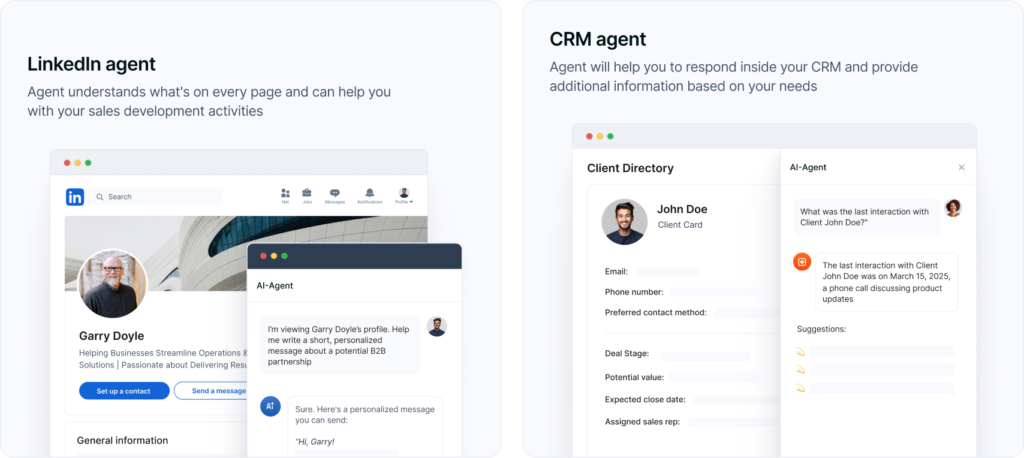
  • LinkedIn Agent works right from your browser—open a company page, and it handles the research.
  • Lead Research Agent delivers 5 hyper-qualified prospects, complete with org charts and personalization cues.

Internal Ops & Enablement

  • Calendar Assistant finds open slots based on your real-time availability.
  • Meeting Analyst turns transcripts into decisions and action items.
  • CRM Update Agents draft follow-ups, proposals, and even QBR decks.
  • Sales Pitch & Outreach Sequence Generators craft messaging based on who you’re targeting.

Client & Partner Portals

  • Ecommerce Support Agent answers order and refund questions 24/7.
  • Knowledge Base Builder creates comprehensive, verified articles from your existing materials.
  • How-To Guide Agent writes step-by-step guides based on user roles and product features.
  • Client Q&A Agents respond in real time with summaries, next steps, and relevant docs.

Creative, Content & Strategy

  • Marketing Strategy Generator builds a campaign plan from scratch.
  • Social Media Post Advisor gives you scroll-stopping post ideas.
  • Slide Deck Builder drafts a full business deck with visuals and transitions.
  • Blog Post Generator, Essay Agent, and Translator all handle content with context.

And we’re just getting started. By the end of May 2025, we’re launching MCP Integrations, so your agents can also run across tools like Salesforce, HubSpot, Notion, and more.

💡 MCP Integrations (short for Multi-Channel Presence Integrations) let AI Agents operate seamlessly across all the surfaces your team or clients already use without switching tools.

The big idea? You don’t need one AI for writing, another for research, another for docs, and five others duct-taped together.
You need one brain with many bodies. That’s what we built.

Real Benefits of AI Agents

Internal Workspace Icon
Internal Workspace
What you get:
  • Sales Portal
  • Process Portal
  • Centralized Hub
  • Internal Knowledge Base
  • Real-Time Collaboration
  • Secure File Storage
  • Video Recording & Transcription
  • Meeting Notes with Context
  • Fast Search & Organization
  • Client-Ready Sharing
  • Tool Integrations
AI Agents Icon
AI Agents
What you get:
  • Works Where You Work
  • Internal & External Workspaces
  • Real Answers from Your Content
  • Automates Busywork
  • Screen-Aware & Prompt-Driven
  • Custom or Prebuilt Agents
  • External Agent Access
  • Synced with Your Stack
  • On-Brand, On-Point
  • No Extra Tools Needed
AI Agents Image
External Workspace Icon
External Workspace
What you get:
  • Partner or Vendor Portal
  • Client Portals
  • External Knowledge Base
  • Drag-and-Drop Page Builder
  • Mutual Action Plans & Task Lists
  • Built-in CRM
  • Built-In E-signatures
  • Forms & Surveys
  • Secure File Sharing
  • Meeting Notes & Videos
  • Live Chat with Clients
  • Client Analytics
  • White-Label & SMTP Support
Learn more

The 5 Core Components of an AI Agent

When I first started working with AI Agents, I assumed they were just smarter chatbots. Turns out, they’re made of several components each doing something important to make the agent feel more like a teammate than a tool.

Here’s a breakdown of the key components behind every FuseBase Agent:

1. Goal (or Intent)
Every agent starts with a clear job to do, like writing a cold email, analyzing a meeting, or researching a lead. That’s its primary objective, and everything else flows from that.

2. Memory & Context
Agents work best when they’re not starting from zero. Ours can access CRM entries, past conversations, brand guidelines, and other workspace data so they speak your language and stay accurate.

3. Reasoning Engine
This is the AI “brain,” a large language model (like GPT-4) or a blend of models that interprets inputs, plans what to do next, and generates helpful outputs.

4. Tools & Actions
Agents aren’t just answering questions, they’re doing the work. That includes generating documents, updating records, kicking off workflows, or fetching the right file from a portal. Think: action, not just text.

5. Interface
You need a way to use the agent. That might be chat inside a FuseBase portal, a browser extension, or an embedded widget. It’s how you (or your clients) actually interact with the AI.

“Once I understood these components, the idea of “deploying an agent” finally clicked. You’re not just turning on a bot, you’re assigning a role, giving it tools, and setting it loose in the right place.” – Pavel Sher, FuseBase CEO
Why FuseBase Agents Are Different

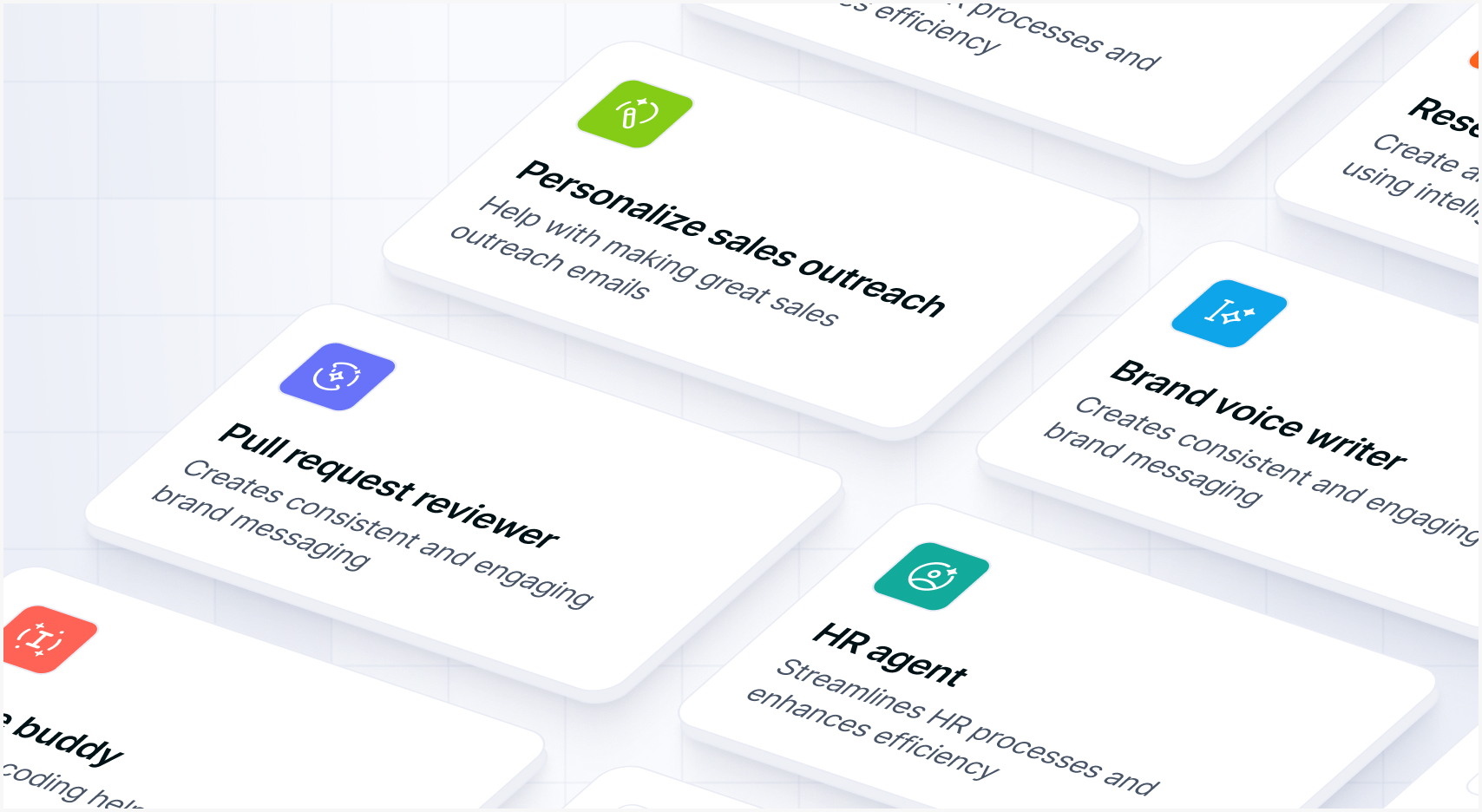
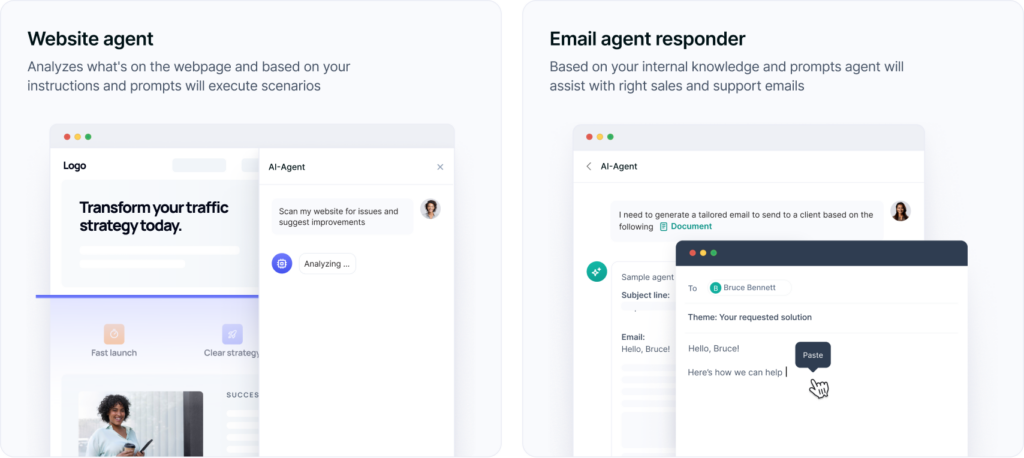
FuseBase AI Agents. Image powered by FuseBase.

When I first explored other “AI tools,” I kept running into the same thing:

  • A chatbot over here.
  • A browser plugin over there.
  • Some doc assistant that kind of works… until you switch tabs.
  • And don’t even get me started on the scripts and zaps duct-taped together in the background.

It felt like juggling ten half-smart tools that didn’t talk to each other, or worse, didn’t understand the actual work I needed done.

That’s why I built FuseBase Agents to be fundamentally different.

Instead of isolated bots, you get a connected system of AI Agents, all sharing one brain, trained on your workflows, and deployed wherever work happens.

Here’s what sets them apart:

1. Built into your actual work

FuseBase Agents aren’t floating off in a sandbox. They live inside your workspaces, inside your client portals, on your web pages, and right in your browser.

2. Secure, brand-aligned, and permission-aware

Every Agent follows your workspace’s data rules. It won’t surface the wrong doc to the wrong client or spit out generic support. It knows who’s asking, what they can access, and how to speak in your tone.

3. One Agent, many roles

You create an Agent once, say, a “Sales Assistant.” Then you can use it to:

→ coach your reps in their workspace
→ score leads in your Sales Portal
→ generate outreach from LinkedIn
→ follow up automatically via the Automation Hub
→ and surface relevant docs in your Client Portal

4. Automations, not babysitting

We also built a no-code Automation Hub where Agents can trigger actions, route approvals, update records, and collaborate with tools like Zapier (and soon, direct MCP integrations). Think of it as your workflow autopilot with Agents driving.

💡 Read more posts on this topic:
  • 🔗 Top 15 Customer & Client Portal Software
  • 🔗 Top 10 Partner Portals in 2025: Tried, Tested, and Ready for Your Team

Four Use Cases You Can Launch Today

1. Sales & Customer-Success Assistant (Browser + Portals)
Drafts personalized outreach, proposes next steps, and handles FAQs on autopilot.
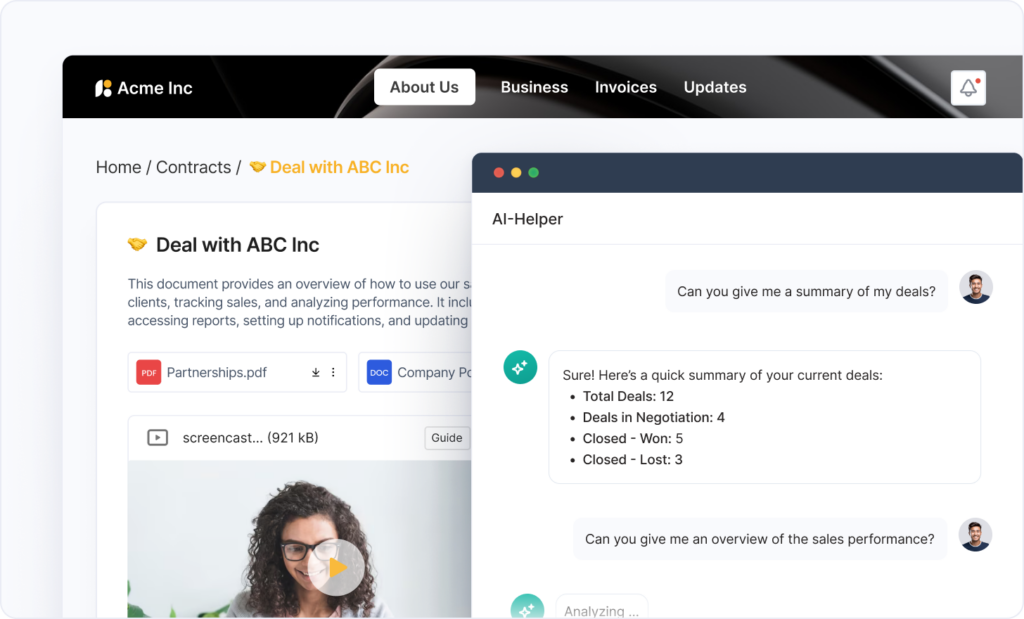
Sales & Customer-Success Assistant. Image powered by FuseBase.

2. LinkedIn Scraper (Browser)
Analyzes profiles and companies, extracts contacts, and pushes insights to your CRM.
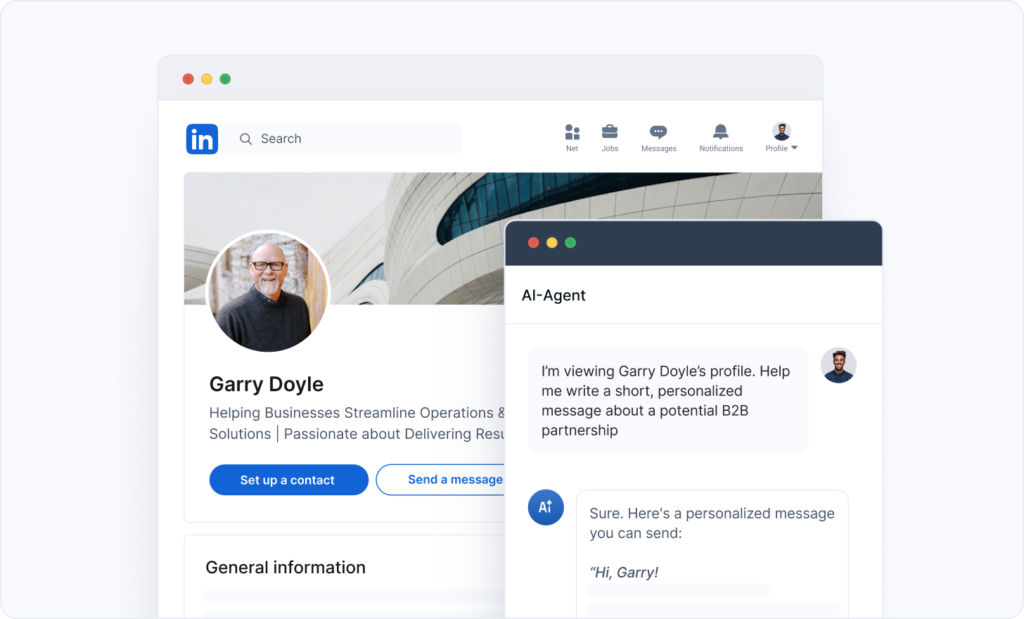
LinkedIn Scraper. Image powered by FuseBase.

3. Department-Specific Agents for Portals
Spin up a Finance, Marketing, or Support Agent, each with its own SOPs, data, and workflows.
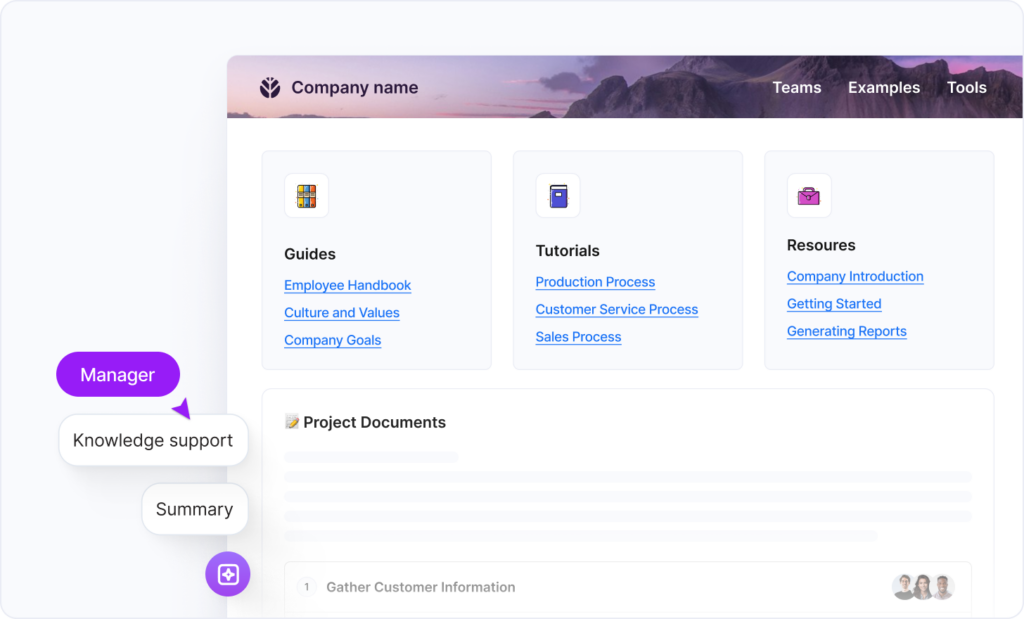
Department-Specific Agents for Portals. Image powered by FuseBase.

4. Task-Specific Agents
Invoice validator, deployment checklist runner, renewal-risk detector tailored for your exact process.
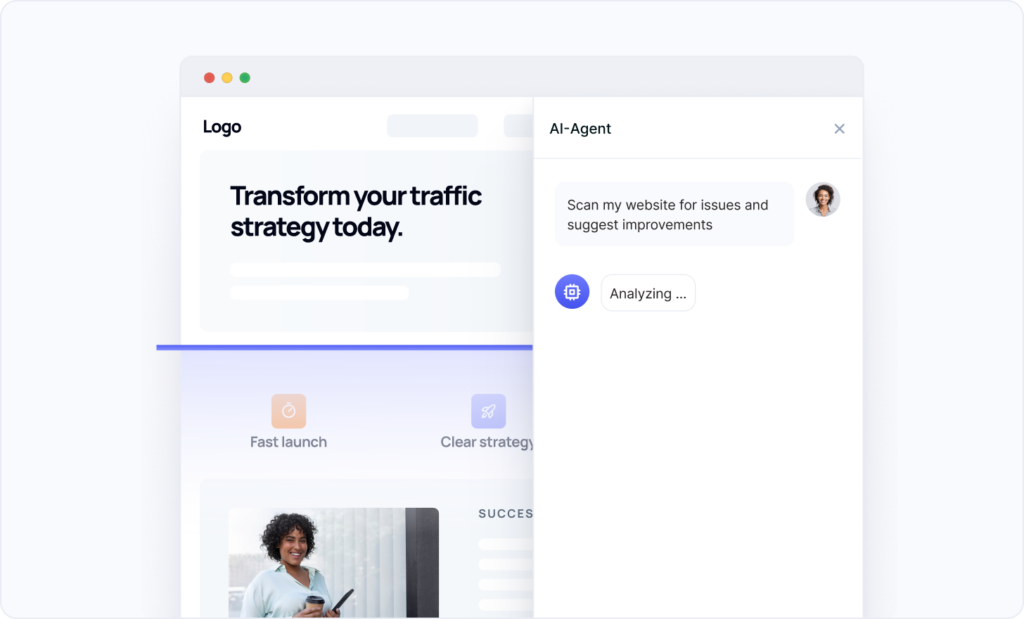
Task-Specific Agents. Image powered by FuseBase.

What’s Coming Next?

We’re just getting started.

By the end of May, we’ll have launched MCP Integrations for Agents, that means your Agents will soon be able to pull from and push to your most critical systems: CRMs, support tools, analytics platforms, and more. Imagine an agent that not only drafts a proposal, but also syncs it to Salesforce, pings your Slack, and schedules a follow-up automatically.

“We’re also expanding agent templates and training tools, so you can build your own agents without prompt engineering headaches. Customize tone, define boundaries, and connect actions with zero code.” – FuseBase Team

FuseBase is becoming the operating system for AI agents across your internal ops and client-facing experiences. One brain, deployed everywhere.

Try FuseBase AI Agent

Frequently Asked Questions

What does an AI Agent do?
AI Agents perform different tasks without hand-holding – they analyze your context, make decisions, and take direct actions. For example, AI Agents can generate content, summarize long documents, flag deal risks, schedule meetings, and more.

What is an example of an AI agent?
One example is a Customer Support Agent that creates onboarding plans, provides product recommendations, answers client questions in the portal, surfaces docs, and preps QBRs.

Is ChatGPT an AI agent?
GPT is mainly a chatbot, and it requires explicit user input for every response. But when you connect it to tools and workflows that allow it to perform tasks autonomously, it can operate as an AI agent.

What are the 7 types of AI agents?

  • Simple Reflex Agents
  • Model-Based Reflex Agents
  • Goal-Based Agents
  • Utility-Based Agents
  • Learning Agents
  • Hierarchical agents
  • Multi-agent systems

How do I create an AI agent?
At FuseBase, you can just set the condition (prompt) using simple natural language. The agent will use AI to understand what needs to be done and solve the task accordingly.

Author Image

Pavel Sher

Founder and CEO of FuseBase

Pavel Sher is on a mission to give teams their time back by replacing busywork with AI agents that handle the repetitive tasks no one has time for. As the CEO of FuseBase, he has turned years of customer insights and productive teams experience into a cutting-edge collaborative portal platform. By introducing deal rooms, onboarding solutions, and knowledge-sharing features, Pavel is helping agencies and sales teams work smarter, close deals faster, and deliver exceptional client experiences. FuseBase AI Agents act as Dream Team of executive assistants that work 24/7.

Found it useful? Share the article with your community

  • Share on Facebook
  • Share on LinkedIn
  • Share on X

Related Articles

Meet FuseBase AI Agents — your Dream Team of executive assistants that work 24/7
AI Agents

Meet FuseBase AI Agents — your Dream Team of executive assistants that work 24/7

  • by Pavel Sher
  • 5 Min read
Subscribe to our blog!

Get weekly tips and insights on how to grow your business

Our solutions
  • Mid-size companies
  • AI Agents (apps)
  • Deal rooms
  • White label
  • Knowledge base
Plans & Pricing
  • Pricing
Enterprise Security
  • Trust Center
    (HIPAA & SOC 2)
  • Terms & Privacy
  • GDPR
Company & Contacts
  • Templates
  • Guides
  • Roadmap
  • Privacy
  • About us
  • Reviews
  • Contact us
Compare with
  • SharePoint
  • Moxo
  • Notion
  • Confluence
  • Asana
  • Airtable
  • Monday
  • See all
Fusebase Logo
  • English
FuseBase - Client collaboration platform for professional services | Product Hunt
  • g2
  • sourceforce
  • g2
  • SOC 2 Type II
  • HIPAA
2014-2026 FuseBase is a product of Nimbus Web Inc., a Delaware company