
Skip to the content
  • Portals & collaboration

    One place to collaborate internally and externally

    • AI Agents (apps)User-friendly AI agents in minutes for every team
    • AI Agents for SalesSales President’s Club AI Agents
    • AI Agents for TeamsSecure Workspace & Agent Management for Modern Teams
    • Client PortalLevel up your collaboration with unified digital hubs
    • Deal RoomsClose faster with smart, sleek spaces for every deal
    • Knowledge BaseCreate one source of truth for clients & teams
    • Partner & Vendor portalsMaximize value from your external relationships
    • Project ManagementWork on clients’ projects without extra hurdles
    Explore portals →

    Browser extensions

    Boost your productivity with FuseBase browser extensions

    • FuseBase ClarityCapture Step-by-Step guides, SOP and tutorials
    • FuseBase AI AssistantAI Chat and Agents everywhere
    • FuseBase Voice AssistantVoice typing everywhere in your browser
    • FuseBase PRO AINote taking, Files Sharing & Collaboration

    Build professional apps

    Production-ready apps in days

    • App developmentCreate professional apps for the way your business works.

    Hosting

    Your tools, hosted by FuseBase.

    • FuseBase WorkAI coworkers with defined roles. Powered by Paperclip.
    • n8nSelf-hosted workflow automation.
    • FirecrawlSelf-hosted web data tools.
    Explore hosting →
    Portals & collaboration

    One place to collaborate internally and externally

    • AI Agents (apps)User-friendly AI agents in minutes for every team
    • AI Agents for SalesSales President’s Club AI Agents
    • AI Agents for TeamsSecure Workspace & Agent Management for Modern Teams
    • Client PortalLevel up your collaboration with unified digital hubs
    • Deal RoomsClose faster with smart, sleek spaces for every deal
    • Knowledge BaseCreate one source of truth for clients & teams
    • Partner & Vendor portalsMaximize value from your external relationships
    • Project ManagementWork on clients’ projects without extra hurdles
    Explore portals →
    Browser extensions

    Boost your productivity with FuseBase browser extensions

    • FuseBase ClarityCapture Step-by-Step guides, SOP and tutorials
    • FuseBase AI AssistantAI Chat and Agents everywhere
    • FuseBase Voice AssistantVoice typing everywhere in your browser
    • FuseBase PRO AINote taking, Files Sharing & Collaboration
    Build professional apps

    Production-ready apps in days

    • App developmentCreate professional apps for the way your business works.
    Hosting

    Your tools, hosted by FuseBase.

    • FuseBase WorkAI coworkers with defined roles. Powered by Paperclip.
    • n8nSelf-hosted workflow automation.
    • FirecrawlSelf-hosted web data tools.
    Explore hosting →
    Book a demo

    with our experts to build your custom workflow

    • Consulting Services Deliver exceptional client service
    • Financial Services Automate compliance, approvals & collaboration
    • Healthcare Secure, compliant portals for care and admin
    • Marketing & Advertising Centralize campaigns and automate client requests
    • Mid-Size companies Growing 50-1000+ employee companies
    • Professional Services Get a one-stop-shop for collaboration
    • Software & Technology Automate workflows with AI-powered portals
    • See all industries
    Book a demo

    with our experts to build your custom workflow

    • FuseBase GitHub Repos One step closer to the open-source community
    • Join FuseBase Discord AI development and autonomous agents for client-facing business
    Book a demo

    with our experts to build your custom workflow

  • Pricing
    • About us Meet FuseBase!
    • Blog Read the latest collaboration tips
    • Case Studies Explore case studies and find tailored solutions
    • Contact us Get growth advice from our experts
    • Guides Answer your FuseBase questions
    • Roadmap See what waits for you in the future
    • Trust center HIPAA & SOC 2. Trusted standards, protected data
    • Affiliate Program Would you turn down free money?
    Book a demo

    with our experts to build your custom workflow

Menu
  • Solutions ›

    Portals & collaboration

    One place to collaborate internally and externally

    • AI Agents (apps)User-friendly AI agents in minutes for every team
    • AI Agents for SalesSales President’s Club AI Agents
    • AI Agents for TeamsSecure Workspace & Agent Management for Modern Teams
    • Client PortalLevel up your collaboration with unified digital hubs
    • Deal RoomsClose faster with smart, sleek spaces for every deal
    • Knowledge BaseCreate one source of truth for clients & teams
    • Partner & Vendor portalsMaximize value from your external relationships
    • Project ManagementWork on clients’ projects without extra hurdles
    Explore portals →

    Browser extensions

    Boost your productivity with FuseBase browser extensions

    • FuseBase ClarityCapture Step-by-Step guides, SOP and tutorials
    • FuseBase AI AssistantAI Chat and Agents everywhere
    • FuseBase Voice AssistantVoice typing everywhere in your browser
    • FuseBase PRO AINote taking, Files Sharing & Collaboration

    Build professional apps

    Production-ready apps in days

    • App developmentCreate professional apps for the way your business works.

    Hosting

    Your tools, hosted by FuseBase.

    • FuseBase WorkAI coworkers with defined roles. Powered by Paperclip.
    • n8nSelf-hosted workflow automation.
    • FirecrawlSelf-hosted web data tools.
    Explore hosting →
    Portals & collaboration

    One place to collaborate internally and externally

    • AI Agents (apps)User-friendly AI agents in minutes for every team
    • AI Agents for SalesSales President’s Club AI Agents
    • AI Agents for TeamsSecure Workspace & Agent Management for Modern Teams
    • Client PortalLevel up your collaboration with unified digital hubs
    • Deal RoomsClose faster with smart, sleek spaces for every deal
    • Knowledge BaseCreate one source of truth for clients & teams
    • Partner & Vendor portalsMaximize value from your external relationships
    • Project ManagementWork on clients’ projects without extra hurdles
    Explore portals →
    Browser extensions

    Boost your productivity with FuseBase browser extensions

    • FuseBase ClarityCapture Step-by-Step guides, SOP and tutorials
    • FuseBase AI AssistantAI Chat and Agents everywhere
    • FuseBase Voice AssistantVoice typing everywhere in your browser
    • FuseBase PRO AINote taking, Files Sharing & Collaboration
    Build professional apps

    Production-ready apps in days

    • App developmentCreate professional apps for the way your business works.
    Hosting

    Your tools, hosted by FuseBase.

    • FuseBase WorkAI coworkers with defined roles. Powered by Paperclip.
    • n8nSelf-hosted workflow automation.
    • FirecrawlSelf-hosted web data tools.
    Explore hosting →
  • Industries ›
    • Consulting Services Deliver exceptional client service
    • Financial Services Automate compliance, approvals & collaboration
    • Healthcare Secure, compliant portals for care and admin
    • Marketing & Advertising Centralize campaigns and automate client requests
    • Mid-Size companies Growing 50-1000+ employee companies
    • Professional Services Get a one-stop-shop for collaboration
    • Software & Technology Automate workflows with AI-powered portals
    • See all industries
  • GitHub / Discord ›
    • FuseBase GitHub Repos One step closer to the open-source community
    • Join FuseBase Discord AI development and autonomous agents for client-facing business
  • Pricing
  • Resources ›
    • About us Meet FuseBase!
    • Blog Read the latest collaboration tips
    • Case Studies Explore case studies and find tailored solutions
    • Contact us Get growth advice from our experts
    • Guides Answer your FuseBase questions
    • Roadmap See what waits for you in the future
    • Trust center HIPAA & SOC 2. Trusted standards, protected data
    • Affiliate Program Would you turn down free money?
Sign in Book a demo Get started for free
  • Sign in
  • Book a demo
  • Get started for free
Categories
  • All articles
  • AI Agents
  • Client & Customer Portals
  • Client Collaboration & Communication
  • Comparisons
  • Customer & Self-Service
  • Knowledge Management
  • Productivity
  • Sales & Deal Management
  • Team & Project Management
  • Updates and News
TABLE OF CONTENTS

  • What is Granola AI and AI note-takers?
  • What features to expect in 2026?
  • Do you need an AI note-taking app?
  • Top 10 Granola AI alternatives
  • 1. FuseBase - Best for Professional Services, Agencies, and Client Success Teams
  • 2. Meet Jamie - Best for Business Managers Who Hate Bots
  • 3. Bluedot - Best for Product Managers and User Researchers
  • 4. Krisp.ai - Best for Remote Workers in Noisy Environments
  • 5. Fireflies.ai - Best for Cross-Functional Teams Needing Heavy Integrations
  • 6. Otter.ai - Best for Students And Journalists Who Need Long-Form Recording
  • 7. Fathom – Best for Individual Sales Reps and Advanced Zoom Users
  • 8. Supernormal - Best for Busy Professionals Who Want Readable Memos
  • 9. Meet Geek - Best for Managers, Teams, and Sales Managers
  • 10. Read.ai - Best for Presenters, Coaches, and HR Leaders
  • The Era of “Just Recording” is Behind for Competitive Teams
  • Home
  • Blog
  • Comparisons...
  • Beyond the Notepads: The Top 10 Granola AI Alternatives to Explore in 2026
Comparisons

Beyond the Notepads: The Top 10 Granola AI Alternatives to Explore in 2026

  • by Sabina Sher
  • December 23, 2025
  • 12 Min read

Why is an AI note-taking app not enough in 2026? A blunt example from the last standard kickoff call happened recently. When the client hung up, our team members relaxed and had an unfiltered discussion for five minutes with quotes like “we underpriced this project” and “we need to check the contract before moving forward”. 

Nothing unusual, except that our Granola meeting link was still running and captured everything, sending the transcript along with internal discussions to the client and all other participants. To put it mildly, they weren’t as thrilled hearing our stories.

While everyone should be professional enough to watch what they say and where they say it, for professional service, you should find a tool that sets the line between internal discussions and external sharing. If your AI note-taker can’t make that distinction and remove your strategy from the client’s inbox, it might be considered a liability, not a tool.

AI note-taking solutions are valuable as a practical utility, especially after long and tedious meetings. In professional service, a recorder should be a strategic asset that secures revenue and manages governance.

TL;DR

  • best for professional services, agencies, and client success teams – FuseBase
  • best for simple AI summaries and executives who hate bots – Meet Jamie
  • best for remote workforce in noisy environments – Krisp.ai
  • best for cross-functional teams needing third-party integration – Fireflies.ai
  • best for students and journalists who need long-form recording – Otter.ai

What is Granola AI and AI note-takers?

Granola AI is a popular meeting assistant from the first wave of privacy-conscious AI note-takers. One of its core features is bot-free capture. App captures audio directly from the device instead of joining the call, so you don’t have a Silent Guest issue. Granola AI transcribes and summarizes meetings, and it can share notes with users even if they don’t create an account.

It’s not without limitations, and most notably, Granola doesn’t provide an audio recording or a full-text transcript, which you can get from Microsoft Teams at the end of the meeting. Moreover, its AI cannot learn or retain knowledge, use cross-meeting context, or understand long-term project dynamics.

Its AI summary is a world appart from a professional document, so you still have administrative overhead you wanted to eliminate in the first place. Finally, most AI note-taking apps lack advanced sorting, tagging, and architectural separation for large teams. 

Still, Granola AI is an incredibly popular tool in 2026, but there are numerous viable alternatives.

What features to expect in 2026?

How many meetings will your company have in 2026? If the answer is “a lot,” you might want to move from classic AI note-taking apps to a solution with a broader feature set. Client OS platforms combine features from meeting assistants with advanced options to detect scope creep and separate notes for internal use and those safe to share with external meeting participants.

An AI meeting assistant should provide an accurate transcript and prepare a high-quality report for everyone in the meeting. This is a starting point, but there is so much more you could expect. Here, we introduce the AI Agent in the picture. The autonomous agent layer makes the shift from tool to almost teammate. You can have specialized agents for sales, finance, or legal matters who can share context and help achieve complex cross-functional goals.

Agents can make autonomous decisions within defined, rules-based boundaries, and AI will not treat each meeting as a blank canvas. An agent can develop an intelligent memory so that suggestions are relevant to the client’s journey stage. 

AI requires more transparency and consent with clear notifications for every AI interaction. On that topic, organizations should have full audit trails to explain why an agent took an action. Creating an AI agent should be security-focused, with a clear identity and well-defined limits. Companies can utilize LLM for high-level reasoning, and Small Language Models fine-tuned on dedicated data for specific tasks.

Do you need an AI note-taking app?

Consider note-taking as an underlying infrastructure like electricity. The era of a basic AI note-taker that just records, transcribes, and summarizes is behind us. The new top feature is “hygiene factor”, something even Microsoft Copilot and Notion include. 

Going into 2026, you should aim for an Agentic System that translates conversations into executed workflows with integrated margin protection. Visualise it as a governed autonomous teammate. That leads us to the top Granola AI alternatives, some with advanced AI features beyond note-taking, and others that still fall into the notes-and-summaries category.

Top 10 Granola AI alternatives

SolutionPricingFree trial Top featuresBest for
FuseBase (Client OS)Value-Based / Contact SalesFree trial/planBranded client portals with recordings, files, and next steps in one place, automatically separate internal data from safe-to-share client recap, and AI Agents that automatically create tasks in the project management layerProfessional services, agencies, and client success teams
Meet Jamiestarts at €25 personal plan/€39 business planYes (Free Tier)System audio recording with no bot, works offline, has a Mac-native feelSimple AI summaries and executives who hate bots
Bluedot starts at $14/monthYes (Free Tier)Meeting recording, note-taking and sharing, Chrome extension recorder, and Notion integrationProduct managers and user researchers
Krisp.aistarts at $8/monthFree trial availableComes with noise cancellation feature, on-device transcription, and accent localizationRemote workforce in noisy environments
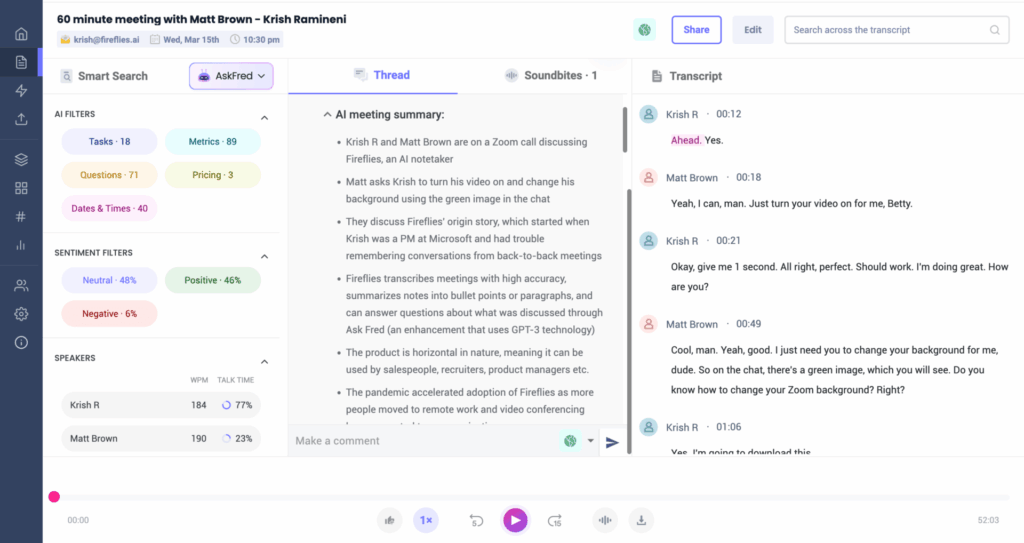
Fireflies.aistarts at $10/monthYes (Free Tier/Plan)Transcription, NLP summaries, AskFred AI assistant, and massive integration libraryCross-functional teams needing heavy integrations
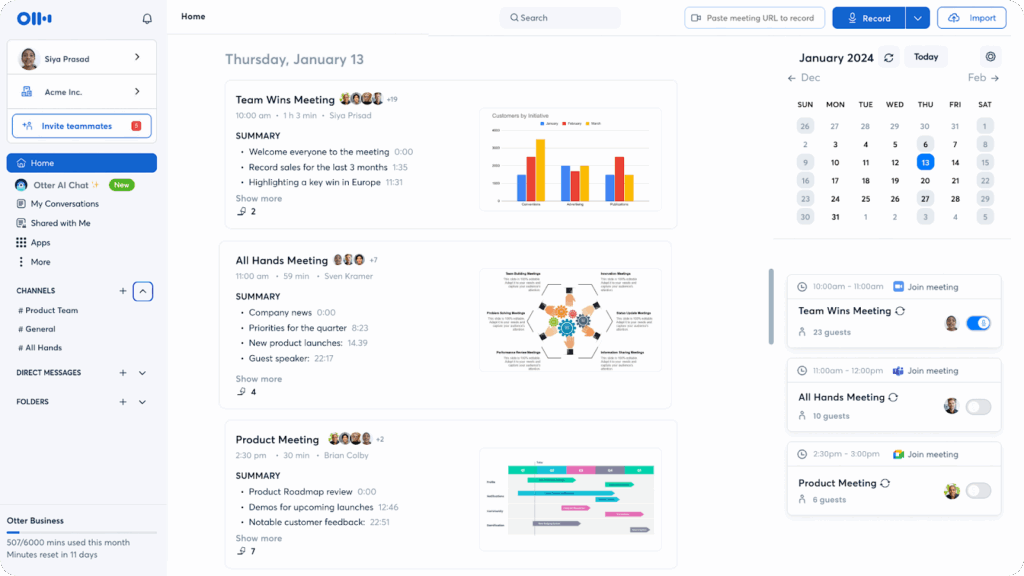
Otter.aistarts at $8.33/monthYes (Free Tier)Real-time transcript, share notes, slide capturing, and focus on the mobile appStudents and journalists who need long-form recording
Fathomstarts at $16/monthYes (Free Tier)Call summaries and highlights, CRM synchronization (HubSpot, Salesforce…), simple Zoom app Individual Sales reps and advanced Zoom users
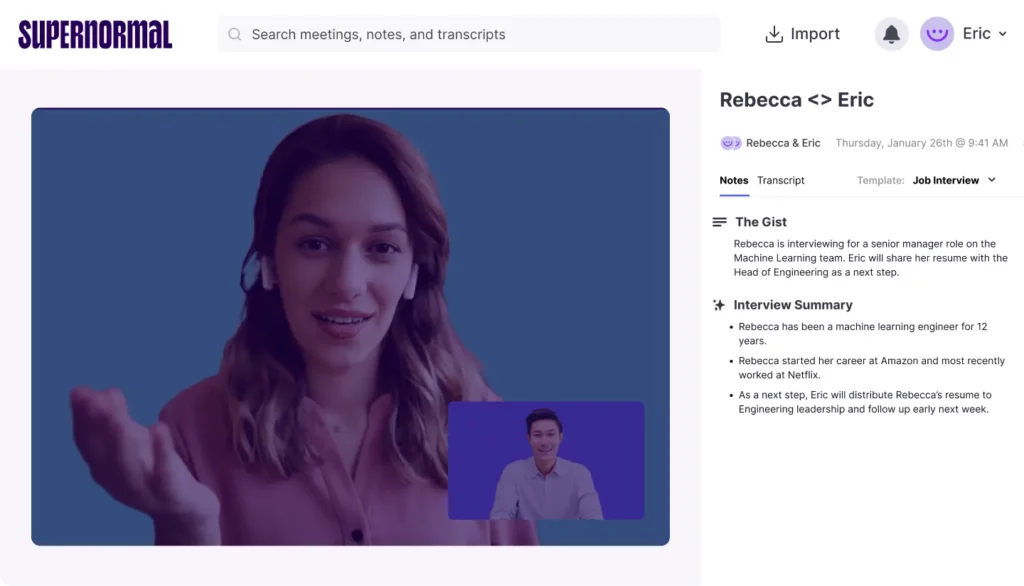
Supernormalstarts at $18/monthYes (Free Tier)Cleanly formatted notes, automatic selection between decisions and actions, recaps, and sharing notesBusy professionals who want readable memos
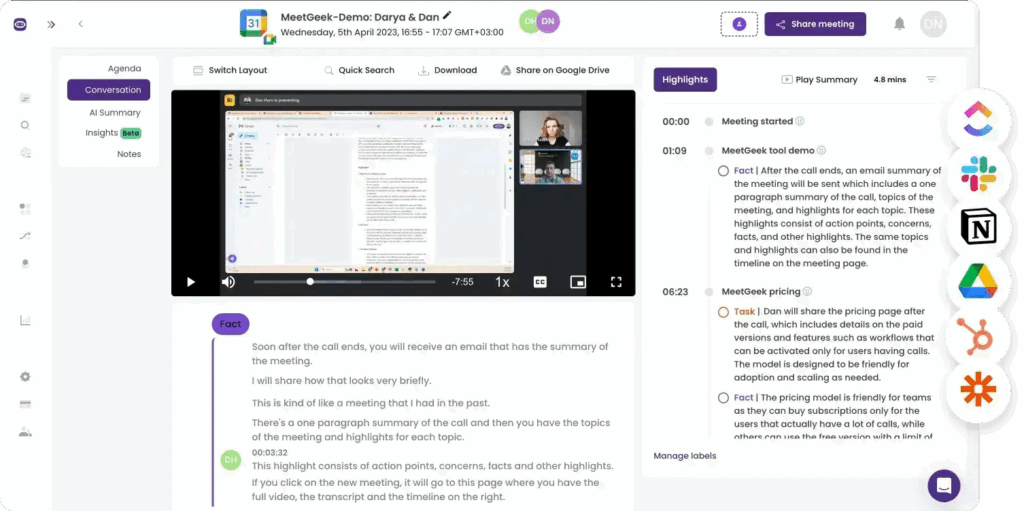
MeetGeekstarts at $9.99/monthYes (Free Tier)Note-taking, action items, follow-ups, “meeting health” scores, and keyword triggersManagers, teams, and sales managers
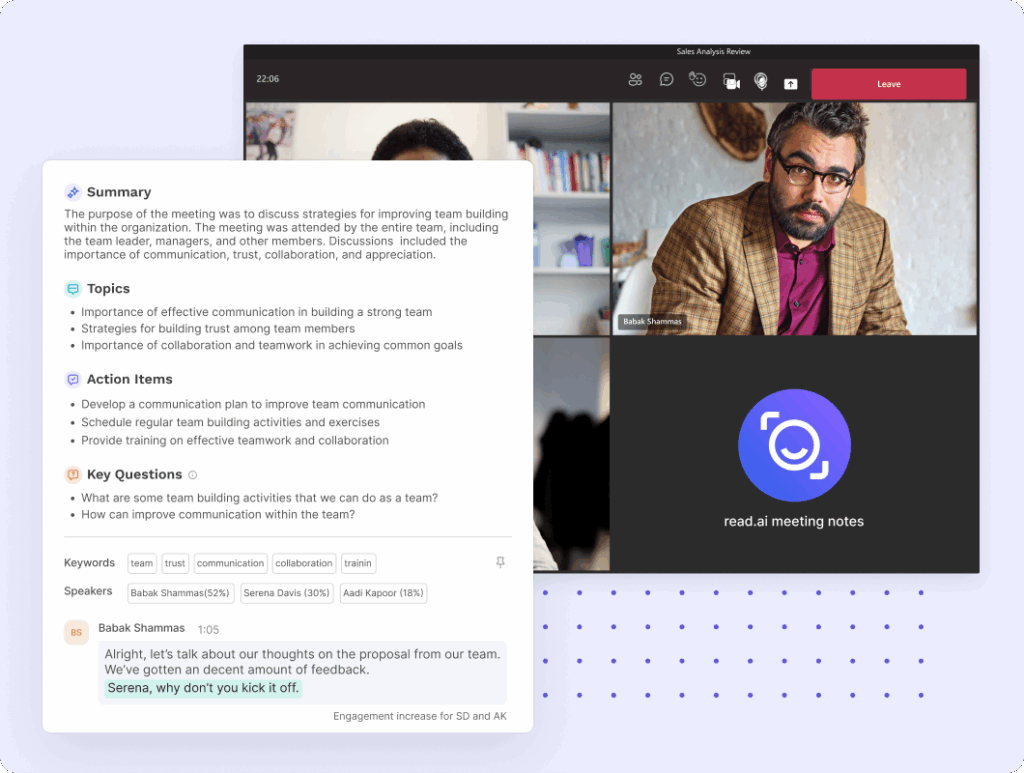
Read.aistarts at $15/monthYes (Free Tier)Real-time engagement score, participant attention tracking, and unique AR overlayPresenters, coaches, and HR leaders

1. FuseBase – Best for Professional Services, Agencies, and Client Success Teams

image

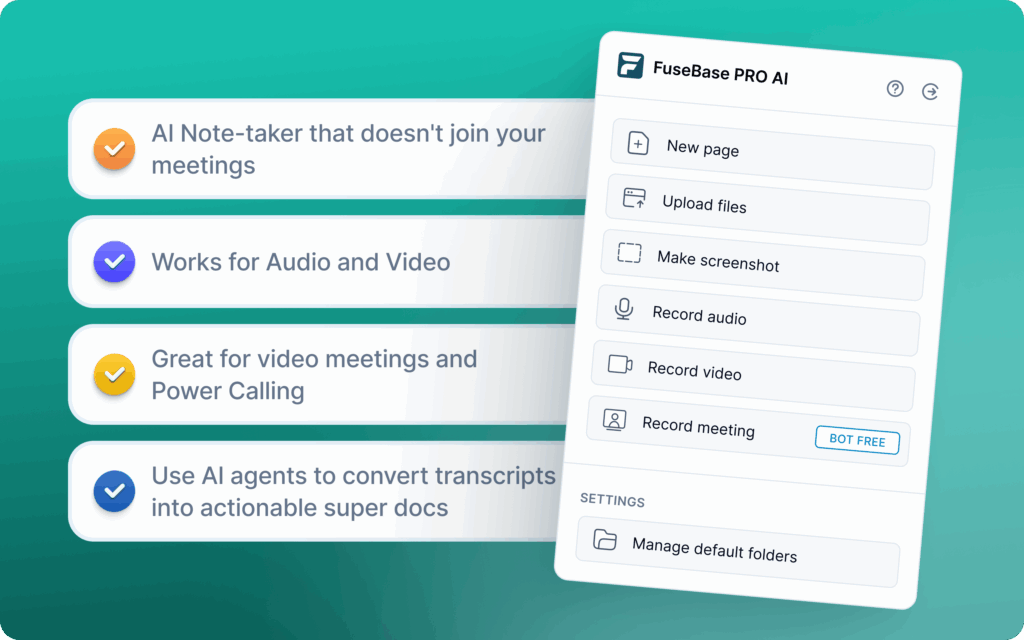
Note-taking is a fundamental task that is useful, but not fast enough to neglect the administrative overview. When we created FuseBase, yes, it’s our tool, we wanted to move from meeting recorder to a comprehensive system, a Client Delivery Platform. It captures the meeting but can partition the data into a safe-to-share Client portal or an internal workspace.

FuseBase and its AI Agent are best for professional services, agencies, or client success teams that have to manage high-value external partners. The solution can replace a raw text summary with a polished branded portal with recordings, files, and next steps. One essential trait is the automatic separation of internal coaching notes from the safe-to-share recap.

Pros:

  • Eliminates administrative “glue” work between meetings and PM tools
  • Protect margins with Scope Creep detection
  • Has unified AI workspace with agents and automation
  • Custom-branded portals

Cons:

  • It may be complex for solo users who just need a personal scratchpad
  • Not so focused on meetings as other pure note-taking tools

2. Meet Jamie – Best for Business Managers Who Hate Bots

image

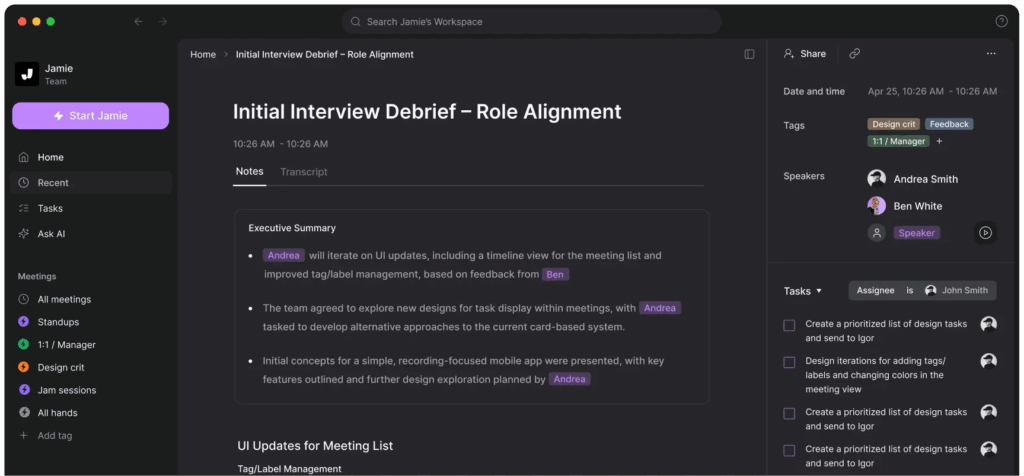
Meet Jamie is macOS-native software integrated into your menu bar. The app records system audio directly so that no bots will join your call. What I liked about Meet Jamie is the offline recording and support for 15+ languages. You could also ask the “Executive Assistant” question about past meetings. If you want to set and forget about a meeting recorder that feels like a native part of your system, Meet Jamie is a viable choice, and it has a low learning curve.

Pros:

  • Enhances the privacy feel as there are no recording bots
  • Polished user interface
  • Offline work
  • Simple meeting summary automation

Cons: 

  • No project management features
  • Local processing leads to manual file sharing
  • Not ideal for complex workflows

3. Bluedot – Best for Product Managers and User Researchers

image

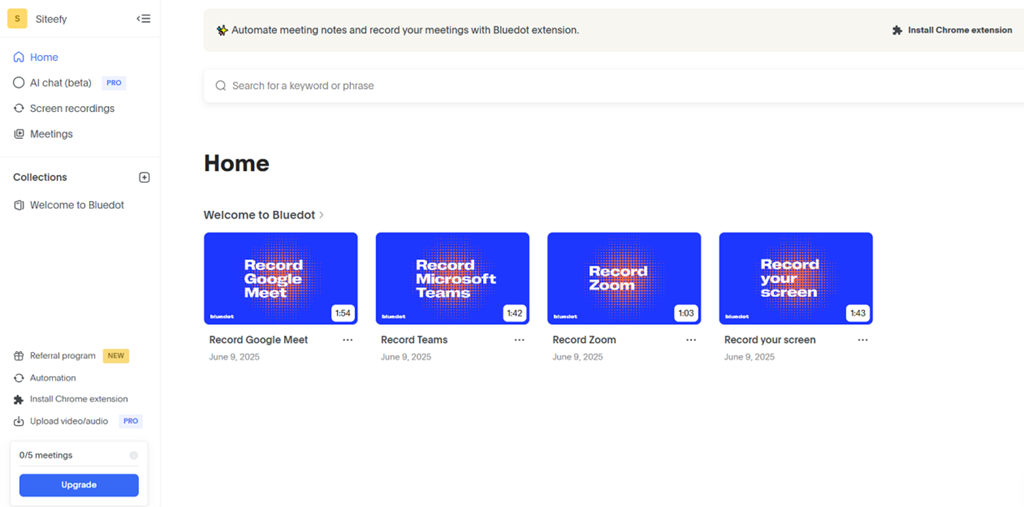
Bluedot is an AI meeting assistant that helps create notes and provides context. Unlike some other software, it is a Chrome extension recorder designed specifically for Google Meet. Again, it avoids the bot-in-the-meeting issue by running in the background of your browser tab. It’s best for all Google Meet users, and especially for product managers or user researchers who need high-quality transcripts. Bluedot has unique templates for user interviews and engineering standups.

Pros:

  • Native video capture in the browser
  • Has advanced integration with Notion and Slack
  • Great async meeting capture

Cons:

  • Very restrictive free tier
  • Extremely reliant on the Chrome browser, and has limited capabilities with other software

4. Krisp.ai – Best for Remote Workers in Noisy Environments

image

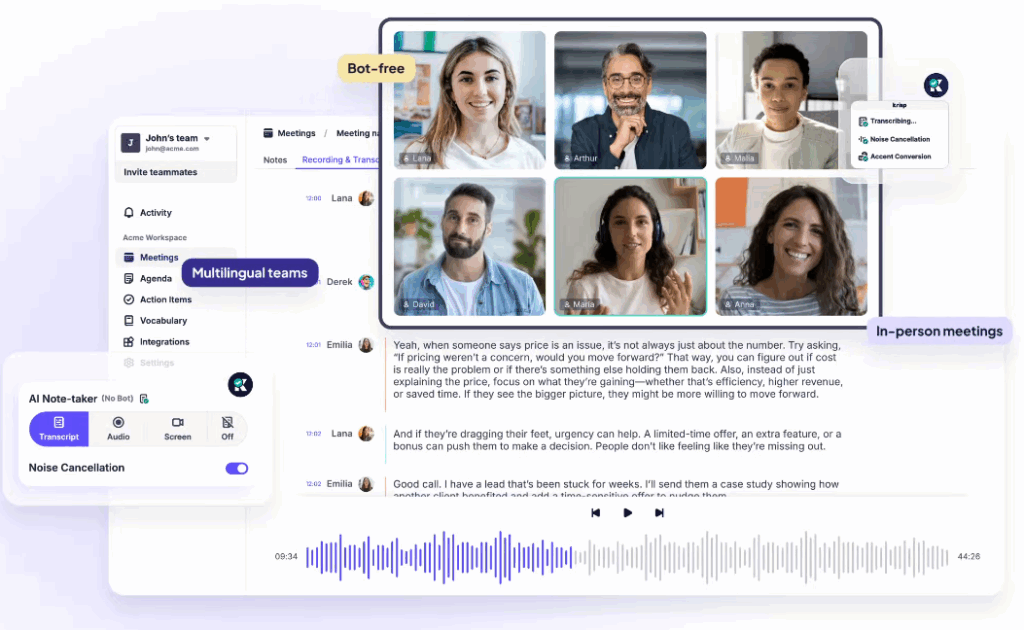
Krisp.ai prides itself on noise cancelling, which is where the app came from. Originally a noise-cancelling tool, the software went into on-device meeting transcription. It processes audio locally on your computer to improve privacy. The tool is best for users who prioritize audio clarity and who store recordings locally. 

Pros:

  • Its noise cancellation improves audio quality for both sides in the meeting.
  • Works with all video conference apps
  • High emphasis on privacy with on-device storage

Cons:

  • Transcripts are basic, text-heavy, and without standard note-taking features
  • Doesn’t have summaries like AI-based competitors
  • Low value outside of calls
💡 Read more posts on this topic:
  • Top 15 Client Portal Software
  • The 12 Best Knowledge Base Software Platforms

5. Fireflies.ai – Best for Cross-Functional Teams Needing Heavy Integrations

image

Fireflies boosts itself with reliable transcripts across platforms and a massive library of integrations. It can connect voice data to almost any other software. Fireflies also has powerful search and topic tracking. The software is best suited for power users who need to use meeting notes across multiple tools, such as CRM, Slack, and Zapier. You will also get “AskFred” AI assistant, comprehensive summaries, and support for 100+ languages.

Pros: 

  • Integrates with almost everything
  • Has affordable entry pricing
  • Robust and highly searchable database

Cons:

  • It has the “sileng guest” problem with its intrusive bot
  • Advanced options are not so affordable
  • Can have issues with accuracy for users with accents or lower audio quality

6. Otter.ai – Best for Students And Journalists Who Need Long-Form Recording

image

Otter is a legacy app, and it’s famous for its live-scrolling transcriptions, which provide real-time reading material. The fast and intuitive transcripts fit well with live meetings and lectures. Otter AI assistant can help answer questions about ongoing or past meetings. Note-taking app offers summaries, broad integrations, and it’s best for journalists and educators who need to record long-form lectures or interviews.

Pros:

  • Real-time transcriptions
  • Strong mobile app
  • Suitable for a quick search of the transcript during the call
  • Automatic slide capture from video feeds

Cons:

  • Not as strong a feature set for sales or revenue teams
  • Poor distinction between internal and external data
  • Had recent unfavorable price changes

7. Fathom – Best for Individual Sales Reps and Advanced Zoom Users

image

Fathom became increasingly popular for its free personal note-taking tier. It is a Zoom-centric recorder that has now expanded to Teams and Meet apps, and comes with a free option and a straightforward click-to-highlight interface. Fathom has a distraction-free interface and offers automatic meeting summaries. You can auto-sync it with CRMs like HubSpot or Salesforce. Simplicity is its strongest feature.

Pros:

  • Generous free tier for individual users
  • Fast setup and processing
  • Automatic meeting summary and highlights

Cons:

  • Enterprise features are gated
  • Not many customization options
  • Not a tool for deep analytics or collaborative workspaces

8. Supernormal – Best for Busy Professionals Who Want Readable Memos

652034a2e79b83c5cf0b11e0_supernormal

Supernormal is another minimalist tool, and its AI notetaker prioritizes clean, formatted notes over raw transcripts, so you get business-ready notes. The app offers template-based note generation and automatic separation between decisions and action items. Supernormal offers easy sharing and collaborative options, and it is best for managers who want to read formatted memos distributed immediately after a call.

Pros:

  • Offers clean and readable text layouts with no visual clutter
  • Simple automatic meeting summary
  • Fast setup

Cons: 

  • Limited AI features outside the text summary
  • Bot capture can be intrusive
  • Less appeal for larger teams.

9. Meet Geek – Best for Managers, Teams, and Sales Managers

image

Meet Geek works across platforms for recording meetings. AI Agent joins the meeting and, along with the bot intrusion, can record, transcribe, and summarize calls. App offers keyword tracking for competitor mentions and focuses on the “Meeting Health” score. Meet Geek can auto-share workflows and provides a good balance between simplicity and insights, with AI summaries and action items among its strong points. It’s best for sales and other managers who want to optimize meetings and reduce lengthy time-wasting calls.

Pros: 

  • Supports multiple meeting platforms
  • Suitable for shortening meetings and coaching junior reps
  • Strong AI summaries and actionable items

Cons:

  • Limited advanced analytics
  • Client-facing sharing has a generic feel
  • “Health scores” can be intrusive and feel like micromanagement

10. Read.ai – Best for Presenters, Coaches, and HR Leaders

image

Read builds on note-taking with analytics tools that can measure engagement and sentiment. You will get participant attention with real-time video analysis. Aside from the “engagement score”, you can turn on Ghost mode, which deletes data after 24 hours. It’s best for HR and leadership positions that need to know if the audience is paying attention.

Pros:

  • Unique engagement and behavior metrics 
  • Insight into audience behavior
  • Great tool for improving presentation skills

Cons:

  • Pop-ups during calls can be intrusive
  • Not focused on actionable notes
  • Attention tracking might be viewed as invasive

The Era of “Just Recording” is Behind for Competitive Teams

Crowderd AI meeting tools market has niches for all business needs. Freelancers or students can have great help from Granola or Otter, and journalists will find Read useful. 

However, complex organisations like agencies or client success teams need more features, because they don’t send naked links from a notetaking app to a client. Private internal notes should remain within the organization. The future of professional services is not in better transcription, but in autonomous service delivery. Solutions should turn conversation data into a transparent, actionable, and secure client relationship where AI capabilities make more than just transcripts and summaries.

Ready to Upgrade? 

You don’t have to change the entire tech stack to see a palpable difference.

Try FuseBase on your next meeting or client call. Instead of sending a follow-up email with notes, you can send a branded Client Portal with a Deal Room, rather than a raw text doc, to speed up approval of next steps.

Author Image

Sabina Sher

Chief Strategy Officer at FuseBase

Meet Sabina Sher, a Chief Strategy Officer at FuseBase and a storyteller turning industry challenges into engaging content packed with actionable advice. She channels rich industry experience and knowledge into our blog, making it a go-to resource for life hacks, tips, and innovative ideas.

Found it useful? Share the article with your community

  • Share on Facebook
  • Share on LinkedIn
  • Share on X

Related Articles

Top Alternatives to Notion Client Portals
Comparisons

Top Alternatives to Notion Client Portals

  • by Sabina Sher
  • 7 Min read
Subscribe to our blog!

Get weekly tips and insights on how to grow your business

Our solutions
  • Mid-size companies
  • AI Agents (apps)
  • Deal rooms
  • White label
  • Knowledge base
Plans & Pricing
  • Pricing
Enterprise Security
  • Trust Center
    (HIPAA & SOC 2)
  • Terms & Privacy
  • GDPR
Company & Contacts
  • Templates
  • Guides
  • Roadmap
  • Privacy
  • About us
  • Reviews
  • Contact us
Compare with
  • SharePoint
  • Moxo
  • Notion
  • Confluence
  • Asana
  • Airtable
  • Monday
  • See all
Fusebase Logo
  • English
FuseBase - Client collaboration platform for professional services | Product Hunt
  • g2
  • sourceforce
  • g2
  • SOC 2 Type II
  • HIPAA
2014-2026 FuseBase is a product of Nimbus Web Inc., a Delaware company