
Skip to the content
FuseBase FuseBase
  • Solutions

    Solutions
    Solutions
    AI-powered Portals for teams, clients, partners

    One place to collaborate internally and externally

    CLIENT PORTALS
    DEAL ROOMS
    PARTNER PORTALS
    ONBOARDING PORTALS
    Browser Extensions

    Boost your productivity with FuseBase browser extensions

    CHROME
    EDGE
    CHROMIUM-BASED
    Build Professional Apps

    Production-ready apps in days

    AI CODING
    AI WORKFLOWS
    PERMISSIONS
    USER MGMT
    Solutions

    Recognized by leading product platforms

    Multiple awards for ease of use, customer satisfaction, and enterprise-grade security

    AI Agents (apps)

    User-friendly AI agents in minutes for every team

    AI Agents for Sales

    Sales President’s Club AI Agents

    AI Agents for Teams

    Secure Workspace & Agent Management for Modern Teams

    Client Portal

    Level up your collaboration with unified digital hubs

    Deal Rooms

    Close faster with smart, sleek spaces for every deal

    Knowledge Base

    Create one source of truth for clients & teams

    Partner & Vendor portals

    Maximize value from your external relationships

    Project Management

    Work on clients’ projects without extra hurdles

    FuseBase Clarity

    Capture Step-by-Step guides, SOP and tutorials

    FuseBase AI Assistant

    AI Chat and Agents everywhere

    FuseBase Voice Assistant

    Voice typing everywhere in your browser

    FuseBase PRO AI

    Note taking, Files Sharing & Collaboration

    Build Professional Apps
    Book a demo with our experts to build your custom workflow
  • Industries

    Industries
    Consulting Services

    Deliver exceptional client service

    Financial Services

    Automate compliance, approvals & collaboration

    Healthcare

    Secure, compliant portals for care and admin

    Marketing & Advertising

    Centralize campaigns and automate client requests

    Mid-Size companies

    Growing 50-1000+ employee companies

    Professional Services

    Get a one-stop-shop for collaboration

    Software & Technology

    Automate workflows with AI-powered portals

    See all industries

    Fusebase highlights

    Book a demo with our experts to build your custom workflow
    • GitHub / Discord

      GitHub / Discord
      FuseBase GitHub Repos

      One step close to opensource community

      Join FuseBase Discord

      AI Development, Autonomous Agents for Client Facing businesses

      Book a demo with our experts to build your custom workflow
      • Pricing
      • Resources

        Resources
        About us

        Meet FuseBase!     

        Blog

        Read the latest collaboration tips

        Case Studies

        Explore case studies and find tailored solutions

        Contact us

        Get growth advice from our experts

        Guides

        Answer your FuseBase questions

        Roadmap

        See what waits for you in the future

        Trust сenter

        HIPAA & SOC 2. Trusted standards, protected data

        Affiliate Program

        Would you turn down free money? 🤔

        Book a demo with our experts to build your custom workflow
        • Book a demo Get Started Free
        • Book a demo with our experts to build your custom workflow
        • Sign in
        • Book a demo
        • Get started for free
        Categories
        • All articles
        • AI Agents
        • Client & Customer Portals
        • Client Collaboration & Communication
        • Comparisons
        • Customer & Self-Service
        • Knowledge Management
        • Productivity
        • Sales & Deal Management
        • Team & Project Management
        • Updates and News
        TABLE OF CONTENTS

        • What is Clinked?
        • What are teams looking for in a Clinked Alternative?
        • Top 8 Alternatives to Clinked for Collaboration in 2026
        • 1. FuseBase
        • 2. Microsoft Teams
        • 3. SuperOkay
        • 4. Asana
        • 5. Trello
        • 6. Moxo
        • 7. Suitedash
        • 8. Monday.com
        • Finding the Best Alternative to Clinked for Collaboration
        • Home
        • Blog
        • Comparisons...
        • 8 Best Clinked Alternatives to Consider in 2026
        Comparisons

        8 Best Clinked Alternatives to Consider in 2026

        • by Pavel Sher
        • July 6, 2026
        • 12 Min read

        Just a couple of years ago, we weren’t sure whether remote work would catch on. Well, now we know for certain that it’s here to stay. As a result, collaboration tools became as important as ever. These tools make it easy for team members to communicate with each other as well as with clients and partners, no matter where they are – whether in different cities or countries.

        One of the most well-known collaboration solutions is Clinked. This software offers a variety of features and client portal capabilities that help teams collaborate more transparently and successfully. However, it may not be the best option for every team. In this article, we’ve ranked the 8 best Clinked alternatives and discussed their pros and cons, so you can choose a tool that’s right for you.
        TL;DR – Top Clinked Alternatives At a Glance

        • FuseBase – Best for client-facing businesses
        • Microsoft Teams – Best for enterprise teams
        • Superokay – Best for creative agencies
        • Asana – Best for marketing teams
        • Trello – Best for small teams and simple collaboration
        • Moxo– Best for financial services firms
        • Suitedash – Best for service businesses and consultants
        • Monday – Best for growing teams

        What is Clinked?

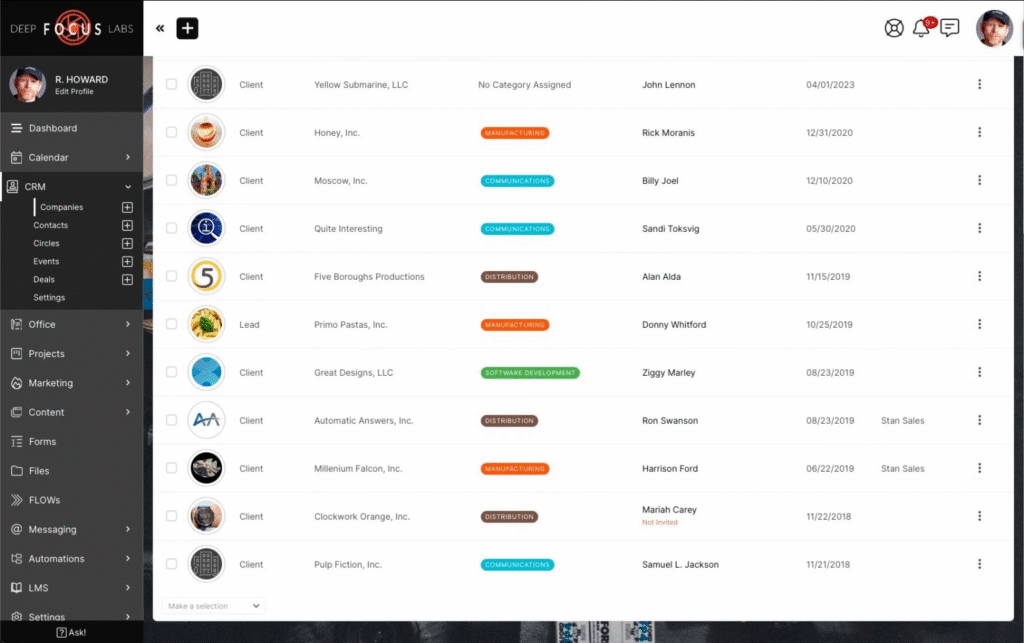
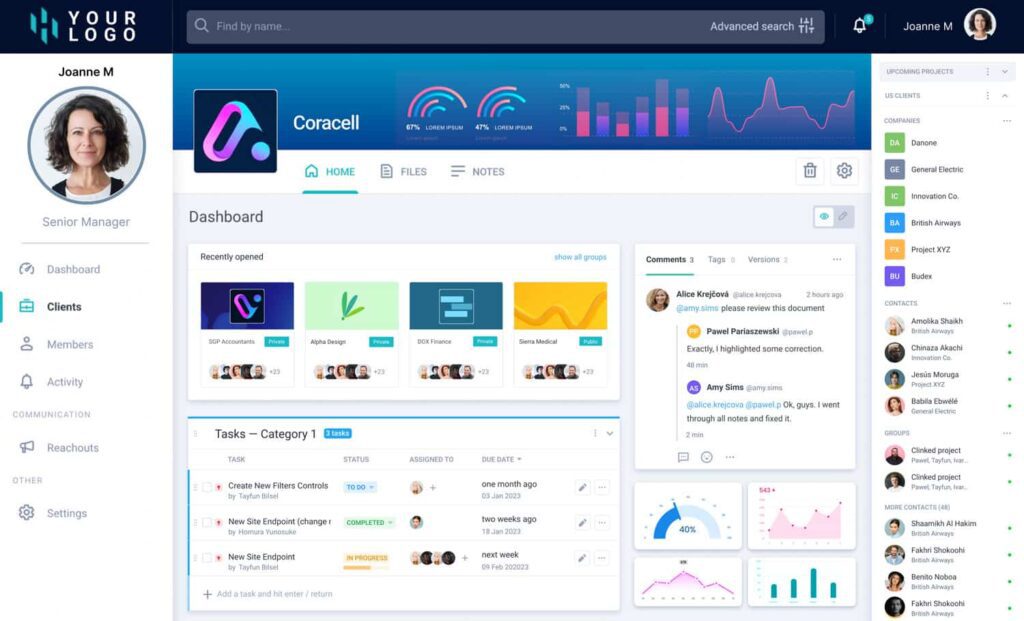
        Clinked. Image powered by FuseBase

        Clinked is a collaboration hub that helps businesses manage projects, share files, communicate, and collaborate on documents in one workspace. The platform is used by businesses of all sizes as well as industries such as finance, legal services, and healthcare.

        Using Clinked, teams can create private workspaces for their projects, where users share files, assign tasks, and discuss ideas via comments, likes, and mentions. Its client portal feature is both a safe and easy way for businesses to share information and communicate with clients in branded spaces. Clinked also offers a white-label option, so you can customize the platform’s branding and user interface to match your own.

        That said, Clinked is not the right fit for every team. Some businesses eventually need more flexibility, stronger workflow support, better visibility into client work, or a more modern client experience. Below, we’ll look at the most common reasons why teams start comparing Clinked with other platforms.

        💡 Read more posts on this topic:
        • 7 Best Moxo Alternatives for Client Collaboration & Portals
        • SuperOkay Client Portals & Its Top 7 Alternatives You Should Know

        What are teams looking for in a Clinked Alternative?

        • Advanced customization: Although Clinked provides some customization options, users say that deeper portal customization is limited. Look for a tool that offers white-labeling and allows you to shape the portal around your unique workflow.
        • Ease of adoption: Some users find that Clinked has a steep learning curve, which could slow down the onboarding process and prevent team members from adopting it. Look for an alternative that offers onboarding support or has an intuitive interface to ensure a smoother client onboarding process.
        • Affordable pricing: Clinked’s pricing may be a disadvantage for some businesses, as the entry-level plan for Clinked starts at $239/month. Growing teams and startups usually look for less expensive tiers.
        • Built-in reporting: Businesses that need detailed project reports may find that Clinked’s capabilities are insufficient. If that’s you, make sure the alternative you choose has solid reporting features.
        • Limited integrations: Though Clinked integrates with several third-party tools, such as QuickBooks, Zapier, Dropbox, Zoom, and DocuSign, some teams may find it to be more limited than other modern solutions. Look for platforms that let you connect to your existing stack so you don’t have to switch back-and-forth.
        • AI features: Clinked has many great features, but AI capabilities are not among them. Look for AI features that are useful for your needs. These could include AI writing, chatbots, meeting notes, AI summaries, or AI workflow automation.

        Now that we know what to look for, let’s look at the best Clinked alternatives on the market.

        Top 8 Alternatives to Clinked for Collaboration in 2026

        If you’re on the hunt for a new collaboration tool, exploring Clinked competitors is a great place to start.
        1. FuseBase

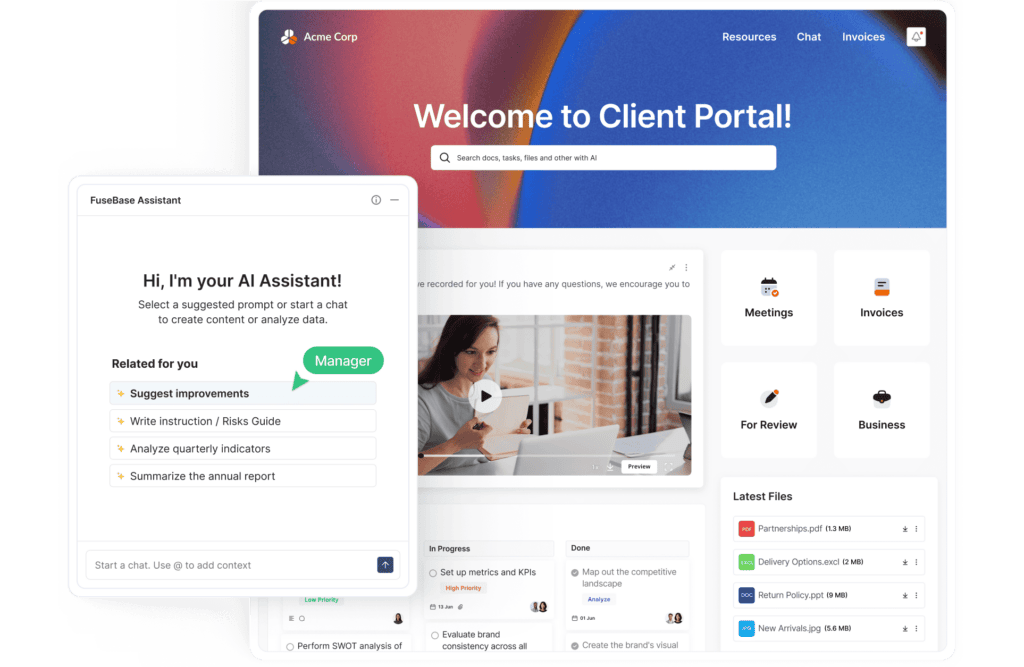
        FuseBase. Image powered by FuseBase.

        Best for: client-facing businesses that want to collaborate in branded workspaces and strengthen client relationships.

        FuseBase is a collaboration platform with an intuitive interface and rich customization options. This alternative also includes project management tools, such as task assignment, CRM dashboards, progress tracking, and real-time communication. The FuseBase Client Portals let customers get an organized info about services and projects in a safe manner. Additionally, FuseBase helps move client work forward, not just store client work. Teams can simplify onboarding, reporting, approvals, and recurring client workflows. Websites like Capterra and G2 have given FuseBase positive ratings, citing its user-friendly interface and comprehensive collaboration features.

        Key Features:

        • AI-native client portals
        • Full white-labeling
        • Secure workspaces and permissions
        • Task coordination and client-facing dashboards
        • AI Agents, apps, and workflow automation

        Pros:

        • Branded client-facing foundation
        • More guided client experience
        • Project updates, files, approvals, CRM dashboards, knowledge, communication, and next steps in one organized space

        Cons:

        • Advanced automation can take time to learn
        • The mobile app receives updates less frequently

        Pricing:

        • Free plan
        • Solo: $32 per month for personal use – 1 client portal and 3 workspaces, 1 client, unlimited content creation, and real-time chat.
        • Essentials: $82 per month for small teams –5 members, 10 portals, 100 clients, efficient PM tools, and workflow automation.
        • Advanced: $266 per month for larger teams – 50 members, 50 portals/150 workspaces, 1000 clients, granular permissions, and white-label.
        • Unlimited: custom pricing.

        2. Microsoft Teams

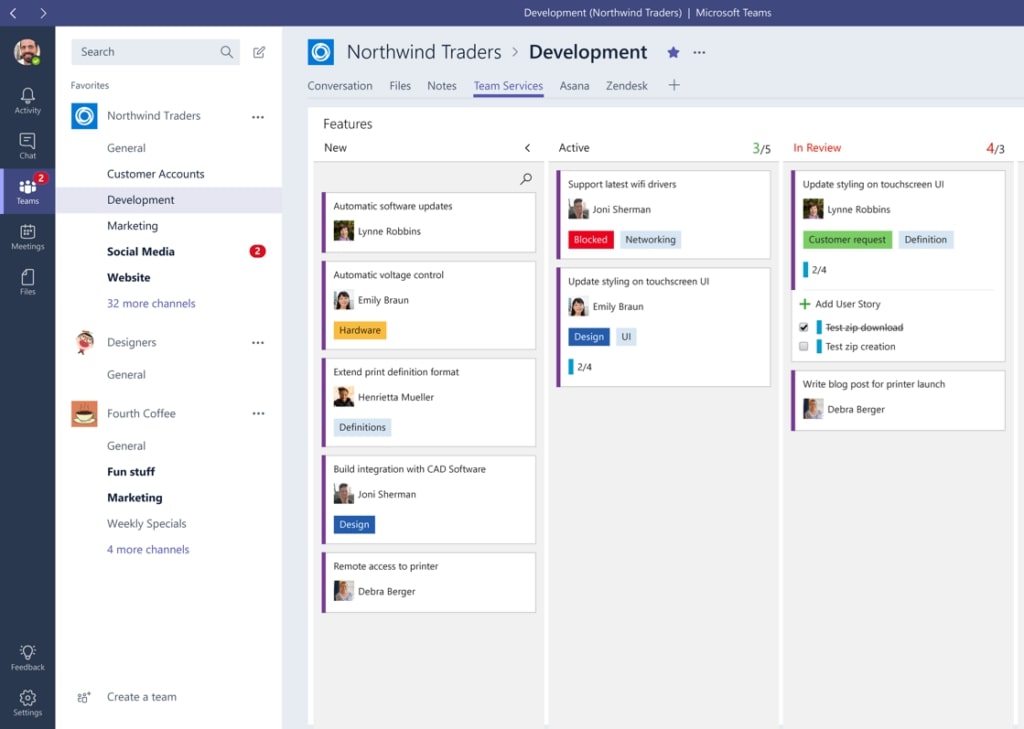
        Microsoft teams. Image powered by FuseBase

        Best for: businesses that need enterprise communication and collaboration

        Microsoft Teams is a popular collaboration tool that lets you communicate via chat and video conferencing. This alternative integrates smoothly with other Microsoft 365 products, such as Outlook and OneDrive, which allows teams to work with their preferred tools. One of the key advantages of Microsoft Teams is its familiarity. Many businesses already use Microsoft products, so this alternative feels like a natural extension of their existing workflow. Overall, it might become a credible equivalent to Clinked.

        Key Features:

        • Video conferencing and real-time chats
        • Analytics and usage reporting
        • Meeting recording and transcription
        • Integration with third-party tools like Trello, Asana, and Google Drive

        Pros:

        • Familiar tool if you’re already using Microsoft products
        • It has a simple design and is easy to set up
        • A solid set of features for remote and hybrid work

        Cons:

        • Some users mention that Microsoft Teams can feel slow, especially on older computers
        • In larger organizations, teams can get messy quickly

        Pricing:

        Business: starts at $4.00 per user/month

        Individuals: free plan is included, paid plans start at $99.99 for 1 person

        Enterprise: starts at $8.55 per user/month
        3. SuperOkay

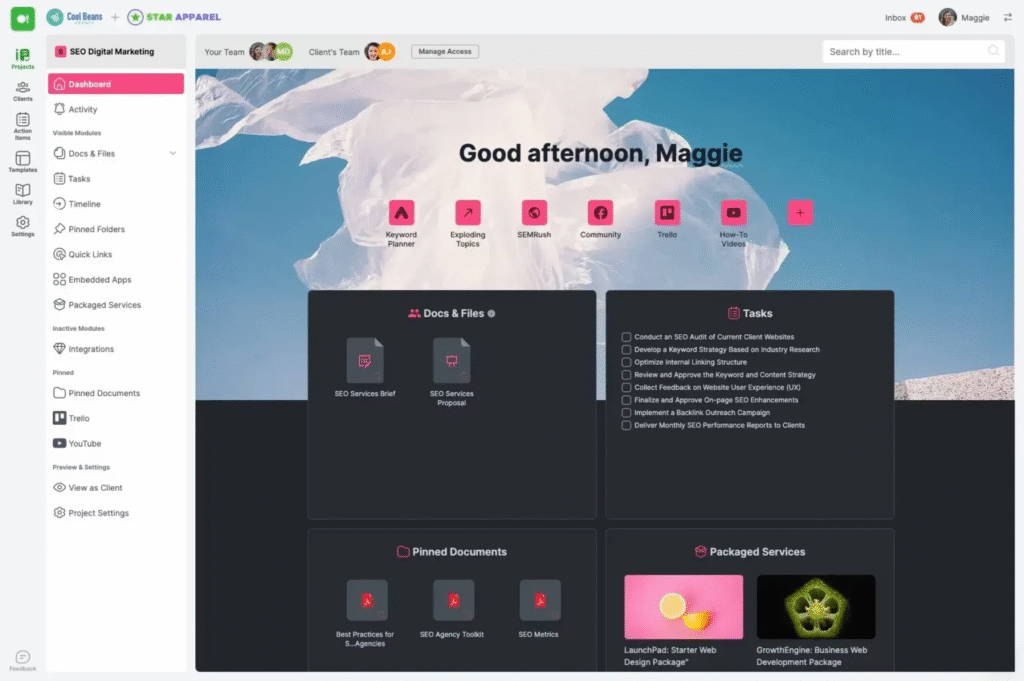
        SuperOkay. Image powered by FuseBase.

        Best for: agile creative agencies that want to manage their client interactions in a white-label client portal.

        SuperOkay offers customizable client portals to share project links, assets, connected apps, and more. Its Portals provide a client-oriented dashboard, quick links, endless customization options (with colors, logos, images, and fonts of your brand), and structured workflows for the business and the customer. In addition, you can embed the apps you already use in your free client portal. All in all, it is a credible substitute for Clinked to consider.

        Key Features:

        • Reusable blocks and embedded apps
        • Packaged services
        • Team bios and case studies
        • Various project and document templates

        Pros:

        • An affordable alternative with a user-friendly interface
        • Good option for organizing all project-related documents in one central hub
        • Can help you optimize project management, eliminate email clutter, and ensure a more organized collaboration

        Cons:

        • Some of the formatting doesn’t match up when you make your own templates
        • Lack of 2FA and AI features

        Pricing:

        • Free plan with basic features
        • Solo: $9 per month for busy freelancers with 3 clients and unlimited projects.
        • Solo+: $29 per month for full white label, 5 clients, and 3 team members
        • Business: $112 per month for unlimited clients and team members, and unlimited packaged service

        4. Asana

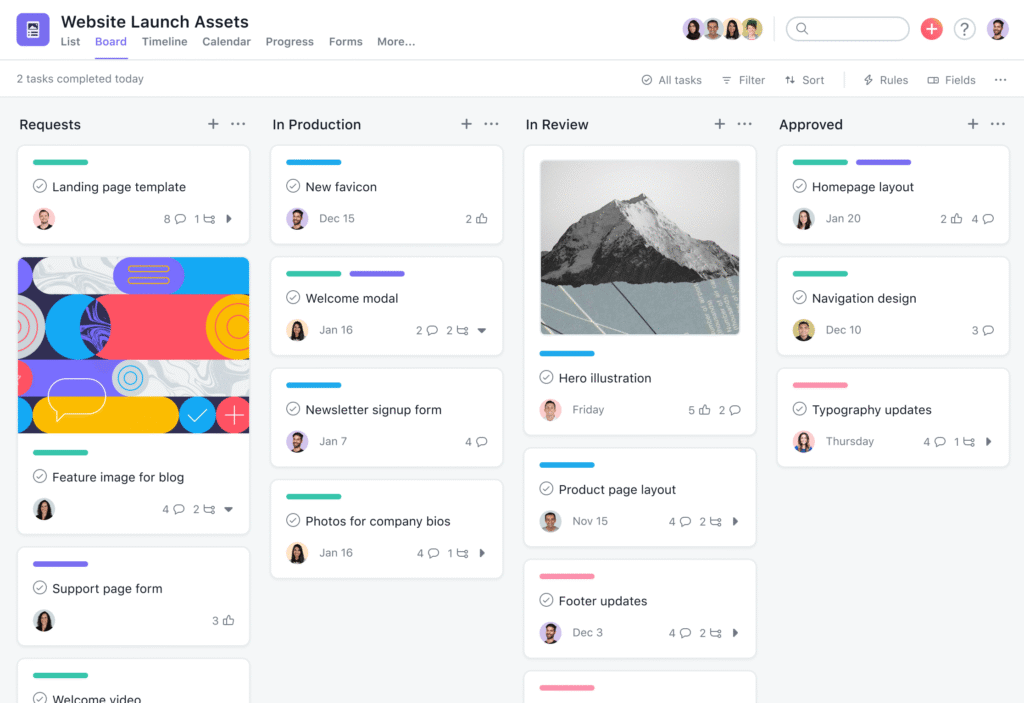
        Asana. Image powered by FuseBase

        Best for: businesses that need advanced project management and collaboration tools.

        Asana has a similar feature set as Clinked, making it a highly capable competitor to Clinked. This project management platform offers businesses a set of features for managing projects and collaborating with team members easily. Asana allows users to assign tasks, set deadlines, and track progress. This alternative also offers a variety of communication tools, including team messaging, comment threads, and notifications. The application offers both free and paid plans, with the latter providing advanced features.

        Key Features:

        • Custom fields, timelines, and advanced search
        • Agentic work management and pre-built AI agents
        • Portfolios and reporting dashboards

        Pros:

        • Integrates with a wide range of programs like Google Drive, Dropbox, and Slack
        • The place where humans and AI agents run an organization’s critical workflows together
        • Has mobile and desktop apps

        Cons:

        • More features are locked at the mid-tier level
        • Focus on project management may make Asana less suitable for businesses that require more extensive communication

        Pricing:

        • Free plan
        • Starter: $10.99 per user/month for growing teams that need to track their projects’ progress and hit deadlines.
        • Advanced: $24.99 per user/month for companies that need to manage a portfolio of work and goals across departments.
        • Enterprise: custom pricing for companies that need to coordinate and automate complex work across departments, without limits.

        5. Trello

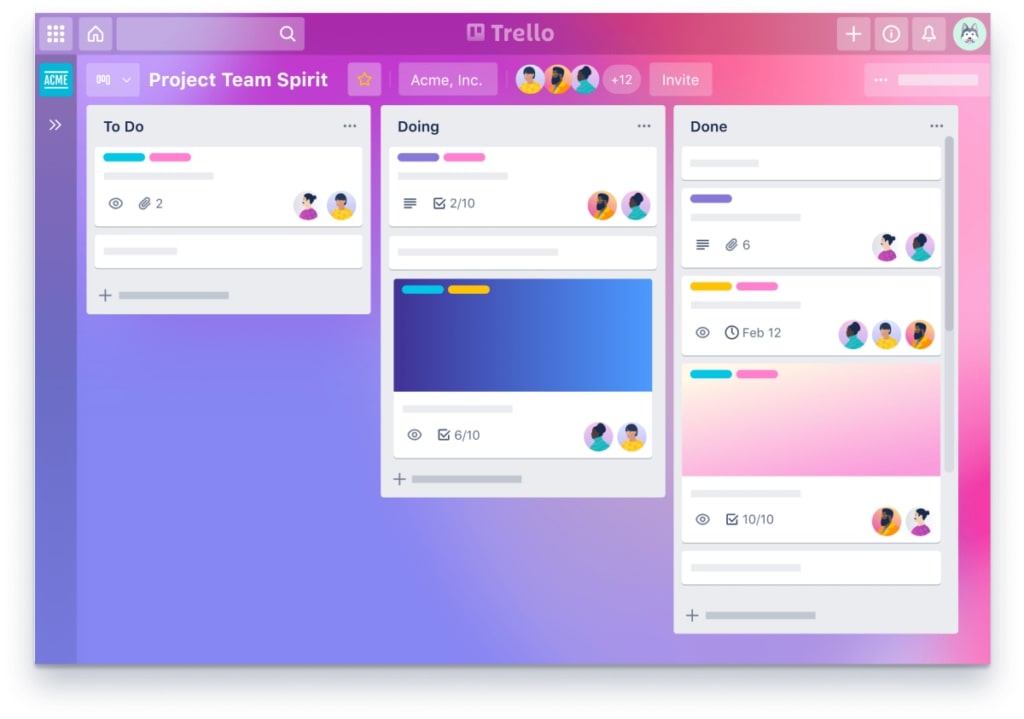
        Trello. Image powered by FuseBase

        Best for: teams that prefer visual and easy-to-use tools.

        Trello is a visual tool that allows teams to manage projects, assign tasks, and collaborate in real-time. It’s based on the Kanban project management method, which involves visualizing workflows and breaking them down into smaller tasks. Simplicity is one of Trello’s key advantages. Businesses that require a transparent, straightforward solution for project management and collaboration will find the platform an ideal alternative.

        Key Features:

        • Custom backgrounds and team templates
        • Trello Inbox and boards
        • Card mirroring and drag-and-drop planner

        Pros:

        • Boards-and-cards system is simple and highly visual
        • A variety of customization options, including the ability to add labels, due dates, and checklists to cards
        • See your projects from every angle with Board, Timeline, Table, Calendar, Dashboard, Map, and Workspace views

        Cons:

        • The platform’s visual approach to project management may not be suitable for all types of projects
        • Can feel disorganised when the project expands

        Pricing:

        • Free plan
        • Standard: $5 per user/month for unlimited boards, card mirroring, and more automation
        • Premium: $10 per user/month to add AI to your boards and admin controls to your toolkit.
        • Enterprise: $17.50 per user/month for enterprise-grade security and controls

        6. Moxo

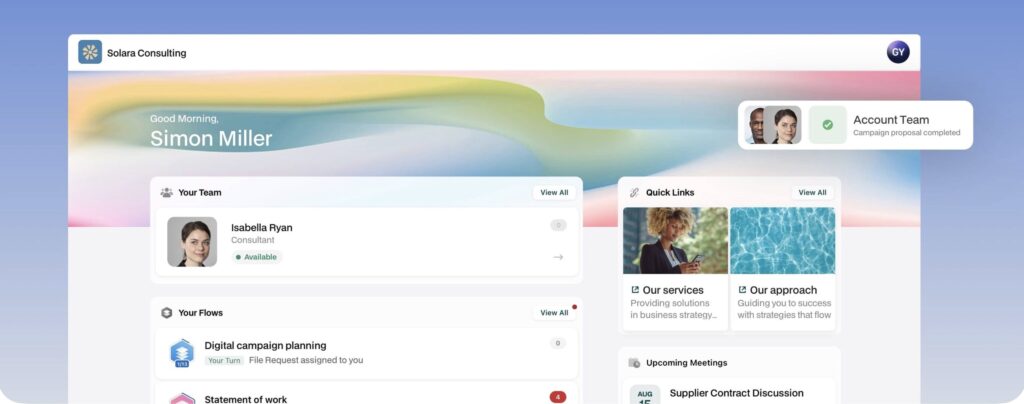
        Moxo. Image powered by FuseBase.

        Best for: teams that manage complex workflows and want to turn them into simple flows.

        Moxo is a cloud-based collaboration platform, and enterprise users can even request a private cloud for storing data. Like Clinked, Moxo also offers native mobile apps that can be branded. It has a strong project management kit, supports workflow automations with third-party integrations, and offers productivity reporting features.

        Key Features:

        • AI workflow orchestration and advanced automation
        • Collaborative project workspaces and reporting dashboard
        • Flow template gallery for onboarding, rev ops, finance, and more

        Pros:

        • You can describe your business process, and Moxo will build and run it
        • Essential tools like data tables, secure messaging, and file sharing
        • Connects to what you already use – PSA tools, project management, CRM, document storage

        Cons:

        • Pricey for growing teams
        • The setup and configuration process can be complex.

        Pricing:

        • Free plan
        • Business: $99/month for third-party integrations, reporting dashboard, and AI reporting agent
        • Pro: $499/month for webhooks, flow catalog, portals, and custom domain
        • Enterprise: custom pricing.

        7. Suitedash

        SuiteDash. Image powered by FuseBase.

        Best for: consultants and service agencies that need to manage their client communications, project management, and invoicing.

        Suitedash is an all-in-one alternative that combines CRM, secure portals, support tickets, and powerful billing. This multi-tool helps you communicate securely and professionally with fully encrypted messaging. With its project management tools, businesses can organize tasks, assign responsibilities, and track progress across projects with ease. Suitedash also helps to simplify onboarding for clients and new members through automated onboarding workflows.

        Key Features:

        • White-label client portals and custom-branded mobile app
        • Appointment scheduling, billing and digital proposals
        • Support tickets and eSignature

        Pros:

        • Customize the Client portal experience with your URL, logo & colors
        • Automatically trigger a customized onboarding flow for new or existing clients
        • Time tracking, collaboration, ticket flows, and billing in one business management platform.

        Cons:

        • Limited API
        • Setting up can feel overwhelming for teams that aren’t familiar with CRMs

        Pricing:

        • Start: $19/month for unlimited members and portals, custom branded mobile app, and email marketing campaigns
        • Thrive: $49/month for dynamic proposals toolkit, advanced custom menus, and client-side live chat
        • Pinnacle: $99/month for complete automation toolkit, flows onboarding toolkit, and support tickets toolkit

        8. Monday.com

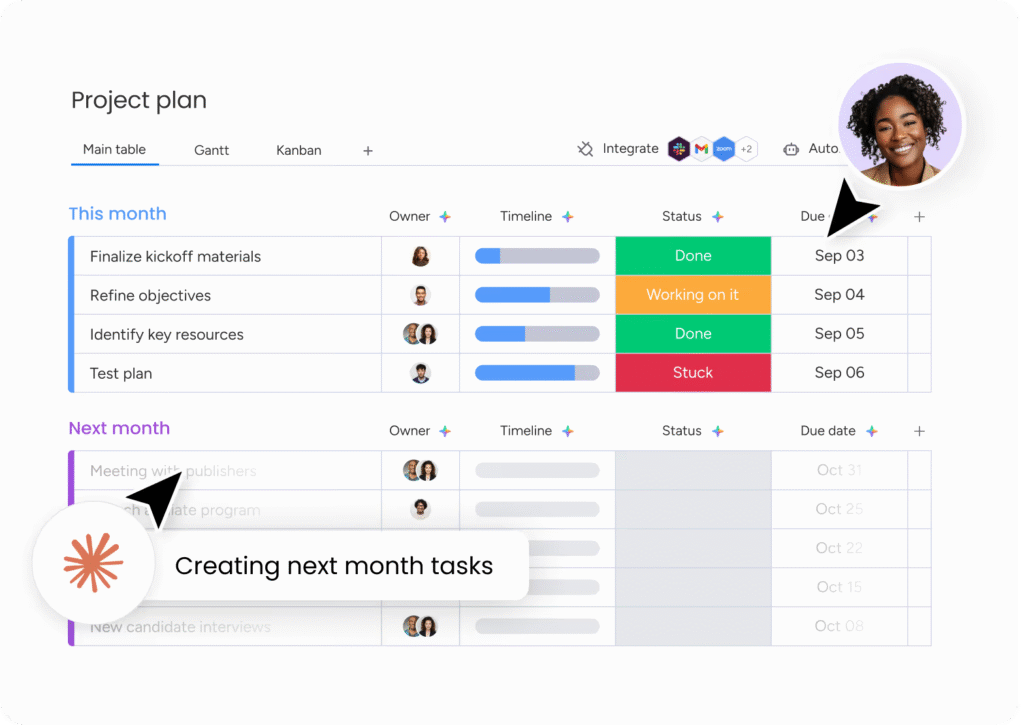
        Monday.com. Image powered by FuseBase.

        Best for: growing teams that manage large amounts of data and need collaboration + project management tools.

        Monday.com is another visual project management and collaboration platform. It allows users to create and customize their own workspaces, boards, and documents, which makes workflows flexible for different project needs. Its live dashboards help teams organize and collaborate on work data, while proactive AI analysis provides insights and alerts. Additionally, users can choose a preferred view of the data, including chart, battery, Gantt, cards, and more.

        Key Features:

        • Custom live dashboards and collaborative docs
        • AI Agents for different teams and cases
        • Live project health, risks, and dependencies

        Pros:

        • See your data exactly how you need it
        • Smart navigation & filtering for Kanban boards
        • Includes products for work management, CRM, service management, and marketing campaigns all on one platform

        Cons:

        • Mastering the more complex dashboards and integrations can be overwhelming for new users
        • Some users state that the AI credit limit is reached too quickly

        Pricing:

        • Free plan
        • Basic: €9/seat per month for unlimited free viewers, unlimited items, and basic AI
        • Standard: €12/seat per month for more views, guest access, and essentials AI
        • Pro: €19/seat per month for private boards and docs, time tracking, advanced columns, and premium AI
        • Enterprise: custom price

        Finding the Best Alternative to Clinked for Collaboration

        Over the last few years, collaboration has gone through major transformations. As a result, new and innovative solutions and approaches are now in demand more than ever. In this article, we explored the top 8 collaboration apps like Clinked. And of all the tools we reviewed below, FuseBase is the best choice for teams that collaborate not only with internal team members but also with clients and partners. With its focus on data security, document management, collaboration, and project management tools, it’s a great alternative.

        Enhance your collaboration with FuseBase!

        Try it now

        FAQ

        What is Clinked used for?

        Teams use Clinked to securely share files, collaborate smoothly, create client portals, and manage projects.

        What are Clinked alternatives?

        Some strong alternatives include FuseBase, Superokay, Asana, Microsoft Teams, Moxo, Trello, Monday.com, and SharePoint.

        Does Clinked offer a free trial?

        Clinked offers a free trial, though it does not include a free plan.

        What kind of businesses use Clinked?

        Clinked is used by teams that collaborate internally and with clients. Common industries include agencies, accounting, finance, hr, real estate, and healthcare.

        Author Image

        Pavel Sher

        Founder and CEO of FuseBase

        Pavel Sher is on a mission to give teams their time back by replacing busywork with AI agents that handle the repetitive tasks no one has time for. As the CEO of FuseBase, he has turned years of customer insights and productive teams experience into a cutting-edge collaborative portal platform. By introducing deal rooms, onboarding solutions, and knowledge-sharing features, Pavel is helping agencies and sales teams work smarter, close deals faster, and deliver exceptional client experiences. FuseBase AI Agents act as Dream Team of executive assistants that work 24/7.

        Found it useful? Share the article with your community

        • Share on Facebook
        • Share on LinkedIn
        • Share on X

        Related Articles

        Top Alternatives to Notion Client Portals
        Comparisons

        Top Alternatives to Notion Client Portals

        • by Sabina Sher
        • 7 Min read
        10 GetAccept Alternative Options and Why They Stand Out
        Comparisons

        10 GetAccept Alternative Options and Why They Stand Out

        • by Sabina Sher
        • 11 Min read
        Subscribe to our blog!

        Get weekly tips and insights on how to grow your business

        Our solutions
        • Mid-size companies
        • AI Agents (apps)
        • Client portal
        • Deal rooms
        • White label
        • Knowledge base
        Plans & Pricing
        • Pricing
        Enterprise Security
        • Trust Center
          (HIPAA & SOC 2)
        • Terms & Privacy
        • GDPR
        Company & Contacts
        • Templates
        • Guides
        • Roadmap
        • Privacy
        • About us
        • Reviews
        • Contact us
        Compare with
        • SharePoint
        • Moxo
        • Notion
        • Confluence
        • Asana
        • Airtable
        • Monday
        • See all
        Fusebase Logo
        • English
        FuseBase - Client collaboration platform for professional services | Product Hunt
        • g2
        • sourceforce
        • g2
        2014-2026 FuseBase is a product of Nimbus Web Inc., a Delaware company