

Skip to the content
  • Portals & collaboration

    One place to collaborate internally and externally

    • AI Agents (apps)User-friendly AI agents in minutes for every team
    • AI Agents for SalesSales President’s Club AI Agents
    • AI Agents for TeamsSecure Workspace & Agent Management for Modern Teams
    • Deal RoomsClose faster with smart, sleek spaces for every deal
    • Knowledge BaseCreate one source of truth for clients & teams
    • Partner & Vendor portalsMaximize value from your external relationships
    • Project ManagementWork on clients’ projects without extra hurdles
    Explore portals →

    Browser extensions

    Boost your productivity with FuseBase browser extensions

    • FuseBase ClarityCapture Step-by-Step guides, SOP and tutorials
    • FuseBase AI AssistantAI Chat and Agents everywhere
    • FuseBase Voice AssistantVoice typing everywhere in your browser
    • FuseBase PRO AINote taking, Files Sharing & Collaboration

    Build professional apps

    Production-ready apps in days

    • App developmentCreate professional apps for the way your business works.

    Hosting

    Your tools, hosted by FuseBase.

    • FuseBase WorkAI coworkers with defined roles. Powered by Paperclip.
    • n8nSelf-hosted workflow automation.
    • FirecrawlSelf-hosted web data tools.
    Explore hosting →

    Industries

    Find the right workspace for your industry.

    • Consulting ServicesDeliver exceptional client service
    • Financial ServicesAutomate compliance, approvals & collaboration
    • HealthcareSecure, compliant portals for care and admin
    • Marketing & AdvertisingCentralize campaigns and automate client requests
    • Mid-Size companiesGrowing 50-1000+ employee companies
    • Professional ServicesGet a one-stop-shop for collaboration
    • Software & TechnologyAutomate workflows with AI-powered portals
    See all industries →
    Portals & collaboration

    One place to collaborate internally and externally

    • AI Agents (apps)User-friendly AI agents in minutes for every team
    • AI Agents for SalesSales President’s Club AI Agents
    • AI Agents for TeamsSecure Workspace & Agent Management for Modern Teams
    • Deal RoomsClose faster with smart, sleek spaces for every deal
    • Knowledge BaseCreate one source of truth for clients & teams
    • Partner & Vendor portalsMaximize value from your external relationships
    • Project ManagementWork on clients’ projects without extra hurdles
    Explore portals →
    Browser extensions

    Boost your productivity with FuseBase browser extensions

    • FuseBase ClarityCapture Step-by-Step guides, SOP and tutorials
    • FuseBase AI AssistantAI Chat and Agents everywhere
    • FuseBase Voice AssistantVoice typing everywhere in your browser
    • FuseBase PRO AINote taking, Files Sharing & Collaboration
    Build professional apps

    Production-ready apps in days

    • App developmentCreate professional apps for the way your business works.
    Hosting

    Your tools, hosted by FuseBase.

    • FuseBase WorkAI coworkers with defined roles. Powered by Paperclip.
    • n8nSelf-hosted workflow automation.
    • FirecrawlSelf-hosted web data tools.
    Explore hosting →
    Industries

    Find the right workspace for your industry.

    • Consulting ServicesDeliver exceptional client service
    • Financial ServicesAutomate compliance, approvals & collaboration
    • HealthcareSecure, compliant portals for care and admin
    • Marketing & AdvertisingCentralize campaigns and automate client requests
    • Mid-Size companiesGrowing 50-1000+ employee companies
    • Professional ServicesGet a one-stop-shop for collaboration
    • Software & TechnologyAutomate workflows with AI-powered portals
    See all industries →
    Book a demo

    with our experts to build your custom workflow

  • Templates NEW
    • FuseBase GitHub Repos One step closer to the open-source community
    • Join FuseBase Discord AI development and autonomous agents for client-facing business
    Book a demo

    with our experts to build your custom workflow

  • Pricing
    • About us Meet FuseBase!
    • Blog Read the latest collaboration tips
    • Case Studies Explore case studies and find tailored solutions
    • Contact us Get growth advice from our experts
    • Guides Answer your FuseBase questions
    • Roadmap See what waits for you in the future
    • Trust center HIPAA & SOC 2. Trusted standards, protected data
    • Affiliate Program Would you turn down free money?
    Book a demo

    with our experts to build your custom workflow

Menu
  • Solutions ›

    Portals & collaboration

    One place to collaborate internally and externally

    • AI Agents (apps)User-friendly AI agents in minutes for every team
    • AI Agents for SalesSales President’s Club AI Agents
    • AI Agents for TeamsSecure Workspace & Agent Management for Modern Teams
    • Deal RoomsClose faster with smart, sleek spaces for every deal
    • Knowledge BaseCreate one source of truth for clients & teams
    • Partner & Vendor portalsMaximize value from your external relationships
    • Project ManagementWork on clients’ projects without extra hurdles
    Explore portals →

    Browser extensions

    Boost your productivity with FuseBase browser extensions

    • FuseBase ClarityCapture Step-by-Step guides, SOP and tutorials
    • FuseBase AI AssistantAI Chat and Agents everywhere
    • FuseBase Voice AssistantVoice typing everywhere in your browser
    • FuseBase PRO AINote taking, Files Sharing & Collaboration

    Build professional apps

    Production-ready apps in days

    • App developmentCreate professional apps for the way your business works.

    Hosting

    Your tools, hosted by FuseBase.

    • FuseBase WorkAI coworkers with defined roles. Powered by Paperclip.
    • n8nSelf-hosted workflow automation.
    • FirecrawlSelf-hosted web data tools.
    Explore hosting →

    Industries

    Find the right workspace for your industry.

    • Consulting ServicesDeliver exceptional client service
    • Financial ServicesAutomate compliance, approvals & collaboration
    • HealthcareSecure, compliant portals for care and admin
    • Marketing & AdvertisingCentralize campaigns and automate client requests
    • Mid-Size companiesGrowing 50-1000+ employee companies
    • Professional ServicesGet a one-stop-shop for collaboration
    • Software & TechnologyAutomate workflows with AI-powered portals
    See all industries →
    Portals & collaboration

    One place to collaborate internally and externally

    • AI Agents (apps)User-friendly AI agents in minutes for every team
    • AI Agents for SalesSales President’s Club AI Agents
    • AI Agents for TeamsSecure Workspace & Agent Management for Modern Teams
    • Deal RoomsClose faster with smart, sleek spaces for every deal
    • Knowledge BaseCreate one source of truth for clients & teams
    • Partner & Vendor portalsMaximize value from your external relationships
    • Project ManagementWork on clients’ projects without extra hurdles
    Explore portals →
    Browser extensions

    Boost your productivity with FuseBase browser extensions

    • FuseBase ClarityCapture Step-by-Step guides, SOP and tutorials
    • FuseBase AI AssistantAI Chat and Agents everywhere
    • FuseBase Voice AssistantVoice typing everywhere in your browser
    • FuseBase PRO AINote taking, Files Sharing & Collaboration
    Build professional apps

    Production-ready apps in days

    • App developmentCreate professional apps for the way your business works.
    Hosting

    Your tools, hosted by FuseBase.

    • FuseBase WorkAI coworkers with defined roles. Powered by Paperclip.
    • n8nSelf-hosted workflow automation.
    • FirecrawlSelf-hosted web data tools.
    Explore hosting →
    Industries

    Find the right workspace for your industry.

    • Consulting ServicesDeliver exceptional client service
    • Financial ServicesAutomate compliance, approvals & collaboration
    • HealthcareSecure, compliant portals for care and admin
    • Marketing & AdvertisingCentralize campaigns and automate client requests
    • Mid-Size companiesGrowing 50-1000+ employee companies
    • Professional ServicesGet a one-stop-shop for collaboration
    • Software & TechnologyAutomate workflows with AI-powered portals
    See all industries →
  • Templates NEW
  • GitHub / Discord ›
    • FuseBase GitHub Repos One step closer to the open-source community
    • Join FuseBase Discord AI development and autonomous agents for client-facing business
  • Pricing
  • Resources ›
    • About us Meet FuseBase!
    • Blog Read the latest collaboration tips
    • Case Studies Explore case studies and find tailored solutions
    • Contact us Get growth advice from our experts
    • Guides Answer your FuseBase questions
    • Roadmap See what waits for you in the future
    • Trust center HIPAA & SOC 2. Trusted standards, protected data
    • Affiliate Program Would you turn down free money?
Sign in Book a demo Get started for free
  • Sign in
  • Book a demo
  • Get started for free
Categories
  • All articles
  • AI Agents
  • Client & Customer Portals
  • Client Collaboration & Communication
  • Comparisons
  • Customer & Self-Service
  • Knowledge Management
  • Productivity
  • Sales & Deal Management
  • Team & Project Management
  • Updates and News
TABLE OF CONTENTS

  • So, What's a Web Portal?
  • Web Portal vs Website
  • Advantages and Disadvantages of Web Portals for Service Businesses
  • Different Types of Web Portals for Your Business
  • Client Portals
  • Partner Portals
  • Corporate Portals
  • Knowledge Management Portals (Knowledge Bases)
  • Student Portals
  • HR Portals
  • FuseBase Web Portal Examples
  • Summing Up
  • FAQ
  • Home
  • Blog
  • Client & Customer Portals...
  • What is a Web Portal? Types, Examples, Key Features
Client & Customer Portals

What is a Web Portal? Types, Examples, Key Features

  • by Sabina Sher
  • October 3, 2024
  • 10 Min read

According to the CX Trends Report, over 70% of customers expect immediate service. Can your business keep up with the growing demands? If not, you’re likely already losing clients to competitors who prioritize customer experience and convenience. But we’ve got good news, folks! There’s a practical solution: web portals.

Web portals streamline collaboration and allow your customers to access essential information and resolve issues on their own, 24/7. Adopting online portals will help your business build stronger relationships with customers while optimizing operational efficiency.

Are you ready to deliver the fast, self-service solutions your clients demand? Let’s learn more about different types of web portals and how they work!

So, What’s a Web Portal?

A web portal is a centralized hub where businesses and clients you collaborate with can find all things related to their projects and communicate with you directly. It’s designed to improve interactions and provide users with a personalized experience tailored to their needs.

The benefits of web portals include improved efficiency and higher client satisfaction, and this is not surprising. By centralizing all project-related information and tools, a web portal eliminates the need for multiple apps for collaboration, streamlining workflows and saving time.
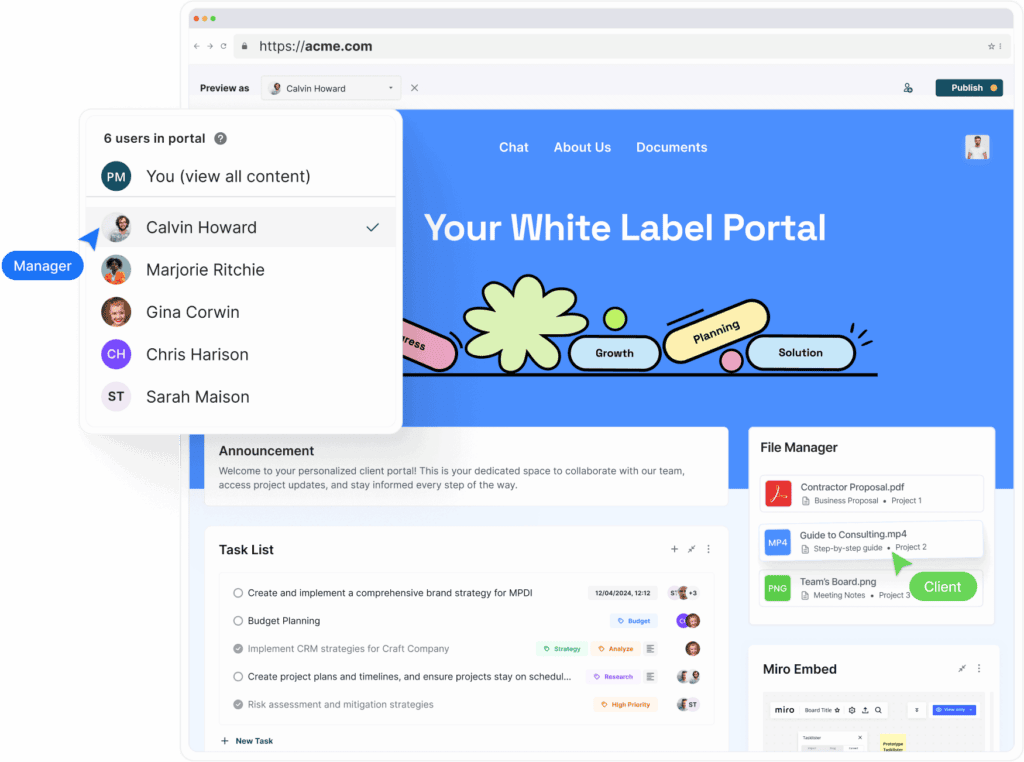
So, What's a Web Portal? Image Powered By FuseBase.

Web Portal vs Website

There are many website builders offering tools for designing no-code or low-code web applications. However, there’s a catch: most of them are not suitable for building even simple web portals and client portals specifically due to their lack of functionality. After all, all they’re good for is building websites!

Websites and web portals serve fundamentally different purposes, and it’s crucial to understand these differences when determining your business’s exact needs. Spoiler alert: it’s best to have both.

A website is a one-way communication tool. It acts as a digital storefront or a marketing platform designed to inform and engage potential clients. Websites are static, meaning they are designed for visitors to consume content rather than interact with it. While they may include forms for inquiries and blogs, websites are mostly built to just push information outwards.

In contrast, the concept of a web portal primarily suggests two-way interaction between your business and its clients, employees, or partners. It allows both you and clients to edit documents, create tasks, update their statuses, chat, and more. A web portal is built to offer more than just access to content — it allows users to actively engage with your business.

So, for businesses that need client-facing platforms capable of real-time document sharing, task tracking, or secure communications, a website alone won’t suffice.

Advantages and Disadvantages of Web Portals for Service Businesses

The main advantage of using web portals is centralized access to information. It allows clients to find all project-related resources and tools in one place, which improves efficiency. But that’s not it! Here are other benefits of client portals:

   1. Easy access to documents and tasks

All relevant files, reports, and documentation are stored in one place, making it easy for users to find the information they need without navigating multiple apps.

   2. Improved efficiency and productivity

Tools are consolidated into one platform, and repetitive tasks are automated with smart workflows. Teams and clients can collaborate in real-time on projects, documents, and tasks, speeding up workflows and reducing miscommunication.

   3. Personalized and branded experiences

A key advantage of modern web portals is the ability to deliver personalized experiences. They’re user-friendly, customizable, and can be set up for each individual client.

   4. Scalability

As businesses grow, their web portals can scale alongside them. Web portals can be expanded to include more users, services, or integrations as the organization’s needs evolve. You can integrate portals with other business software, such as CRM, ERP, or PM tools, to create a seamless workflow.

   5. Collaboration tools, streamlined communication

Centralizing communication channels ensures that all messages, notifications, and updates are available in one location. So, yes, no more lost emails and misunderstandings!

While the advantages of web portals sound exciting, you should also consider the disadvantages of using them. Here are a few:

   1. High development costs (when building from scratch)

Building a custom collaboration solution from scratch would require hiring a full web development department or at least a few freelancers, and not all businesses can afford this kind of luxury.

   2. Time-consuming setup

Depending on the complexity of the portal, setup and implementation can take months, which may delay the return on investment.

   3. Training costs and learning curve

Employees and users may need training to effectively use the portal, which can add to initial costs.

Luckily, platforms like FuseBase offer pre-built portals that can be easily customized and branded. The level of supported customization is enough to build a web portal for free on your own, even if you don’t have technical expertise.

💡 Read more posts on this topic:
  • 📚 FuseBase Academy: Short Tutorials to Master the Client Collaboration Platform
  • 🔝 Top 13 Customer & Client Portal Software

Real Benefits of Web Portals

Internal Workspace Icon
Internal Workspace
What you get:
  • Sales Portal
  • Process Portal
  • Centralized Hub
  • Internal Knowledge Base
  • Real-Time Collaboration
  • Secure File Storage
  • Video Recording & Transcription
  • Meeting Notes with Context
  • Fast Search & Organization
  • Client-Ready Sharing
  • Tool Integrations
AI Agents Icon
AI Agents
What you get:
  • Works Where You Work
  • Internal & External Workspaces
  • Real Answers from Your Content
  • Automates Busywork
  • Screen-Aware & Prompt-Driven
  • Custom or Prebuilt Agents
  • External Agent Access
  • Synced with Your Stack
  • On-Brand, On-Point
  • No Extra Tools Needed
AI Agents Image
External Workspace Icon
External Workspace
What you get:
  • Partner or Vendor Portal
  • Client Portals
  • External Knowledge Base
  • Drag-and-Drop Page Builder
  • Mutual Action Plans & Task Lists
  • Built-in CRM
  • Built-In E-signatures
  • Forms & Surveys
  • Secure File Sharing
  • Meeting Notes & Videos
  • Live Chat with Clients
  • Client Analytics
  • White-Label & SMTP Support
Learn more

Different Types of Web Portals for Your Business

Setting up a portal allows businesses and professionals to manage projects, organize knowledge, and collaborate with partners as smoothly as possible. The most basic web portal features you will find on every platform are tools for communication and project management: chats, task lists, calendars, and so on. However, specific functionality varies depending on the type of portal and its intended purpose. Below are some common types of web portals and their features:

Client Portals

Nowadays, providing personalized portal experiences to clients is what makes a service business stand out. Customer portals help businesses shape how they collaborate with clients, smoothing interactions across all project phases, from the initial proposal to sharing deliverables and collecting feedback for the portfolio. Also, most client portals can be customized to match your brand and meet the specific needs of your client projects.

Key features of client portals:

  • Personalized hubs for easy access to information and online services
  • White-label solution for complete control over design
  • Project management tools, real-time collaboration on tasks and documents
  • Workflow automation and AI tools
  • Content generation and management
  • Visualization of project progress, timelines
  • Billing and invoicing
  • Personalized dashboards and notification panels
  • Live chats, mentions, comment feeds

Partner Portals

Supplier portals and vendor portals are essential tools for businesses that rely on external partners to manage supply chains and procure goods. These web portals offer real-time access to important information like purchase orders, invoices, contracts, and delivery schedules. In addition to supplier and vendor management, partner portals are ideal for affiliates and resellers. Businesses can use them to post information about products and services, share news, and provide resources to help their partners sell more effectively.

Key features of partner portals:

  • Order tracking and management
  • eSignatures support
  • File management and secure sharing
  • Notification panels and dashboards
  • Invoice submission and payment tracking
  • Feedback and communication tools

Corporate Portals

Corporate portals, also known as employee web portals, are secure online platforms designed specifically for internal collaboration within an organization. They often integrate seamlessly with other enterprise software systems, providing a unified interface for employees to carry out multiple tasks. Having a well-implemented employee portal leads to a more engaged and informed workforce.

Key features of a corporate portal:

  • Centralized access to company resources
  • Training materials
  • Forms and templates
  • Project management and workspaces
  • Team collaboration tools
  • Company announcements
  • Version control
  • Feedback forms

Knowledge Management Portals (Knowledge Bases)

Knowledge bases are self-service web portals that contain interactive documents with essential information related to business projects or operation processes (internal or external). For example, you can fill your knowledge portal with guides, SOPs, and troubleshooting documentation. Developing web portals for knowledge management will efficient environment for knowledge sharing, whether it’s for your team or clients.

Knowledge base features:

  • Real-time collaboration on documents
  • Rich text editors for formatting text, embedding support, and hyperlinking
  • Search by keywords, tags, or document titles
  • Hierarchical categories for grouping related documents
  • Track changes and revert to previous versions with version control
  • Comments, feedback, or suggestions for improving content
  • Restricted access and granular permissions

Student Portals

Managing academic load and staying on top of assignments can sometimes feel overwhelming for students, so having a centralized online platform for access to course materials and tasks would be a great help in staying organized and maintaining consistent communication with instructors and peers. A well-designed education portal provides a one-stop solution for accessing everything a student needs in their academic journey.

Student portal features:

  • Access lecture slides, notes, and reading materials
  • Submit assignments and projects
  • Review recorded lectures or tutorials
  • Deadline reminders
  • Course announcements
  • Feedback collection
  • Document management

HR Portals

HR portals are centralized digital platforms designed to enhance and streamline human resource management within an organization. By providing self-service options for employees and automating administrative tasks for HR teams, these internet portals free up HR teams to focus on more strategic initiatives while empowering employees to take charge of their own HR needs.

Key features of portals for HR:

  • Employee profile management
  • Onboarding checklists, leave requests, vacation tracking
  • Templates for all kinds of documentation
  • Managing employee handbook
  • Access to important legal documents and training materials
  • Performance review and 360-degree feedback
  • Managing job postings and applications

FuseBase Web Portal Examples

FuseBase is a top web portal platform that helps create secure online spaces for team and client collaboration. It offers themes and templates to help you create a custom web portal for your business and client collaboration needs. You can also turn to the FuseBase team for custom web portal development.
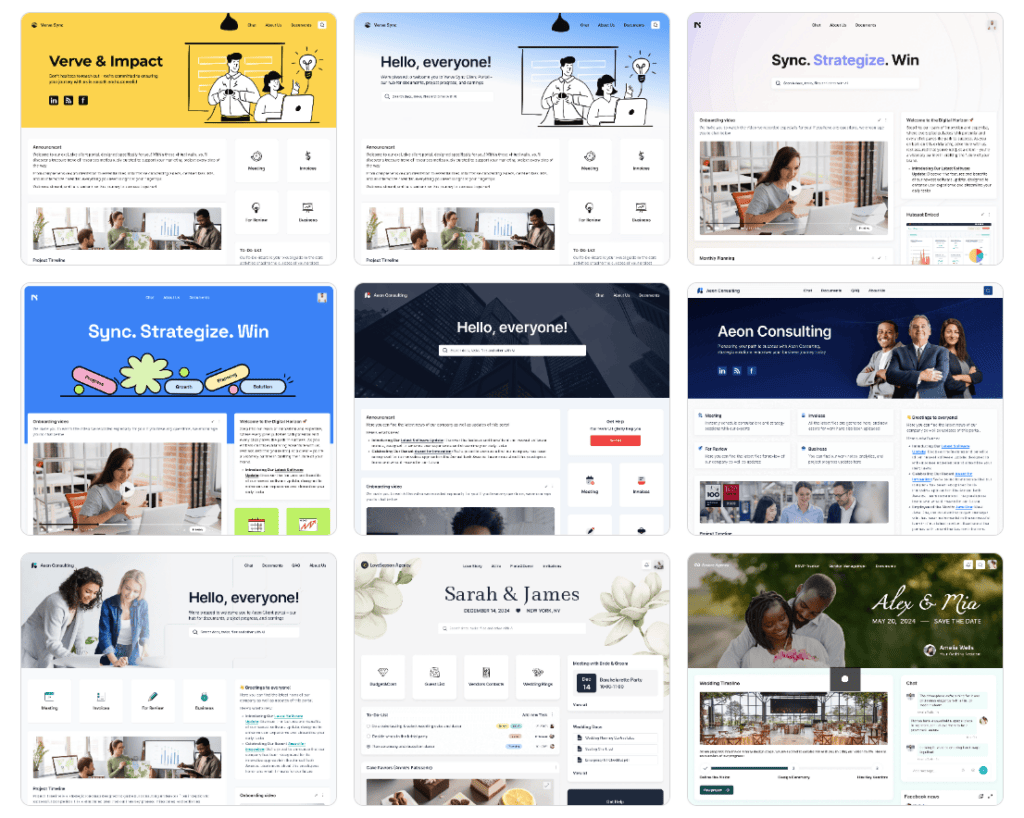
FuseBase Web Portal Examples. Image Powered By FuseBase.

Examples of web portals:

  • Portals for wedding planners
  • Portals for digital agencies
  • Portals for consultants

Building a portal that connects clients with your team is an investment in business growth and success. Create a web portal for free and experience the difference in service delivery.

🤖 Watch how FuseBase AI Agents transform external collaboration:

Image powered by FuseBase.

Summing Up

Web portals are versatile tools that can be tailored to meet the needs of different industries and user groups. Are you looking to improve client relationships and service delivery? Try branded client portals. Do you want to streamline knowledge sharing between teams? Set up a knowledge base.

Each type of portal comes with its own set of features, allowing businesses and users to access the tools and resources they need in one centralized platform.

FAQ

What is a web portal?
A web portal (or client portal) is a centralized online platform that provides your clients with access to project-related information, tools, and services.

What does a web portal do?
A web portal streamlines communication, collaboration, and resource management by centralizing all relevant content and tools in one place for users.

What are the types of web portals?
Client portals, employee portals, knowledge management portals, and customer support portals are common types of web portals.

What is a good portal?
A good portal is user-friendly, offers personalized experiences, integrates with other tools, and provides secure, real-time access to relevant information and services.

What is the difference between a website and a web portal?
A website is primarily for presenting information, while a web portal offers two-way communication and collaboration tools.

Build a perfect portal for your business with FuseBase!

Try it now!
Author Image

Sabina Sher

Chief Strategy Officer at FuseBase

Meet Sabina Sher, a Chief Strategy Officer at FuseBase and a storyteller turning industry challenges into engaging content packed with actionable advice. She channels rich industry experience and knowledge into our blog, making it a go-to resource for life hacks, tips, and innovative ideas.

Found it useful? Share the article with your community

  • Share on Facebook
  • Share on LinkedIn
  • Share on X

Related Articles

22 Best Client & Customer Portal Software in 2026
Client & Customer Portals

22 Best Client & Customer Portal Software in 2026

  • by Pavel Sher
  • 13 Min read
Building a Client Portal: 8 Steps to Achieve Success
Client & Customer Portals

Building a Client Portal: 8 Steps to Achieve Success

  • by Luis P. Wadley
  • 9 Min read
Subscribe to our blog!

Get weekly tips and insights on how to grow your business

Our solutions
  • Mid-size companies
  • AI Agents (apps)
  • Deal rooms
  • White label
  • Knowledge base
Plans & Pricing
  • Pricing
Enterprise Security
  • Trust Center
    (HIPAA & SOC 2)
  • Terms & Privacy
  • GDPR
Company & Contacts
  • Templates
  • Guides
  • Roadmap
  • Privacy
  • About us
  • Reviews
  • Contact us
Compare with
  • SharePoint
  • Moxo
  • Notion
  • Confluence
  • Asana
  • Airtable
  • Monday
  • See all
Fusebase Logo
  • English
FuseBase - Client collaboration platform for professional services | Product Hunt
  • g2
  • sourceforce
  • g2
  • SOC 2 Type II
  • HIPAA
2014-2026 FuseBase is a product of Nimbus Web Inc., a Delaware company