
Skip to the content
  • Portals & collaboration

    One place to collaborate internally and externally

    • AI Agents (apps)User-friendly AI agents in minutes for every team
    • AI Agents for SalesSales President’s Club AI Agents
    • AI Agents for TeamsSecure Workspace & Agent Management for Modern Teams
    • Client PortalLevel up your collaboration with unified digital hubs
    • Deal RoomsClose faster with smart, sleek spaces for every deal
    • Knowledge BaseCreate one source of truth for clients & teams
    • Partner & Vendor portalsMaximize value from your external relationships
    • Project ManagementWork on clients’ projects without extra hurdles
    Explore portals →

    Browser extensions

    Boost your productivity with FuseBase browser extensions

    • FuseBase ClarityCapture Step-by-Step guides, SOP and tutorials
    • FuseBase AI AssistantAI Chat and Agents everywhere
    • FuseBase Voice AssistantVoice typing everywhere in your browser
    • FuseBase PRO AINote taking, Files Sharing & Collaboration

    Build professional apps

    Production-ready apps in days

    • App developmentCreate professional apps for the way your business works.

    Hosting

    Your tools, hosted by FuseBase.

    • FuseBase WorkAI coworkers with defined roles. Powered by Paperclip.
    • n8nSelf-hosted workflow automation.
    • FirecrawlSelf-hosted web data tools.
    Explore hosting →
    Portals & collaboration

    One place to collaborate internally and externally

    • AI Agents (apps)User-friendly AI agents in minutes for every team
    • AI Agents for SalesSales President’s Club AI Agents
    • AI Agents for TeamsSecure Workspace & Agent Management for Modern Teams
    • Client PortalLevel up your collaboration with unified digital hubs
    • Deal RoomsClose faster with smart, sleek spaces for every deal
    • Knowledge BaseCreate one source of truth for clients & teams
    • Partner & Vendor portalsMaximize value from your external relationships
    • Project ManagementWork on clients’ projects without extra hurdles
    Explore portals →
    Browser extensions

    Boost your productivity with FuseBase browser extensions

    • FuseBase ClarityCapture Step-by-Step guides, SOP and tutorials
    • FuseBase AI AssistantAI Chat and Agents everywhere
    • FuseBase Voice AssistantVoice typing everywhere in your browser
    • FuseBase PRO AINote taking, Files Sharing & Collaboration
    Build professional apps

    Production-ready apps in days

    • App developmentCreate professional apps for the way your business works.
    Hosting

    Your tools, hosted by FuseBase.

    • FuseBase WorkAI coworkers with defined roles. Powered by Paperclip.
    • n8nSelf-hosted workflow automation.
    • FirecrawlSelf-hosted web data tools.
    Explore hosting →
    Book a demo

    with our experts to build your custom workflow

    • Consulting Services Deliver exceptional client service
    • Financial Services Automate compliance, approvals & collaboration
    • Healthcare Secure, compliant portals for care and admin
    • Marketing & Advertising Centralize campaigns and automate client requests
    • Mid-Size companies Growing 50-1000+ employee companies
    • Professional Services Get a one-stop-shop for collaboration
    • Software & Technology Automate workflows with AI-powered portals
    • See all industries
    Book a demo

    with our experts to build your custom workflow

    • FuseBase GitHub Repos One step closer to the open-source community
    • Join FuseBase Discord AI development and autonomous agents for client-facing business
    Book a demo

    with our experts to build your custom workflow

  • Pricing
    • About us Meet FuseBase!
    • Blog Read the latest collaboration tips
    • Case Studies Explore case studies and find tailored solutions
    • Contact us Get growth advice from our experts
    • Guides Answer your FuseBase questions
    • Roadmap See what waits for you in the future
    • Trust center HIPAA & SOC 2. Trusted standards, protected data
    • Affiliate Program Would you turn down free money?
    Book a demo

    with our experts to build your custom workflow

Menu
  • Solutions ›

    Portals & collaboration

    One place to collaborate internally and externally

    • AI Agents (apps)User-friendly AI agents in minutes for every team
    • AI Agents for SalesSales President’s Club AI Agents
    • AI Agents for TeamsSecure Workspace & Agent Management for Modern Teams
    • Client PortalLevel up your collaboration with unified digital hubs
    • Deal RoomsClose faster with smart, sleek spaces for every deal
    • Knowledge BaseCreate one source of truth for clients & teams
    • Partner & Vendor portalsMaximize value from your external relationships
    • Project ManagementWork on clients’ projects without extra hurdles
    Explore portals →

    Browser extensions

    Boost your productivity with FuseBase browser extensions

    • FuseBase ClarityCapture Step-by-Step guides, SOP and tutorials
    • FuseBase AI AssistantAI Chat and Agents everywhere
    • FuseBase Voice AssistantVoice typing everywhere in your browser
    • FuseBase PRO AINote taking, Files Sharing & Collaboration

    Build professional apps

    Production-ready apps in days

    • App developmentCreate professional apps for the way your business works.

    Hosting

    Your tools, hosted by FuseBase.

    • FuseBase WorkAI coworkers with defined roles. Powered by Paperclip.
    • n8nSelf-hosted workflow automation.
    • FirecrawlSelf-hosted web data tools.
    Explore hosting →
    Portals & collaboration

    One place to collaborate internally and externally

    • AI Agents (apps)User-friendly AI agents in minutes for every team
    • AI Agents for SalesSales President’s Club AI Agents
    • AI Agents for TeamsSecure Workspace & Agent Management for Modern Teams
    • Client PortalLevel up your collaboration with unified digital hubs
    • Deal RoomsClose faster with smart, sleek spaces for every deal
    • Knowledge BaseCreate one source of truth for clients & teams
    • Partner & Vendor portalsMaximize value from your external relationships
    • Project ManagementWork on clients’ projects without extra hurdles
    Explore portals →
    Browser extensions

    Boost your productivity with FuseBase browser extensions

    • FuseBase ClarityCapture Step-by-Step guides, SOP and tutorials
    • FuseBase AI AssistantAI Chat and Agents everywhere
    • FuseBase Voice AssistantVoice typing everywhere in your browser
    • FuseBase PRO AINote taking, Files Sharing & Collaboration
    Build professional apps

    Production-ready apps in days

    • App developmentCreate professional apps for the way your business works.
    Hosting

    Your tools, hosted by FuseBase.

    • FuseBase WorkAI coworkers with defined roles. Powered by Paperclip.
    • n8nSelf-hosted workflow automation.
    • FirecrawlSelf-hosted web data tools.
    Explore hosting →
  • Industries ›
    • Consulting Services Deliver exceptional client service
    • Financial Services Automate compliance, approvals & collaboration
    • Healthcare Secure, compliant portals for care and admin
    • Marketing & Advertising Centralize campaigns and automate client requests
    • Mid-Size companies Growing 50-1000+ employee companies
    • Professional Services Get a one-stop-shop for collaboration
    • Software & Technology Automate workflows with AI-powered portals
    • See all industries
  • GitHub / Discord ›
    • FuseBase GitHub Repos One step closer to the open-source community
    • Join FuseBase Discord AI development and autonomous agents for client-facing business
  • Pricing
  • Resources ›
    • About us Meet FuseBase!
    • Blog Read the latest collaboration tips
    • Case Studies Explore case studies and find tailored solutions
    • Contact us Get growth advice from our experts
    • Guides Answer your FuseBase questions
    • Roadmap See what waits for you in the future
    • Trust center HIPAA & SOC 2. Trusted standards, protected data
    • Affiliate Program Would you turn down free money?
Sign in Book a demo Get started for free
  • Sign in
  • Book a demo
  • Get started for free
Categories
  • All articles
  • AI Agents
  • Client & Customer Portals
  • Client Collaboration & Communication
  • Comparisons
  • Customer & Self-Service
  • Knowledge Management
  • Productivity
  • Sales & Deal Management
  • Team & Project Management
  • Updates and News
TABLE OF CONTENTS

  • What is a Digital Office?
  • Why Employees Avoid Physical Offices
  • Remote Service: What Consumers Say
  • 5 Business Benefits from Digital Offices
  • Golden Tips for Maximizing Your Digital Office
  • Wrapping Up
  • Home
  • Blog
  • Team & Project Management...
  • How You Can Make the Most of the Digital Office
Team & Project Management

How You Can Make the Most of the Digital Office

  • by Sabina Sher
  • January 2, 2024
  • 6 Min read

Covid-19 has slowed in the past two years. Offices were supposed to regain their relevance as places of work and service provision. However, that didn’t happen.

The Future Workforce Report 2021 suggests that remote jobs will only increase to 48% in the coming years. The business owners they interviewed gave an even higher figure: 58%.

Consumers also still prefer online services despite the reduced contactless need. McKinsey & Company’s survey shows over 75% of B2B customers prefer online consulting or digital self-service.

Let’s explore the deal with digital offices and how you can make the most of them.

What is a Digital Office?

A digital office is a high-tech work environment with various modern technologies. You shouldn’t confuse it with a virtual office. Digital offices can be both online and offline.

  • Offline offices can be found at Google and Apple. Large corporations can afford digital bookshelves or entire augmented reality areas in their workspaces. However, the high budget required for these incredible technologies makes these offices rare.
  • Online offices are most likely where you work now. All your digital tools, from Google Meet to FuseBase, create your high-tech workplace. Companies often simply need to renew a subscription, so such offices are common.

The spread of digital offices may seem connected to the pandemic. However, this crisis only sped up technology development, making such offices possible at home. Workers liked this idea too much.

Why Employees Avoid Physical Offices

‘The Office’ was a popular show in the early 2000s as it depicted the familiar daily life of an office worker. But that was before Covid-19.

The pandemic rewrote the rules of the game. Thousands of micro-offices were temporarily created in kitchens, living rooms, and bedrooms. Now it looks like workers are staying there forever.

The Zapier survey shows 95% of their respondents prefer remote work. 74% would leave their jobs if their leaders forced them back into the office. Do they miss socialization? Not really.

Working from home offers these 10 benefits:

  • save money;
  • work from wherever you are;
  • enjoy more family time;
  • higher productivity;
  • better mental health;
  • more eco-friendly;
  • make more time for pets;
  • cost-effective relocation;
  • make family life easier;
  • parental care.

OK, all is clear with remote workers. But customer opinions are just as valuable. Let’s find out if remote support hurts client service or leaves them satisfied.

Remote Service: What Consumers Say

Clients liked remote services and shopping during the pandemic as well. However, their preferences have nuances.

B2C customers

According to one of Verint’s reports, only 23% of customers would still prefer to visit a store for any interaction. Yet, such clients are not ready to completely replace live communication with digital tools. Meanwhile, 73% would rather write or talk to your team member (especially when there is a problem) than an autoresponder. That’s fair enough.

B2B customers

Some of these clients also return to face-to-face meetings, especially at the beginning of their supplier relationship. However, 50% of customers are ready to start with remote consultations, and 20% are even with digital self-service. As their relationship with the supplier develops, their desire to switch to modern technologies will only grow.

5 Business Benefits from Digital Offices

The main parties of your company seem satisfied. But to make a final decision, you need to weigh both human and business benefits. Let’s see what a digital office has to offer.

Business agility

Modern technologies aim to simplify corporate IT systems. With them, you can automate the assessment and correction of common problems. And this frees up your IT resources for other profitable projects.

Security for business

Many proven technologies protect company data, reduce the risk of destructive attacks, and help better plan IT resources. This will help you manage your work devices more efficiently, allowing you to secure and grow your business.

Customer attraction

People prefer to buy from growth-oriented companies. Modern technology investments show persistence and signal to clients that you are a long-term partner.

Sustaining the environment

Document management applications will help reduce the use of paper and plastic stationery materials. Online digital offices will also reduce the carbon your workers’ cars emit on the way to work and back every day.

Increased employee productivity & motivation

Workers can organize their schedules and distribute tasks better throughout the day. They are more likely to meet deadlines this way. Furthermore, remote work can help recruit new employees since most will find it attractive.

💡 Read more posts on this topic:
  • ⌛ Essential Guide to Successful Client Project Management
  • ☕ Remote Team Alignment: Sticks in a Bundle are Unbreakable

Golden Tips for Maximizing Your Digital Office

Most companies use modern technologies, from startups to large corporations. Nevertheless, not all tools improve workflow or business development. This leads to someone breaking into the market leaders and grazing their backs. Ensure the last one is not you by following these simple but important rules when choosing applications.

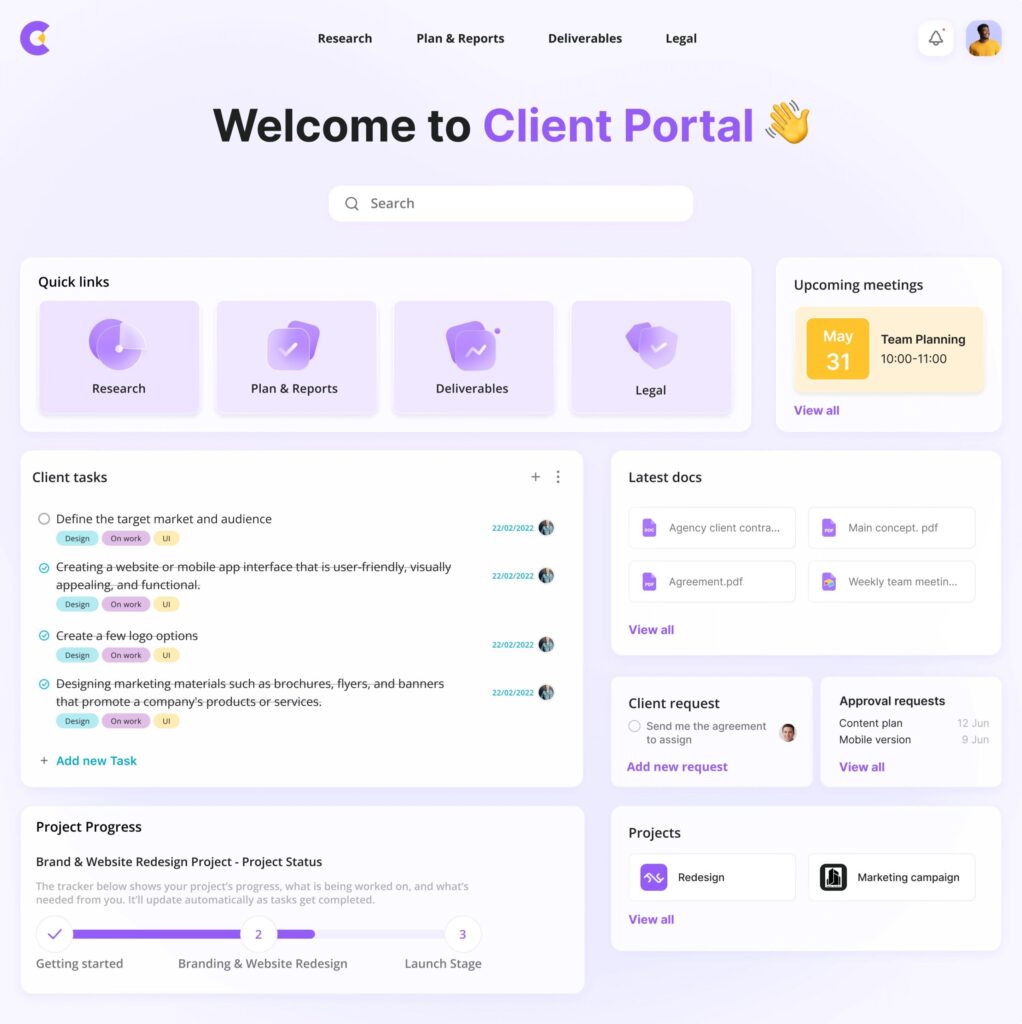
1. Ensure clients have everything they need
FuseBase-Portals-scaled

Customers should have access to your service at any time and in any situation, quickly, remotely, without restrictions or obstacles. They should also be able to access their data and confirm their actions.

All products must be customizable, management-able and opt-outable. The right digital office should help your client resolve all issues about goods and services.

2. Provide communication channels for your remote team

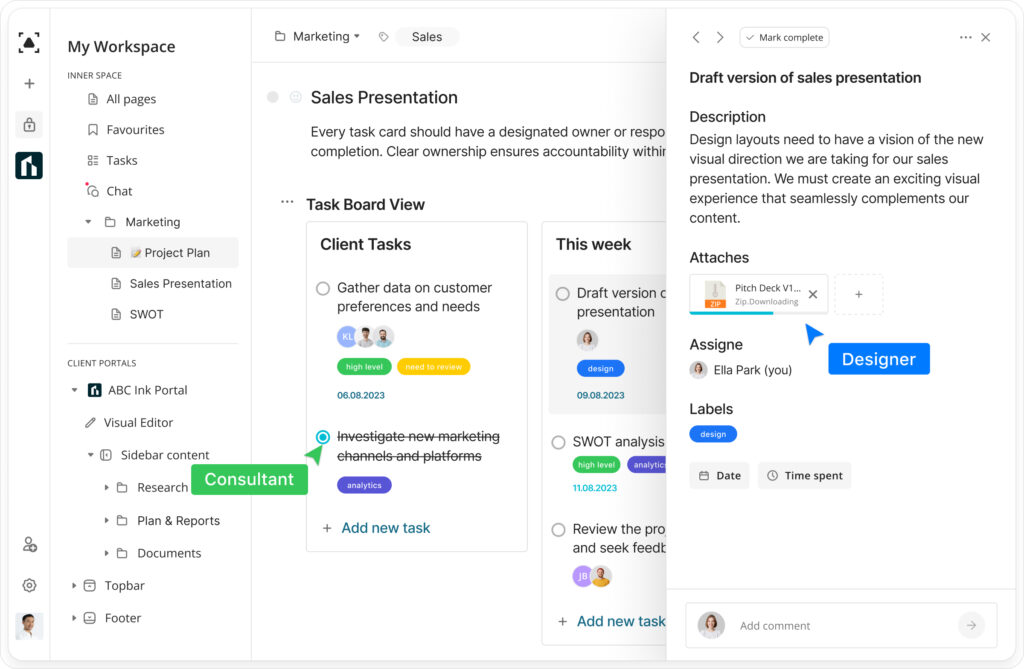
The most essential item for a remote team is collaboration software. Workers should have access to several modes of communication to choose the best one, depending on their situation. It’s good news that there’s no need to run different apps.
FuseBase Internal Workspace

A tool like FuseBase can combine multiple communication methods. Teammates can engage in real-time chat or asynchronously communicate by commenting and exchanging videos.

The user’s online status will also be useful since it will let them know which colleagues are available. This will reduce downtime and help your workers plan their workflow better. The team will demonstrate increased efficiency and productivity.

3. Discover new technologies

Don’t limit yourself to technologies before Covid-19. Today’s digital market offers tools for almost every aspect of the business: content management, accounting, design, marketing, etc. You only need to identify which processes you want to automate.

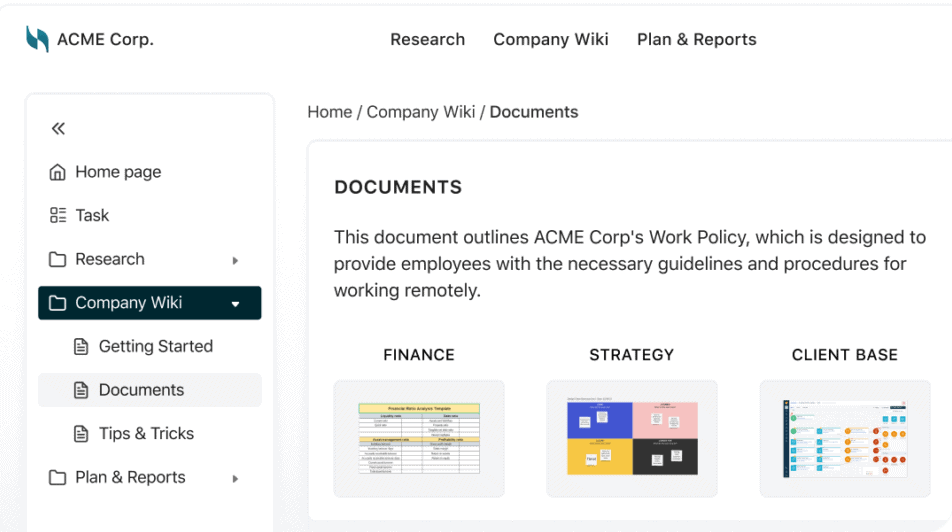
If you are rebooting your digital office, you can start by updating your document management software. It is necessary for everyone and often solves multiple problems at once.
knowledge-base-1024x597-1-e1705410118324

FuseBase, for example, lets you create worker knowledge bases, assign tasks, share documents, and more.

Applications that you are trying should have a trial period. It will give you time to compare competitive options and make a more informed decision.

Wrapping Up

Let’s be honest: your office is already digitalized. Still, introducing new technologies may seem challenging. The business effects of technology, worker feedback and user convenience are all important considerations. However, it pays off to increase company efficiency!

You can always test new technologies without much overhead and slow down your digitalization if things don’t work out. A virtual office plan is usually on a month-to-month basis and can be canceled at any time. Will you need or want it? With FuseBase, there’s no chance! Sign up for your trial now. Get a taste of modern technologies!

Create your own digital office with the FuseBase suite of tools!

Check it out

Follow FuseBase on Facebook for the latest articles and updates!

Author Image

Sabina Sher

Chief Strategy Officer at FuseBase

Meet Sabina Sher, a Chief Strategy Officer at FuseBase and a storyteller turning industry challenges into engaging content packed with actionable advice. She channels rich industry experience and knowledge into our blog, making it a go-to resource for life hacks, tips, and innovative ideas.

Found it useful? Share the article with your community

  • Share on Facebook
  • Share on LinkedIn
  • Share on X

No related posts.

Subscribe to our blog!

Get weekly tips and insights on how to grow your business

Our solutions
  • Mid-size companies
  • AI Agents (apps)
  • Deal rooms
  • White label
  • Knowledge base
Plans & Pricing
  • Pricing
Enterprise Security
  • Trust Center
    (HIPAA & SOC 2)
  • Terms & Privacy
  • GDPR
Company & Contacts
  • Templates
  • Guides
  • Roadmap
  • Privacy
  • About us
  • Reviews
  • Contact us
Compare with
  • SharePoint
  • Moxo
  • Notion
  • Confluence
  • Asana
  • Airtable
  • Monday
  • See all
Fusebase Logo
  • English
FuseBase - Client collaboration platform for professional services | Product Hunt
  • g2
  • sourceforce
  • g2
  • SOC 2 Type II
  • HIPAA
2014-2026 FuseBase is a product of Nimbus Web Inc., a Delaware company