

Skip to the content
  • Portals & collaboration

    One place to collaborate internally and externally

    • AI Agents (apps)User-friendly AI agents in minutes for every team
    • AI Agents for SalesSales President’s Club AI Agents
    • AI Agents for TeamsSecure Workspace & Agent Management for Modern Teams
    • Client PortalLevel up your collaboration with unified digital hubs
    • Deal RoomsClose faster with smart, sleek spaces for every deal
    • Knowledge BaseCreate one source of truth for clients & teams
    • Partner & Vendor portalsMaximize value from your external relationships
    • Project ManagementWork on clients’ projects without extra hurdles
    Explore portals →

    Browser extensions

    Boost your productivity with FuseBase browser extensions

    • FuseBase ClarityCapture Step-by-Step guides, SOP and tutorials
    • FuseBase AI AssistantAI Chat and Agents everywhere
    • FuseBase Voice AssistantVoice typing everywhere in your browser
    • FuseBase PRO AINote taking, Files Sharing & Collaboration

    Build professional apps

    Production-ready apps in days

    • App developmentCreate professional apps for the way your business works.

    Hosting

    Your tools, hosted by FuseBase.

    • FuseBase WorkAI coworkers with defined roles. Powered by Paperclip.
    • n8nSelf-hosted workflow automation.
    • FirecrawlSelf-hosted web data tools.
    Explore hosting →
    Portals & collaboration

    One place to collaborate internally and externally

    • AI Agents (apps)User-friendly AI agents in minutes for every team
    • AI Agents for SalesSales President’s Club AI Agents
    • AI Agents for TeamsSecure Workspace & Agent Management for Modern Teams
    • Client PortalLevel up your collaboration with unified digital hubs
    • Deal RoomsClose faster with smart, sleek spaces for every deal
    • Knowledge BaseCreate one source of truth for clients & teams
    • Partner & Vendor portalsMaximize value from your external relationships
    • Project ManagementWork on clients’ projects without extra hurdles
    Explore portals →
    Browser extensions

    Boost your productivity with FuseBase browser extensions

    • FuseBase ClarityCapture Step-by-Step guides, SOP and tutorials
    • FuseBase AI AssistantAI Chat and Agents everywhere
    • FuseBase Voice AssistantVoice typing everywhere in your browser
    • FuseBase PRO AINote taking, Files Sharing & Collaboration
    Build professional apps

    Production-ready apps in days

    • App developmentCreate professional apps for the way your business works.
    Hosting

    Your tools, hosted by FuseBase.

    • FuseBase WorkAI coworkers with defined roles. Powered by Paperclip.
    • n8nSelf-hosted workflow automation.
    • FirecrawlSelf-hosted web data tools.
    Explore hosting →
    Book a demo

    with our experts to build your custom workflow

    • Consulting Services Deliver exceptional client service
    • Financial Services Automate compliance, approvals & collaboration
    • Healthcare Secure, compliant portals for care and admin
    • Marketing & Advertising Centralize campaigns and automate client requests
    • Mid-Size companies Growing 50-1000+ employee companies
    • Professional Services Get a one-stop-shop for collaboration
    • Software & Technology Automate workflows with AI-powered portals
    • See all industries
    Book a demo

    with our experts to build your custom workflow

    • FuseBase GitHub Repos One step closer to the open-source community
    • Join FuseBase Discord AI development and autonomous agents for client-facing business
    Book a demo

    with our experts to build your custom workflow

  • Pricing
    • About us Meet FuseBase!
    • Blog Read the latest collaboration tips
    • Case Studies Explore case studies and find tailored solutions
    • Contact us Get growth advice from our experts
    • Guides Answer your FuseBase questions
    • Roadmap See what waits for you in the future
    • Trust center HIPAA & SOC 2. Trusted standards, protected data
    • Affiliate Program Would you turn down free money?
    Book a demo

    with our experts to build your custom workflow

Menu
  • Solutions ›

    Portals & collaboration

    One place to collaborate internally and externally

    • AI Agents (apps)User-friendly AI agents in minutes for every team
    • AI Agents for SalesSales President’s Club AI Agents
    • AI Agents for TeamsSecure Workspace & Agent Management for Modern Teams
    • Client PortalLevel up your collaboration with unified digital hubs
    • Deal RoomsClose faster with smart, sleek spaces for every deal
    • Knowledge BaseCreate one source of truth for clients & teams
    • Partner & Vendor portalsMaximize value from your external relationships
    • Project ManagementWork on clients’ projects without extra hurdles
    Explore portals →

    Browser extensions

    Boost your productivity with FuseBase browser extensions

    • FuseBase ClarityCapture Step-by-Step guides, SOP and tutorials
    • FuseBase AI AssistantAI Chat and Agents everywhere
    • FuseBase Voice AssistantVoice typing everywhere in your browser
    • FuseBase PRO AINote taking, Files Sharing & Collaboration

    Build professional apps

    Production-ready apps in days

    • App developmentCreate professional apps for the way your business works.

    Hosting

    Your tools, hosted by FuseBase.

    • FuseBase WorkAI coworkers with defined roles. Powered by Paperclip.
    • n8nSelf-hosted workflow automation.
    • FirecrawlSelf-hosted web data tools.
    Explore hosting →
    Portals & collaboration

    One place to collaborate internally and externally

    • AI Agents (apps)User-friendly AI agents in minutes for every team
    • AI Agents for SalesSales President’s Club AI Agents
    • AI Agents for TeamsSecure Workspace & Agent Management for Modern Teams
    • Client PortalLevel up your collaboration with unified digital hubs
    • Deal RoomsClose faster with smart, sleek spaces for every deal
    • Knowledge BaseCreate one source of truth for clients & teams
    • Partner & Vendor portalsMaximize value from your external relationships
    • Project ManagementWork on clients’ projects without extra hurdles
    Explore portals →
    Browser extensions

    Boost your productivity with FuseBase browser extensions

    • FuseBase ClarityCapture Step-by-Step guides, SOP and tutorials
    • FuseBase AI AssistantAI Chat and Agents everywhere
    • FuseBase Voice AssistantVoice typing everywhere in your browser
    • FuseBase PRO AINote taking, Files Sharing & Collaboration
    Build professional apps

    Production-ready apps in days

    • App developmentCreate professional apps for the way your business works.
    Hosting

    Your tools, hosted by FuseBase.

    • FuseBase WorkAI coworkers with defined roles. Powered by Paperclip.
    • n8nSelf-hosted workflow automation.
    • FirecrawlSelf-hosted web data tools.
    Explore hosting →
  • Industries ›
    • Consulting Services Deliver exceptional client service
    • Financial Services Automate compliance, approvals & collaboration
    • Healthcare Secure, compliant portals for care and admin
    • Marketing & Advertising Centralize campaigns and automate client requests
    • Mid-Size companies Growing 50-1000+ employee companies
    • Professional Services Get a one-stop-shop for collaboration
    • Software & Technology Automate workflows with AI-powered portals
    • See all industries
  • GitHub / Discord ›
    • FuseBase GitHub Repos One step closer to the open-source community
    • Join FuseBase Discord AI development and autonomous agents for client-facing business
  • Pricing
  • Resources ›
    • About us Meet FuseBase!
    • Blog Read the latest collaboration tips
    • Case Studies Explore case studies and find tailored solutions
    • Contact us Get growth advice from our experts
    • Guides Answer your FuseBase questions
    • Roadmap See what waits for you in the future
    • Trust center HIPAA & SOC 2. Trusted standards, protected data
    • Affiliate Program Would you turn down free money?
Sign in Book a demo Get started for free
  • Sign in
  • Book a demo
  • Get started for free
Categories
  • All articles
  • AI Agents
  • Client & Customer Portals
  • Client Collaboration & Communication
  • Comparisons
  • Customer & Self-Service
  • Knowledge Management
  • Productivity
  • Sales & Deal Management
  • Team & Project Management
  • Updates and News
TABLE OF CONTENTS

  • What is a Quote?
  • How To Make a Quote For a Client in 7 Steps
  • What to Specify in an Online Quote?
  • Try Professional Quote Templates by FuseBase
  • FAQ
  • Home
  • Blog
  • Productivity...
  • How to Make a Quote for Business: Tips and Free Quote Templates
Productivity

How to Make a Quote for Business: Tips and Free Quote Templates

  • by Sabina Sher
  • October 18, 2024
  • 6 Min read

When you send a quote, also known as a quotation in business, you’re not just sharing prices. You’re presenting a professional snapshot of your business offerings. It’s an opportunity to showcase your expertise and value proposition with detailed information about the products or services you offer.

In this article, we will share all the basics and essentials of creating a quote. Also, we’ll show a few of our quotation templates that will help you create polished and professional quotations with ease.

What is a Quote?

A quote is a formal document that outlines the costs and terms of a proposed business transaction. Learning how to make a professional quote is essential for any business owner or sales professional. When you write a quote, you’re creating a first impression that can significantly impact your relationship with a potential client.
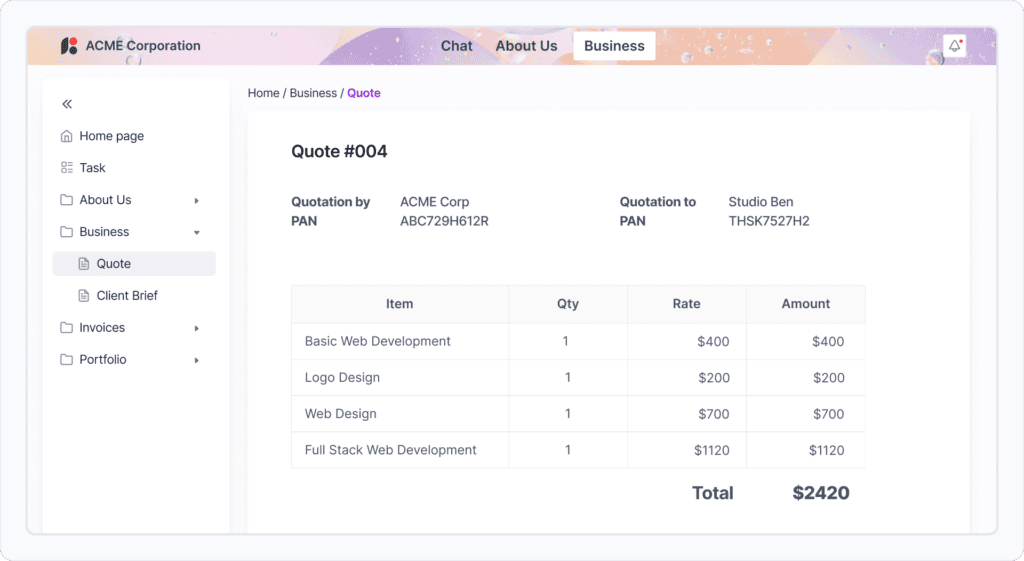
Quote_published_on_a_client_portal. Image powered by FuseBase.

Considering that fact, it’s safe to say that understanding how to make a quote for a customer involves more than just crunching numbers. A well-crafted quote should be clear, concise, and professional, reflecting the quality of your work and attention to detail.

How To Make a Quote For a Client in 7 Steps

Once you have all the tools and knowledge of how to make a good quote, it can significantly improve your chances of winning business and building strong client relationships. Here’s how to make a business quote that stands out and effectively communicates your value proposition:

Step 1: Gather all necessary information. Before you start crafting your quotation, ensure you have a clear understanding of the client’s requirements, project scope, and any specific requests they may have.

Step 2: Use a professional template. A well-designed template can help structure your quote and give it a polished appearance. FuseBase templates offer a range of professional designs, making them invaluable.

Step 3: Include detailed descriptions. Clearly describe the products or services you’re offering, including quantities, specifications, and any relevant terms or conditions.

Step 4: Break down costs. Provide a transparent breakdown of costs for each item or service, as this will help your potential client understand exactly what they’re paying for.

Step 5: Highlight your unique value. Explain why your offer is the best choice. For example, emphasize your expertise, quality guarantees, or additional services you provide.

Step 6: Set clear terms. Specify payment terms, delivery timelines, and any other relevant conditions.

Step 7: Make it visually appealing. Use a clean, easy-to-read layout. To make the quote more memorable, consider adding your company logo and using your brand colors.

What to Specify in an Online Quote?

When you create a quote online, it’s crucial to include all necessary information in a clear and organized format. A well-structured quotation not only serves as a precursor to an invoice but also as a professional representation of your business.
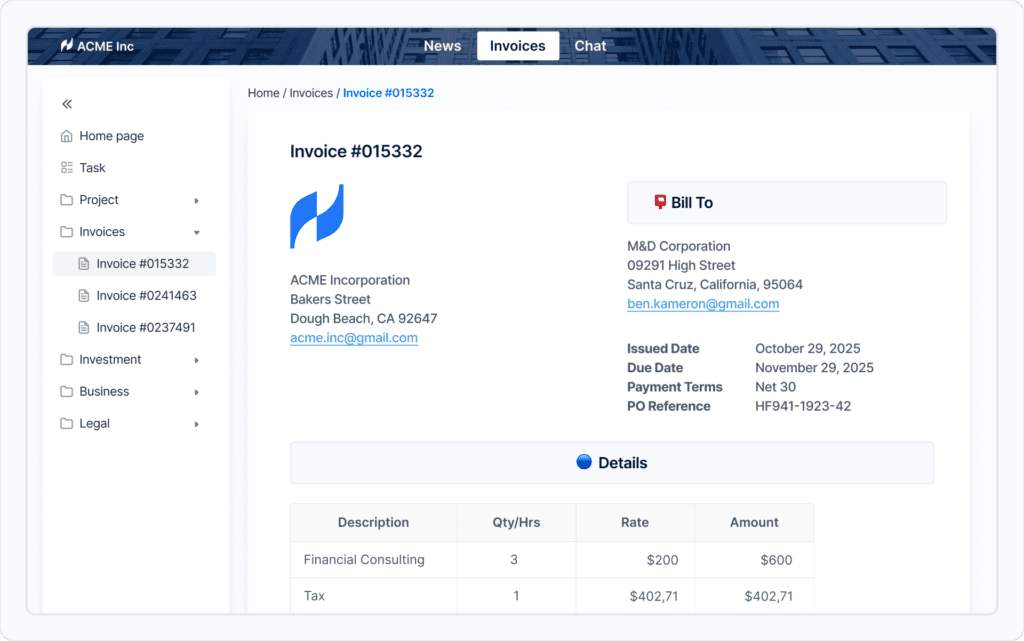
Invoice_published_on_a_client_portal. Image powered by FuseBase.

Let’s break down all the things you should specify, including the list of your services and details of the work to be done.

Itemized List of Products or Services Provided

Start by clearly outlining the goods or services you’re offering. List services in detail, providing a comprehensive description of the items. Also include any relevant specifications, quantities, or customizations. With the detailed breakdown, the client understands exactly what they’re getting and prevents misunderstandings later on.

Date of Issue, Price, and Payment Due

State how much your services will cost. If you’re offering a fixed price, make that clear. If there’s potential for additional work, explain how that would be charged. Break down labor costs and material costs separately if applicable. Specify accepted payment methods and when payment is due. Don’t forget to include the total price, issue date, and a unique quote number for easy reference.

Terms and Conditions

Including terms and conditions is an important step in creating a detailed quote. You’d want to cover aspects like project timeline, revision policies, cancellation terms, and any warranties or guarantees you offer. Clear terms protect both you and your client, setting expectations from the start.

Customer Information

When a potential buyer requests a quote, it’s important to get their details right. Include the customer’s name, company name (if applicable), address, and contact information. First, it personalizes the quote. Second, it ensures you have the correct information for follow-up communications.

Your Contact Information

As a small business, it’s crucial to provide your full contact details. Include your business name, address, phone number, email, and website if you have one. This way, it will be easy for the customer to reach out with any questions or to accept the quote.

💡 Read more posts on this topic:
  • 🙌🏻 Improving Service Delivery with Client Collaboration Software Tools & Portals
  • 🙌🏻 How to Build Trust with Your Clients: 8 Best Practices

Try Professional Quote Templates by FuseBase

You don’t need expensive quoting software to create professional-looking quotes and invoices. While Microsoft Word templates are outdated, FuseBase offers modern, efficient solutions for your business needs.

With FuseBase, you can easily create a new quote, customize it to your brand, and send quotes to the client through client portals, streamlining your entire quoting process.

Business Proposal Template

A well-crafted Business Proposal Template can significantly enhance your sales process. When a client contacts you to request a quote, having a ready-to-use template allows you to respond quickly and professionally.
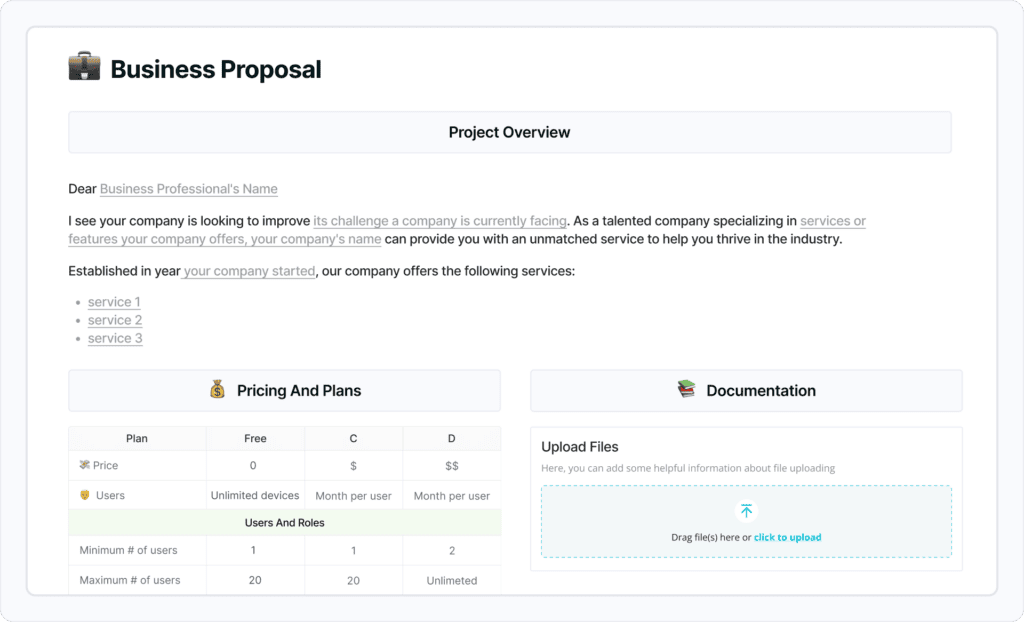
Business_Proposal_Template. Image powered by FuseBase.

With FuseBase templates, you can create a compelling proposal that outlines your services, pricing, and value proposition. Once you’ve tailored the proposal to the client’s specific needs, you can easily send it to your client through secure channels, making a strong first impression.

Invoice Template

Creating an invoice quote doesn’t have to be complicated. FuseBase provides intuitive invoice templates that guide you through writing an effective quote.
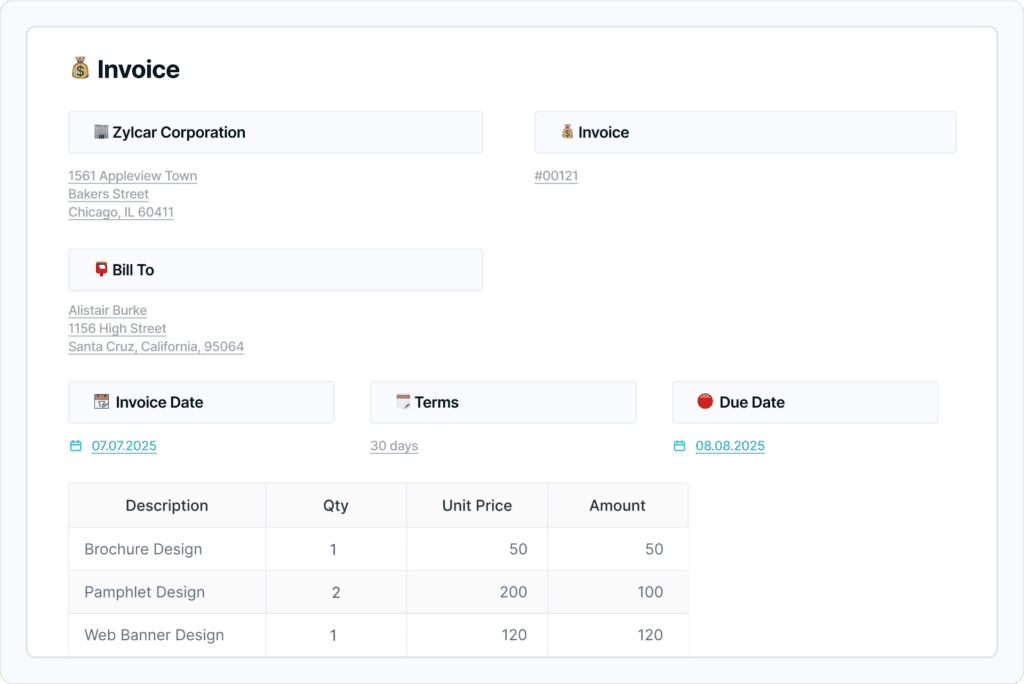
Invoice_Template. Image powered by FuseBase.

Our Invoice Quote Template allows you to clearly list each item and the total amount, ensuring transparency. You can easily customize the template to include your company logo, contact information, and payment terms.

FAQ

Do you need invoicing software to make quotes?

No, you don’t need dedicated invoicing software to make quotes. FuseBase offers high-quality, customizable templates for quotations and invoices as part of its comprehensive collaboration platform.

Where to find free quotation templates for Word?

While Word templates are available on the web, FuseBase offers superior, modern templates that are fully customizable and easily exportable to PDF.

How to send a quote to your client?

With FuseBase, sending quotes is streamlined through secure client portals. Simply create your quote using a template and publish it to your client’s portal for easy access and review.

How to make a quote for a job?

FuseBase templates simplify the process of creating job quotes. Choose a suitable template, input your job details and pricing, and customize it to your needs for a professional-looking quote in minutes.

How to make a quote template?

FuseBase provides a range of pre-designed, customizable quote templates. Select a template that fits your needs, modify it to match your brand, and save it for future use to create your own personalized quote template.

How to make a block quote in Google Docs?

While Google Docs has its uses, FuseBase templates offer a more comprehensive solution for creating professional quotes. They provide pre-formatted options for block quotes and other elements, saving you time and effort.

Author Image

Sabina Sher

Chief Strategy Officer at FuseBase

Meet Sabina Sher, a Chief Strategy Officer at FuseBase and a storyteller turning industry challenges into engaging content packed with actionable advice. She channels rich industry experience and knowledge into our blog, making it a go-to resource for life hacks, tips, and innovative ideas.

Found it useful? Share the article with your community

  • Share on Facebook
  • Share on LinkedIn
  • Share on X

Related Articles

Business Documents: 10 Documents You Must Have
Productivity

Business Documents: 10 Documents You Must Have

  • by Sabina Sher
  • 14 Min read
Subscribe to our blog!

Get weekly tips and insights on how to grow your business

Our solutions
  • Mid-size companies
  • AI Agents (apps)
  • Deal rooms
  • White label
  • Knowledge base
Plans & Pricing
  • Pricing
Enterprise Security
  • Trust Center
    (HIPAA & SOC 2)
  • Terms & Privacy
  • GDPR
Company & Contacts
  • Templates
  • Guides
  • Roadmap
  • Privacy
  • About us
  • Reviews
  • Contact us
Compare with
  • SharePoint
  • Moxo
  • Notion
  • Confluence
  • Asana
  • Airtable
  • Monday
  • See all
Fusebase Logo
  • English
FuseBase - Client collaboration platform for professional services | Product Hunt
  • g2
  • sourceforce
  • g2
  • SOC 2 Type II
  • HIPAA
2014-2026 FuseBase is a product of Nimbus Web Inc., a Delaware company