
Skip to the content
FuseBase FuseBase
  • Solutions

    Solutions
    AI Agents (apps)

    User-friendly AI agents in minutes for every team

    AI Agents for Sales

    Sales President’s Club AI Agents

    AI Agents for Teams

    Secure Workspace & Agent Management for Modern Teams

    Client Portal

    Level up your collaboration with unified digital hubs

    Deal Rooms

    Close faster with smart, sleek spaces for every deal

    Knowledge Base

    Create one source of truth for clients & teams

    Partner & Vendor portals

    Maximize value from your external relationships

    Project Management

    Work on clients’ projects without extra hurdles

    Book a demo with our experts to build your custom workflow
    • Industries

      Industries
      Consulting Services

      Deliver exceptional client service

      Financial Services

      Automate compliance, approvals & collaboration

      Healthcare

      Secure, compliant portals for care and admin

      Marketing & Advertising

      Centralize campaigns and automate client requests

      Mid-Size companies

      Growing 50-1000+ employee companies

      Professional Services

      Get a one-stop-shop for collaboration

      Software & Technology

      Automate workflows with AI-powered portals

      See all industries

      Fusebase highlights

      Book a demo with our experts to build your custom workflow
      • Browser Extensions

        Browser Extensions
        FuseBase AI Assistant

        AI Chat and Agents everywhere

        FuseBase Clarity

        Capture Step-by-Step guides, SOP and tutorials

        FuseBase PRO AI

        Note taking, Files Sharing & Collaboration

        Book a demo with our experts to build your custom workflow
        • Pricing
        • Resources

          Resources
          About us

          Meet FuseBase!     

          Blog

          Read the latest collaboration tips

          Case Studies

          Explore case studies and find tailored solutions

          Contact us

          Get growth advice from our experts

          Guides

          Answer your FuseBase questions

          Roadmap

          See what waits for you in the future

          Trust сenter

          HIPAA & SOC 2. Trusted standards, protected data

          Book a demo with our experts to build your custom workflow
          • Book a demo Get Started Free
          • Book a demo with our experts to build your custom workflow
          • Sign in
          • Book a demo
          • Get started for free
          Categories
          • All articles
          • AI Agents
          • Client & Customer Portals
          • Client Collaboration & Communication
          • Comparisons
          • Customer & Self-Service
          • Knowledge Management
          • Productivity
          • Sales & Deal Management
          • Team & Project Management
          • Updates and News
          • Home
          • Blog
          • Updates and News...
          • New Nimbus Clipper for Google Chrome – new design and “quick” clip features
          Updates and News

          New Nimbus Clipper for Google Chrome – new design and “quick” clip features

          • by Kuzma Safonov
          • January 3, 2016
          • 2 Min read

          A new version of our web clipper has been released. The app design has undergone serious changes, and we also added a range of features that will make saving information in Nimbus Note even quicker.

          Download Nimbus Clipper for Google Chrome- https://chrome.google.com/webstore/detail/web-clipper-nimbus/kiokdhlcmjagacmcgoikapbjmmhfchbi

          New design

          First and foremost we should mention our clipper’s new design. We decided to get rid of the bottom panel and move buttons from it to a drop-down menu that appears when you click on the add-on button. On the one hand, this can be seen as harmonization of our applications (our browser screenshot maker has the same operating principle), on the other hand we solved the problem of the add-on conflicting with different websites (we did our best to resolve them, but they popped up every now and then anyway).
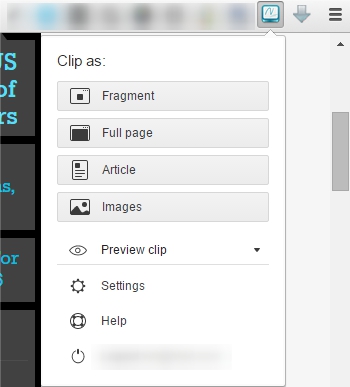
          The new version comes with a few features that allow significantly speeding up your work with the clipper.
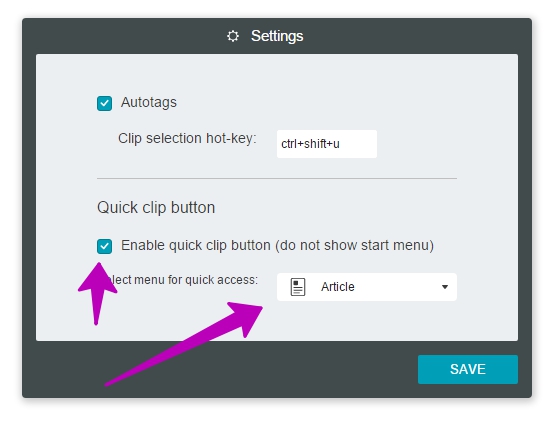
          «Quick» clip

          For instance, you are using the clipper just for saving articles. Then why waste your time pressing the clipper button and searching for the required button there? No reason at all – now all you need to do is select a preferred saving mode. It will activate it as soon as the app button is pressed.
          Autosave

          We have a neat preview window to see your future note. There you can define folders/tags, remove unnecessary text etc. But by far not everyone needs those features, so we have been asked more than once to allow saving a clip without any additional windows. We heard you and made it happen. Now users can select the type of action they need after clipping in a drop-down menu: show a preview window or send directly to Nimbus Note.
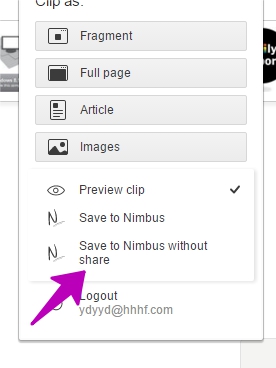
          And most importantly – by combining the two features above, you can save articles from sites in literally one click. Firstly, in the clipper menu you need to select Save without Sharing, then activate Quick saving in Settings and select item Article. Then you just need to click on the clipper button once to save an article and send it directly to Nimbus Note.

          Among other notable changes is the fact the app can finally work error-free in Incognito Mode.

          Author Image

          Kuzma Safonov

          CTO at FuseBase

          Kuzma Safonov, FuseBase's CTO, is the driving force behind our product strategy and technology. He leads the development of tools that help businesses improve client collaboration. In his FuseBase blog articles, he shares insights on industry trends, product updates, and best practices for maximizing client satisfaction.

          Found it useful? Share the article with your community

          Related Articles

          2023 Recap: FuseBase Growth, Goals and Plans for the Future
          Updates and News

          2023 Recap: FuseBase Growth, Goals and Plans for the Future

          • by Sabina Sher
          • 7 Min read
          FuseBase Updates (Feb–Mar 2024): Granular Permissions & More
          Updates and News

          FuseBase Updates (Feb–Mar 2024): Granular Permissions & More

          • by Kuzma Safonov
          • 5 Min read
          Subscribe to our blog!

          Get weekly tips and insights on how to grow your business

          Our solutions
          • Mid-size companies
          • AI Agents (apps)
          • Client portal
          • Deal rooms
          • White label
          • Knowledge base
          Plans & Pricing
          • Pricing
          Enterprise Security
          • Trust Center
            (HIPAA & SOC 2)
          • Terms & Privacy
          • GDPR
          Company & Contacts
          • Templates
          • Guides
          • Roadmap
          • Privacy
          • About us
          • Reviews
          • Contact us
          Compare with
          • SharePoint
          • Moxo
          • Notion
          • Confluence
          • Asana
          • Airtable
          • Monday
          • See all
          Fusebase Logo
          • English
          FuseBase - Client collaboration platform for professional services | Product Hunt
          • g2
          • sourceforce
          • g2
          Copyright © 2025 FuseBase is a product of Nimbus Web Inc., a Delaware company