

Skip to the content
FuseBase FuseBase
  • Solutions

    Solutions
    AI Agents (apps)

    User-friendly AI agents in minutes for every team

    AI Agents for Sales

    Sales President’s Club AI Agents

    AI Agents for Teams

    Secure Workspace & Agent Management for Modern Teams

    Client Portal

    Level up your collaboration with unified digital hubs

    Deal Rooms

    Close faster with smart, sleek spaces for every deal

    Knowledge Base

    Create one source of truth for clients & teams

    Partner & Vendor portals

    Maximize value from your external relationships

    Project Management

    Work on clients’ projects without extra hurdles

    Book a demo with our experts to build your custom workflow
    • Industries

      Industries
      Consulting Services

      Deliver exceptional client service

      Financial Services

      Automate compliance, approvals & collaboration

      Healthcare

      Secure, compliant portals for care and admin

      Marketing & Advertising

      Centralize campaigns and automate client requests

      Mid-Size companies

      Growing 50-1000+ employee companies

      Professional Services

      Get a one-stop-shop for collaboration

      Software & Technology

      Automate workflows with AI-powered portals

      See all industries

      Fusebase highlights

      Book a demo with our experts to build your custom workflow
      • Browser Extensions

        Browser Extensions
        FuseBase AI Assistant

        AI Chat and Agents everywhere

        FuseBase Clarity

        Capture Step-by-Step guides, SOP and tutorials

        FuseBase PRO AI

        Note taking, Files Sharing & Collaboration

        Book a demo with our experts to build your custom workflow
        • Pricing
        • Resources

          Resources
          About us

          Meet FuseBase!     

          Blog

          Read the latest collaboration tips

          Case Studies

          Explore case studies and find tailored solutions

          Contact us

          Get growth advice from our experts

          Guides

          Answer your FuseBase questions

          Roadmap

          See what waits for you in the future

          Trust сenter

          HIPAA & SOC 2. Trusted standards, protected data

          Book a demo with our experts to build your custom workflow
          • Book a demo Get Started Free
          • Book a demo with our experts to build your custom workflow
          • Sign in
          • Book a demo
          • Get started for free
          Categories
          • All articles
          • AI Agents
          • Client & Customer Portals
          • Client Collaboration & Communication
          • Comparisons
          • Customer & Self-Service
          • Knowledge Management
          • Productivity
          • Sales & Deal Management
          • Team & Project Management
          • Updates and News
          • Home
          • Blog
          • Client Collaboration & Communication...
          • HR Management with FuseBase: Robbie Forsyth’s Case Study
          Client Collaboration & Communication

          HR Management with FuseBase: Robbie Forsyth’s Case Study

          • by Kuzma Safonov
          • August 23, 2023
          • 4 Min read

          “Now we can easily present the updated HR information and make it custom to each person.”
          Robbie Forsyth, Director at Youth Football Scotland & YFS Media.

          Youth Football Scotland & YFS Media
          YFS is a not-for-profit social enterprise providing one-stop interactive information, communication, and service resources for players, coaches, teams, clubs and referees involved in Scottish youth football.

          What problems did Robbie Forsyth have?

          Robbie Forsyth has been a director at Youth Football Scotland for eleven years and a Media director for five years. He has tons of responsibilities from coaching to fundraising and event planning. Part of his work is also in HR management.

          Keeping track of expenses, vacations and other human resource management can be time-consuming. Robbie Forsyth was seeking affordable and flexible software to organize a smooth HR workflow. That’s why he chose FuseBase for his six-member team.

          How did he solve his problems with FuseBase?

          General idea

          Robbie Forsyth has created a system of workspaces: one workspace for each team member (six in total). Each employee has their own workspace as an HR center, which is only viewable to them and HR managers. HR managers create workspaces and have the right to modify them (add additional forms or agreements to sign). They have administrator rights in the FuseBase ecosystem.

          To keep information organized, the YFS team has created several crucial folders: Contracts & Agreements, Expenses, Hours, Holidays and Payslips. HR managers add notes with the needed textual information (e.g. holiday guidances) and embeds (Excel tables, Google forms, PDF files). Team members fill in the tables and track their work hours and vacation dates.

          Here is how everybody can find general HR information and track all data. Meanwhile, HR managers have access to an overall image. With this human resources management system, it has become much easier to manage the team and keep documents, guides and trackers in one place.

          Watch source YouTube video recorded by Robbie Forsyth>>

          More details

          The HR management system unites several FuseBase workspaces. Each team member has their own workspace (HR center), where they can see general guidelines and add information (hours, vacation dates, expenses and so on). Certainly, each employee’s confidential information is available only to the employee and HR managers.
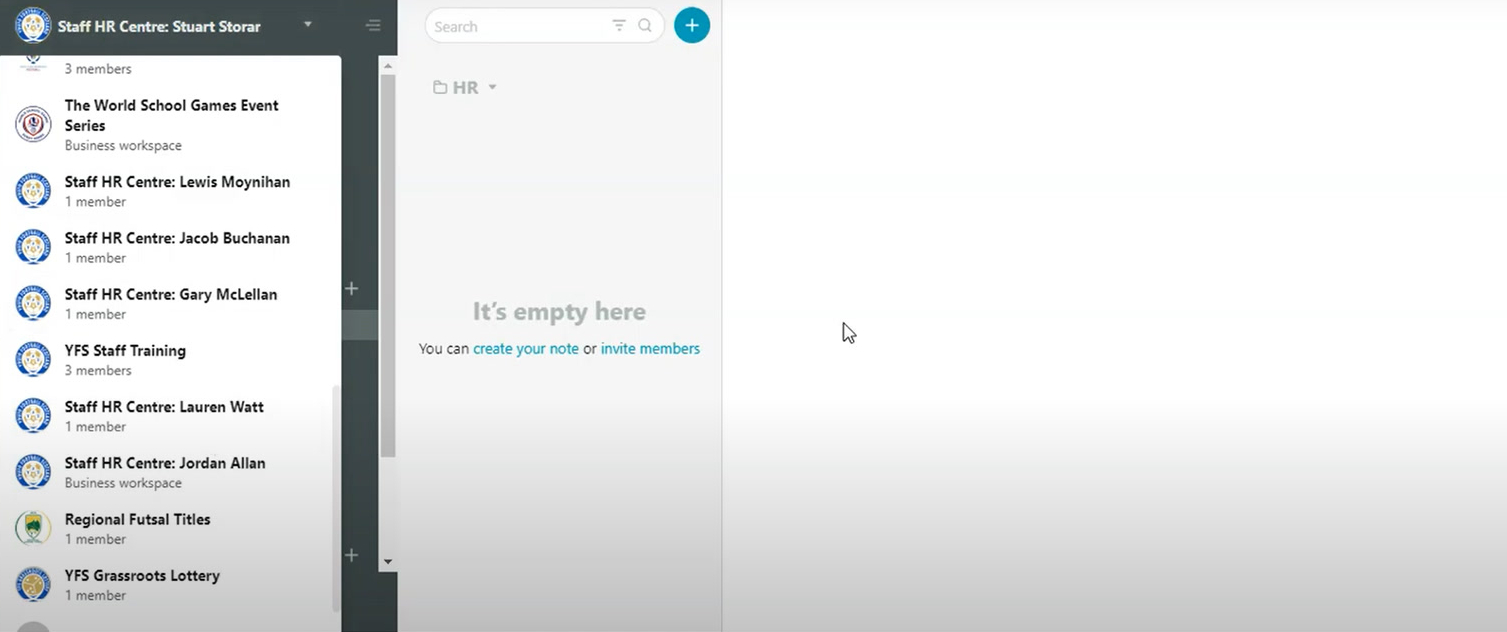
          The HR management system unites several Nimbus workspaces.
          To keep everything organized and sorted by topic, the YFS team sets several folders.
          The Contract and Agreements folder is for storing current contracts and historic ones.
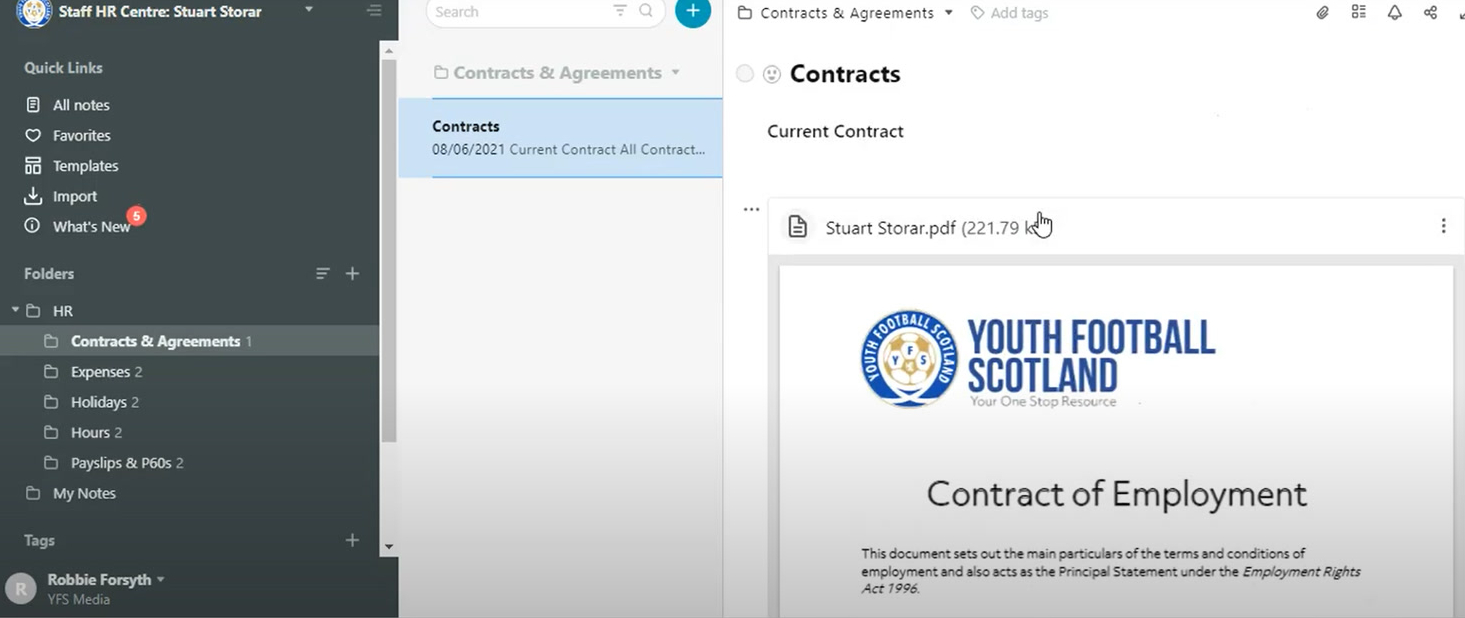
          Contract and Agreements folder
          In the Expenses folder, the administrators embedded an Excel table to track travel expenses. They also created a Google form for claiming expenses and added it as a link. This way, all staff members know where to find the link and don’t have to scroll through an entire mailbox for it.
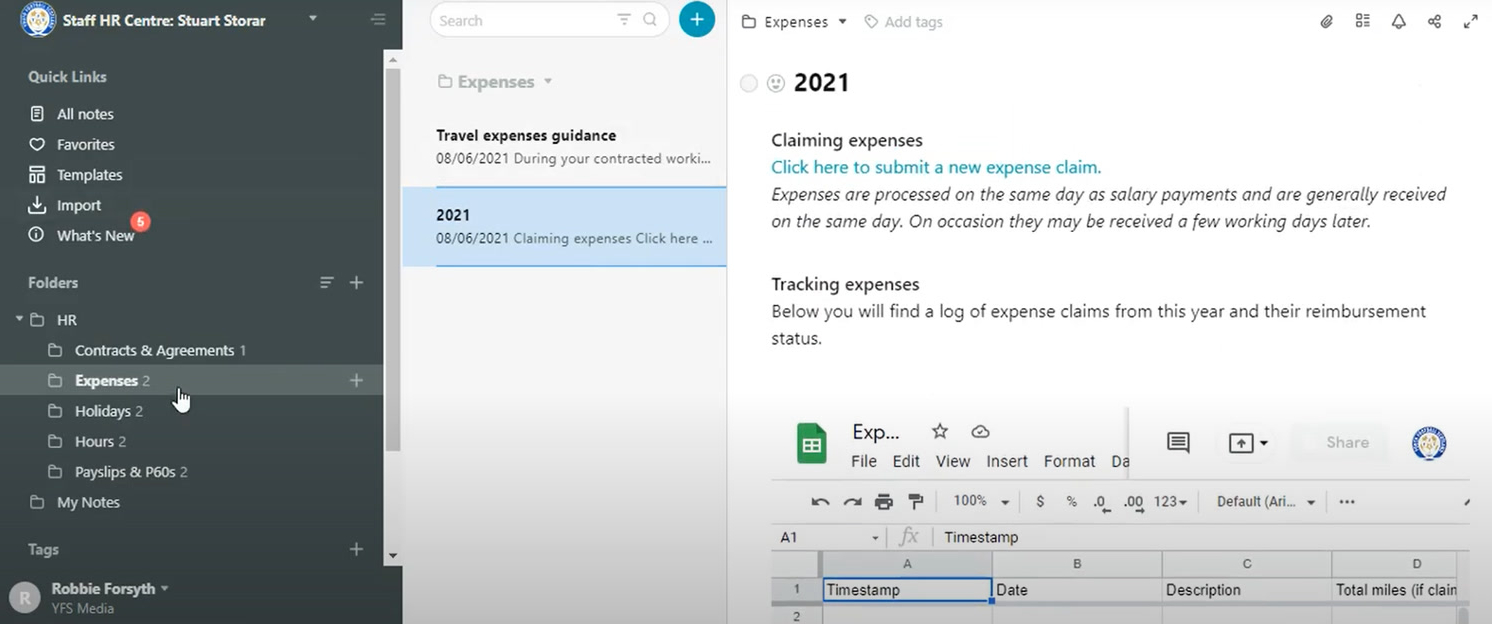
          Expenses folder
          A similar solution was applied to the Holidays folder. Here, employees can find text guidelines, a form to fill out for vacations and a holiday tracker.
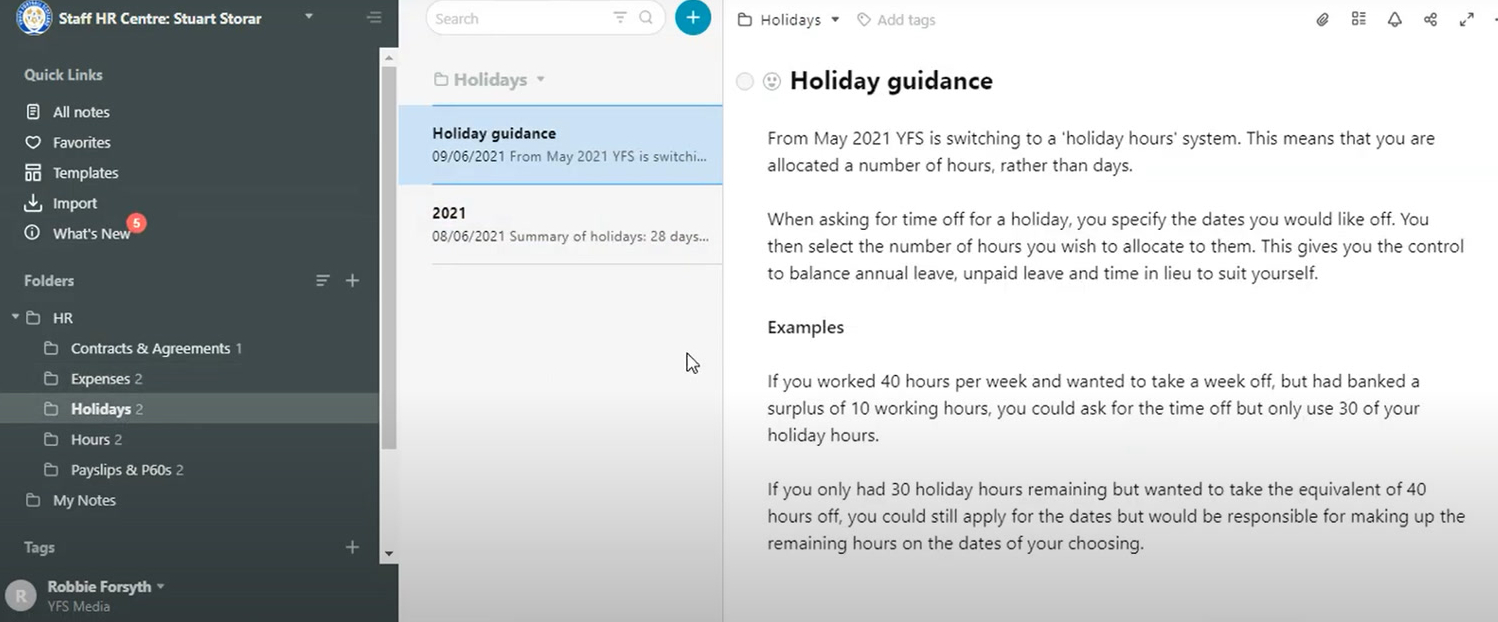

          In the Payslips and p60 forms folder, all employee personnel files on staff historic payslips and p60 forms are gathered. A simple table with two columns helps keep the documentation organized. The first column is for payslips months, the second – for the payslips themselves added as files.
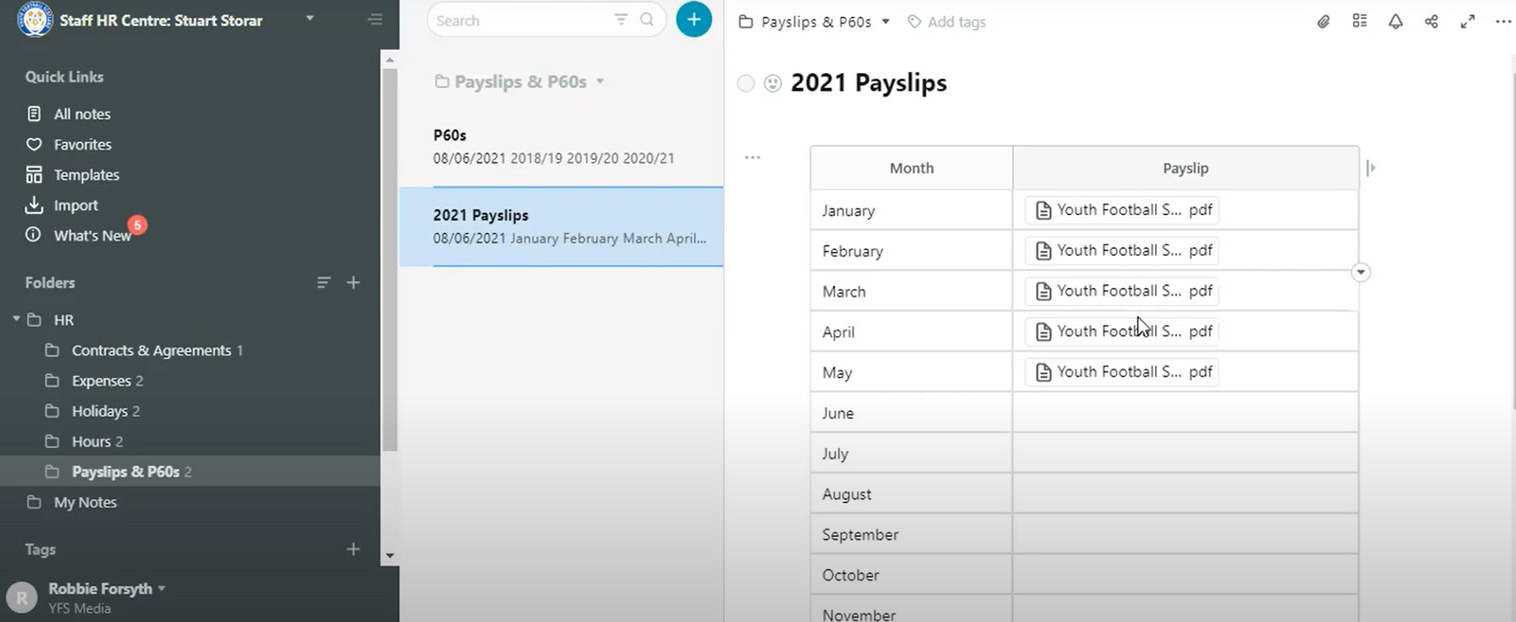
          Payslips and p60 forms folder
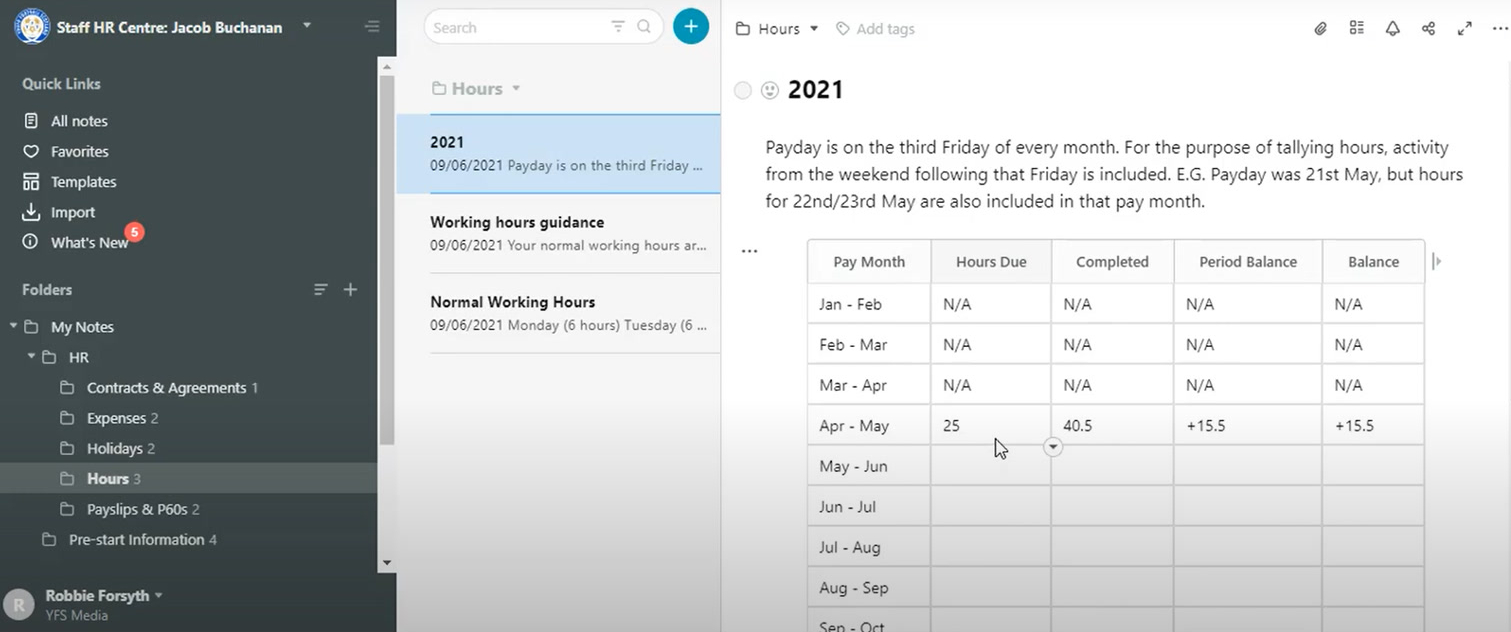
          For some junior members of staff, there is also an Hours folder. There, employees can read the guidelines about working hours and track theirs. The team estimates the hours and then fills in the tables. This tracking is used for employee performance reviews.

          With FuseBase , Robbie Forsyth:

          • has built a convenient tracker for each staff member and an efficient HRM system for administrators;
          • keeps all information on HR processes in one place: each employee knows where to look for a needed links or information;
          • controls information flow. Team members see only their personal information and general rules established for the company. Administrators see an overall picture through embeds, tables, forms;
          • provides flexibility to the team.

          Credits to Robbie Forsyth for his ideas on using FuseBase .

          You can try FuseBase too and open the world of multiple solutions! Build a human resources management system like the YFS team or create your own use case.

          Tailor FuseBase to your needs and achieve your goals!

          Try now!
          💡 Read more posts on this topic:
          • 👍 5 Time Management Tips That Can Help You Right Away
          • 👍 Top 10 Accelo Alternatives for Smarter Project Management
          Author Image

          Kuzma Safonov

          CTO at FuseBase

          Kuzma Safonov, FuseBase's CTO, is the driving force behind our product strategy and technology. He leads the development of tools that help businesses improve client collaboration. In his FuseBase blog articles, he shares insights on industry trends, product updates, and best practices for maximizing client satisfaction.

          Found it useful? Share the article with your community


          Related Articles

          Best Practices in Client Communication: A Consultant’s Guide
          Client Collaboration & Communication

          Best Practices in Client Communication: A Consultant’s Guide

          • by Kuzma Safonov
          • 9 Min read
          Subscribe to our blog!

          Get weekly tips and insights on how to grow your business

          Our solutions
          • Mid-size companies
          • AI Agents (apps)
          • Client portal
          • Deal rooms
          • White label
          • Knowledge base
          Plans & Pricing
          • Pricing
          Enterprise Security
          • Trust Center
            (HIPAA & SOC 2)
          • Terms & Privacy
          • GDPR
          Company & Contacts
          • Templates
          • Guides
          • Roadmap
          • Privacy
          • About us
          • Reviews
          • Contact us
          Compare with
          • SharePoint
          • Moxo
          • Notion
          • Confluence
          • Asana
          • Airtable
          • Monday
          • See all
          Fusebase Logo
          • English
            • Deutsch (German)
          FuseBase - Client collaboration platform for professional services | Product Hunt
          • g2
          • sourceforce
          • g2
          Copyright © 2025 FuseBase is a product of Nimbus Web Inc., a Delaware company